
centos上搭建git服务--2
在 Linux 下搭建 Git 服务器
环境:

服务器 CentOS6.6 + git(version 1.7.1)
客户端 Windows10 + git(version 2.8.4.windows.1)
① 安装 Git
Linux 做为服务器端系统,Windows 作为客户端系统,分别安装 Git
服务器端:
#yum install -y git
安装完后,查看 Git 版本
[root@localhost ~]# git --version

git version 1.7.1
客户端:
下载 Git for Windows,地址:https://git-for-windows.github.io/
安装完之后,可以使用 Git Bash 作为命令行客户端。
安装完之后,查看 Git 版本
$ git --version

git version 2.8.4.windows.1
② 服务器端创建 git 用户,用来管理 Git 服务,并为 git 用户设置密码
[root@localhost home]# id git

id: git:无此用户

[root@localhost home]# useradd git

[root@localhost home]# passwd git
③ 服务器端创建 Git 仓库
设置 /home/data/git/gittest.git 为 Git 仓库
然后把 Git 仓库的 owner 修改为 git
[root@localhost home]# mkdir -p data/git/gittest.git

[root@localhost home]# git init --bare data/git/gittest.git

Initialized empty Git repository in /home/data/git/gittest.git/

[root@localhost home]# cd data/git/

[root@localhost git]# chown -R git:git gittest.git/
④ 客户端 clone 远程仓库
进入 Git Bash 命令行客户端,创建项目地址(设置在 d:/wamp64/www/gittest_gitbash)并进入:

dee@Lenovo-PC MINGW64 /d

$ cd wamp64/www

dee@Lenovo-PC MINGW64 /d/wamp64/www

$ mkdir gittest_gitbash

dee@Lenovo-PC MINGW64 /d/wamp64/www

$ cd gittest_gitbash

dee@Lenovo-PC MINGW64 /d/wamp64/www/gittest_gitbash

$
然后从 Linux Git 服务器上 clone 项目:
$ git clone git@192.168.56.101:/home/data/gittest.git
如果SSH用的不是默认的22端口,则需要使用以下的命令(假设SSH端口号是7700):
$ git clone ssh://git@192.168.56.101:7700/home/data/gittest.git
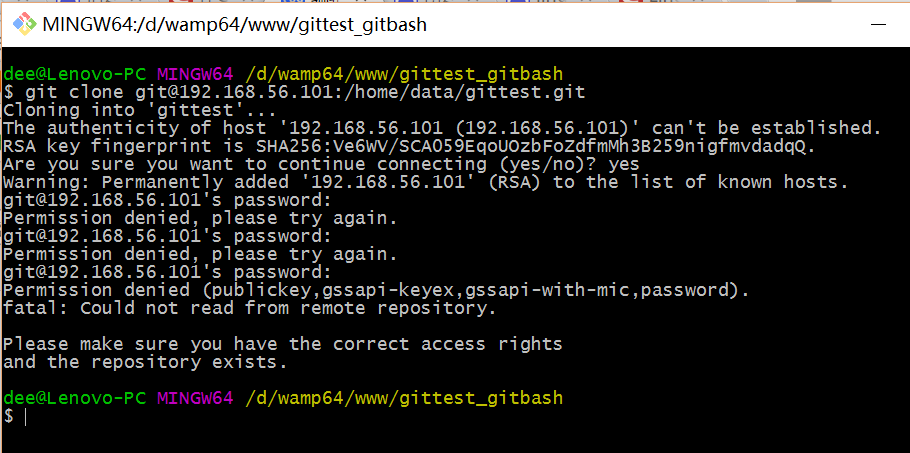
当第一次连接到目标 Git 服务器时会得到一个提示:
The authenticity of host '192.168.56.101 (192.168.56.101)' can't be established.

RSA key fingerprint is SHA256:Ve6WV/SCA059EqoUOzbFoZdfmMh3B259nigfmvdadqQ.

Are you sure you want to continue connecting (yes/no)?
选择 yes:
Warning: Permanently added '192.168.56.101' (RSA) to the list of known hosts.
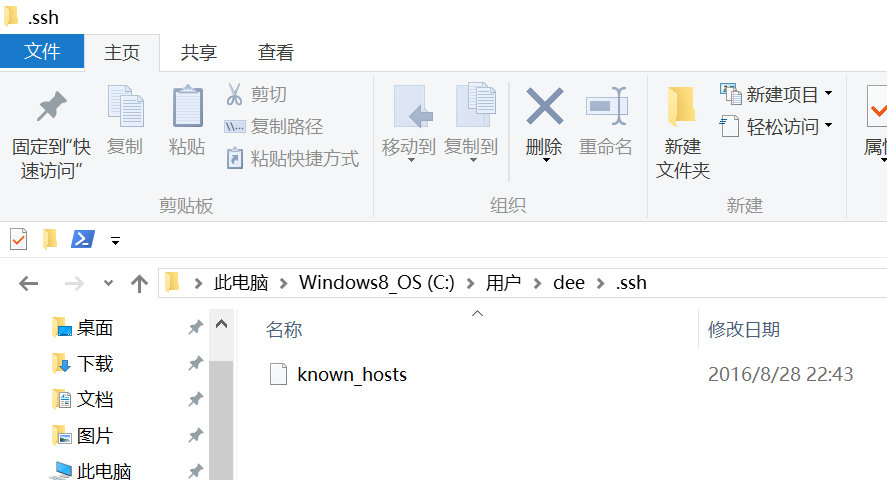
此时 C:\Users\用户名\.ssh 下会多出一个文件 known_hosts,以后在这台电脑上再次连接目标 Git 服务器时不会再提示上面的语句。
后面提示要输入密码,可以采用 SSH 公钥来进行验证。
⑤ 客户端创建 SSH 公钥和私钥
$ ssh-keygen -t rsa -C "472323087@qq.com"
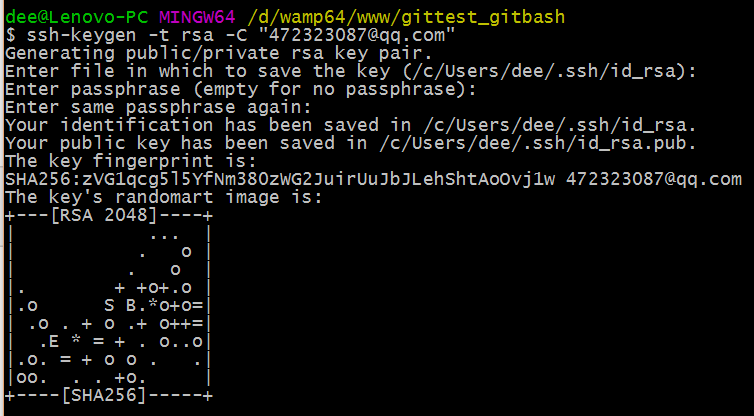
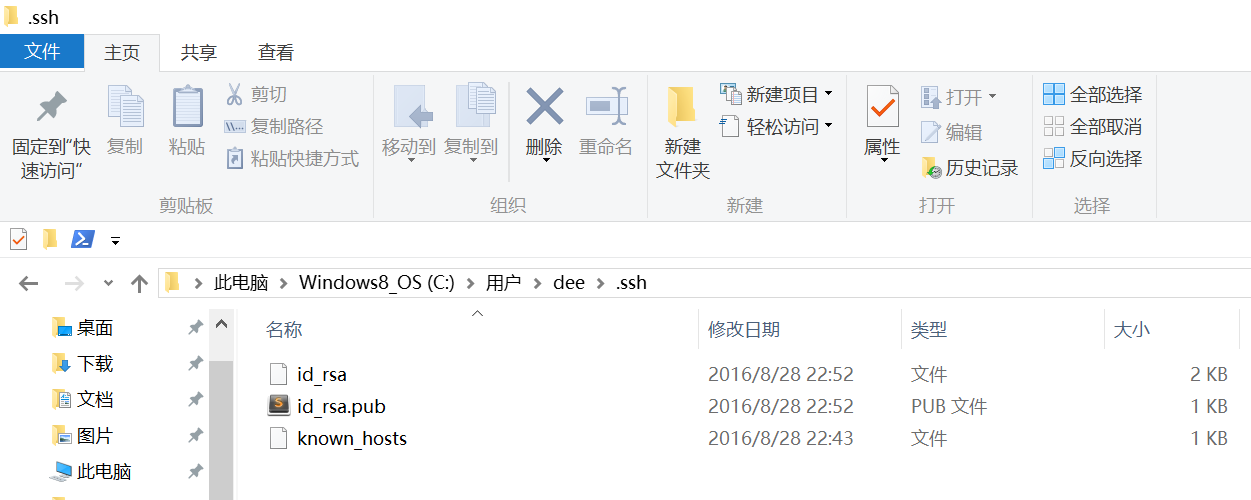
此时 C:\Users\用户名\.ssh 下会多出两个文件 id_rsa 和 id_rsa.pub
id_rsa 是私钥
id_rsa.pub 是公钥
⑥ 服务器端 Git 打开 RSA 认证
进入 /etc/ssh 目录,编辑 sshd_config,打开以下三个配置的注释:
RSAAuthentication yes

PubkeyAuthentication yes

AuthorizedKeysFile .ssh/authorized_keys
保存并重启 sshd 服务:
[root@localhost ssh]# /etc/rc.d/init.d/sshd restart
由 AuthorizedKeysFile 得知公钥的存放路径是 .ssh/authorized_keys,实际上是 $Home/.ssh/authorized_keys,由于管理 Git 服务的用户是 git,所以实际存放公钥的路径是 /home/git/.ssh/authorized_keys
在 /home/git/ 下创建目录 .ssh
[root@localhost git]# pwd

/home/git
[root@localhost git]# mkdir .ssh
[root@localhost git]# ls -a
. .. .bash_logout .bash_profile .bashrc .gnome2 .mozilla .ssh
然后把 .ssh 文件夹的 owner 修改为 git
[root@localhost git]# chown -R git:git .ssh

[root@localhost git]# ll -a

总用量 32

drwx------. 5 git  git  4096 8月  28 20:04 .

drwxr-xr-x. 8 root root 4096 8月  28 19:32 ..

-rw-r--r--. 1 git  git    18 10月 16 2014 .bash_logout

-rw-r--r--. 1 git  git   176 10月 16 2014 .bash_profile

-rw-r--r--. 1 git  git   124 10月 16 2014 .bashrc

drwxr-xr-x. 2 git  git  4096 11月 12 2010 .gnome2

drwxr-xr-x. 4 git  git  4096 5月   8 12:22 .mozilla

drwxr-xr-x. 2 git  git  4096 8月  28 20:08 .ssh
⑦ 将客户端公钥导入服务器端 /home/git/.ssh/authorized_keys 文件
回到 Git Bash 下,导入文件:
$ ssh git@192.168.56.101 'cat >> .ssh/authorized_keys' < ~/.ssh/id_rsa.pub
需要输入服务器端 git 用户的密码

回到服务器端,查看 .ssh 下是否存在 authorized_keys 文件:
[root@localhost git]# cd .ssh

[root@localhost .ssh]# ll

总用量 4

-rw-rw-r--. 1 git git 398 8月  28 20:08 authorized_keys
可以查看一下是否是客户端生成的公钥。
重要:
修改 .ssh 目录的权限为 700
修改 .ssh/authorized_keys 文件的权限为 600
[root@localhost git]# chmod 700 .ssh

[root@localhost git]# cd .ssh

[root@localhost .ssh]# chmod 600 authorized_keys
⑧ 客户端再次 clone 远程仓库
$ git clone git@192.168.56.101:/home/data/git/gittest.git

查看客户端项目目录:
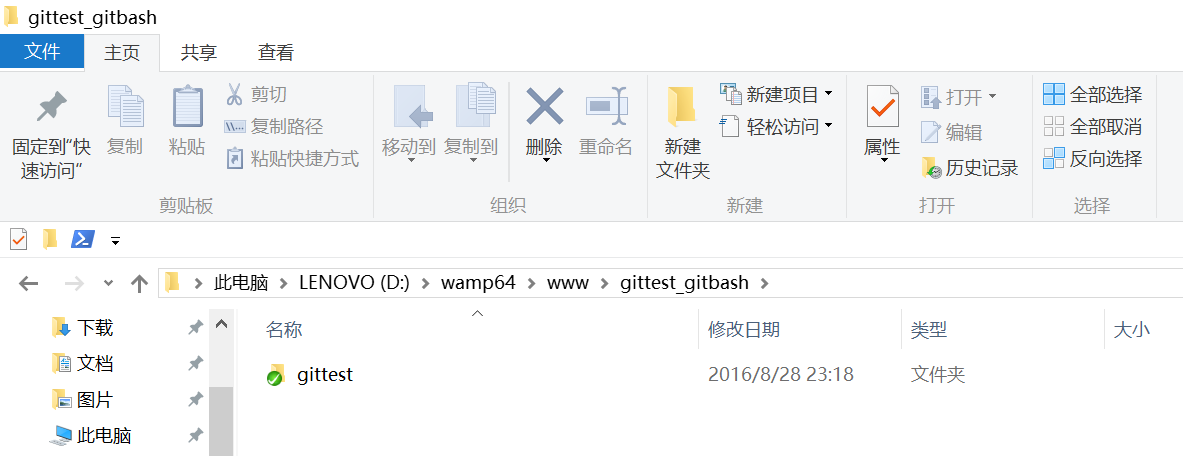
项目已经 clone 了。
也可以使用 tortoiseGit 客户端来管理项目:
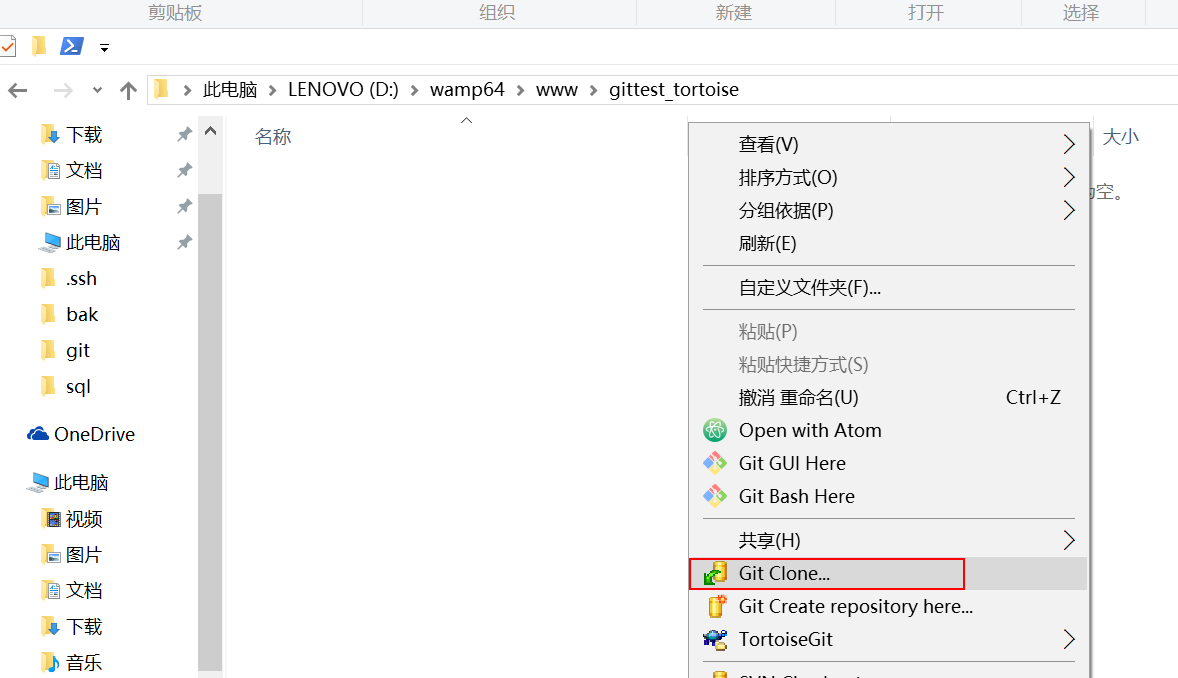
clone
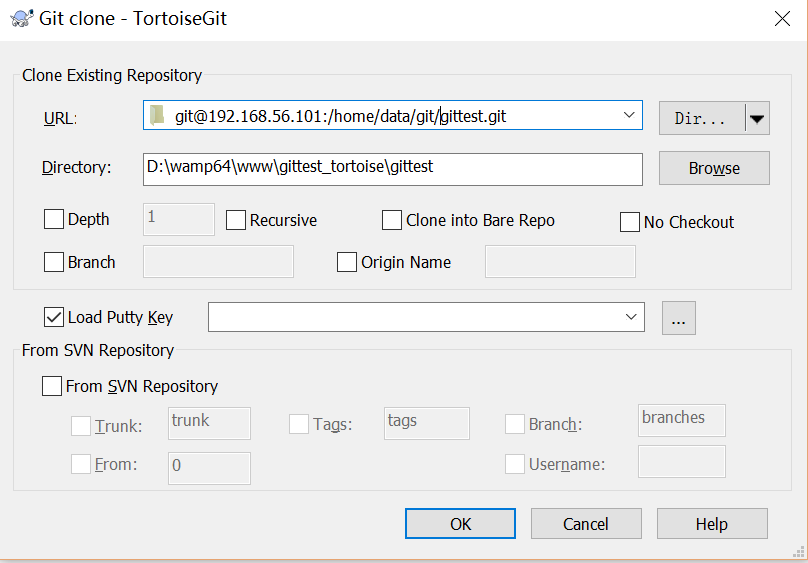
⑨ 禁止 git 用户 ssh 登录服务器
之前在服务器端创建的 git 用户不允许 ssh 登录服务器
编辑 /etc/passwd
找到:
git:x:502:504::/home/git:/bin/bash
修改为
git:x:502:504::/home/git:/bin/git-shell
此时 git 用户可以正常通过 ssh 使用 git,但无法通过 ssh 登录系统。
centos上搭建git服务--2的更多相关文章
- centos上搭建git服务--3
前言:当我们想要实现几个小伙伴合作开发同一个项目,或者建立一个资源分享平台的时候,GIT就是一个很好的选择.当然,既然是一个共有平台,那么把这个平台放到个人计算机上明显是不合适的,因此就要在服务器上搭 ...
- Centos上搭建git服务
1.安装Git $ yum install curl-devel expat-devel gettext-devel openssl-devel zlib-devel perl-devel $ yum ...
- centos上搭建git服务--4
Git是目前世界上最先进的分布式版本控制系统(没有之一).使用Svn的请参考<版本控制-svn服务器搭建和常用命令(centos 6.3)>,下面介绍Git的常用命令 常用命令 简单版 升 ...
- CentOs上搭建git服务器
CentOs上搭建git服务器 首先安装setuptools wget http://pypi.python.org/packages/source/s/setuptools/setuptools-0 ...
- 用Gogs在Windows上搭建Git服务
1.下载并安装Git,如有需求,请重启服务器让Path中的环境变量生效. 2.下载并安装Gogs,请注意,在Windows中部署时,请下载MiniWinService(mws)版本. 3.在Maria ...
- CentOS 上安装 GIT 服务
获取 YUM 中 GIT 信息: yum info git 查看当前 GIT 的版本: git --version 或 git version 卸载当前版本的 GIT: ...
- window服务器上搭建git服务,window server git!!!
先给大家看一个高大上的,这是我给我公司配置的,小伙伴们都说好! 阿里云的2012server 基于这篇大神的教程,我把服务端搭建好了. 传送门,当然我还是自己做个笔记的好. 1.下载java,并安装 ...
- 在centos上搭建Git服务器
第一步:先安装一些相关依赖库和编译工具 yum install curl-devel expat-devel gettext-devel openssl-devel zlib-devel yum in ...
- CentOS上安装GitBlit服务
简单介绍 在上一篇文章中,已经简单的介绍了如何在CentOS的服务器上搭建git服务器.但是这种方式实现的服务器功能比较弱,操作起来也比较繁琐.在网上搜索了一圈,感觉Gitblit比较符合我的需求.接 ...
随机推荐
- SqlParameter 2
SqlParameter string strSql = "Insert into News(TypeId,NewsCaption,NewsContent) values(@TypeId,@ ...
- c++学习笔记(新手学习笔记,如有错误请与作者联系)
逗号”,“运算符:a = 公式1,公式2:把公式1的结果放进公式2中进行运算,如: a = 3*5 , a*4; 计算结果:a = 3*5*4=60; typedef:类型别名,为已有类型另外命名 t ...
- C++_类和对象
类和对象 OOP第二课 1 类的构成 1.1 从结构到类 1.2 类的构成 2 成员函数的声明 2.1 普通成员函数形式 2.2 将成员函数以内联函数的形式进行说明 3 对象的定义和使用 3.1 对象 ...
- Spring MVC中如何解决POST请求中文乱码问题,GET的又如何处理呢
在web.xml中配置过滤器 GET请求乱码解决: 在Tomcat中service.xml中
- C语言基础篇(零)gcc编译和预处理
导航: 1. gcc编译 2. 预处理 ----->x<------------->x<--------------->x<--------------->x ...
- scala (6) Map
在scala中Map分为可变长(mutable)和不可变长(imtable) /** * 不可变长map 长度一旦初始化,就不能在进行更改 */ // 通过对偶元组的方式创建map val map = ...
- SQLSERVER字符串处理函数
sqlserver提供了一系列字符串处理函数:substring.left.right.len.charindex.patindex.replace.replicate.stuff.upper.low ...
- ASP.NET <% %>的各种形式用法
1.<% %>用来绑定后台代码 < % ;i<;i++) { Reaponse.Write(i.ToString()); } %> 2.<%# %> 是在绑定 ...
- 2017-2018-1 20155318 《信息安全系统设计基础》第2周课堂实践、makefile、以及myod
2017-2018-1 20155318 <信息安全系统设计基础>第2周课堂实践.makefile.以及myod 测试3-gdb测试 用gcc -g编译vi输入的代码 在main函数中设置 ...
- 微信小程序点击按钮,修改状态
WXML中: <view wx:if="{{orderstate}} = '待送检' " data-no="{{orderstate}}" bindtap ...