
springcloud18---springCloudConfig
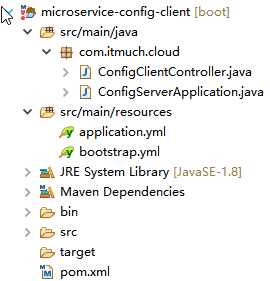
package com.itmuch.cloud;

import org.springframework.beans.factory.annotation.Value;

import org.springframework.web.bind.annotation.GetMapping;

import org.springframework.web.bind.annotation.RestController;

@RestController

public class ConfigClientController {

  @Value("${profile}")

  private String profile; //可以获取本地application.yml配置文件profile: ssss的值

  @GetMapping("/profile")

  public String getProfile() {

    System.out.println(this.profile);

    return this.profile;

  }

}
package com.itmuch.cloud;

import org.springframework.boot.SpringApplication;

import org.springframework.boot.autoconfigure.SpringBootApplication;

@SpringBootApplication

public class ConfigServerApplication {

  public static void main(String[] args) {

    SpringApplication.run(ConfigServerApplication.class, args);

  }

}
application.yml
server:

  port: 8081

# profile: ssss

# 通过localhsot:8081/profile就可以访问到config server里面的配置,如果本地有profile属性就加载本地的profile属性

#
bootstrap.yml
# springcloud里面有一个启动上下文,用来加载远端的配置就是config server里面的配置

# 先加载bootstrap.yml加载config server里面的配置,然后去加载application.yml里面的配置

#

spring:

  cloud:

    config:

      uri: http://localhost:8080  #config server的端口

      profile: dev

      label: master   # 当configserver的后端存储是Git时,默认就是master

  application:

    name: foobar  #本工程的名字,去config server的git仓库里面找foobar-dev.yml文件
<project xmlns="http://maven.apache.org/POM/4.0.0" xmlns:xsi="http://www.w3.org/2001/XMLSchema-instance"

    xsi:schemaLocation="http://maven.apache.org/POM/4.0.0 http://maven.apache.org/xsd/maven-4.0.0.xsd">

    <modelVersion>4.0.0</modelVersion>

    <parent>

        <groupId>com.itmuch.cloud</groupId>

        <artifactId>microservice-spring-cloud</artifactId>

        <version>0.0.1-SNAPSHOT</version>

    </parent>

    <artifactId>microservice-config-client</artifactId>

    <packaging>jar</packaging>

    <properties>

        <project.build.sourceEncoding>UTF-8</project.build.sourceEncoding>

    </properties>

    <dependencies>

        <!-- config client依赖 -->

        <dependency>

            <groupId>org.springframework.cloud</groupId>

            <artifactId>spring-cloud-starter-config</artifactId>

        </dependency>

        <!-- springmvc依赖 -->

        <dependency>

            <groupId>org.springframework.boot</groupId>

            <artifactId>spring-boot-starter-web</artifactId>

        </dependency>

    </dependencies>

</project>
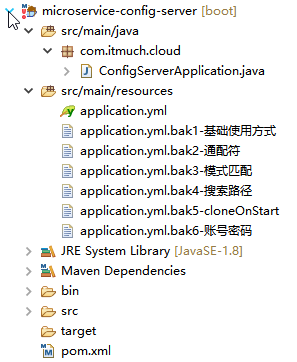
package com.itmuch.cloud;

import org.springframework.boot.SpringApplication;

import org.springframework.boot.autoconfigure.SpringBootApplication;

import org.springframework.cloud.config.server.EnableConfigServer;

@SpringBootApplication

@EnableConfigServer

public class ConfigServerApplication {

  public static void main(String[] args) {

    SpringApplication.run(ConfigServerApplication.class, args);

  }

}
application.yml
server:

  port: 8080

spring:

  cloud:

    config:

      server:

        git:

          uri: https://git.oschina.net/it-much/config-repo-51cto-video

          username:

          password:

# git里面 foobar-dev.yml内容profile: profile-dev,给工程foobar使用的。

# git里面application.yml内容profile: profile-default,档foobar工程找不到foobar-dev.yml时候使用。
application.yml.bak1-基础使用方式
server:

  port: 8080

spring:

  cloud:

    config:

      server:

        git:

          uri: https://git.oschina.net/it-much/config-repo-51cto-video
application.yml.bak2-通配符
server:

  port: 8080

spring:

  cloud:

    config:

      server:

        git:

          uri: https://git.oschina.net/it-much/{application}
application.yml.bak3-模式匹配
server:

  port: 8080

spring:

  cloud:

    config:

      server:

        git:

          uri: https://git.oschina.net/it-much/config-repo-51cto-video      # 公用

          repos:

            simple: https://git.oschina.net/it-much/simple

            special:

              pattern: special*/dev*,special*/test*

              uri: https://git.oschina.net/it-much/special
application.yml.bak4-搜索路径
server:

  port: 8080

spring:

  cloud:

    config:

      server:

        git:

          uri: https://git.oschina.net/it-much/config-repo-51cto-video      # 公用

          search-paths:

            - foo   # foo路径

            - bar   # bar路径
application.yml.bak5-cloneOnStart
server:

  port: 8080

spring:

  cloud:

    config:

      server:

        git:

          uri: https://git.oschina.net/it-much/config-repo-51cto-video      # 公用

          clone-on-start: true

          repos:

            simple: https://git.oschina.net/it-much/simple

            special:

              pattern: special*/dev*,special*/test*

              uri: https://git.oschina.net/it-much/special

              cloneOnStart: false
application.yml.bak6-账号密码
server:

  port: 8080

spring:

  cloud:

    config:

      server:

        git:

          uri: https://git.oschina.net/it-much/config-repo-51cto-video

          username:

          password:
<project xmlns="http://maven.apache.org/POM/4.0.0" xmlns:xsi="http://www.w3.org/2001/XMLSchema-instance"

    xsi:schemaLocation="http://maven.apache.org/POM/4.0.0 http://maven.apache.org/xsd/maven-4.0.0.xsd">

    <modelVersion>4.0.0</modelVersion>

    <parent>

        <groupId>com.itmuch.cloud</groupId>

        <artifactId>microservice-spring-cloud</artifactId>

        <version>0.0.1-SNAPSHOT</version>

    </parent>

    <artifactId>microservice-config-server</artifactId>

    <packaging>jar</packaging>

    <properties>

        <project.build.sourceEncoding>UTF-8</project.build.sourceEncoding>

    </properties>

    <dependencies>

        <!-- config server依赖 -->

        <dependency>

            <groupId>org.springframework.cloud</groupId>

            <artifactId>spring-cloud-config-server</artifactId>

        </dependency>

    </dependencies>

</project>
springcloud18---springCloudConfig的更多相关文章
- SpringCloud-config分布式配置中心
为什么要统一管理微服务配置? 随着微服务不断的增多,每个微服务都有自己对应的配置文件.在研发过程中有测试环境.UAT环境.生产环境,因此每个微服务又对应至少三个不同环境的配置文件.这么多的配置文件,如 ...
- SpringCloudConfig配置中心git库以及refresh刷新
基于git库的Spring Cloud Config配置中心代码demo下载地址:https://gitlab.com/mySpringCloud/config-git SpringBoot版本: 1 ...
- SpringCloud系列十:SpringCloudConfig 高级配置(密钥加密处理(JCE)、KeyStore 加密处理、SpringCloudConfig 高可用机制、SpringCloudBus 服务总线)
1.概念:SpringCloudConfig 高级配置 2.具体内容 在 SpringCloudConfig 之中考虑到所有配置文件都暴露在远程仓库之中的安全性问题,所以提供有安全访问的处理机制,这样 ...
- SpringCloud系列九:SpringCloudConfig 基础配置(SpringCloudConfig 的基本概念、配置 SpringCloudConfig 服务端、抓取配置文件信息、客户端使用 SpringCloudConfig 进行配置、单仓库目录匹配、应用仓库自动选择、仓库匹配模式)
1.概念:SpringCloudConfig 基础配置 2.具体内容 通过名词就可以发现,SpringCloudConfig 核心作用一定就在于进行配置文件的管理上.也就是说为了更好的进行所有微服务的 ...
- spring-cloud-config——Quick Start
参考资料: https://cloud.spring.io/spring-cloud-static/spring-cloud-config/1.4.0.RELEASE/single/spring-cl ...
- 六:SpringCloud-Config
十:SpringCloudConfig分布式配置中心 1. 概述 1.1 分布式系统面临的 配置问题 微服务意味着要将单体应用中的业务拆分成一个个子服务,每个服务的粒度相对较小,因此系统中会出现大量的 ...
- spring-cloud-config笔记
忽略元数据末尾 回到原数据开始处 spring-cloud-config 简单来讲就是spring-cloud实现的分布式配置中心.与之前介绍的开源配置服务方案 disconf是一样的,spring- ...
- spring-cloud-config 配置中心快速上手
spring-cloud-config 配置中心实现 Spring Cloud Config 用于为分布式系统中的基础设施和微服务应用提供集中化的外部配置支持,分为server端和client端. s ...
- springcloud学习之路: (五) springcloud集成SpringCloudConfig分布式配置中心
SpringCloud全家桶中的分布式配置中心SpringCloudConfig, 它使用git来管理配置文件, 在修改配置文件后只需要调用一个接口就可以让新配置生效, 非常方便. SpringClo ...
- SpringCloud-Config通过Java访问URL对敏感词加密解密
特别提示:本人博客部分有参考网络其他博客,但均是本人亲手编写过并验证通过.如发现博客有错误,请及时提出以免误导其他人,谢谢!欢迎转载,但记得标明文章出处:http://www.cnblogs.com/ ...
随机推荐
- Linux printf 命令
printf 命令用来格式化输出,用法如下: [keysystem@localhost ~]$ printf "%s\n" 1 2 3 4 1 2 3 4 [keysystem@l ...
- php学习九:存取器&魔术方法
当声明属性的时候用到了private,那么的话只能本类中才能访问此属性,其他地方无法使用,这个时候需要给外界提供一些方法来使外界访问 方法一:存取器: 可以提供一个public的方法来使外界对类里面的 ...
- MUI Hbuilder设置模拟器运行APP项目
1 安装hbuilder和夜神模拟器 2 hbuilder 新建app项目 3 hbuilder:运行-> 设置web服务器->Hbuilder 第三方安卓模拟器端口:62001 4 运 ...
- 部署软件RDMA的步骤
date: 2018-08-28 19:46:56 参考原文原文:http://corasql.blog.51cto.com/5908329/1930455 ...
- SeaJS简介一:由来,特点以及优势
由来: 在软件开发过程中,模块化编程思想已经习以为常了,模块化编程不仅仅给开发团队带来效率方面上的好处,还能够让开发的项目或者产品维护成本大大降低. 那么,在WEB开发过程中JS脚本语言已经不可或缺了 ...
- 使用Martix来实现缩放图片的功能
使用Martix(android.graphics.Matrix)类中的postScale()方法结合Bitmap来实现缩放图片的功能 Bitmap bmp = BitmapFactory.decod ...
- BeginnerAdmin后台框架的使用!
基于layui的后台框架,我比较喜欢使用BeginnerAdmin模板.但是在构建的时候可能会遇到一些问题. 问题一:侧栏出不来: 报错是这样的: 这个错误:说明的是 navbar.js没有引进来. ...
- ubuntu16.04下安装pcl点云库
安装依赖项 sudo apt-get update sudo apt-get install git build-essential linux-libc-dev sudo apt-get insta ...
- spring boot实战(第一篇)第一个案例
版权声明:本文为博主原创文章,未经博主允许不得转载. 目录(?)[+] spring boot实战(第一篇)第一个案例 前言 写在前面的话 一直想将spring boot相关内容写成一个系列的 ...
- 新一代Java模板引擎Thymeleaf
新一代Java模板引擎Thymeleaf-spring,thymeleaf,springboot,java 相关文章-天码营 https://www.tianmaying.com/tutorial/u ...