
css--一些基本属性
关于css各标签的属性: w3cschool一应俱全
设置固定的图片:
body

  {

  background-image: url(bgimage.gif);

  background-attachment: fixed;

  }
边框设置属性:
效果:
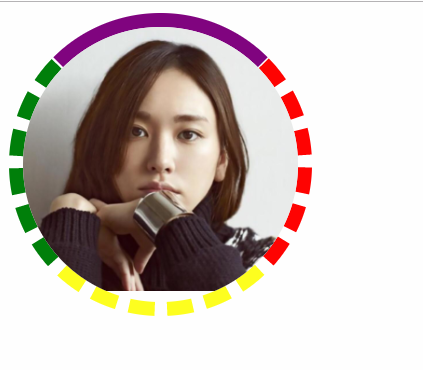
      .c1{

            /* 200*200是正方形 */

            width: 200px;

            height: 200px;

            /*height: 100px;*/

            /*border: 10px dashed blue;*/

            border-left:  10px dashed green;

            border-right:  10px dashed red;

            border-bottom: 10px dashed yellow;

            border-top: 10px solid purple;

            border-radius: 50%;

            /*background: url("xyjy.png") no-repeat;*/

            /*溢出的部分隐藏*/

            overflow: hidden;

        }

        .c1 img{

            /*按照父级标签的宽度来展示,并且进行等比缩放*/

            max-width: 100%;

        }

<div class="c1">

<img src="xyjy.png" alt="">

</div>
关于div浮动
效果:
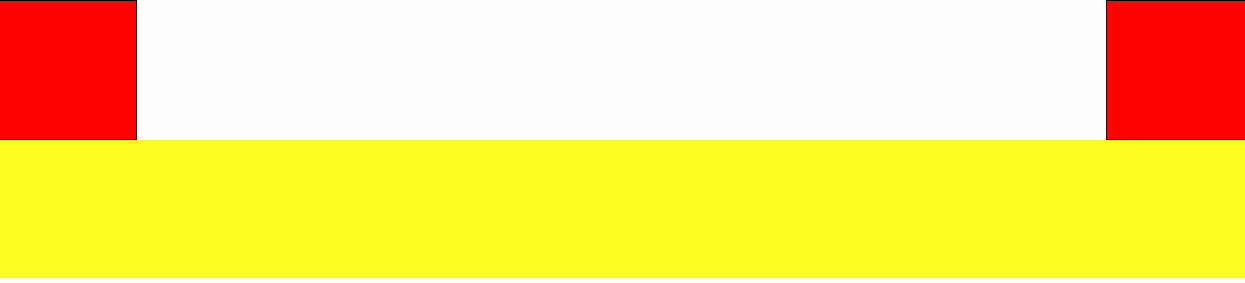
div使用float进行浮动,浮动后产生异常需要处理一下,将浮动后外面加上一层
.clearfix:after{

            content: '';

            display: block;

            clear: both;

        }
<!DOCTYPE html>

<html lang="en">

<head>

    <meta charset="UTF-8">

    <title>Title</title>

    <!--<script src="https://cdn.bootcss.com/vue/2.5.17-beta.0/vue.js"></script>-->

    <!--<script src="https://cdn.bootcss.com/vue-router/3.0.1/vue-router.js"></script>-->

    <style>

        .c1{

            width: 200px;

            height: 100px;

            border: 1px solid black;

        }

        .c2{

            background-color: red;

            /*display: none;*/

            /*visibility: hidden;*/

        }

        .c3{

            background-color: blue;

        }

        .c3,.c4{

            display: inline-block;

        }

        /*.sp1{*/

            /*border: 1px solid red;*/

            /*display: block;*/

            /*width: 100px;*/

            /*height: 100px;*/

        /*}*/

    </style>

</head>

<body>

    <div class="c1">

    </div>

    <div class="c1 c2">

    </div>

    <div class="c1 c3">

        我是c3标签

    </div>

    <div class="c1 c4">

        我是c4标签

    </div>

    <!--<span class="sp1">-->

        <!--我是span1-->

    <!--</span>-->

    <!--<span class="sp1">-->

        <!--我是span2-->

    <!--</span>-->

</body>

</html>
示例
定位:返回顶部按钮
效果:

<head>

    <meta charset="UTF-8">

    <title>Title</title>

    <!--<script src="https://cdn.bootcss.com/vue/2.5.17-beta.0/vue.js"></script>-->

    <!--<script src="https://cdn.bootcss.com/vue-router/3.0.1/vue-router.js"></script>-->

    <style>

        body{

            margin:;

            padding:;

        }

        .c1,.c2,.c3{

            width: 100px;

            height: 600px;

            background-color: red;

            border: 1px solid black ;

        }

        /*相对定位*/

        /*.c2{*/

            /*position: relative;*/

            /*left: 102px;*/

            /*!*top:-102px;*!*/

            /*bottom:102px;*/

            /*!*right: ;*!*/

        /*}*/

        /*绝对定位*/

        .c2{

            background-color: yellow;

            position: absolute;

            height: 100px;

            left: 60px;

            top:20px;

        }

        .c4{

            width: 200px;

            height: 200px;

            background-color: pink;

            position: relative;

            left: 100px;

            top:150px;

        }

        .back-top{

            position: fixed;

            bottom: 20px;

            right: 20px;

            width: 80px;

            height: 40px;

            background-color: rgba(255,165,0,0.5);

            text-align: center;

            line-height: 40px;

            border-radius: 5%;

        }

        .back-top:hover{

            background-color: rgba(255,165,0,1);

        }

        .back-top a{

            color: white;

            text-decoration: none;

        }

    </style>

</head>

<body>

<a name="top">顶部位置在这里</a>

<div class="c1">

    c1

</div>

<!--测试一下相对定位和绝对定位的组合使用-->

<div class="c4">

    <div class="c2">

    </div>

</div>

<!--简单测试相对定位和绝对定位的-->

<!--<div class="c2">-->

    <!--c2-->

<!--</div>-->

<div class="c3">

    c3

</div>

<span class="back-top">

    <a href="#top">返回顶部</a>

</span>

</body>

</html>
代码
溢出:
当文字超过div的大小时,使用overflow:scroll
效果:

<!DOCTYPE html>

<html lang="en">

<head>

    <meta charset="UTF-8">

    <title>Title</title>

    <!--<script src="https://cdn.bootcss.com/vue/2.5.17-beta.0/vue.js"></script>-->

    <!--<script src="https://cdn.bootcss.com/vue-router/3.0.1/vue-router.js"></script>-->

    <style>

        div{

            width: 200px;

            height: 200px;

            border: 1px solid red;

            overflow: scroll;

        }

    </style>

</head>

<body>

<div>

    犀一点通.

</div>

</body>

</html>
代码
z-index完成模拟注册对话框
效果

<html lang="en">

<head>

    <meta charset="UTF-8">

    <title>Title</title>

    <!--<script src="https://cdn.bootcss.com/vue/2.5.17-beta.0/vue.js"></script>-->

    <!--<script src="https://cdn.bootcss.com/vue-router/3.0.1/vue-router.js"></script>-->

    <style>

        body{

            margin:;

            padding:;

        }

        .content{

            height: 600px;

            width: 600px;

            border:1px solid blue;

            background-color: pink;

        }

        .shadow{

            background-color: black;

            /*整个标签内容的颜色的透明度*/

            opacity: 0.2;

            position: fixed;

            width: 100%;

            height: 900px;

            top:;

            left:;

            color:red;

            z-index:;

        }

        .reg{

            width: 1000px;

            height: 360px;

            background-color: white;

            border-radius: 5%;

            position: fixed;

            top:50%;

            left: 50%;

            margin-left:-500px;

            margin-top: -180px;

            z-index:;

        }

    </style>

</head>

<body>

<div class="content">

 文字

</div>

<div class="content">

    <a href="">金风玉露一相逢,便胜却人家无数</a>

</div>
代码
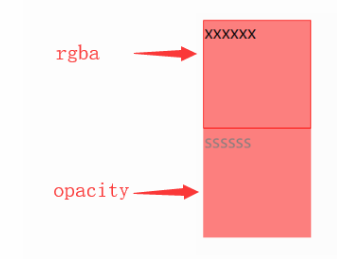
透明度属性:
rgba设置的是单独属性的透明度
opacity设置的是整个标签的透明度
效果:
<!DOCTYPE html>

<html lang="en">

<head>

    <meta charset="UTF-8">

    <title>Title</title>

    <!--<script src="https://cdn.bootcss.com/vue/2.5.17-beta.0/vue.js"></script>-->

    <!--<script src="https://cdn.bootcss.com/vue-router/3.0.1/vue-router.js"></script>-->

    <style>

        .c1,.c2{

            width: 100px;

            height: 100px;

            /*background-color: red;*/

            border: 1px solid red;

        }

        /*rgba设置的是单独属性的透明度*/

        .c1{

            background-color: rgba(255,0,0,0.5);

        }

        /*整个标签的透明度设置*/

        .c2{

            background-color: rgb(255,0,0);

            opacity: 0.5;

        }

    </style>

</head>

<body>

<div class="c1">

    xxxxxx

</div>

<div class="c2">

    ssssss

</div>

</body>

</html>
透明度代码
css--一些基本属性的更多相关文章
- css选择器基本属性
选择器一,相邻选择器: 1,相邻选择器 1),定义:相邻选择器匹配指定元素的相邻兄弟元素 2),用法:如果需要选择紧接在另一个元素后的元素,而且二者有相同的父元素,可以使用相邻兄弟选择器 3),表示符 ...
- CSS3条件判断——@supports/window.CSS.supports()(转)
CSS3条件判断,听起来"不明觉厉",如果你对CSS稍为熟悉一点的话,你会发现CSS中的"@media"就是条件判断之一.是的,在CSS3的条件判断规范文档中包 ...
- HTML and CSS学习概述-续
1, CSS是层叠样式表(Cascading Style Sheets)的缩写,它用于定义HTML元素的显示形式,是一种格式化网页内容的技术.CSS现在已经被大多数浏览器所支持,成为网页设计者必须 ...
- day15 web前端之css
css的概念以及初体验 概念: CSS(cascading style sheet)也就是层叠样式表:它是一种网页设计的新技术,现在已经被大多数浏览器所支持,层位网页设计必不可少的工具之一.优点: ...
- jquery进阶(1)
今天我们接着来学习jQuery中的内容,包括css的操作.尺寸的操作.文档的操作.动画(有待补充),事件处理操作. 一.CSS 在css中可以设置css的基本属性 - .css("color ...
- Matplotlib数据可视化(3):文本与轴
在一幅图表中,文本.坐标轴和图像的是信息传递的核心,对着三者的设置是作图这最为关心的内容,在上一篇博客中虽然列举了一些设置方法,但没有进行深入介绍,本文以围绕如何对文本和坐标轴进行设置展开(对图像 ...
- html基础--css基本属性
HTML基础--css基本属性 <!DOCTYPE html> <html lang="en"> <head> <meta cha ...
- CSS基础篇之了解CSS和它的基本属性
CSS是什么? CSS英文全名是Cascading Style Sheets翻译过来就是层叠样式表,它主是把网页表现与内容分离的一种样式设计语言.这种语言能优化我们编程,把东西简化和优化写法,而且不同 ...
- css基本属性
CSS属性分类(最最常用的属性):颜色和长度文字盒模型布局定位背景文本和其他 常用CSS属性: <style>div{ color:#23729e; /*前景色*/ background: ...
- 第二章 CSS基本属性
1.CSS:层叠样式表 一个元素允许同时应用多种样式,页面元素最终的样式即为多种样式的叠加效果. 2.CSS样式优先级 行内样式表>内部样式表>外部样式表[就近原则] id选择器>类 ...
随机推荐
- c#正则获取html里面a标签href的值
获取单个a中href的值: string str = "<a href=\"http://www.itsve.com\">下载</a>" ...
- 怎么查看在centos中创建的用户组
用户列表文件:/etc/passwd 用户组列表文件:/etc/group 查看系统中有哪些用户:cut -d : -f 1 /etc/passwd 查看可以登录系统的用户:cat /etc/pass ...
- 为阿里云ECS服务器二级域名绑定tomcat子目录,实现一个IP多个二级域名
摘要:前几天租了阿里云ECS服务器,选择的Windows系统,并在服务器上部署了tomcat服务器,随后我又买了一个域名,可一个域名只能指向一个IP地址,包括二级域名也只能指向一个IP地址,并不能指向 ...
- JS计算字符长度、字节数 -- 转
一个汉字在UTF-8编码中占用几个字节? 占用3个字节的范围 U+2E80 - U+2EF3 : 0xE2 0xBA 0x80 - 0xE2 0xBB 0xB3 共 115 个 U+2F00 - U+ ...
- LUA Metatables
__index:当我们访问一个表中的元素不存在时,则会触发去寻找__index元方法,如果不存在,则返回nil,如果存在,则返回结果. 博主注:__index有点像异常处理的意思 __newindex ...
- iOS load和initialize的区别
可能有些还不清楚load和initialize的区别,下面简单说一下: 首先说一下 + initialize 方法:苹果官方对这个方法有这样的一段描述:这个方法会在 第一次初始化这个类之前 被调用,我 ...
- c语言静态断言-定义自己的静态断言
c语言里面可以自己定义静态断言,更加方便的调试代码. 使用静态断言 #include<stdio.h> #include<stdlib.h> #include<asser ...
- mysql资源总结
MySQL查询语句大全集锦 http://www.jb51.net/article/85889.htm linux下mysql命令大全 http://www.cnblogs.com/mfryf/arc ...
- Java NIO API详解(转)
原文连接: http://www.blogjava.net/19851985lili/articles/93524.html 感谢原作者 NIO API 主要集中在 java.nio 和它的 subp ...
- 一起做RGB-D SLAM(7) (完结篇)
第七讲 添加回环检测 2016.11 更新 把原文的SIFT替换成了ORB,这样你可以在没有nonfree模块下使用本程序了. 回环检测的阈值作出了相应的调整. 请以现在的github上源码为准. 简 ...