
BUILDING ANGULAR APPS USING FLUX ARCHITECTURE
Flux is an architectural pattern based on unidirectional data flow. Although it is originated in the React community, it is general and can be used with any non-opinionated framework. In this article I will show how to use it with Angular.
WHAT IS FLUX
There are four core components in Flux.
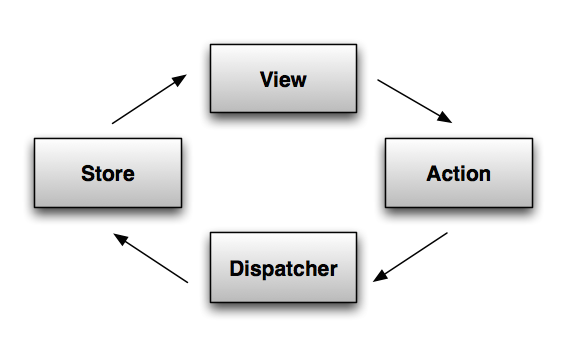
- Views render data and trigger actions.
- The dispatcher propagates actions from views to stores.
- Stores contain application logic and state.
A typical Flux interaction looks as follows:
- The view triggers an action.
- The action layer, using the data provided by the view, constructrs an action object.
- The dispatcher receives the action, puts it in its action queue, and later notifies the store about it.
- The store updates its state based on the action and broadcasts a change event.
- The view reads data from the store and updates itself.
REPLACEMENT FOR MVC?
MVC is a very old pattern. And as a result, it is hardly possible to find two people who would agree on what it really means. I see MVC as a component pattern, with the view and the controller forming the component. Defined like this, MVC does not conflict with Flux and can be used in the view layer.
APPLICATION
I won’t cover the pattern itself in great detail. So if you feel confused after reading the post, I highly recommend you to check outthis screencast series by Joe Maddalone, which is absolutely excellent. In the series Joe Maddalone builds a shopping cart application, a simplified version of which I am going to build in this post.
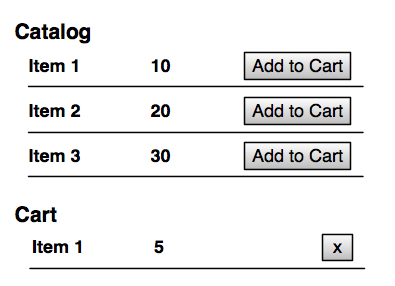
The application displays two tables: the catalog and the shopping cart, and supports two operations: addItem and removeItem.
ANGULAR & FLUX
VIEWS
Let’s start with the catalog table.
<table ng-controller="CatalogCtrl as catalog">

    <tr ng-repeat="item in catalog.catalogItems">

        <td>{{item.title}}</td>

        <td>{{item.cost}}</td>

        <td>

            <button ng-click="catalog.addToCart(item)">Add to Cart</button>

        </td>

    </tr>

</table>
Where CatalogCtrl is defined as follows:
var m = angular.module('cart', []);

class CatalogCtrl {

  constructor(catalogItems, cartActions) {

    this.cartActions = cartActions;

    this.catalogItems = catalogItems;

  }

  addToCart(catalogItem) {

    this.cartActions.addItem(catalogItem);

  }

}

m.controller("CatalogCtrl", CatalogCtrl);
To make it simple, let’s hardcode catalogItems.
m.value("catalogItems", [

  {id: 1, title: 'Item #1', cost: 1},

  {id: 2, title: 'Item #2', cost: 2},

  {id: 3, title: 'Item #3', cost: 3}

]);
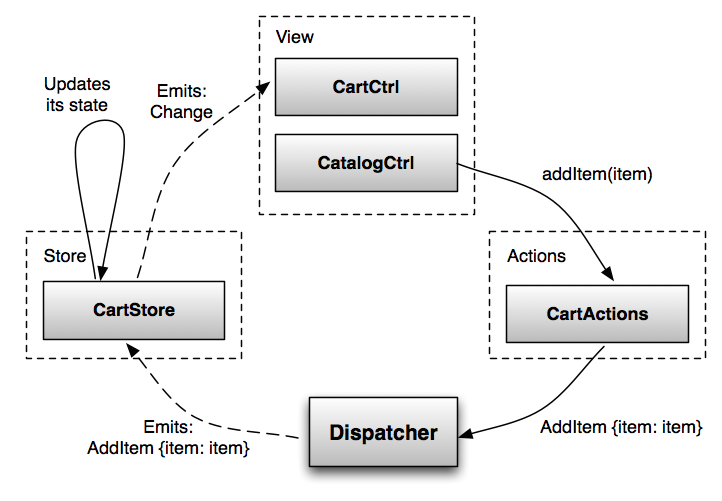
The controller does not do much. It has no application logic: it just triggers the addItem action. It is worth noting that not everything should be handled as an action and go through the pipeline. Local view concerns (e.g., UI state) should be kept in the view layer.
ACTIONS
The action layer is nothing but a collection of helper functions, which, at least in theory, should have a helper for every action your application can perform.
var ADD_ITEM = "ADD_ITEM";

m.factory("cartActions", function (dispatcher) {

  return {

    addItem(item) {

      dispatcher.emit({

        actionType: ADD_ITEM,

        item: item

      })

    }

  };

});
DISPATCHER
The dispatcher is a message-bus service that propagates events from views to stores. It has no application logic. A real project should probably use the Dispatcher library from Facebook, or implement it using RxJS. In this article I will use this simpleEventEmitter class, just to illustrate the interaction.
class EventEmitter {

  constructor() {

    this.listeners = [];

  }

  emit(event) {

    this.listeners.forEach((listener) => {

      listener(event);

    });

  }

  addListener(listener) {

    this.listeners.push(listener);

    return this.listeners.length - 1;

  }

}

m.service("dispatcher", EventEmitter);
Since all actions go through the dispatcher, it is a great place to add such things as logging.
STORE
A store contains application logic and state for a particular domain. It registers itself with the dispatcher to be notified about the events flowing through the system. The store then updates itself based on those events. And what is really important, there is no other way to update it. Views and other stores can read data from the store, but not update it directly. The store is observable, so it emits events that views can listen for.
This’s one way to implement the cart store.
class CartStore extends EventEmitter {

  constructor() {

    super();

    this.cartItems = [];

  }

  addItem(catalogItem) {

    var items = this.cartItems.filter((i) => i.catalogItem == catalogItem);

    if (items.length == 0) {

      this.cartItems.push({qty: 1, catalogItem: catalogItem});

    } else {

      items[0].qty += 1;

    }

  }

  removeItem(cartItem) {

    var index = this.cartItems.indexOf(cartItem);

    this.cartItems.splice(index, 1);

  }

  emitChange() {

    this.emit("change");

  }

}
Next, we need to register it.
m.factory("cartStore", function (dispatcher) {

  var cartStore = new CartStore();

  dispatcher.addListener(function (action) {

    switch(action.actionType){

      case ADD_ITEM:

        cartStore.addItem(action.item);

        cartStore.emitChange();

        break;

      case REMOVE_ITEM:

        cartStore.removeItem(action.item);

        cartStore.emitChange();

        break;

    }

  });

  //expose only the public interface

  return {

    addListener: (l) => cartStore.addListener(l),

    cartItems: () => cartStore.cartItems

  };

});
Since stores is where all of the application logic is contained, they can become very complicated very quickly. In this exampleCartStore is implemented using the transaction script pattern, which works fairly well for small applications, but breaks apart when dealing with complex domains. In addition, stores are responsible for both the domain and application logic. This, once again, works well for small applications, but not so much for larger one. So you may consider separating the two.
CLOSING THE LOOP
We are almost done. There is only one piece left to see the whole interaction working: we need to implement the cart table.
<h1>Cart</h1>

<table ng-controller="CartCtrl as cart">

    <tr ng-repeat="item in cart.items track by $id(item)">

        <td>{{item.catalogItem.title}}</td>

        <td>{{item.qty}}</td>

        <td>

            <button ng-click="cart.removeItem(item)">x</button>

        </td>

    </tr>

</table>

class CartCtrl {

  constructor(cartStore, cartActions) {

    this.cartStore = cartStore;;

    this.cartActions = cartActions;

    this.resetItems();

    cartStore.addListener(() => this.resetItems());

  }

  resetItems() {

    this.items = this.cartStore.cartItems();

  }

  removeItem(item) {

    //to be implemented

  }

}

m.controller("CartCtrl", CartCtrl);
The controller listens to the store, and when that changes, resets the list of cart items.
INTERACTION
SUMMING UP
Flux is an architectural pattern based on unidirectional data flow. It can be used with any non-opinionated framework. In this blog post I have shown how it can be used with Angular.
READ MORE
- The example from this post, including the remove item functionality.
- Flux Architecture Overview
- Flux Arhitecture by Joe Maddalone
- Read up on CQRS. CQRS is a well-established pattern for building server-side applications. Flux is built around the same set of ideas. There is a lot of great material on CQRS: pros and cons, how to structure actions, and so on. Most of it can be applied to Flux.
BUILDING ANGULAR APPS USING FLUX ARCHITECTURE的更多相关文章
- Building Web Apps with SignalR, Part 1
Building Web Apps with SignalR, Part 1 In the first installment of app-building with SignalR, learn ...
- Building Android Apps 30条建议
Building Android Apps — 30 things that experience made me learn the hard way There are two kinds of ...
- Building the Unstructured Data Warehouse: Architecture, Analysis, and Design
Building the Unstructured Data Warehouse: Architecture, Analysis, and Design earn essential techniqu ...
- Flux architecture
[Flux architecture] Flux is a pattern for managing data flow in your application. The most important ...
- [AngularJS] Sane, scalable Angular apps are tricky, but not impossible.
Read fromhttps://medium.com/@bluepnume/sane-scalable-angular-apps-are-tricky-but-not-impossible-less ...
- HoloLens开发手记 - 构建2D应用 Building 2D apps
HoloLens可以让我们在真实世界中看到全息图像内容.但是它本质上还是一台Windows 10设备,这意味着HoloLens可以以2D应用形式运行Windows Store里的大部分UWP应用. 目 ...
- [Angular] Debug Angular apps in production without revealing source maps
Source: https://blog.angularindepth.com/debug-angular-apps-in-production-without-revealing-source-ma ...
- AngularJS + RequireJS
http://www.startersquad.com/blog/AngularJS-requirejs/ While delivering software projects for startup ...
- Kivy: Building GUI and Mobile apps with Python
Intro Python library for building gui apps (think qt, gdk,processing) build from ground up for lates ...
随机推荐
- Java编程之Map中分拣思想。
题目:给定一个字符串,求出字符串中每一个单词在字符串中出现的次数 旨意:map的分拣思想. 每一个key的包装类,存放出现的次数 /** * 作为包装类,用来存放英文单词,和该英文单词出现的次数 * ...
- strapi 开源api && 内容管理平台试用
strapi 是一个开源的api && 内容管理平台,功能操作起来还是比较方便简单的. 安装 使用docker && docker-compose 代码clone gi ...
- WinSCP一个好用的连接linux服务器的
用虚拟机ssh登陆远程服务器,终端命令copy本地文件到服务器简直弱爆了. 不然用win下的WinSCP,牛逼到爆了.操作跟FTP软件差不多
- 在Eclipse中搭建Python开发环境
在Eclipse中搭建Python开发环境 来自: http://hi.baidu.com/hqwfreefly/blog/item/2543181d0afd9604314e150e.html 前言 ...
- (转)SQL SERVER 日志已满的处理方法
本文转载自:http://www.cnblogs.com/eycbest/archive/2012/01/04/2311567.html 事务日志文件Transaction Log File是用来记录 ...
- 汇编_指令_SUB
SUB是减法运算. 比如mov ax,2mov bx,1sub ax,bx 其中sub ax,bx就是ax中的值减bx中的值,等于1,然后把结果,也就是1,放入ax中.
- Waiting for device dev/disk/by-id/ata-...-part2 to appear
问题: 平台:Oralce VM Virtualbox的虚拟机Opensuse11.4 导出该机器的OVA文件后,把该OVA文件导入虚拟机,开机启动时报如下错误: Trying manual resu ...
- tornado相关文章
http://www.linuxzen.com/shi-yong-tornadojin-xing-wang-luo-yi-bu-bian-cheng.html http://cloudaice.com ...
- C++ 排序总结
原帖地址 http://kongec.blog.sohu.com/85141353.html 附 六分钟演示15中算法 http://www.guokr.com/post/482666/ 一.插入排 ...
- Spring batch学习 (1)
Spring Batch 批处理框架 埃森哲和Spring Source研发 主要解决批处理数据的问题,包含并行处理,事务处理机制等.具有健壮性 可扩展,和自带的监控功能,并且支持断点和重发.让程序员 ...