
css样式DEMO
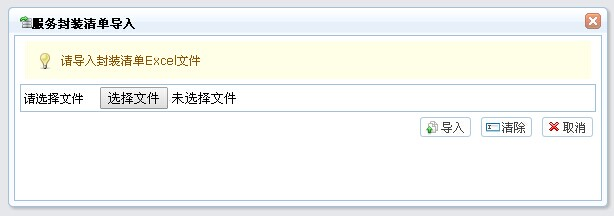
<!-- 导入框 -->
<div id="importWin" class="easyui-window" title="服务封装清单导入" style="width:600px;height:200px" data-options="iconCls:'ope-import',modal:true,collapsible:false,minimizable:false,maximizable:false,resizable:false,closed:true">
<div style="margin-left: 5px;margin-right: 5px;margin-top: 5px;">
<div class="data-tips-info">
<div class="data-tips-tip icon-tip"></div>
请导入封装清单Excel文件
</div>
<form id="form_upload" method="post" action="esbService/uploadTemplet.do" enctype="multipart/form-data">
<table class="tableForm_L" style="margin-top: 3px" width="99%" border="0" cellpadding="0" cellspacing="1">
<tr>
<td>
<div id="filediv">请选择文件
<input id="file_templet" type="file" name="file" style="width: 280px;" class="easyui-validatebox" required="true" missingMessage="请选择一个文件" /></div>
</td>
</tr>
</table>
<table width="100%" style="margin-top: 5px" border="0" cellpadding="0" cellspacing="0">
<tr>
<td align="right">
<a href="#" class="easyui-linkbutton" data-options="iconCls:'ope-bulkUpload'" onclick="btn_import()">导入</a>
<a href="#" class="easyui-linkbutton" data-options="iconCls:'ope-empty'" onclick="clearImport()">清除</a>
<a href="#" class="easyui-linkbutton" data-options="iconCls:'ope-cancel'" onclick="cancelImport()">取消</a>
</td>
</tr>
</table>
</form>
</div>
</div>
.data-tips-info {
margin: 5px;
background: #FFFEE6;
color: #8F5700;
padding: 12px;
}
<div id="showDiv" style="display:none;">
<div id="pwdDialog" class="easyui-dialog" title="修改密码" style="width: 400px; height: 180px;"
data-options="iconCls:'pag-list',modal:true,collapsible:false,minimizable:false,maximizable:false,resizable:false,closed:true">
<input type="hidden" id="userId">
<!-- <div class="easyui-layout" data-options="fit:true" style="width: 98%; height: 98%;" align="center" id="pwdLayout">
<div data-options="region:'north',border:false" style="height: 10px;"></div>
<div data-options="region:'center',border:true"> -->
<table class="tableForm_L" style="margin: 6px; width: 97%" border="0" cellpadding="0" cellspacing="1">
<tr>
<td>
<form id="pwdForm" method="post">
<table style="text-align: right;" align="center">
<tr>
<td>请输入原密码</td>
<td style="text-align: left; padding-left: 10px;"><input type="password" id="userPassword" name="userPassword" class="easyui-validatebox"
data-options="required:true" validType="checkPassword"/>
</td>
</tr>
<tr>
<td>请输入新密码</td>
<td style="text-align: left; padding-left: 10px;"><input type="password" id="newPassword" name="newPassword" class="easyui-validatebox"
data-options="required:true" />
</td>
</tr>
<tr>
<td>请确认输入新密码</td>
<td style="text-align: left; padding-left: 10px;"><input type="password" id="reNewPassword" name="reNewPassword"
class="easyui-validatebox" data-options="required:true" validType="equalTo['newPassword']" />
</td>
</tr>
</table>
</form>
</td>
</tr>
</table>
<!-- </div>
<div data-options="region:'south',border:false" style="height: 50px; text-align: right;vertical-align: middle;"> -->
<div id="pwdBtn" style="height: 20%; padding-right: 3px; text-align:right;">
<a href="#" class="easyui-linkbutton" data-options="iconCls:'ope-finish'" onclick="commitPwd();">确定</a>
<a href="#" class="easyui-linkbutton" data-options="iconCls:'ope-cancel'" onclick="pwdDialogCancel()">取消</a>
</div>
<!-- </div> -->
</div>
</div>
</div>
css样式DEMO的更多相关文章
- getPropertyValue 获取CSS样式
新学习一个js 的方法 getPropertyValue (实现 js框架中 css 的最终调用的函数),取得元素最终计算出的css 样式 DEMO: <!DOCTYPE html> ...
- React组件(组件属性this.state和this.props,css样式修饰组件)
目录: 1.创建组件的第一种方式 function2.将组件抽离为单独的jsx文件3.省略.jsx后缀, 配置webpack设置根目录4.创建组件的第二种方式--使用class关键字创建组件5.组件私 ...
- CSS居中demo
<!DOCTYPE html> <html lang="en"> <head> <meta charset="UTF-8&q ...
- CSS特异性(CSS Specificity)的细节之CSS样式权重的计算与理解(CSS样式覆盖规则)
本篇讲解CSS特异性(CSS Specificity)的细节,也就是CSS样式选择器的权重计算 通过计算选择器的权重(weight)最终决定哪个选择器将获得优先权去覆盖其他选择器的样式设定,即“优先原 ...
- css样式 --- CSS hack
前端样式,虽然不是经常需要hack,但是我们经常会遇到各浏览器表现不一致的情况.基于此,某些情况我们会极不情愿的使用这个不太友好的方式来达到大家要求的页面表现.我个人是不太推荐使用hack的,要知道一 ...
- Chrome开发工具Elements面板(编辑DOM和CSS样式)详解
Element 译为“元素”,Element 面板可以让我们动态查看和编辑DOM节点和CSS样式表,并且立即生效,避免了频繁切换浏览器和编辑器的麻烦. 我们可以使用Element面板来查看源代码,它不 ...
- CSS样式优先级
关于CSS样式优先级 一般情况下: [1位重要标志位] > [4位特殊性标志] > 声明先后顺序 !important > [ id > class > tag ] 使用 ...
- 改变CSS样式
改变CSS样式 1.改变HTML元素样式的语法 //改变HTML样式的语法 document.getElementById(id).style.property = new style 例子: < ...
- css扁平化博客学习总结(二)css样式重置
css样式重置 方法一:不推荐使用,这么写会让网页解析速度变慢. *{ margin: 0; padding: 0;} 方法二:大家常用的写法,比较流行. body, html, div, block ...
随机推荐
- 【jQuery】网上看到一个不错的登陆界面
预览截图如下: Html部分代码: <!DOCTYPE html PUBLIC "-//W3C//DTD XHTML 1.0 Transitional//EN" " ...
- pycurl 学习笔记--getinfo 函数
通过 pycurl.Curl 对象的 getinfo 函数,可以获取到响应的如下信息: (参考: http://curl.haxx.se/libcurl/c/curl_easy_getinfo.htm ...
- Linux中断 - softirq
一.前言 对于中断处理而言,linux将其分成了两个部分,一个叫做中断handler(top half),是全程关闭中断的,另外一部分是deferable task(bottom half),属于不那 ...
- 图解IIS配置过程
环境介绍: 操作系统:win7,64位.IIS7 开发软件:VS2010,32位 图解IIS配置过程: 此过程之前确保已安装了IIS. 1.在"控制面板"中找到"管理工具 ...
- POJ 1465 Multiple (BFS,同余定理)
id=1465">http://poj.org/problem?id=1465 Multiple Time Limit: 1000MS Memory Limit: 32768K T ...
- PixelLink
简介 论文题目:PixelLink: Detecting Scene Text via Instance Segmentation 论文地址:https://arxiv.org/abs/1801.01 ...
- nginx配置文件中location说明
1 nginx配置文件 文件结构 ... #全局块 events { #events块 ...} http #http块 { ... #http全局块 server #server块 { ... #s ...
- introduction to python for statistics,analysis笔记3
一.产生数组和矩阵 1.linspace(start,end,number),产生在start和end数之间number个数 >>> x = linspace(, , ) >& ...
- alsa project
http://www.alsa-project.org/main/index.php/Main_Page
- nrm 的使用说明
nrm -- NPM registry 管理工具 开发的npm registry 管理工具 nrm, 能够查看和切换当前使用的registry, 最近NPM经常 down 掉, 这个还是很有用的哈哈 ...