
Entity Framework应用:Code First的实体继承模式
Entity Framework的Code First模式有三种实体继承模式
1、Table per Type (TPT)继承
2、Table per Class Hierarchy(TPH)继承
3、Table per Concrete Class (TPC)继承
一、TPT继承模式
当领域实体类有继承关系时,TPT继承很有用,我们想把这些实体类模型持久化到数据库中,这样,每个领域实体都会映射到单独的一张表中。这些表会使用一对一关系相互关联,数据库会通过一个共享的主键维护这个关系。
假设有这么一个场景:一个组织维护了一个部门工作的所有人的数据库,这些人有些是拿着固定工资的员工,有些是按小时付费的临时工,要持久化这个场景,我们要创建三个领域实体:Person、Employee和Vendor类。Person类是基类,另外两个类会继承自Person类。实体类结构如下:
1、Person类
 using System;

 using System.Collections.Generic;

 using System.Linq;

 using System.Text;

 using System.Threading.Tasks;

 namespace TPTPattern.Model

 {

     public class Person

     {

         public int Id { get; set; }

         public string Name { get; set; }

         public string Email { get; set; }

         public string PhoneNumber { get; set; }

     }

 }
Employee类结构
 using System;

 using System.Collections.Generic;

 using System.ComponentModel.DataAnnotations.Schema;

 using System.Linq;

 using System.Text;

 using System.Threading.Tasks;

 namespace TPTPattern.Model

 {

     [Table("Employee")]

     public class Employee :Person

     {

         /// <summary>

         /// 薪水

         /// </summary>

         public decimal Salary { get; set; }

     }

 }
Vendor类结构
 using System;

 using System.Collections.Generic;

 using System.ComponentModel.DataAnnotations.Schema;

 using System.Linq;

 using System.Text;

 using System.Threading.Tasks;

 namespace TPTPattern.Model

 {

     [Table("Vendor")]

     public class Vendor :Person

     {

         /// <summary>

         /// 每小时的薪水

         /// </summary>

         public decimal HourlyRate { get; set; }

     }

 }
在VS中的类图如下:
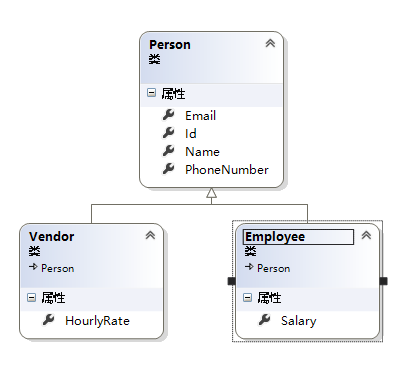
对于Person类,我们使用EF的默认约定来映射到数据库,而对Employee和Vendor类,我们使用了数据注解,将它们映射为我们想要的表名。
然后我们需要创建自己的数据库上下文类,数据库上下文类定义如下:
 using System;

 using System.Collections.Generic;

 using System.Data.Entity;

 using System.Linq;

 using System.Text;

 using System.Threading.Tasks;

 using TPTPattern.Model;

 namespace TPTPattern.EFDatabaseContext

 {

     public class EFDbContext :DbContext

     {

         public EFDbContext()

             : base("name=Default")

         { }

         public DbSet<Person> Persons { get; set; }

     }

 }
在上面的上下文中,我们只添加了实体类Person的DbSet,没有添加另外两个实体类的DbSet。因为其它的两个领域模型都是从这个模型派生的,所以我们也就相当于将其它两个类添加到了DbSet集合中了,这样EF会使用多态性来使用实际的领域模型。当然,也可以使用Fluent API和实体伙伴类来配置映射细节信息。
2、使用数据迁移创建数据库
使用数据迁移创建数据库后查看数据库表结构:
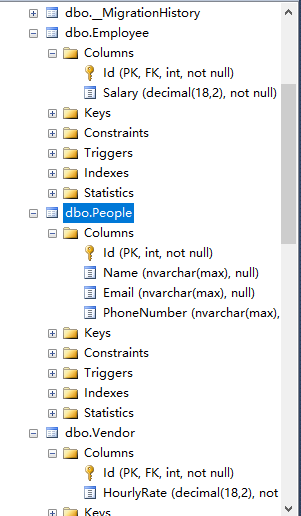
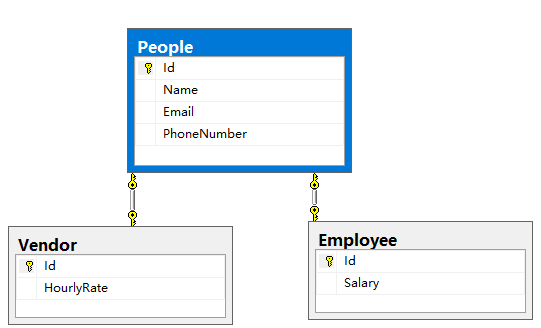
在TPT继承中,我们想为每个领域实体类创建单独的一张表,这些表共享一个主键。因此生成的数据库关系图表如下:
3、填充数据
现在我们使用这些领域实体来创建一个Employee和Vendor类来填充数据,Program类定义如下:
 using System;

 using System.Collections.Generic;

 using System.Linq;

 using System.Text;

 using System.Threading.Tasks;

 using TPTPattern.EFDatabaseContext;

 using TPTPattern.Model;

 namespace TPTPattern

 {

     class Program

     {

         static void Main(string[] args)

         {

             using (var context = new EFDbContext())

             {

                 Employee emp = new Employee()

                 {

                   Name="李白",

                   Email="LiBai@163.com",

                    PhoneNumber="",

                    Salary=2345m

                 };

                 Vendor vendor = new Vendor()

                 {

                    Name="杜甫",

                    Email="DuFu@qq.com",

                    PhoneNumber="",

                    HourlyRate=456m

                 };

                 context.Persons.Add(emp);

                 context.Persons.Add(vendor);

                 context.SaveChanges();

             }

             Console.WriteLine("信息录入成功");

         }

     }

 }
查询数据库填充后的数据:
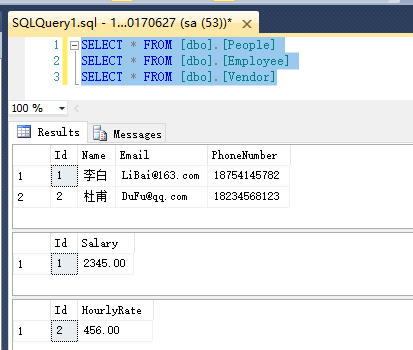
我们可以看到每个表都包含单独的数据,这些表之间都有一个共享的主键。因而这些表之间都是一对一的关系。
注:TPT模式主要应用在一对一模式下。
二、TPH模式
当领域实体有继承关系时,但是我们想将来自所有的实体类的数据保存到单独的一张表中时,TPH继承很有用。从领域实体的角度,我们的模型类的继承关系仍然像上面的截图一样:
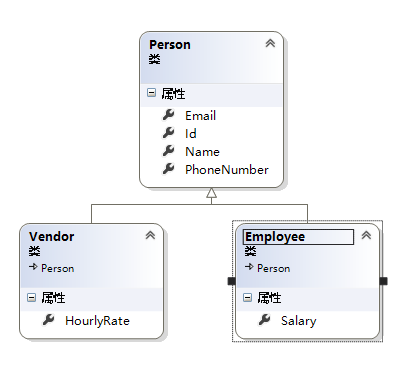
但是从数据库的角度讲,应该只有一张表保存数据。因此,最终生成的数据库的样子应该是下面这样的:
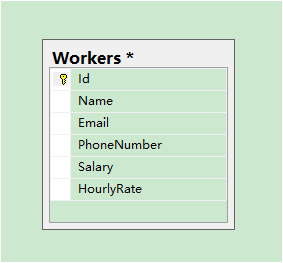
注意:从数据库的角度看,这种模式很不优雅,因为我们将无关的数据保存到了单张表中,我们的表是不标准的。如果我们使用这种方法,那么总会存在null值的冗余列。
1、创建有继承关系的实体类
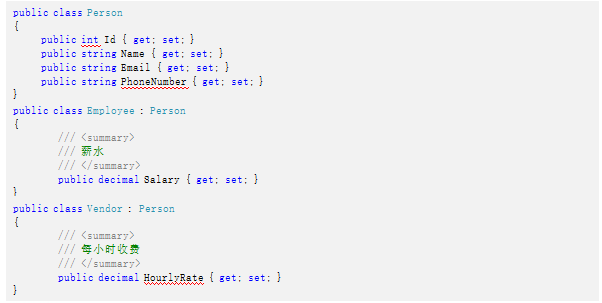
现在我们创建实体类来实现该继承,注意:这次创建的三个实体类和之前创建的只是没有了类上面的数据注解,这样它们就会映射到数据库的单张表中(EF会默认使用父类的DbSet属性名或复数形式作为表名,并且将派生类的属性映射到那张表中),类结构如下:
2、创建数据上下文
 using System;

 using System.Collections.Generic;

 using System.Data.Entity;

 using System.Linq;

 using System.Text;

 using System.Threading.Tasks;

 using TPHPattern.Model;

 namespace TPHPattern.EFDatabaseContext

 {

     public class EFDbContext :DbContext

     {

         public EFDbContext()

             : base("name=Default")

         { }

         public DbSet<Person> Persons { get; set; }

         public DbSet<Employee> Employees { get; set; }

         public DbSet<Vendor> Vendors { get; set; }

     }

 }
3、使用数据迁移创建数据库
使用数据迁移生成数据库以后,会发现数据库中只有一张表,而且三个实体类中的字段都在这张表中了, 创建后的数据库表结构如下:
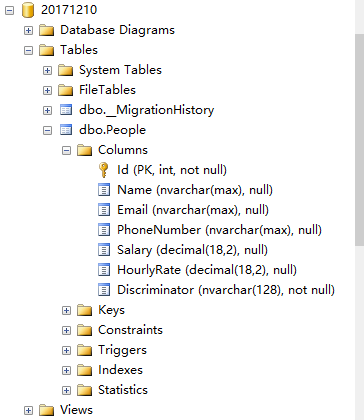
注意:查看生成的表结构,会发现生成的表中多了一个Discriminator字段,它是用来找到记录的实际类型,即从Person表中找到Employee或者Vendor。
4、不使用默认生成的区别多张表的类型
使用Fluent API,修改数据上下文类,修改后的类定义如下:
 using System;

 using System.Collections.Generic;

 using System.Data.Entity;

 using System.Linq;

 using System.Text;

 using System.Threading.Tasks;

 using TPHPattern.Model;

 namespace TPHPattern.EFDatabaseContext

 {

     public class EFDbContext :DbContext

     {

         public EFDbContext()

             : base("name=Default")

         { }

         public DbSet<Person> Persons { get; set; }

         public DbSet<Employee> Employees { get; set; }

         public DbSet<Vendor> Vendors { get; set; }

         protected override void OnModelCreating(DbModelBuilder modelBuilder)

         {

             // 强制指定PersonType是鉴别器 1代表全职职员 2代表临时工

             modelBuilder.Entity<Person>()

                 .Map<Employee>(m => m.Requires("PersonType").HasValue())

                 .Map<Vendor>(m => m.Requires("PersonType").HasValue());

             base.OnModelCreating(modelBuilder);

         }

     }

 }
重新使用数据迁移把实体持久化到数据库,持久化以后的数据库表结构:
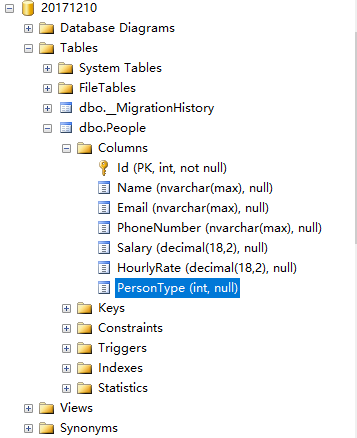
生成的PersonType列的类型是int。
5、填充数据
 using System;

 using System.Collections.Generic;

 using System.Linq;

 using System.Text;

 using System.Threading.Tasks;

 using TPHPattern.EFDatabaseContext;

 using TPHPattern.Model;

 namespace TPHPattern

 {

     class Program

     {

         static void Main(string[] args)

         {

             using (var context = new EFDbContext())

             {

                 Employee emp = new Employee()

                 {

                     Name = "李白",

                     Email = "LiBai@163.com",

                     PhoneNumber = "",

                     Salary = 2345m

                 };

                 Vendor vendor = new Vendor()

                 {

                     Name = "杜甫",

                     Email = "DuFu@qq.com",

                     PhoneNumber = "",

                     HourlyRate = 456m

                 };

                 context.Persons.Add(emp);

                 context.Persons.Add(vendor);

                 context.SaveChanges();

             }

             Console.WriteLine("信息录入成功");

         }

     }

 }
6、查询数据
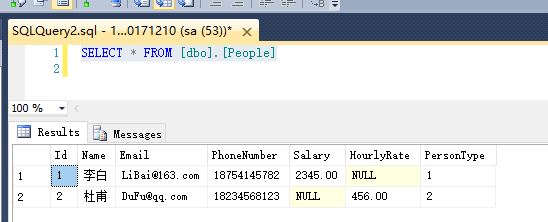
注意:TPH模式和TPT模式相比,TPH模式只是少了使用数据注解或者Fluent API配置子类的表名。因此,如果我们没有在具有继承关系的实体之间提供确切的配置,那么EF会默认将其对待成TPH模式,并把数据放到单张表中。
三、TPC模式
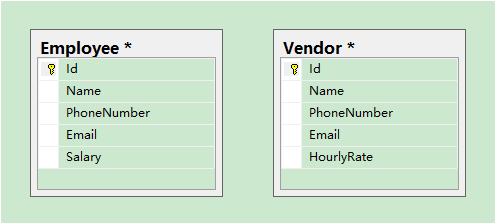
当多个领域实体类派生自一个基类实体,并且我们想将所有具体类的数据分别保存在各自的表中,以及抽象基类实体在数据库中没有对应的表时,使用TPC继承模式。实体模型还是和之前的一样。
然而,从数据库的角度看,只有所有具体类所对应的表,而没有抽象类对应的表。生成的数据库如下图:
1、创建实体类
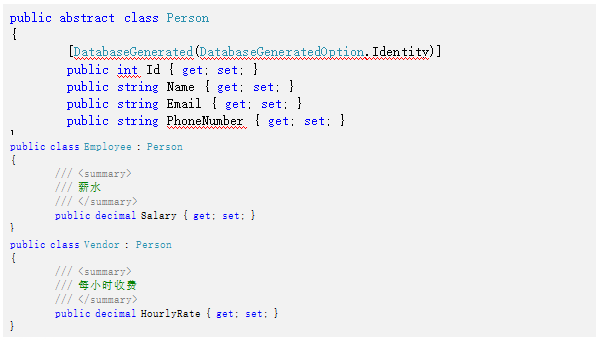
创建领域实体类,这里Person基类应该是抽象的,其他的地方都和上面一样:
2、配置数据上下文
接下来就是应该配置数据库上下文了,如果我们只在数据库上下文中添加了Person的DbSet泛型属性集合,那么EF会当作TPH继承处理,如果我们需要实现TPC继承,那么还需要使用Fluent API来配置映射(当然也可以使用配置伙伴类),数据库上下文类定义如下:
 using System;

 using System.Collections.Generic;

 using System.Data.Entity;

 using System.Linq;

 using System.Text;

 using System.Threading.Tasks;

 using TPCPattern.Model;

 namespace TPCPattern.EFDatabaseContext

 {

     public class EFDbContext :DbContext

     {

         public EFDbContext()

             : base("name=Default")

         { }

         public virtual DbSet<Person> Persons { get; set; }

         protected override void OnModelCreating(DbModelBuilder modelBuilder)

         {

             //MapInheritedProperties表示继承以上所有的属性

             modelBuilder.Entity<Employee>().Map(m =>

             {

                 m.MapInheritedProperties();

                 m.ToTable("Employees");

             });

             modelBuilder.Entity<Vendor>().Map(m =>

             {

                 m.MapInheritedProperties();

                 m.ToTable("Vendors");

             });

             base.OnModelCreating(modelBuilder);

         }

     }

 }
上面的代码中,MapInheritedProperties方法将继承的属性映射到表中,然后我们根据不同的对象类型映射到不同的表中。
3、使用数据迁移生成数据库
生成的数据库表结构如下:
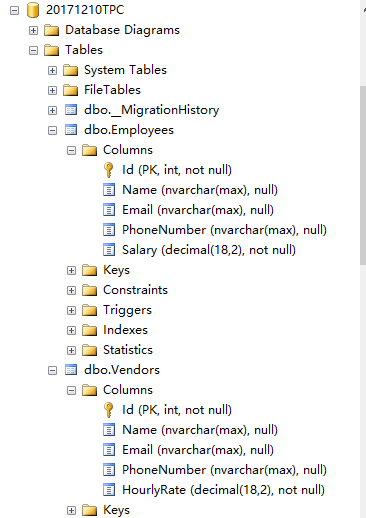
查看生成的表结构会发现,生成的数据库中只有具体类对应的表,而没有抽象基类对应的表。具体实体类对应的表中有所有抽象基类里面的字段。
4、填充数据
 using System;

 using System.Collections.Generic;

 using System.Linq;

 using System.Text;

 using System.Threading.Tasks;

 using TPCPattern.EFDatabaseContext;

 using TPCPattern.Model;

 namespace TPCPattern

 {

     class Program

     {

         static void Main(string[] args)

         {

             using (var context = new EFDbContext())

             {

                 Employee emp = new Employee()

                 {

                     Name = "李白",

                     Email = "LiBai@163.com",

                     PhoneNumber = "",

                     Salary = 2345m

                 };

                 Vendor vendor = new Vendor()

                 {

                     Name = "杜甫",

                     Email = "DuFu@qq.com",

                     PhoneNumber = "",

                     HourlyRate = 456m

                 };

                 context.Persons.Add(emp);

                 context.Persons.Add(vendor);

                 context.SaveChanges();

             }

             Console.WriteLine("信息录入成功");

         }

     }

 }
查询数据库:
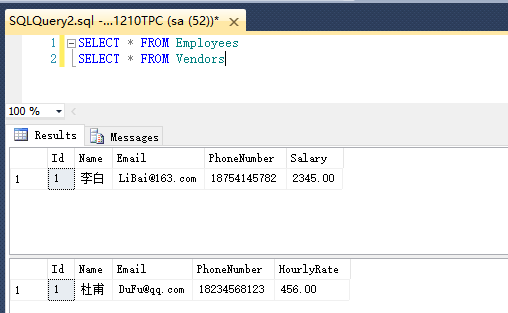
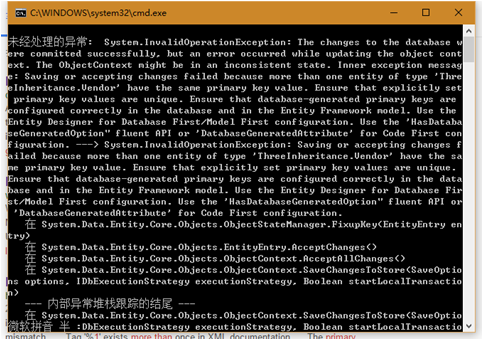
注意:虽然数据是插入到数据库了,但是运行程序时也出现了异常,异常信息见下图。出现该异常的原因是EF尝试去访问抽象类中的值,它会找到两个具有相同Id的记录,然而Id列被识别为主键,因而具有相同主键的两条记录就会产生问题。这个异常清楚地表明了存储或者数据库生成的Id列对TPC继承无效。
如果我们想使用TPC继承,那么要么使用基于GUID的Id,要么从应用程序中传入Id,或者使用能够维护对多张表自动生成的列的唯一性的某些数据库机制。
Entity Framework应用:Code First的实体继承模式的更多相关文章
- Code First的实体继承模式
Entity Framework的Code First模式有三种实体继承模式 1.Table per Type (TPT)继承 2.Table per Class Hierarchy(TPH)继承 3 ...
- Entity Framework(EF) Code First将实体中的string属性映射成text类型的几种方式
1.通过ColumnType属性设置 [Column(TypeName="text")] public string Text { get; set; } 在进行以上属性设置时,请 ...
- 【极力分享】[C#/.NET]Entity Framework(EF) Code First 多对多关系的实体增,删,改,查操作全程详细示例【转载自https://segmentfault.com/a/1190000004152660】
[C#/.NET]Entity Framework(EF) Code First 多对多关系的实体增,删,改,查操作全程详细示例 本文我们来学习一下在Entity Framework中使用Cont ...
- [C#/.NET]Entity Framework(EF) Code First 多对多关系的实体增,删,改,查操作全程详细示例
本文我们来学习一下在Entity Framework中使用Context删除多对多关系的实体是如何来实现的.我们将以一个具体的控制台小实例来了解和学习整个实现Entity Framework 多对多关 ...
- 使用NuGet助您玩转代码生成数据————Entity Framework 之 Code First
[前言] 如果是Code First老鸟或者对Entity Framework不感兴趣,就不用浪费时间往下看了. 记得09年第一次接触ORM————Linq2Sql,从此对她的爱便一发不可收拾,一年后 ...
- Entity Framework 之 Code First
使用NuGet助您玩转代码生成数据————Entity Framework 之 Code First [前言] 如果是Code First老鸟或者对Entity Framework不感兴趣,就不用浪费 ...
- 在Entity Framework 中用 Code First 创建新的数据库
在Entity Framework 中用 Code First 创建新的数据库 (原文链接) 本文将逐步介绍怎样用Code First 创建新数据库,使用在代码中定义类和API中提供的特性(Attri ...
- Entity Framework 6 Code First新特性:支持存储过程
Entity Framework 6提供支持存储过程的新特性,本文具体演示Entity Framework 6 Code First的存储过程操作. Code First的插入/修改/删除存储过程 默 ...
- AppBox升级进行时 - 拥抱Entity Framework的Code First开发模式
AppBox 是基于 FineUI 的通用权限管理框架,包括用户管理.职称管理.部门管理.角色管理.角色权限管理等模块. 从Subsonic到Entity Framework Subsonic最早发布 ...
随机推荐
- 把Android源代码加入SDK
各位调试Android程序的时候遇到“source not found”错误应该很抓狂吧,Goolge在发布SDK时没有把源代码包含进去着实有点让人费解,对很多人来说Git无疑是个生涩的东西,而 fr ...
- WebApi和MVC的区别
使用上区分,mvc主要用于建站,web api主要用于构建http服务,当然你非要用mvc来构建Uri式的Api也行,不过显然是没有这个必要的,一个不恰当的比喻就像是你也可以玩破解版的单机游戏,也可以 ...
- ADF_ADF基本概要(汇总)
20150601 Created By BaoXinjian
- Linux内核(15) - 方法论
什么是方法论 方法论给人的第一感觉就是它是一个玄之又玄的很朦胧的东西,显然,学习本身就是一件很玄乎的事情,有些人整天潇潇洒洒没见怎么用心就能够获得很好的成绩,而有些人则相反,投悬梁锥刺骨也还是成绩平平 ...
- mysql-5.7中的innodb_buffer_pool_prefetching(read-ahead)详解
一.innodb的read-ahead是什么: 所谓的read-ahead就是innodb根据你现在访问的数据,推测出你接下来可能要访问的数据,并把它们(可能要访问的数据)读入 内存. 二.read- ...
- 机器学习 Top 20 Python 开源项目
转自:http://mp.weixin.qq.com/s?__biz=MzA4MjEyNTA5Mw==&mid=2652565022&idx=1&sn=9aa035097120 ...
- INFINITY的一个坑
float a=INFINITY; if(a==INFINITY){ cout<<"a is inf"<<endl; }else{ cout<< ...
- Visual Studio 中突出显示的引用
有时候代码中处理的变量多了,看起代码来就比较的费劲,有时想看一个变量都在哪里用到了,还要一个一个的去仔细分辨. 一.VS2012本身就提供了选中提示功能 但是本身带的这个选中提示功能颜色比较浅,不过这 ...
- excel错误:外部表不是预期的格式 错误
环境:win7+iis7+Office2007 在asp.net网站中导出Excel文件后,再把文件导入到数据库中. 读取Excel文件时,打开连接出错. 错误为:外部表不是预期的格式 解决:检查了一 ...
- Disable Oracle Automatic Jobs
By default, Oracle will run some maintance jobs every night. If you don't want to run those jobs, yo ...