
PyTorch Notes | PyTorch 编程实践笔记
[ 今天最开心的事情! ]
PyTorch的stable版本更新为1.0之后,原本3D模型无脑out of memory、3D模型torch.backends.cudnn.benchmark必须False的问题总算解决了!!!*★,°*:.☆( ̄▽ ̄)/$:*.°★* 。
在训练ResNet50 I3D时发现,benchmark在3D模型训练时仍然要为False!
[ PyTorch基础API ]
PyTorch中基础API包括:
Network architecture: torch.nn.Module
Data: torch.utils.data.Dataset (need to implement __init__, __getitem__, __len__), torch.utils.data.DataLoader (need to give Dataset, batch_size, shuffle and so on)
Parallelism: torch.nn.DataParallel, Tensor.to(), Tensor.cuda()
[ Python延迟实例化 ]
Python 的类名可以作为参数直接传递,而不需要实例化,在使用该类对象之前对其进行实例化即可。
* use [ isinstance( object, classinfo) ] can detect whether the object is the instance of the classinfo.
[ Parameter and Hyperparameter ]
Parameter: the parameter inside the model, such as Weight, Bias .etc.
Hyperparameter: the parameter used to describe the model, is the configuration of network, such as the size of the input or output.
[ single-asterisk form of *args ]
def multiply(*args):

    z = 1

    for num in args:

        z *= num

    print(z)
Convey an argument list to the funcion.
[ The launch command of the first model ]
CUDA_VISIBLE_DEVICES=2,3 \
python main.py \
ucf101 \
data/ucf101/ucf101_train_split1_list.txt \
data/ucf101/ucf101_val_split1_list.txt \
--arch resnet50_3d \
--dro 0.2 \
--mode 3D \
--t_length 16 \
--t_stride 4 \
--pretrained \
--epochs 95 \
--batch-size 64 \
--lr 0.001 \
--lr_steps 40 80 90 \
--workers 16 \
--image_tmpl img_{:05d}.jpg \
* Description: 1) 使用两块Titan x,因此batch-size改为16。如果报错out of memory,则batch-size要调小。 2)workers是数据加载的线程数,根据log中batch的数值,可以判断workers是否合理,合理的情况是内存不超并且batch=0,即批加载时间为0。
[ in_channels & out_channels ]
also called inplanes & outplanes
输入通道数与卷积核的卷积通道数一致,3通道2D图像IMG(3*W*H),2D卷积核(3*w*h),每一个卷积核每一次对IMG的一个3*w*h局部卷积产生一个点,该卷积核卷积完成后产生一个feature map。一个卷积核生成一张feature map,N个卷积核产生N个feature map,构成了N通道的输出。
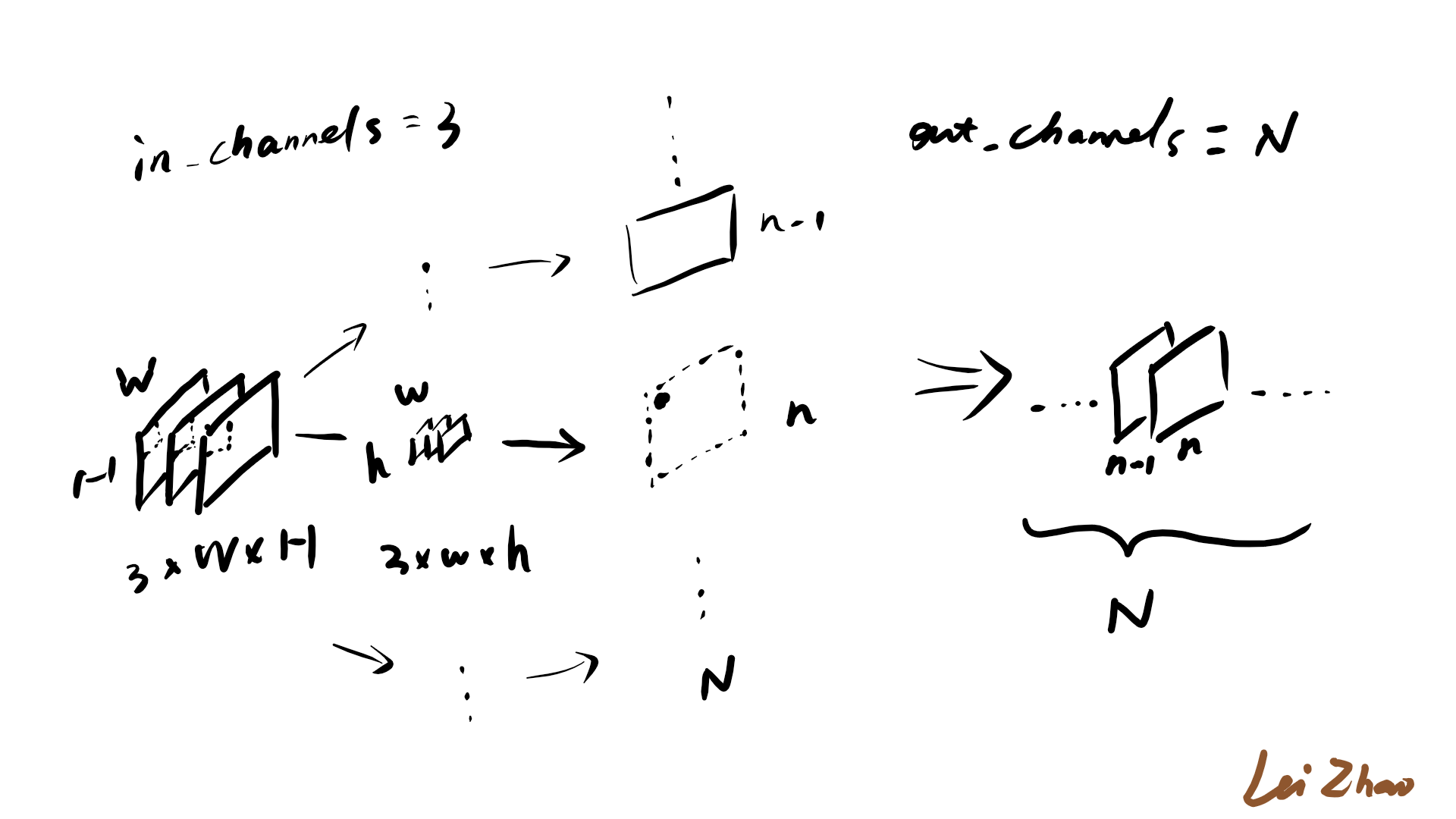
(the draft made by me, shows the process of the conv)
[ Weight sharing ]
also called parameter sharing
It relies on one reasonable assumption: if a patch feature is useful to compute at some spatial position, then it should also be useful to compute at other positions. (refered Wikipedia)
The weights of a filter( also called kernel) should be fixed, which means the filter is shared by a certain input feature map. Actually it is obvious and natural to do this. But in contrast, we can imagine that what if we change the weights of the filter once it moves. Apparently the network will have more parameters to optimize. It is not a good news for GPUs. So the parameter sharing fashion is GPU-friendly.
[ ReLU ]
Rectified Linear Unit
目前,只知道NN的非线性能力来源于此。
[ Batch Normalization ]
The target of normalization is to set the input of norm layer be a Standard Norm Distribution.
BN是以Batch为单位进行操作的,
[ class torch.utils.data.Dataset ]
An abstract class representing a Dataset.
All other datasets should subclass it. All subclasses should override __len__, that provides the size of the dataset, and __getitem__, supporting integer indexing in range from 0 to len(self) exclusive.
[ torch.backends.cudnn.benchmark ]
大部分情况下,设置这个 flag 可以让内置的 cuDNN 的 auto-tuner 自动寻找最适合当前配置的高效算法,来达到优化运行效率的问题。
一般来讲,应该遵循以下准则:
(1) 如果网络的输入数据维度或类型上变化不大,设置 torch.backends.cudnn.benchmark = true 可以增加运行效率;
(2) 如果网络的输入数据在每次 iteration 都变化的话,会导致 cuDNN 每次都会去寻找一遍最优配置,这样反而会降低运行效率。
*开启这个flag,可能会造成CUDNN_STATUS_NOT_INITIALIZED报错。
[ enumerate and __getitem__ ]
An instance of the class implemented the __getitem__ method can be the parameter of the enumerate().
To find more info about Interator and Generator: http://www.bubuko.com/infodetail-2330183.html
[ 一次训练的时间感受 ]
num_traindata=9537, num_valdata=3783, architecture=resnet50_3d, GPU=Nvidia Titan x, num_GPUs=2, num_workers=16
consumed time = 24 hours
[ RuntimeError: CuDNN error: CUDNN_STATUS_MAPPING_ERROR ]
Traceback (most recent call last):
Error information is as below:
$ ...
$ training, momentum, eps, torch.backends.cudnn.enabled
$ RuntimeError: CuDNN error: CUDNN_STATUS_MAPPING_ERROR
出现这种问题,我也很无奈啊....不过好在我对照另一份代码发现了一点问题,那就是torch.nn.Module.cuda()调用之前,要过一次torch.nn.DataParallel(),至于原因目前还不知道。
有些回答说这种情况和CUDA版本过旧,可以作为一种参考思路。
[ Connection error: connection reset by peer ]
系统的并行能力已经超载,连接被断开。查看登录用户情况,然后关闭部分已经不用的登录账户创建的进程。
[ Caffe中BN+Scale 与 PyTorch中BN ]
在Caffe中,Batch Normalization是通过BN + Scale两个层实现的,BN层是调整数据的均值和标准差,Scale是对调整后的数据进行放缩和偏移(Y=wX+b)。
在PyTorch中,两个步骤合二为一,只需要一个BN层即可。
另外,PyTorch中的momentum是真正的momentum,而Caffe中的是1-momentum。
[ 叉乘与点乘 ]
Cross product: torch.matmul(Tensor_A, Tensor_B), or torch.mm(Tensor_A, Tensor_B)
Dot product: torch.mul(Tensor_A, Tensor_B), or Tensor_A * Tensor_B
[ Tensor维度重整的空间连续性要求 ]
在PT中,使用Tensor.view()或者torch.reshape()操作对Tensor进行重整时,要求该Tensor对象所处的内存或显存空间具有连续性,因此若在执行view或reshape操作前对Tensor有permute这种会改变其内存或显存地址的操作,需要使用一次Tensor.contiguous()操作,使其空间连续即可。
[ allow_unreachable=True & device-side assert triggered ]

Model中#classes值 或 label范围不正确,如果是400类,则label的范围是 [0, 399]。如果是0-1分类,则num_class应该为2,而不是1;label范围为{ 0, 1 }。
[ 使用FC (torch.nn.Linear) 后出现size mismatch的问题 ]
在使用Linear之前,需要使用view或者reshape整理维度:
out = out.view(out.shape[0], -1)
[ 测试时网络infer出现不稳定周期性卡顿 ]
一种可能的原因是DataLoader在加载数据时,出现了“供不应求”的情况,也就是参与数据传输的线程数不足,不能及时供应数据。因为在训练的时候,网络需要forward和backward两个过程,少量的线程数可以来得及传输数据到显存,但是在测试时只有forward一个过程,这时若使用同样的线程数,就会来不及传输数据了。
在网上看了一下,基本上建议线程数在GPU数量的2倍~4倍。根据个人经验,可能在训练的时候可以考虑1倍~2倍,测试的时候2倍~4倍。
[ tensor类型转换 ]
①使用Tensor的类型成员函数: .long() .float() .int() .double()
②使用Tensor的.type()成员函数:
import torch

tensor = torch.randn(3, 5)

print(tensor)

int_tensor = tensor.type(torch.IntTensor)

print(int_tensor)
③使用Tensor的.type_as()成员函数:
import torch

tensor_1 = torch.FloatTensor(5)

tensor_2 = torch.IntTensor([10, 20])

tensor_1 = tensor_1.type_as(tensor_2)
[ PyTorch中feature map数据类型 ]
通过debug模式发现:dataset类中读入图像使用PIL.image.open(),读入的数据格式为PIL的图像格式(RGB),在经过transform中的ToTorchFormatTensor()之后,数据变成了Tensor,此时的数据格式为torch.float32,即32位浮点(4 Byte)。
根据 https://blog.csdn.net/gaishi_hero/article/details/81153361
经过ToTorchFormatTensor()之后,不仅仅是数据类型的变化,数据维度也会有HWC变为CHW。
[ BN在单GPU上实现 ]
[ 玄学报错 ]
回了一趟本科学校,回来再调代码出现了一些报错,让我莫名其妙,故称其为“玄学报错”,用了一晚上+一上午的时间解决了,做下记录。
1. 报 THCudaCheck FAIL file=/opt/conda/conda-bld/pytorch_1535491974311/work/aten/src/THC/THCCachingHostAllocator.cpp line=265 error=77 : an illegal memory access was encountered
同时还有一大串frame #0: <unknown function>...
可能的原因是在3D模式下开启了B*M*,会出现这种错误。
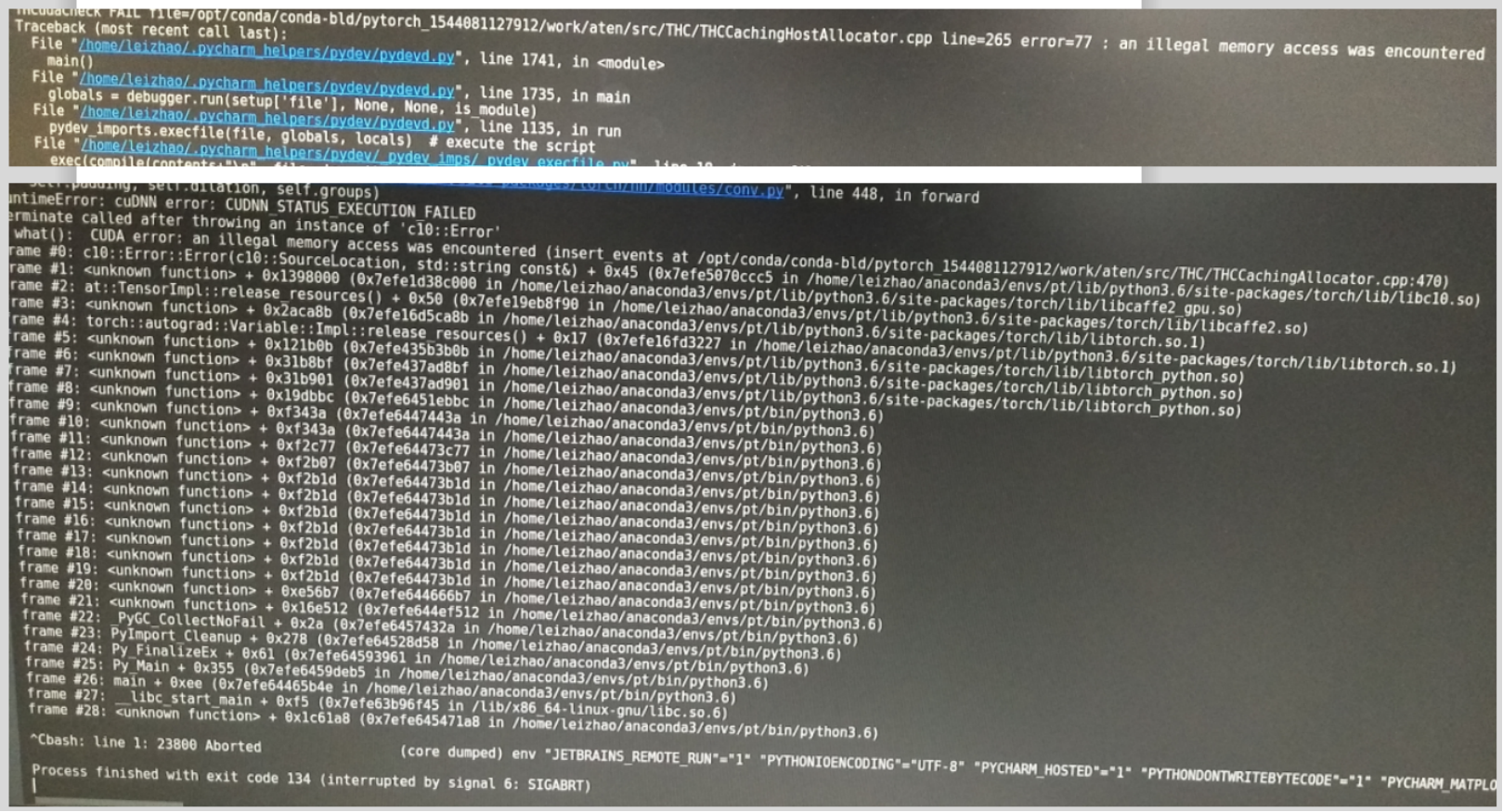
2. 从师兄那了解到,在测试时给了过多的workers也有可能导致 an illegal memory access was encountered 这种报错,减少workers和batchsize可以解决。
3. 使用PyCharm对测试程序进行debug时,无法正常启动运行,并且报错:RuntimeError: all tensors must be on devices[0]. 可是在服务器上直接运行时没有问题。
net = torch.nn.DataParallel(net, device_ids=[0, 1, 2, 3, 4, 5, 6, 7]).cuda()
在做并行化的时候,需要指定GPU编号。
4. 加载训练好的模型时报错:
...python3.6/site-packages/torch/nn/modules/module.py", line 769, in load_state_dict
self.__class__.__name__, "\n\t".join(error_msgs)))
RuntimeError: Error(s) in loading state_dict for DataParallel:
Missing key(s) in state_dict: "module.base_model.operation1.fc_t1.weight" ...
Unexpected key(s) in state_dict: "module.base_model.stc1.fc_t1.weight" ...
是由于名称不对应,所以加载失败。state_dict是一个OrderedDict,使用items()方法获取其键值对,使用str.replace()修改键即可。
从同学那了解到,'module.'是并行训练存储模型参数时才有的前缀,如果先加载模型,再并行分布,则需要去掉前缀,操作方法与上类似。
5. RuntimeError: DataLoader worker (pid 5657) is killed by signal: Killed. Details are lost due to multiprocessing. Rerunning with num_workers=0 may give better error trace.
使用PyCharm在server上debug时出现这个报错,度娘查了一圈是说debug导致server上某块空间不够了,无法multiprocess,因此把worker调成0就可以正常debug了。
PyTorch Notes | PyTorch 编程实践笔记的更多相关文章
- java并发编程实践笔记
文章转自:http://kenwublog.com/java-concurrency-in-practise-note 1, 保证线程安全的三种方法 :a, 不要跨线程访问共享变量b, 使共享变量是 ...
- 编程实践笔记{Java 线程 并发处理 Webservice}(转)
http://www.cnblogs.com/mingzi/archive/2009/03/09/1406694.html 1, 保证线程安全的三种方法: a, 不要跨线程访问共享变量 b, 使共享变 ...
- 《JavaScript语言精髓与编程实践》读书笔记
JavaScript语言精髓与编程实践读书笔记 function v1(v1){ v1 = 100; alert('v1:'+v1); } function v2(name){ v1.apply(th ...
- Python编程从入门到实践笔记——异常和存储数据
Python编程从入门到实践笔记——异常和存储数据 #coding=gbk #Python编程从入门到实践笔记——异常和存储数据 #10.3异常 #Python使用被称为异常的特殊对象来管理程序执行期 ...
- Python编程从入门到实践笔记——文件
Python编程从入门到实践笔记——文件 #coding=gbk #Python编程从入门到实践笔记——文件 #10.1从文件中读取数据 #1.读取整个文件 file_name = 'pi_digit ...
- Python编程从入门到实践笔记——类
Python编程从入门到实践笔记——类 #coding=gbk #Python编程从入门到实践笔记——类 #9.1创建和使用类 #1.创建Dog类 class Dog():#类名首字母大写 " ...
- Python编程从入门到实践笔记——函数
Python编程从入门到实践笔记——函数 #coding=gbk #Python编程从入门到实践笔记——函数 #8.1定义函数 def 函数名(形参): # [缩进]注释+函数体 #1.向函数传递信息 ...
- Python编程从入门到实践笔记——用户输入和while循环
Python编程从入门到实践笔记——用户输入和while循环 #coding=utf-8 #函数input()让程序暂停运行,等待用户输入一些文本.得到用户的输入以后将其存储在一个变量中,方便后续使用 ...
- Python编程从入门到实践笔记——字典
Python编程从入门到实践笔记——字典 #coding=utf-8 #字典--放在{}中的键值对:跟json很像 #键和值之间用:分隔:键值对之间用,分隔 alien_0 = {'color':'g ...
随机推荐
- Linux之Ubuntu基本命令提炼,分条列出
Ubuntu系统的root用户有时没有安装,我们可以先输入一个root,他会有一个提示命令,然后我们输入该命令,进行安装,安装完后,使用sudopasswd 命令设置密码,设置完后的密码就是root用 ...
- 4.spring di
spring di,即依赖注入,从应用的浅显意义来讲就是对属性赋值 1.用setter赋值,在spring的applicationContext.xml配置文件的bean下的property标签 属性 ...
- 删除N天前的备份文件脚本(windows)
D:\bat\forfiles.exe /p "D:\dmpbk" /s /m *.dmp /d -2 /c "cmd /c del @path" 解析: 使用 ...
- 安装和使用phpstorm
下载网址:https://www.jetbrains.com/phpstorm/ 第一步:解压在官网上所下的文件,双击 Phpstorm10.0.3.exe 第二步:安装目录选择,自定义选择安装目录, ...
- swiper移动端日历-1
先上图: 说明:这是基于移动端的,对于PC端浏览器支持不是很好(我测的结果是IE无效),另外这个swiper是4.x版本的 思路: 先引用css <link href="css/ ...
- 【MFC】CHtmlView::GetSource中文乱码的问题
在MFC的SDI中,使用CHtmlView::GetSource来获取网页源码,保存到本地,发现中文中的一部分乱码,有些中文正常.自己先试着转码等各种尝试,发现一无所获.网上也没有正确的解决方案. 自 ...
- 浅谈 Underscore.js 中 _.throttle 和 _.debounce 的差异[转]
看的文章来自: https://blog.coding.net/blog/the-difference-between-throttle-and-debounce-in-underscorejs 使用 ...
- 微服务架构之spring cloud eureka
Spring Cloud Eureka是spring cloud的核心组件,负责服务治理功能,起到中心枢纽作用,其它组件都依赖eureka来获取服务,然后再根据项目需求实现自己的业务,eureka在整 ...
- Ubuntu 17.04 upgrade to 17.10
Just try sudo do-release-upgrade if you get this An upgrade from 'zesty' to 'bionic' is not support ...
- SQL server 和 Oracle 中列转行的小操作
Oracle: create table zjhis.mz_zdxx_zl as select a.sfsb, wm_concat(a.zdmc) as 诊断 from zjhis.mz_zdxx a ...