
centOS 中安装 Redis
之前安装过了 jdk,mysql,tomcat,这次安装 Redis,最开始是将 redis 安装在 windows 下 run 的,这时安装在 Linux 里面试试。
1 . 首先得安装 c环境,用来编译 Redis源码,
[root@msym lib64]# clear

[root@msym lib64]# yum install gcc-c++
接下来大约要下载 22MB 这个样子,很快就能下载完,
2 . 准备 redis 源码文件
利用 SSH 将 redis 拷贝到 centOS 中的 /soft 中,然后我在 /usr/local/ 下新建了一个 redis_home 的目录,将 redis 解压到这个里面,解压好之后查看一下,
[root@msym soft]# cd /usr/local/redis_home/

[root@msym redis_home]# ll

总用量 4

drwxrwxr-x. 6 root root 4096 4月   1 2015 redis-3.0.0

[root@msym redis_home]#
3 . 编译 redis 源码
解压好,在进入 redis 目录中,使用 make 指令进行编译,大约需要一分钟:
[root@msym redis_home]# cd redis-3.0.0/

[root@msym redis-3.0.0]# make
编译完成后就可以安装了,执行下面命令:(命令中的 redis 是真正的安装目录,之前创建的目录 redis_home 只是我的习惯)
[root@msym redis-3.0.0]# make PREFIX=/usr/local/redis install
4 . 启动服务(前端启动)
然后进行 redis 目录,进入 bin 目录,运行 redis-server:
[root@msym redis-3.0.0]# cd ../

[root@msym redis_home]# cd ../

[root@msym local]# cd redis

[root@msym redis]# ll

总用量 4

drwxr-xr-x. 2 root root 4096 7月   2 08:38 bin

[root@msym redis]# cd bin

[root@msym bin]# ll

总用量 15440

-rwxr-xr-x. 1 root root 4588886 7月   2 08:38 redis-benchmark

-rwxr-xr-x. 1 root root   22193 7月   2 08:38 redis-check-aof

-rwxr-xr-x. 1 root root   45411 7月   2 08:38 redis-check-dump

-rwxr-xr-x. 1 root root 4691801 7月   2 08:38 redis-cli

lrwxrwxrwx. 1 root root      12 7月   2 08:38 redis-sentinel -> redis-server

-rwxr-xr-x. 1 root root 6450321 7月   2 08:38 redis-server

[root@msym bin]#
运行 redis :(./和redis之间没有空格,是紧挨着的)
[root@msym bin]# ./redis-server

10010:C 02 Jul 08:44:03.199 # Warning: no config file specified, using the default config. In order to specify a config file use ./redis-server /path/to/redis.conf

10010:M 02 Jul 08:44:03.200 * Increased maximum number of open files to 10032 (it was originally set to 1024).

                _._

           _.-``__ ''-._

      _.-``    `.  `_.  ''-._           Redis 3.0.0 (00000000/0) 64 bit

  .-`` .-```.  ```\/    _.,_ ''-._

 (    '      ,       .-`  | `,    )     Running in standalone mode

 |`-._`-...-` __...-.``-._|'` _.-'|     Port: 6379

 |    `-._   `._    /     _.-'    |     PID: 10010

  `-._    `-._  `-./  _.-'    _.-'

 |`-._`-._    `-.__.-'    _.-'_.-'|

 |    `-._`-._        _.-'_.-'    |           http://redis.io

  `-._    `-._`-.__.-'_.-'    _.-'

 |`-._`-._    `-.__.-'    _.-'_.-'|

 |    `-._`-._        _.-'_.-'    |

  `-._    `-._`-.__.-'_.-'    _.-'

      `-._    `-.__.-'    _.-'

          `-._        _.-'

              `-.__.-'

10010:M 02 Jul 08:44:03.216 # Server started, Redis version 3.0.0

10010:M 02 Jul 08:44:03.217 # WARNING overcommit_memory is set to 0! Background save may fail under low memory condition. To fix this issue add 'vm.overcommit_memory = 1' to /etc/sysctl.conf and then reboot or run the command 'sysctl vm.overcommit_memory=1' for this to take effect.

10010:M 02 Jul 08:44:03.218 # WARNING you have Transparent Huge Pages (THP) support enabled in your kernel. This will create latency and memory usage issues with Redis. To fix this issue run the command 'echo never > /sys/kernel/mm/transparent_hugepage/enabled' as root, and add it to your /etc/rc.local in order to retain the setting after a reboot. Redis must be restarted after THP is disabled.

10010:M 02 Jul 08:44:03.219 # WARNING: The TCP backlog setting of 511 cannot be enforced because /proc/sys/net/core/somaxconn is set to the lower value of 128.

10010:M 02 Jul 08:44:03.219 * The server is now ready to accept connections on port 6379
这样 redis 服务器就启动了。
在 SSH 客户端下再开启一个命令行窗口,进入redis的bin目录,运行redis-cli,用作客户端,
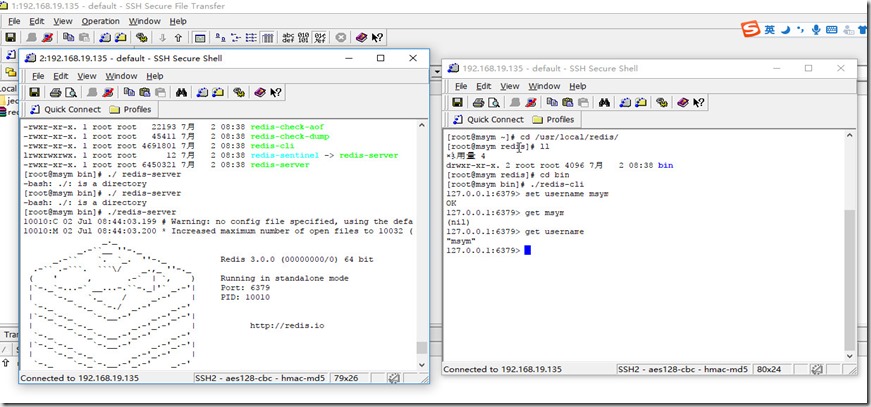
如果将服务器的命令关闭或者按下Ctrl + c,就是关闭服务器了,接下来在后台启动 redis 服务器,
5 . 启动服务器(后端启动)
进入到之前的 redis_home 目录中redis源码所在目录:
找到 redis.conf ,把它拷贝到 redis/bin目录下,(其实拷到哪里都可以,只要知道他的路径就可以,这里是为了方便)
[root@msym redis]# cd /usr/local/redis_home/

[root@msym redis_home]# ll

总用量 4

drwxrwxr-x. 6 root root 4096 4月   1 2015 redis-3.0.0

[root@msym redis_home]# cd redis-3.0.0/

[root@msym redis-3.0.0]# ll

总用量 144

-rw-rw-r--.  1 root root 25890 4月   1 2015 00-RELEASENOTES

-rw-rw-r--.  1 root root    53 4月   1 2015 BUGS

-rw-rw-r--.  1 root root  1439 4月   1 2015 CONTRIBUTING

-rw-rw-r--.  1 root root  1487 4月   1 2015 COPYING

drwxrwxr-x.  6 root root  4096 7月   2 08:36 deps

-rw-rw-r--.  1 root root    11 4月   1 2015 INSTALL

-rw-rw-r--.  1 root root   151 4月   1 2015 Makefile

-rw-rw-r--.  1 root root  4223 4月   1 2015 MANIFESTO

-rw-rw-r--.  1 root root  5201 4月   1 2015 README

-rw-rw-r--.  1 root root 41403 4月   1 2015 redis.conf    【我在这里】

-rwxrwxr-x.  1 root root   271 4月   1 2015 runtest

-rwxrwxr-x.  1 root root   280 4月   1 2015 runtest-cluster

-rwxrwxr-x.  1 root root   281 4月   1 2015 runtest-sentinel

-rw-rw-r--.  1 root root  7109 4月   1 2015 sentinel.conf

drwxrwxr-x.  2 root root  4096 7月   2 08:37 src

drwxrwxr-x. 10 root root  4096 4月   1 2015 tests

drwxrwxr-x.  5 root root  4096 4月   1 2015 utils

[root@msym redis-3.0.0]#
拷贝一份到 redis/bin下:
[root@msym redis-3.0.0]# cp redis.conf /usr/local/redis/bin/

[root@msym redis-3.0.0]# cd ../../redis/bin

[root@msym bin]# ll

总用量 15488

-rw-r--r--. 1 root root      35 7月   2 09:03 dump.rdb

-rwxr-xr-x. 1 root root 4588886 7月   2 08:38 redis-benchmark

-rwxr-xr-x. 1 root root   22193 7月   2 08:38 redis-check-aof

-rwxr-xr-x. 1 root root   45411 7月   2 08:38 redis-check-dump

-rwxr-xr-x. 1 root root 4691801 7月   2 08:38 redis-cli

-rw-r--r--. 1 root root   41403 7月   2 09:10 redis.conf

lrwxrwxrwx. 1 root root      12 7月   2 08:38 redis-sentinel -> redis-server

-rwxr-xr-x. 1 root root 6450321 7月   2 08:38 redis-server

[root@msym bin]#
然后 vim 编辑 redis.conf 文件:
将其中的一个 daemonize no 改为 daemonize yes,即后台运行;
在下次启动的时候,需要指定 redis.conf 文件,就能后端启动了,【这里指定的 redis.conf 文件就是之前修改的】
[root@msym bin]# ./redis-server redis.conf
[root@msym bin]#
这样就后端启动了 redis 服务器了。
获取之前存储的字符串:
[root@msym bin]# ./redis-server redis.conf
[root@msym bin]# ./redis-cli
127.0.0.1:6379> get username
"msym"
127.0.0.1:6379>
6 . 关闭 redis 服务器:(先Ctrl + c 或者 exit 退出客户端,再关闭服务器)
[root@msym bin]# ./redis-cli shutdown
7 . 开启外部访问 redis 端口(6379)
开启端口,然后保存
[root@msym bin]# /sbin/iptables -I INPUT -p tcp --dport 6379 -j ACCEPT

[root@msym bin]# /etc/rc.d/init.d/iptables save

iptables:将防火墙规则保存到 /etc/sysconfig/iptables:     [确定]

[root@msym bin]#
在加几点,redis 的事务相关,设置事务的属性需要前往 redis.conf 配置文件进行修改,rdb 和 aof的设置,编辑使用命令 vim。
再补充一点:
需要外部访问 Linux 中的 redis 时和访问 Tomcat 服务器一样,需要在防火墙中开启端口,
/sbin/iptables -I INPUT -p tcp --dport 6379 -j ACCEPT

/etc/rc.d/init.d/iptables save
然后启动服务器即可。
补充:(2017/7/5)
回想一下,在 windows下,安装 jdk之后,如果不配置 bin的路径的话,就只能在安装 jdk的 bin目录下才能运行 java和 javac命令,在系统环境变量中的 path配置了 bin路径之后,就可以任意目录下运行 java和javac了。
那么 centOS中的 redis也应该是可以的,包括 tomcat的启动,mysql,jdk,类比 windows。
下面就开始设置了:
启动 centOS ,使用 putty连接,
centOS 中安装 Redis的更多相关文章
- 虚拟机centOS中安装Redis,主机Redis Destop Manager不能访问虚拟机Redis server的解决方案
今天在学些redis的时候碰到个问题,发现主机Redis Destop Manager不能访问虚拟机Redis server的解决方案,找了一些网上的资料,原因可能有两个,整理记录下来: 1. Red ...
- CentOS中搭建Redis伪分布式集群【转】
解压redis 先到官网https://redis.io/下载redis安装包,然后在CentOS操作系统中解压该安装包: tar -zxvf redis-3.2.9.tar.gz 编译redis c ...
- 如何在win7系统中安装redis
转载于:http://www.itxuexiwang.com/a/shujukujishu/redis/2016/0216/92.html?1455871954 如何在win7系统中安装redis ...
- 在centos中安装jenkins master测试环境
在centos中安装jenkins 1)安装目录 pwd (/home/AAA) 2)检查java是否安装 [AAA@Centos_AAA jenkins]$ java -version j ...
- centos中安装chromium和flash
安装环境:centos 6.5 64位 在centos中安装chromium 安装Google源 cd /etc/yum.repos.d/ sudo wget http://people.CentOS ...
- 在Ubuntu中安装Redis
原文地址:http://blog.fens.me/linux-redis-install/ 在Ubuntu中安装Redis R利剑NoSQL系列文章,主要介绍通过R语言连接使用nosql数据库.涉及的 ...
- Centos中安装Sublime编辑器
Centos中安装Sublime编辑器 1.从官网下载相应操作系统的下的安装包(http://www.sublimetext.com/2),这里下的是linux下的安装包 2.解压安装包,并将其放在/ ...
- centos中安装tomcat6
在centos中安装tomcat6 1)通过yum自动安装tomcat和dependences root@Centos_AAA ~]# yum install tomcat6 [root@Cent ...
- 在Centos中安装HustOJ实验记录
hustoj是目前使用最广泛的刷题平台,自建平台是编程教学中重要一环,教,学,测,反思形成闭合回路.目前利用现有的服务器资源,建成了开高开源code中心,一个刷题系统,六月再建一个私有云,私有云不仅是 ...
随机推荐
- 重学Verilog(1)
1.线与.线或功能 wor module WO(A, B, C, D, WireOR) input A,B,C,D; output WireOr; wor WireOr; assign WireOr ...
- 微信小程序真机预览跟本地不同的问题。原文地址:https://blog.csdn.net/qq_27187991/article/details/69664247/
微信小程序中出现最多的一个问题,就是真机跟本地不同:我简单列举一些我发现的原因,给大家参考,大家也可以把自己发现的东西回复给我,给我参考: 本地看不到数据,就先让本地能看到数据,再看本帖....特别提 ...
- Linux入门第五天——shell脚本入门(中)基础语法之判断与条件
一.判断式 利用 test 命令进行执行结果的判断(例如判断是否存在该文件):关于test test:test 示例:结合回传值 $? 进行判断:关于$?:$? [root@localhost tm ...
- AWT之—画图
package edu.ch4; import java.awt.Color;import java.awt.Font;import java.awt.Frame;import java.util.C ...
- 2017-2018-1 20155318《信息安全技术》实验二——Windows口令破解
2017-2018-1 20155318<信息安全技术>实验二--Windows口令破解 一.实验原理 口令破解方法 口令破解主要有两种方法:字典破解和暴力破解. 字典破解是指通过破解者对 ...
- 你真的认为iphone只是一部手机么
闲言不表,直奔主题.我是一个程序员,上周参加了一个开源软件交流大会,其实会上并没有听到什么新鲜的东西.但是在会中,偶然间听到了一个关于iphone的秘密,却着实令我震惊了,事情具体是这样的,听我慢慢道 ...
- Apache入门篇(三)之apache2.4.33的新特性解析与虚拟主机实战
1.http 2.4新特性 新特性: (1) 在编译时可以将多个MPM构建为可加载模块,可以在运行时通过LoadModule指令配置所选的MPM: (2) 2.2版本的event MPM在实验阶段,到 ...
- 无旋treap的简单思想以及模板
因为学了treap,不想弃坑去学splay,终于理解了无旋treap... 好像普通treap没卵用...(再次大雾) 简单说一下思想免得以后忘记.普通treap因为带旋转操作似乎没卵用,而无旋tre ...
- php 批量载入文件的几种方式
方式1:spl_autoload_register // Register the autoloader. /** * Contains the functionality for auto-load ...
- 建表/修改表名/增加删除字段(MySql)
修改表名:alter table 旧表名 rename 新表名; 删除字段:alter table 表名 drop 字段名; 增加字段:alter table 表名 add 字段名 字段类型 [def ...