
[Laravel] 14 - REST API: Laravel from scratch
前言
一、基础
Ref: Build a REST API with Laravel API resources
Goto: [Node.js] 08 - Web Server and REST API
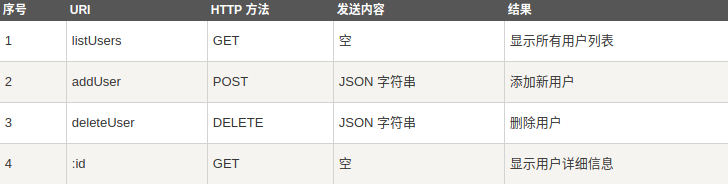
二、资源
Goto: Laravel 5.4 From Scratch【原讲座】
Goto: https://laravel.com/docs/5.4
Ref: Laravel China 社区
三、快捷键
[1] 自动生成 html 基本的 head, body 代码模板。

[2] extends
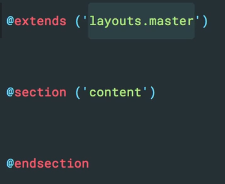
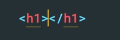
[3] h1
[4] bstext
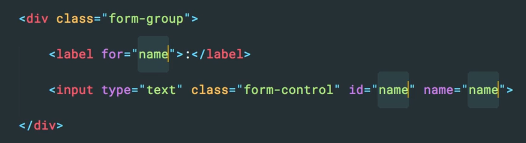
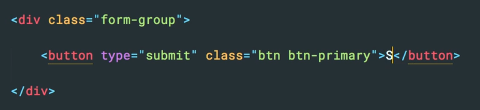
[5] bssubmit
本系列主要关注一些前面未曾提到的,或者是一些重难点在此复习一遍。
Let's Go!
一、安装
Ref: [Laravel] 01 - Love beautiful code? We do too. -- 项目配置
Ref: https://laracasts.com/series/laravel-from-scratch-2017/episodes/1
二、路由
Ref: [Laravel] 02 - Route and MVC
- 视图传参
view中的传参,可以作为第二个参数,或者使用 ->with(<k>, <v>),或者采用 compact 如下所示:
Route::get('/', function () {

  $name = 'Jeffrey';

  return view('welcome', compact('name'));

});
传参往往与 foreach($tasks as $task) 是好伴侣。
- 大括号解析变量
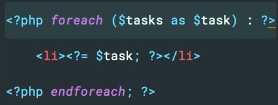
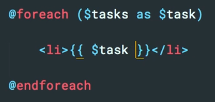
以下表达 更为简洁。
三、数据库
- 数据迁移 Migration
数据迁移,建立了两个表。
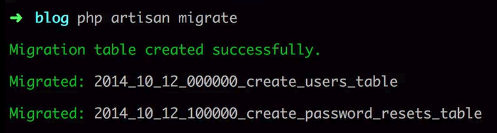
有三个表:migration, password_resets, users
详情:[Laravel] 08 - Auth & Data Migration,“登录注册实现 ----> 二、Laravel中的 数据迁移”
- BDD vs TDD
相对官方的视频: https://laracasts.com/lessons/phpspec-is-so-good
Ref: https://www.cnblogs.com/Leo_wl/p/4780678.html
phpspec 是 规格驱动的PHP框架。
Behavior Driven Development,行为驱动开发是一种敏捷软件开发的技术,它鼓励软件项目中的开发者、QA和非技术人员或商业参与者之间的协作。
Test-Driven Development,TDD的原理是在开发功能代码之前,先编写单元测试用例代码,测试代码确定需要编写什么产品代码。
BDD是一种敏捷软件开发的技术。它对TDD的理念进行了扩展。
在 TDD中侧重点偏向开发,通过测试用例来规范约束开发者编写出质量更高、bug更少的代码。
而 BDD更加侧重设计,其要求在设计测试用例的时候对系统进行定义,倡导使用通用的语言将系统的行为描述出来,将系统设计和测试用例结合起来,从而以此为驱动进行开发工作。
- 命令行 php artisan
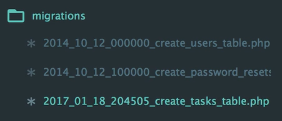
写命令:
php artisan make:migration create_tasks_table
来自于:

生成了:
填充类:
class CreateTasksTable extends Migration {


  public function up()
  {
    Schema::create('tasks', function(参数) {
      /* 定义表 */
    });
  }

}
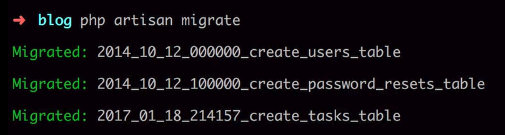
执行类:
php artisan migrate
四、命令行
- 创建控制器
php artisan make:controller 控制器名称

php artisan make:controller SitesController
- 创建模型 model
php artisan make:model 模型名称

php artisan make:model User
- 创建数据表
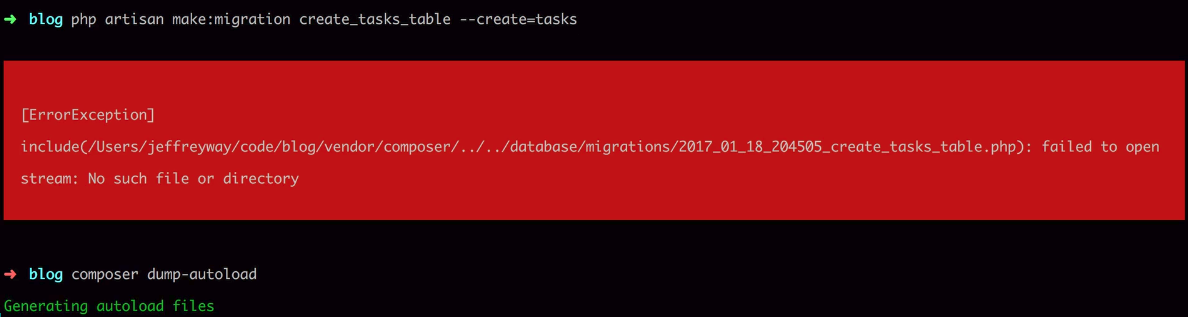
php artisan make:migration create_表名_table --create=表名

php artisan make:migration create_tasks_table --create=tasks // 创建 migration 文件
php artisan migrate //执行创建指令
- 添加数据表字段名
php artisan make:migration add_字段名_column_to_表名 --table=表名

php artisan make:migration add_intro_column_to_tasks --table=tasks

php artisan migrate
五、模型
讲解:How do query scopes work in Laravel?
模型可以与数据库相关构成一个接口封装: 一个task封装,其实只是一条sql任务。
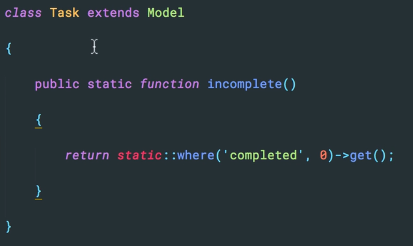
App\Task::incomplete();
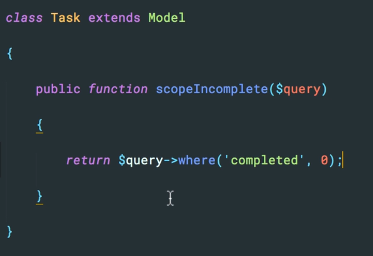
App\Task::incomplete()->where('id', '>=" , 2)->get();
六、控制器
生成一个 TasksController 控制器。
$ php artisan make:controller TasksController
- 参数的提取和处理
Goto: [Laravel] 02 - Route and MVC ----> 二、URL 处理
基本思路:获得参数 ---> 传给模型 ---> 作为sql查询的关键字 ---> 返回结果
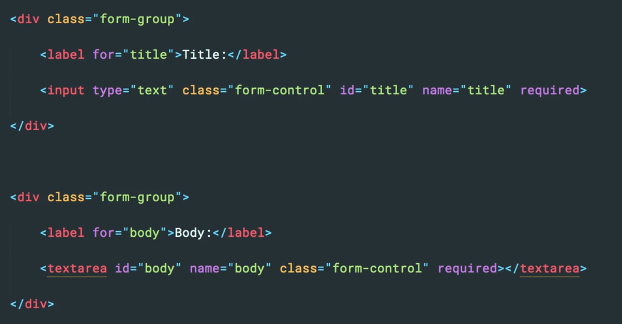
- 表单信息的验证
[1] 必须要填写的内容,关键字:required.
- Error 信息的输出
Goto: [Laravel] 07 - Project: functions in Controller - 二、数据验证
Validator类验证法 【相较于 控制器验证法 有什么好处么】
// 2. Validator类验证

$validator = \Validator::make($request->input(), [

    'Student.name' => 'required|min:2|max:20',

    'Student.age'  => 'required|integer',

    'Student.sex'  => 'required|integer',

], [

    'required'     => ':attribute 为必填项',

    'min'          => ':attribute 长度不符合要求',

    'integer'      => ':attribute 必须为整数',

], [

    'Student.name' => '姓名',

    'Student.age'  => '年龄',

    'Student.sex'  => '性别',

]);

if ($validator->fails()) {

    return redirect()->back()->withErrors($validator)->withInput();

}
七、Form Request Data and CSRF【视图】
Ref: https://v4-alpha.getbootstrap.com/examples/blog/【bootstrap的各种模板】
关于界面部分,本篇暂时不作考虑。以下是其他的一些界面相关章节:
- Rendering Posts
- Laravel Mix and the Front-end
- 一个例子引出两个问题
Ref: https://segmentfault.com/a/1190000007616066
@extends('layout')

@section('content')

    <h1>Edit the Comment</h1>

    <form method="POST" action="/comments/{{ $comment->id }}">
     {{ method_field('PATCH') }}

        {{ csrf_field() }}

        <div class="form-group">

            <textarea name="content" class="form-control">{{ $comment->content }}</textarea>

        </div>

        <div class="form-group">

            <button type="submit" class="btn btn-primary">Update Comment</button>

        </div>

    </form>

@stop
- 跨站方法伪造
<input type="hidden" name="_method" value="PATCH">
跨站方法伪造,HTML 表单没有支持 PUT、PATCH 或 DELETE 动作。
所以在从 HTML 表单中调用被定义的 PUT、PATCH 或 DELETE 路由时,你将需要在表单中增加隐藏的 _method 字段来伪造该方法,详情参考 官方文档。
- 跨站请求伪造
Ref: https://blog.csdn.net/fationyyk/article/details/50832687
CSRF是跨站请求伪造(Cross-site request forgery)
Laravel自动为每个用户Session生成了一个CSRF Token,该Token可用于验证登录用户和发起请求者是否是同一人,如果不是则请求失败。
Laravel提供了一个全局帮助函数csrf_token(本地存放在:\www\laravel5.1\vendor\laravel\framework\src\Illuminate\Foundation\helpers.php)来获取该Token值,因此只需在视提交图表单中添加如下HTML代码即可在请求中带上Token。
以下是第二种写法:
{!! csrf_field() !!}
八、接口基本思路
[1] 创建控制器,以及对应的迁移文件。
$ php artisan make:model Comment -m
[2] 模型
class Post extends Model

{

  public function comments()

  {

    return $this->hasMany(Comment::class);  //返回的是什么?

  }

  public function addComment($body)

  {

    $this->comments()->create(compact('body'));

  }

}
[3] 命令行测试模型:$ php artisan tinker
$ post = App\Post::find(6); # 获取id=6的数据
以上算是 test api 的一个方式。
功能模块
一、用户注册
Ref: [Laravel] 08 - Auth & Data Migration【此篇的登录不是很完善,在此补充】
- 添加一个用户
Ref: 使用 Php Artisan Tinker 来调试你的 Laravel
填充基本信息:name, email, password
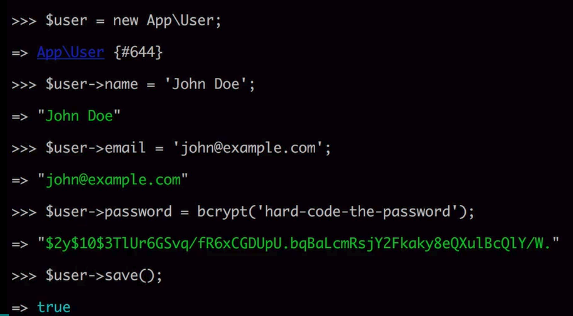
如此,数据库便添加了一条信息。
- ORM关联
也即是:数据库中关于 user_id字段 的问题。
$comment -> post --> user
Ref: Laravel框架ORM关联hasOne, belongsTo, hasMany
- 建立两个 '控制器'
注册:RegistrationController.php
public function store() {

  (1) Validate the form.

  $this->validate(request(), [

    'name'     => 'required',

    'email'    => 'required|email',

    'password' => 'required'

  ]);

  (2) Create and save the user.

  $user = User::create(request(['name', 'email', 'password']));

  (3) Sign them in.

  auth()->login($user);

  (4) Redirect to the home page.

  return redirect()->home();

}
会话:SessionsController.php
public function create()

{

}

public function destroy()

{

  auth()->logout();

  return redirect()->home();

}
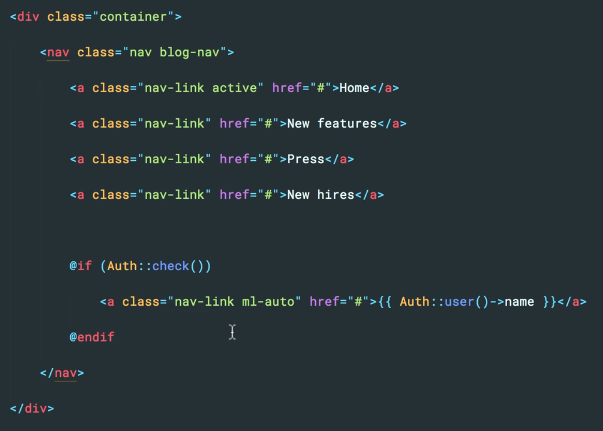
- 导航条username显示
- 将参数封装
[PostsController.php]
auth()->user()->publish(

  new Post(request(['title', 'body']))

);
[User.php]
public function publish(Post $post)

{

  $this->posts()->save($post);

}
- Guest 中间件
[SessionsController.php]
public funcion __construct()
{
  $this->middleware('guest', ['except' => 'destroy']);
}
二、邮件
Ref: [Laravel] 09 - Functional models - 邮件发送
- 调用 ’send email'
\Mail::to($user)->send(new Email);
- 申请 'email account'
Goto: https://mailtrap.io【申请一个测试邮箱】
- 编写 'email类’
$ php artisan make:mail Welcome
[app/Mail/Welcom.php]
class Welcome extends Mailable

{

  ...

  public function __construct(User $user)  # 这里支持了传参

  {

    $this->user = $user;

  }

  public functionbuild()

  {

    return $this->view('email.welcome');  # 这里可以考虑with传参

  }

}
- 编写 view of email
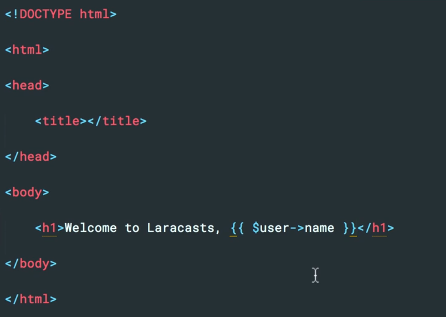
- markdown

Mail:
public functionbuild()

{

  return $this->markdown('emails.welcome-again');

}
View:
同时在 views/emails下生成 welcome-again.blade.php
Goto: https://laravel.com/docs/5.4/mail#writing-markdown-messages
Goto: Laravel 5.4中邮件已支持Markdown语法
三、Form Requests and Form Objects
- 生成框架文件
$ php artisan make:request RegistrationRequest
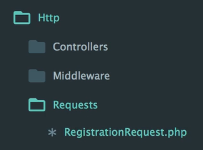
提供了两个函数。同时也意味着 request 的处理可以分配到这里一部分。
// Determine if the user is authorized to make this request.
public function authorize()

{

  return true;

}

// Get the validation rules that apply to the request.

public function rules()

{

  return [

    //

  ];

}
- 分离 参数验证
目的 - 精简控制器中的函数逻辑
第一步:
[1] 填充 RegistrationRequest
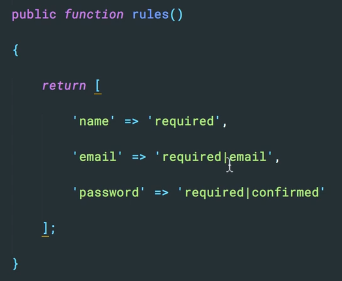
[2] 控制器内对应函数添加参数:RegistrationRequest
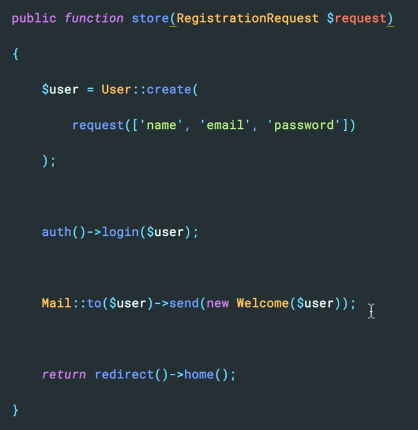
第二步:
[1] 转移控制器函数内的剩余逻辑到自定义函数:persist()
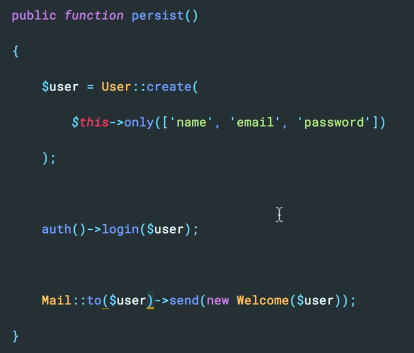
[2] 这样一来,函数已空,但看上去貌似不错。

四、Session Handling and Flash Messaging
Ref: [PHP] 05 - Cookie & Session【php控制session的原生态方式】
public function store(RegistrationForm $form)

{

  $form->persist();

  session('message', 'Here is a default message');

  return redirect()->home();

}
Ref: [ Laravel 5.4 文档 ] HTTP层 —— Session
看这个文档相对容易一些。
- DB 作为 session 驱动
使用 Session 来存储用户请求信息。Laravel 通过干净、统一的 API 处理后端各种 Session 驱动,目前支持的流行后端驱动包括 Memcached、Redis 和 数据库。
Goto: [Laravel] 09 - Functional models - 缓存使用
Goto: [Laravel] 11 - WEB API : cache & timer - 静态缓存
Goto: [Laravel] 12 - WEB API : cache implement - 三个方案
Session 配置文件位于 config/session.php。
- 默认情况下,Laravel 使用的 Session 驱动为
file驱动,这对许多应用而言是没有什么问题的。 - 在生产环境中,你可能考虑使用
memcached或者redis驱动以便获取更快的 Session 性能。
- 默认情况下,Laravel 使用的 Session 驱动为
- 实现方法
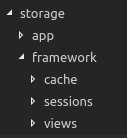
如下可见,cache、sessions是分开的目录。
可以认为,sessions 有自己的实现方式,或者可以借助 cache 的方式(数据库)。
[Laravel] 14 - REST API: Laravel from scratch的更多相关文章
- Laravel POST请求API接口 使用validate表单验证返回欢迎页
突然遇到的问题 就是使用Laravel进行开发API接口的时候 发现在表单验证不通过的时候返回了登录页 猜测问题应该是因为表单验证失败后进行了重定向导致的 因为返回状态码200 网上找了好久没找到 ...
- 利用Laravel 搭建oauth2 API接口 附 Unauthenticated 解决办法
利用Laravel 搭建oauth2 API接口 要求 laravel 5.4以上 安装 $ composer require laravel/passport 在配置文件 config/app.ph ...
- laravel jwt 做API 退出登录(注销) 该怎么弄? 如何让token失效
laravel jwt 做API 退出登录(注销) 该怎么弄? 如何让token失效 php框架 laravel 2.1k 次浏览 问题对人有帮助,内容完整,我也想知道答案0问题没有实际价值,缺少关键 ...
- laravel使用Dingo\Api通过response()->json()返回空对象
laravel使用Dingo\Api写接口跟android对接时,android一直反应解析错误,无法解析数据. { "status_code":200, "messag ...
- laravel 配置路由 api和web定义的路由的区别详解
1.路由经过中间件方面不同 打开kerenl.php就可以看到区别 protected $middlewareGroups = [ 'web' => [ \App\Http\Middleware ...
- Laravel Study(使用 Laravel )
開始 伺服器及相關工具安裝自行建立,在伺服器跟目錄下 有兩種方式建立 Laravel 專案,這裡使用 composer 建立專案 使用 composer 要在 PHP 5.3.2 以上才能使用 com ...
- laravel框架——composer导入laravel
第一种: composer create-project --prefer-dist laravel/laravel 名称 "5.2.*"第二种: composer global ...
- 【转】简单的 Laravel 5 REST API
Introduction Almost all successful internet based companies have APIs. API is an acronym for Applica ...
- [Laravel] 10 - WEB API : wrapper
前言 一.常用的解决方案 React 前端 + PHP (Laravel) 后端 Such as "some exposure to WEB API’s and/or RESTful“. 使 ...
随机推荐
- while 、函数、参数
while 循环 一个循环语句 表示当某个条件成立时就循环 不知道具体循环次数,但能确定循环的成立条件的时候用while循环 while 条件表达式: 语句块 例1 :如果年利率为6.7%,本利是每年 ...
- 3dmax多个版本软件的安装包以及安装教程
这个文档具体出自哪里,我也是记不得了,需要的看下,链接如果是失效,那我也无能为力了. 免费分享,链接永久有效 2014版3D MAX链接:http://pan.baidu.com/s/1nuFr7Xv ...
- p4中如何rollback/backout merge/integration
原文: http://answers.perforce.com/articles/KB_Article/How-To-Rollback-An-Integration 当我们需要将一个branch上的代 ...
- MUI DtPicker 显示自定义日期
MUI地址:http://dev.dcloud.net.cn/mui/ 首先引入相关JS CSS脚本. HTML代码: <input class="dt flat" styl ...
- jdk TreeMap工作原理分析
TreeMap是jdk中基于红黑树的一种map实现.HashMap底层是使用链表法解决冲突的哈希表,LinkedHashMap继承自HashMap,内部同样也是使用链表法解决冲突的哈希表,但是额外添加 ...
- windows 2003 iis 360防黑加固后不能使用
最近在使用360的防黑加固加固2003系统,发现IIS居然不能够使用了,报401.1错误,查找解决方案如下: 1.我的电脑-〉属性-〉管理-〉本地用户和组,查看IUSER用户是否开启,如果未开启开启后 ...
- Postgres空间地理类型POINT POLYGON实现附近的定位和电子围栏功能
目录 需求和背景 安装插件postgis 点POINT类型和距离 表添加POINT类型 添加空间索引 插入点 两个点之间的距离 附近5公里内的点 最近的10个点 面多边形'POLYGON' 添加字段类 ...
- 关于Python ,requests的小技巧
版权声明:本文为博主原创文章,未经博主允许不得转载. https://blog.csdn.net/xie_0723/article/details/52790786 关于 Python Request ...
- linux下chmod使用
用法 chmod使用语法 $ chmod [options] mode[,mode] file1 [file2 ...] 使用ls命令的查看文件或目录的属性 $ ls -l file 八进制语法 ch ...
- zabbix用户管理
zabbix用户管理,主要包括用户增删改查.用户报警媒介管理.用户权限管理. 安装完zabbix后,已经自带了两个用户Admin和Guests 超级管理员默认账号:Admin,密码:zabbix,这是 ...