
H3C S5120清除console口密码
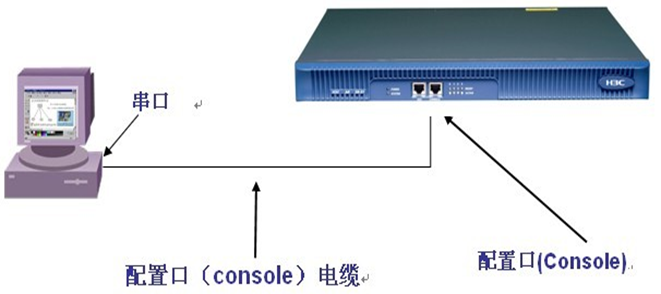
1、开机启动交换机显示Press Ctrl-B to enter Extended Boot menu...0 字样迅速按Ctrl-B进入如下字符介面提示:
Press Ctrl-B to enter Extended Boot menu...0
BootRom password: Not required. Please press Enter to continue.
Password recovery capability is enabled.
BOOT MENU
1. Download application file to flash
2. Select application file to boot
3. Display all files in flash
4. Delete file from flash
5. Restore to factory default configuration
6. Enter BootRom upgrade menu
7. Skip current system configuration
8. Reserved
9. Set switch startup mode
0. Reboot
Ctrl+F: Format File System
Ctrl+P: Skip Super Password
Ctrl+R: Download application to SDRAM and Run
Ctrl+Z: Access EXTEND-ASSISTANT MENU
Ctrl+C: Display Copyright
Enter your choice(0-9): 7 (选择7选项按回车键)
The current setting will run with current configuration file when reboot.
Are you sure you want to skip current configuration file when reboot? Yes or No
(Y/N): Y (选择 Y确认)
Setting...Done!
BOOT MENU
1. Download application file to flash
2. Select application file to boot
3. Display all files in flash
4. Delete file from flash
5. Restore to factory default configuration
6. Enter BootRom upgrade menu
7. Skip current system configuration
8. Reserved
9. Set switch startup mode
0. Reboot
Ctrl+F: Format File System
Ctrl+P: Skip Super Password
Ctrl+R: Download application to SDRAM and Run
Ctrl+Z: Access EXTEND-ASSISTANT MENU
Ctrl+C: Display Copyright
Enter your choice(0-9): 0 (选择0选项重启)
标注:重启后进入交换机不需要输入密码,但只限这次登录有效,如果交换机再重启后又会加载原来配置文件,密码依然存在。现在有两种方法清除:
方法一:直接修改console口密码,然后保存,但保存之后交换机原来的配置信息都清空。
方法二:临时配置一个网口连接到笔记本,通过tftp软件把配置文件下载下来,直接修改或删除配置文件的console口的密码再通过tftp上传到交换机后
默认交换机启动加载修改过的配置文件。这种方法可以保存交换机原来的配置信息,只是清空了console密码。
采用方法二:
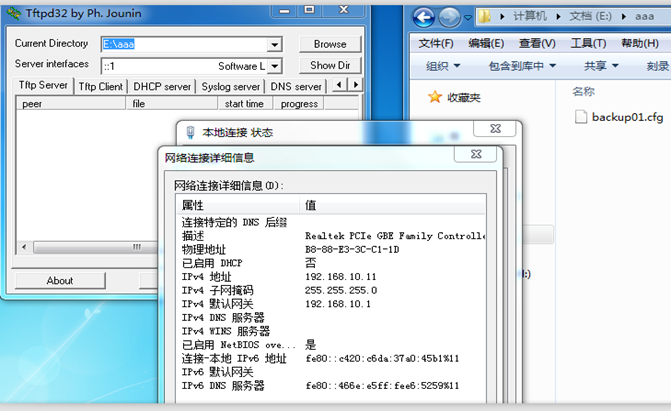
电脑网线接到交换机,设置一个固定IP,然后打开tftp软件进行上传与下载
<H3C>system-view
[H3C]vlan 10
[H3C-vlan10]port GigabitEthernet 1/0/1 to GigabitEthernet 1/0/10
[H3C-vlan10]quit
[H3C]interface Vlan-interface 10
[H3C-Vlan-interface10]ip address 192.168.10.1 255.255.255.0
[H3C-Vlan-interface10]quit
[H3C]quit
<H3C>dir /all (显示交换机保存的配置文件)
Directory of flash:/
0 -rwh 2936 Apr 26 2000 12:41:21 private-data.txt
1 -rw- 12203 Apr 26 2000 12:41:21 config.cwmp
2 -rw- 3247 Apr 26 2000 12:41:23 startup.cfg
3 -rw- 14869224 May 10 2017 16:41:58 s5120tt.bin
4 drw- - Apr 26 2000 12:00:12 logfile
97920 KB total (81868 KB free)
<H3C>tftp 192.168.10.11 put startup.cfg backup01.cfg
(下载交换机配置文件startup.cfg并把名字修改成backup01.cfg,通过txt文本打开backup01.cfg配置文件把密码删除掉)
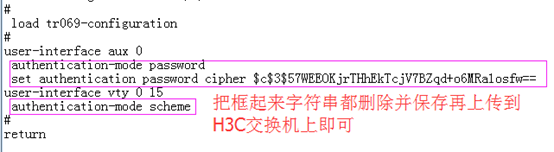
<H3C>tftp 192.168.10.11 get backup01.cfg (上传到交换机)
File will be transferred in binary mode
Downloading file from remote TFTP server, please wait...\
TFTP: 2962 bytes received in 0 second(s)
File downloaded successfully.
<H3C>dir /all (显示交换机保存的配置文件)
Directory of flash:/
0 -rw- 2962 Apr 26 2000 12:36:53 backup01.cfg
1 -rwh 2936 Apr 26 2000 12:41:21 private-data.txt
2 -rw- 12203 Apr 26 2000 12:41:21 config.cwmp
3 -rw- 3247 Apr 26 2000 12:41:23 startup.cfg
4 -rw- 14869224 May 10 2017 16:41:58 s5120tt.bin
5 drw- - Apr 26 2000 12:00:12 logfile
97920 KB total (81862 KB free)
<H3C>display startup (显示交换机启动默认加载配置)
MainBoard:
Current startup saved-configuration file: NULL
Next main startup saved-configuration file: flash:/startup.cfg
Next backup startup saved-configuration file: NULL
<H3C>startup saved-configuration backup01.cfg
Please wait ...
Setting the master board ...
... Done!
<H3C>display startup
MainBoard:
Current startup saved-configuration file: NULL
Next main startup saved-configuration file: flash:/backup01.cfg
Next backup startup saved-configuration file: NULL
<H3C>reboot (重启交换机)
Start to check configuration with next startup configuration file, please wait.
........DONE!
This command will reboot the device. Current configuration will be lost, save c
urrent configuration? [Y/N]:N (这里要选择N不保存当前配置)
This command will reboot the device. Continue? [Y/N]:Y
特殊操作:
还有一种方法也可以破解console口密码,直接把交换机系统格式化掉,再从H3C官网下载一个同型号的交换机系统文件通过tftp上传到H3C交换机。
Enter your choice(0-9):
BOOT MENU
1. Download application file to flash
2. Select application file to boot
3. Display all files in flash
4. Delete file from flash
5. Restore to factory default configuration
6. Enter BootRom upgrade menu
7. Skip current system configuration
8. Reserved
9. Set switch startup mode
0. Reboot
Ctrl+F: Format File System
Ctrl+P: Skip Super Password
Ctrl+R: Download application to SDRAM and Run
Ctrl+Z: Access EXTEND-ASSISTANT MENU
Ctrl+C: Display Copyright
Enter your choice(0-9): (按快捷键Ctrl+F 格式化交换机系统)
1. Download application file to flash
2. Select application file to boot
3. Display all files in flash
4. Delete file from flash
5. Restore to factory default configuration
6. Enter BootRom upgrade menu
7. Skip current system configuration
8. Reserved
9. Set switch startup mode
0. Reboot
Ctrl+F: Format File System
Ctrl+P: Skip Super Password
Ctrl+R: Download application to SDRAM and Run
Ctrl+Z: Access EXTEND-ASSISTANT MENU
Ctrl+C: Display Copyright
Enter your choice(0-9): 1 (选择 1 选项上传交换机系统)
1. Download application file to flash
2. Select application file to boot
3. Display all files in flash
4. Delete file from flash
5. Restore to factory default configuration
6. Enter BootRom upgrade menu
7. Skip current system configuration
8. Reserved
9. Set switch startup mode
0. Reboot
Ctrl+F: Format File System
Ctrl+P: Skip Super Password
Ctrl+R: Download application to SDRAM and Run
Ctrl+Z: Access EXTEND-ASSISTANT MENU
Ctrl+C: Display Copyright
Enter your choice(0-9): 2 (选择2 选项选择交换机系统启动文件)
H3C S5120清除console口密码的更多相关文章
- HUAWEI网络设备恢复Console口密码
密码遗忘 本章介绍了Console口丢失的处理方法,建议用户妥善保管密码,并定期修改. 恢复Console口密码 设备提供如下方法恢复Console口密码.•方法一:通过STelnet/Telnet登 ...
- 连接H3C交换机的Console口连不上
一.故障:使用Console线连接交换机的Console口连不上. 处理步骤: 1.先把Console线连接好,一端连接交换机的Console口,另一端连接电脑的USB口. 2.安装Console线驱 ...
- Win7使用USB口连接H3C交换机的Console口
使用Console线的一端连接交换机的Console口,另一端连接电脑的USB口. 使用驱动精灵安装USB转串口驱动,我电脑上面提示安装的是: Prolific PL2303 USB转串口驱动1.16 ...
- H3C配置console口密码
方法一: [H3C]user-interface console 0 [H3C-ui-console0]authentication-mode password [H3C-ui-console0]se ...
- 路由器/交换机Console口登录密码丢失后如何恢复
Console口登录密码丢失后如何恢复 如果忘记了Console口登录密码,用户可以通过以下两种方式来设置新的Console口登录密码. 通过STelnet/Telnet登录路由器/交换机设置新的Co ...
- 华为交换机Console口属性配置
华为交换机Console口属性配置 一.设置通过账号和密码(AAA验证)登陆Console口 进入 Console 用户界面视图 <Huawei>system-view [Huawei]u ...
- H3C ER6300 + 两台 H3C S5120 组网举例
组网需求: 1.H3C ER6300 作出口路由.防火墙及Qos限速等功能(ER6300 配置LAN口 192.168.30.254默认网关) 2.H3C S5120 两台配置相同VLAN10 VLA ...
- 配置通过Console口登录交换机
组网图形 图1 通过Console口登录交换机组网图 通过Console口登录交换机简介 通过Console口登录交换机是指使用专门的Console通信线缆将用户PC的串口与交换机的Console口相 ...
- 通过console口连接交换机
最近发现有人不会通过console口连接交换机. 想想当初我还是小白的时候也是如此啊,如是写下教程. 虽然略简单... 1.连线: console线:(Console---usb) 2.安装驱动 (可 ...
随机推荐
- #1075 : 开锁魔法III
描述 一日,崔克茜来到小马镇表演魔法. 其中有一个节目是开锁咒:舞台上有 n 个盒子,每个盒子中有一把钥匙,对于每个盒子而言有且仅有一把钥匙能打开它.初始时,崔克茜将会随机地选择 k 个盒子用魔法将它 ...
- Python中的pass的作用
1.pass语句什么也不做,一般作为占位符或者创建占位程序,pass语句不会执行任何操作2.保证格式完整 3.保证语义完整 以if语句为例,在c或c++/java中: ? if(true) ;//do ...
- 潭州课堂25班:Ph201805201 爬虫基础 第九课 图像处理- PIL (课堂笔记)
Python图像处理-Pillow 简介 Python传统的图像处理库PIL(Python Imaging Library ),可以说基本上是Python处理图像的标准库,功能强大,使用简单. 但是由 ...
- Java知识回顾 (4)Java包装类
一. Java Number 一般地,当需要使用数字的时候,我们通常使用内置数据类型,如:byte.int.long.double 等. 然而,在实际开发过程中,我们经常会遇到需要使用对象,而不是内置 ...
- C# Queue 和Stack的实现
Queue 和Stack的使用就不用多说吧,一个是先进先出,一个是后进先出. 这里我主要关注其实现原理. queue的实现如下: public class Queue<T> : IEnum ...
- Android典型界面设计(7) ——DrawerLayout+Fragement+ViewPager+PagerTabStrip实现双导航
一.问题描述 在Android典型界面设计(3)的我们实现了双导航效果,即外层底部导航和内部区域的头部导航,如网易新闻等很多应用采用了这种导航,但Google提供DrawerLayout可实现抽屉式导 ...
- 《学习opencv》笔记——矩阵和图像操作——cvAnd、cvAndS、cvAvg and cvAvgSdv
矩阵和图像的操作 (1)cvAnd函数 其结构 void cvAnd( //将src1和src2按像素点取"位与运算" const CvArr* src1,//第一个矩阵 cons ...
- 小程序canvas的一个坑
很奇怪,原来好好的,结果现在显示乱了,模拟器和手机都不一样.模拟器上,整个canvas都往右偏移了,手机上,右侧有一大片空白. 反复试验,发现问题是:page的对齐方式是center引起的,改为lef ...
- Android HandlerThread 源代码分析
HandlerThread 简单介绍: 我们知道Thread线程是一次性消费品,当Thread线程运行完一个耗时的任务之后.线程就会被自己主动销毁了.假设此时我又有一 个耗时任务须要运行,我们不得不又 ...
- 微软BI 之SSIS 系列 - 变量查询语句引起列输出顺序不一致的解决方法
开篇介绍 这个问题来自于 天善BI社区,看了一下比较有意思,因为我自己认为在 SSIS中处理各种类型文件的经验还比较丰富(有一年的时间几乎所有ETL都跟文件相关),但是这个问题确实之前没有特别考虑过. ...