
springMVC(二): @RequestBody @ResponseBody 注解实现分析
一、继承结构
@RequestBody、@ResponseBody的处理器:RequestResponseBodyMethodProcessor
@ModelAttribute处理器: ModelAttributeMethodProcessor
HttpEntity处理器: HttpEntityMethodProcessor
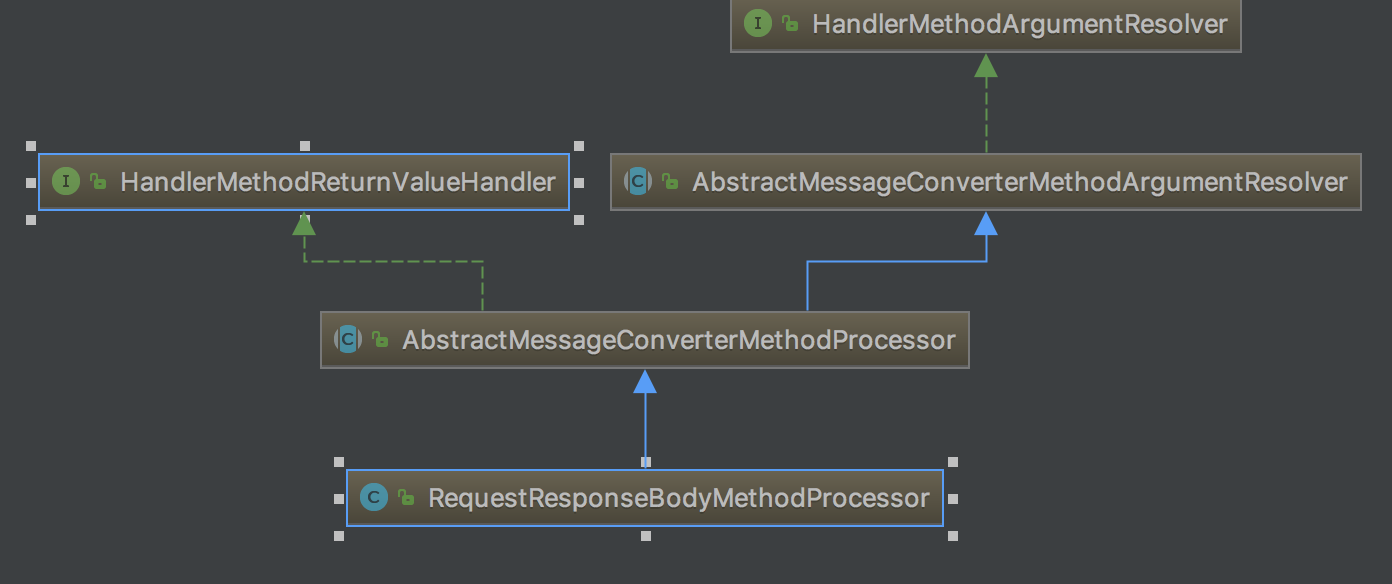
参数值解析器: HandlerMethodArgumentResolver
返回值处理器: HandlerMethodReturnValueHandler
使用HttpMessageConverter 转换方法参数: AbstractMessageConverterMethodArgumentResolver
二、 处理过程
1. RequestResponseBodyMethodProcessor的resolveArgument过程
    @Override

    public Object resolveArgument(MethodParameter parameter, ModelAndViewContainer mavContainer,

            NativeWebRequest webRequest, WebDataBinderFactory binderFactory) throws Exception {


     //返回@RequestBody需要的参数, Spring使用我们自定义的RequestBodyAdvice, ResponseBodyAdvice发生在这里

        Object arg = readWithMessageConverters(webRequest, parameter, parameter.getGenericParameterType());

        String name = Conventions.getVariableNameForParameter(parameter);


     //输入参数转换成Java对象发生在这里,后面有专门的文章讲解,注意:每次请求绑定的对象的重新生成的

        WebDataBinder binder = binderFactory.createBinder(webRequest, arg, name);

        if (arg != null) {

            validateIfApplicable(binder, parameter);

            if (binder.getBindingResult().hasErrors() && isBindExceptionRequired(binder, parameter)) {

                throw new MethodArgumentNotValidException(parameter, binder.getBindingResult());

            }

        }

        mavContainer.addAttribute(BindingResult.MODEL_KEY_PREFIX + name, binder.getBindingResult());

        return arg;

    }

    @Override

    protected <T> Object readWithMessageConverters(NativeWebRequest webRequest, MethodParameter methodParam,

            Type paramType) throws IOException, HttpMediaTypeNotSupportedException, HttpMessageNotReadableException {

        HttpServletRequest servletRequest = webRequest.getNativeRequest(HttpServletRequest.class);

        ServletServerHttpRequest inputMessage = new ServletServerHttpRequest(servletRequest);


     //调用父类的readWithMessageCoverters()方法

        Object arg = readWithMessageConverters(inputMessage, methodParam, paramType);

        if (arg == null) {

            if (methodParam.getParameterAnnotation(RequestBody.class).required()) {

                throw new HttpMessageNotReadableException("Required request body is missing: " +

                        methodParam.getMethod().toGenericString());

            }

        }

        return arg;

    }
springMVC(二): @RequestBody @ResponseBody 注解实现分析的更多相关文章
- @RequestBody, @ResponseBody 注解详解(转)
原文地址: https://www.cnblogs.com/qq78292959/p/3760651.html @RequestBody, @ResponseBody 注解详解(转) 引言: 接上一篇 ...
- SpringMVC学习八 @ResponseBody注解
(一)在方法上只有@RequestMapping 时,无论方法返回值是什么认为需要跳转,代码实例如下 @RequestMapping("demo10") public People ...
- @RequestBody, @ResponseBody 注解理解
@RequestBody, @ResponseBody 注解理解 自己以前没怎么留意过,来实习后公司采用前后端分离的开发方式,前后端拿到的注释都是 json 格式的,这时候 @RequestBody, ...
- @RequestBody, @ResponseBody 注解详解
简介: @RequestBody 作用: i) 该注解用于读取Request请求的body部分数据,使用系统默认配置的HttpMessageConverter进行解析,然后把相应的数据绑定到要返回的对 ...
- SpringMVC中 解决@ResponseBody注解返回中文乱码
问题:在前端通过get请求服务端返回String类型的服务时,会出现中文乱码问题 原因:由于spring默认对String类型的返回的编码采用的是 StringHttpMessageConverter ...
- SpringMVC中使用@ResponseBody注解将任意POJO对象返回值转换成json进行返回
@ResponseBody 作用: 该注解用于将Controller的方法返回的对象,通过适当的HttpMessageConverter转换为指定格式后,写入到Response对象的body数据区. ...
- 在SpringMVC中使用@RequestBody和@ResponseBody注解处理json时,报出HTTP Status 415的解决方案
我在使用SpringMVC的@RequestBody和@ResponseBody注解处理JSON数据的时候,总是出现415的错误,说是不支持所提交数据格式,我在页面中使用了JQuery的AJAX来发出 ...
- SpringMVC源码剖析5:消息转换器HttpMessageConverter与@ResponseBody注解
转自 SpringMVC关于json.xml自动转换的原理研究[附带源码分析] 本系列文章首发于我的个人博客:https://h2pl.github.io/ 欢迎阅览我的CSDN专栏:Spring源码 ...
- @RequestBody、@ResponseBody注解是如何将输入输出转换成json的
@RequestBody.@ResponseBody注解,可以直接将输入解析成Json.将输出解析成Json,但HTTP 请求和响应是基于文本的,意味着浏览器和服务器通过交换原始文本进行通信,而这里其 ...
随机推荐
- 解决com.mysql.jdbc.PacketTooBigException: Packet for query is too large
在做查询数据库操作时,报了以上错误,还有out of memery heap hacp ,原因是MySQL的max_allowed_packet设置过小引起的,我一开始设置的是1M,后来改为了20M ...
- 1分钟了解MyISAM与InnoDB的索引差异
版权声明:本文为博主原创文章,未经博主同意不得转载. https://blog.csdn.net/z50L2O08e2u4afToR9A/article/details/82111747 <数据 ...
- NLog类库的使用探索——认识配置+实习小感悟
1 写在前面 1.1 为什么学了软件 1.高考失败,分数不高,不能随心所欲 2.农村孩子,学点技术,将来有口饭吃 3.有科技含量,想玩电脑(那个时候是这么想的,那个时候觉得学计算机就是玩电脑) 1.2 ...
- js添加事件处理程序
<!DOCTYPE html> <html lang="en"> <head> <meta charset="UTF-8&quo ...
- [原]NTP时间服务器简单设置
====server edit /etc/ntp.conf 添加 server 127.127.1.0 fudge 127.127.1.0 stratum 1 fudge 127.127.1.0 ...
- hadoop程序实例
安装了Eclipse及hadoop-eclipse-plugin后学着<hadoop权威指南>中的气温例子写了一个输出气温的程序,数据是我自己简单写的,但是输出却不是我预想的,这中间还有很 ...
- 基于jdk1.8的HashMap源码学习笔记
作为一种最为常用的容器,同时也是效率比较高的容器,HashMap当之无愧.所以自己这次jdk源码学习,就从HashMap开始吧,当然水平有限,有不正确的地方,欢迎指正,促进共同学习进步,就是喜欢程序员 ...
- UIScrollView _getDelegateZoomView bug 经历
[UIScrollView _getDelegateZoomView] UIKit -[UIScrollView_offsetForCenterOfPossibleZoomView:withIncom ...
- [No0000104]JavaScript-基础课程4
要说 JavaScript 和其他较为常用的语言最大的不同是什么,那无疑就是 JavaScript 是函数式的语言,函数式语言的特点如下: 函数为第一等的元素,即人们常说的一等公民.就是说,在函数式编 ...
- [No0000E0]批量打开当前路径下的文件
for /r %i in ( *) do start %i