
python写web服务器
 #coding = utf-8

 from http.server import BaseHTTPRequestHandler, HTTPServer

 class RequestHandler(BaseHTTPRequestHandler):

     Page = '''

         <html>

         <body>

         <p>Hello, world!</p>

         </body>

         </html>

         '''

     #重载do_GET方法

     def do_GET(self):

         self.send_response(200)  #发送状态码,200是ok

         self.send_header('Content-Type', 'text/html')

         '''

         发送http头部信息,text/html指HTML格式

         另外还有诸如text/plain纯文本格式,image/gif GIF图片格式

         通过头部信息浏览器就知道如何处理所发来的内容了

         另外还有self.send_header('Content-Encoding','gzip')是指让浏览器按照压缩方式处理内容

         另外还有很多。。。

         '''

         self.end_headers()

         self.wfile.write(self.Page.encode())

 #----------------------------------------------------------------------

 if __name__ == '__main__':

     serverAddress = ('', 8080)

     server = HTTPServer(serverAddress, RequestHandler)

     server.serve_forever()
简单的web服务器
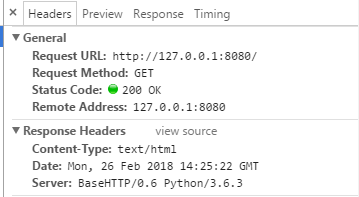
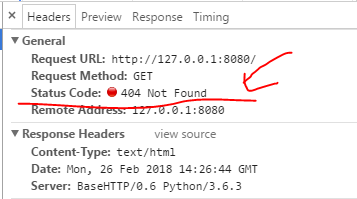
如果我把self.send_response(200)状态码改为404,那么就会出现下述情况:
 #coding = utf-8

 from http.server import BaseHTTPRequestHandler, HTTPServer

 class RequestHandler(BaseHTTPRequestHandler):

     #<tr>代表一行,<td>代表一列

     Page = '''

 <html>

 <body>

 <table>

 <tr>  <td>Header</td>         <td>Value</td>          </tr>

 <tr>  <td>Date and time</td>  <td>{date_time}</td>    </tr>

 <tr>  <td>Client host</td>    <td>{client_host}</td>  </tr>

 <tr>  <td>Client port</td>    <td>{client_port}</td> </tr>

 <tr>  <td>Command</td>        <td>{command}</td>      </tr>

 <tr>  <td>Path</td>           <td>{path}</td>         </tr>

 </table>

 </body>

 </html>

         '''

     def do_GET(self):

         page = self.create_page()

         self.send_content(page)

     def send_content(self, page):

         self.send_response(200)

         self.send_header('Content-Type', 'text/html')

         self.end_headers()

         self.wfile.write(page.encode())

     def create_page(self):

         values = {

             'date_time': self.date_time_string(),

             'client_host': self.client_address[0],

             'client_port': self.client_address[1],

             'command': self.command,

             'path': self.path

         }

         page = self.Page.format(**values)

         '''

         字符串格式化函数

         通过字典设置参数

         site = {'name': '菜鸟教程', 'url': 'www.runoob.com'}

         print('网站名:{name}, 地址:{url}'.format(**site))

         '''

         return page

 #----------------------------------------------------------------------

 if __name__ == '__main__':

     serverAddress = ('', 8080)

     server = HTTPServer(serverAddress, RequestHandler)

     server.serve_forever()
显示请求的信息

 #coding = utf-8

 from http.server import BaseHTTPRequestHandler, HTTPServer

 import sys, os

 class serverException(Exception):

     '''服务器内部错误'''

     pass

 class RequestHandler(BaseHTTPRequestHandler):

     errorPage = """\

         <html>

         <body>

         <h1>Error accessing {path}</h1>

         <p>{msg}</p>

         </body>

         </html>

         """

     def do_GET(self):

         try:

             fullPath = os.getcwd() + self.path

             if not os.path.exists(fullPath):  #不存在就报错

                 raise serverException("'{0}' not found".format(self.path))

             elif os.path.isfile(fullPath):   #如果是文件,则打开

                 self.handle_file(fullPath)

             else:      #其余情况

                 raise serverException("Unknown object '{0}'".format(self.path))

         except Exception as msg:

             self.handle_error(msg)

     def handle_error(self, msg):

         content = self.errorPage.format(path=self.path, msg=msg)

         self.send_content(content, 404)

     def send_content(self, page, status=200):

         self.send_response(status)

         self.send_header('Content-Type', 'text/html')

         self.end_headers()

         self.wfile.write(page.encode())

     def handle_file(self, fullPath):

         try:

             f = open(fullPath, 'r')   #python3要注意是以r读还是rb读

             content = f.read()

             self.send_content(content)

         except IOError as msg:

             msg = "'{0}' cannot be read: {1}".format(self.path, msg)

             self.handle_error(msg)

 #----------------------------------------------------------------------

 if __name__ == '__main__':

     serverAddress = ('', 8080)

     server = HTTPServer(serverAddress, RequestHandler)

     server.serve_forever()
响应静态页面
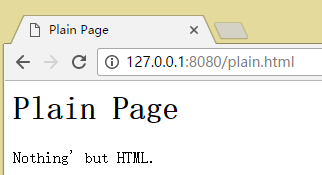
在这里的话需要把plain.html这个文件放在代码相同目录下。
测试情况如下:


 #coding = utf-8

 from http.server import BaseHTTPRequestHandler, HTTPServer

 import sys, os

 class serverException(Exception):

     '''服务器内部错误'''

     pass

 '''

 将不同的情况单独写成一个类,最后将这些类保存在一个列表之中,这样最后遍历列表即可,不需要if-elif了

 '''

 class case_no_file(object):

     '''路径不存在'''

     def test(self, handler):

         return not os.path.exists(handler.fullPath)

     def act(self, handler):

         raise serverException("'{0}' not found".format(handler.path))

 class case_is_file(object):

     '''路径是文件'''

     def test(self, handler):

         return os.path.isfile(handler.fullPath)

     def act(self, handler):

         handler.handle_file(handler.fullPath)

 class case_always_fail(object):

     '''不满足时的默认处理类'''

     def test(self, handler):

         return True

     def act(self, handler):

         raise serverException("Unknown object '{0}'".format(handler.Path))

 class case_directory_index_file(object):

     '''进入根目录时显示主页'''

     def index_path(self, handler):

         return os.path.join(handler.fullPath, 'index.html')   #前后合并

     def test(self, handler):

         return os.path.isdir(handler.fullPath) and os.path.isfile(self.index_path(handler))

     def act(self, handler):

         handler.handle_file(self.index_path(handler))

 class RequestHandler(BaseHTTPRequestHandler):

     caseList = [case_no_file(),

                 case_is_file(),

                 case_directory_index_file(),

                 case_always_fail()]

     errorPage = """\

         <html>

         <body>

         <h1>Error accessing {path}</h1>

         <p>{msg}</p>

         </body>

         </html>

         """

     def do_GET(self):

         try:

             self.fullPath = os.getcwd() + self.path

             for case in self.caseList:

                 if case.test(self):

                     case.act(self)

                     break

         except Exception as msg:

             self.handle_error(msg)

     def handle_error(self, msg):

         content = self.errorPage.format(path=self.path, msg=msg)

         self.send_content(content, 404)

     def send_content(self, page, status=200):

         self.send_response(status)

         self.send_header('Content-Type', 'text/html')

         self.end_headers()

         self.wfile.write(page.encode())

     def handle_file(self, fullPath):

         try:

             f = open(fullPath, 'r')   #python3要注意是以r读还是rb读

             content = f.read()

             self.send_content(content)

         except IOError as msg:

             msg = "'{0}' cannot be read: {1}".format(self.path, msg)

             self.handle_error(msg)

 #----------------------------------------------------------------------

 if __name__ == '__main__':

     serverAddress = ('', 8080)

     server = HTTPServer(serverAddress, RequestHandler)

     server.serve_forever()
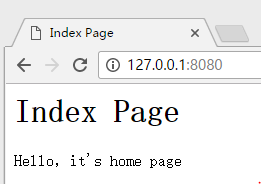
在url根目录显示主页
之前所做的是静态页面的显示,如果要显示动态页面的话就不能写成html的文件了,在这里可以使用CGI协议与脚本来实现动态页面。
服务器在收到客户端的请求后执行指定的CGI应用程序,CGI应用程序执行后再转换成服务器和浏览器能够理解的内容,比如说HTML页面。
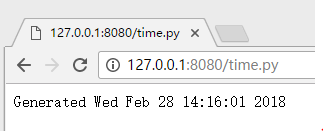
下面的例子就是做一个展示当前时间的页面,先是用python实现了一个CGI脚本time.py,当浏览器请求这个CGI脚本的时候,服务器就会去执行time.py,然后得到执行结果的一段HTML形式的字符,最后就输出即可。
在这里就用到了python库中的subprocess模块,它的功能使fork一个子进程,然后运行一个外部程序。
subprocess.check_output(args, *, stdin=None, stderr=None, shell=False, universal_newlines=False)
它的作用是执行args中的命令,并将其输出成字符串返回。
 #!/usr/bin/env python

 import time

 print('''\

 <html>

 <body>

 <p>Generated {0}</p>

 </body>

 </html>

 '''.format(time.asctime()))
time.py
 #coding = utf-8

 from http.server import BaseHTTPRequestHandler, HTTPServer

 import sys, os

 import subprocess

 class serverException(Exception):

     '''服务器内部错误'''

     pass

 '''

 将不同的情况单独写成一个类,最后将这些类保存在一个列表之中,这样最后遍历列表即可,不需要if-elif了

 '''

 class case_no_file(object):

     '''路径不存在'''

     def test(self, handler):

         return not os.path.exists(handler.fullPath)

     def act(self, handler):

         raise serverException("'{0}' not found".format(handler.path))

 class case_is_file(object):

     '''路径是文件'''

     def test(self, handler):

         return os.path.isfile(handler.fullPath)

     def act(self, handler):

         handler.handle_file(handler.fullPath)

 class case_always_fail(object):

     '''不满足时的默认处理类'''

     def test(self, handler):

         return True

     def act(self, handler):

         raise serverException("Unknown object '{0}'".format(handler.Path))

 class case_directory_index_file(object):

     '''进入根目录时显示主页'''

     def index_path(self, handler):

         return os.path.join(handler.fullPath, 'index.html')   #前后合并

     def test(self, handler):

         return os.path.isdir(handler.fullPath) and os.path.isfile(self.index_path(handler))

     def act(self, handler):

         handler.handle_file(self.index_path(handler))

 class case_cgi_file(object):

     '''脚本文件处理'''

     def test(self, handler):

         return os.path.isfile(handler.fullPath) and handler.fullPath.endswith('.py')

     def act(self, handler):

         handler.run_cgi(handler.fullPath)

 class RequestHandler(BaseHTTPRequestHandler):

     caseList = [case_no_file(),

                 case_cgi_file(),

                 case_is_file(),

                 case_directory_index_file(),

                 case_always_fail()]

     errorPage = """\

         <html>

         <body>

         <h1>Error accessing {path}</h1>

         <p>{msg}</p>

         </body>

         </html>

         """

     def do_GET(self):

         try:

             self.fullPath = os.getcwd() + self.path

             for case in self.caseList:

                 if case.test(self):

                     case.act(self)

                     break

         except Exception as msg:

             self.handle_error(msg)

     def handle_error(self, msg):

         content = self.errorPage.format(path=self.path, msg=msg)

         self.send_content(content, 404)

     def send_content(self, page, status=200):

         self.send_response(status)

         self.send_header('Content-Type', 'text/html')

         self.end_headers()

         self.wfile.write(page.encode())

     def handle_file(self, fullPath):

         try:

             f = open(fullPath, 'r')   #python3要注意是以r读还是rb读

             content = f.read()

             self.send_content(content)

         except IOError as msg:

             msg = "'{0}' cannot be read: {1}".format(self.path, msg)

             self.handle_error(msg)

     def run_cgi(self, fullPath):

         data = subprocess.check_output(['python', fullPath])

         self.send_content(data.decode())

 #----------------------------------------------------------------------

 if __name__ == '__main__':

     serverAddress = ('', 8080)

     server = HTTPServer(serverAddress, RequestHandler)

     server.serve_forever()
main.py
python写web服务器的更多相关文章
- Python搭建Web服务器,与Ajax交互,接收处理Get和Post请求的简易结构
用python搭建web服务器,与ajax交互,接收处理Get和Post请求:简单实用,没有用框架,适用于简单需求,更多功能可进行扩展. python有自带模块BaseHTTPServer.CGIHT ...
- JavaSE 手写 Web 服务器(二)
原文地址:JavaSE 手写 Web 服务器(二) 博客地址:http://www.extlight.com 一.背景 在上一篇文章 <JavaSE 手写 Web 服务器(一)> 中介绍了 ...
- JavaSE 手写 Web 服务器(一)
原文地址:JavaSE 手写 Web 服务器(一) 博客地址:http://www.extlight.com 一.背景 某日,在 Java 技术群中看到网友讨论 tomcat 容器相关内容,然后想到自 ...
- (转)Python的web服务器
1.浏览器请求动态页面过程 2.WSGI Python Web Server Gateway Interface (或简称 WSGI,读作“wizgy”). WSGI允许开发者将选择web框架和web ...
- python之Web服务器案例
HTTP协议简介 1. 使用谷歌/火狐浏览器分析 在Web应用中,服务器把网页传给浏览器,实际上就是把网页的HTML代码发送给浏览器,让浏览器显示出来.而浏览器和服务器之间的传输协议是HTTP,所以: ...
- Python的web服务器
1.浏览器请求动态页面过程 2.WSGI Python Web Server Gateway Interface (或简称 WSGI,读作“wizgy”). WSGI允许开发者将选择web框架和web ...
- Python基础Web服务器案例
一.WSGI 1.PythonWeb服务器网关接口(Python Web Server Gateway Interface,缩写为WSGI) 是Python应用程序或框架和Web服务器之间的一种接口, ...
- python对web服务器做压力测试并做出图形直观显示
压力测试有很多工具啊.apache的,还有jmeter, 还有loadrunner,都比较常用. 其实你自己用python写的,也足够用. 压力测试过程中要统计时间. 比如每秒的并发数,每秒的最大响应 ...
- 用python写web一定要去破解的异步请求问题.经历web.py和tornado,完破!
1.问题 上个学期,给学校写了一个数据服务,主要从oracle里面读取一些数据供查询使用,非常快速的用web.py搭建了起来.调试顺利,测试正常,上线!接下来就是挨骂了,我铁定知道会卡,但是没想到会那 ...
随机推荐
- 那个写书教你交易期权的人James Cordier爆仓了
那个写书教你交易期权的人James Cordier爆仓了 11月15日,James Cordier掌管的期权交易公司OptionSellers.com通过邮件告知投资者,其公司管理的账户遭遇了毁灭性的 ...
- 2017年3月29日 webService入门理解 二
前边说到了N多webService的概念. 其实,说白了,我个人理解的话,webService就是一个“概念”.就好像互联网一样,就是一个很虚幻,很高的一个概念.同样,webService也是.互联网 ...
- Step3 SQL Server 通过备份文件初始化复制
一.本文所涉及的内容(Contents) 本文所涉及的内容(Contents) 背景(Contexts) 搭建过程(Process) 注意事项(Attention) 疑问(Questions) 参考文 ...
- easyui dialog 和 dategrid相关设置与应用
1 dialog一些参数 可以进行文件上传等操作closed:true:定义初始状态为关闭:modal:true:对话框被打开时,会有一个modal-mask,使得对话框底部的内容被一个层覆盖,不 ...
- slideDown留言板
<!doctype html> <html lang="en"> <head> <meta http-equiv="Conten ...
- Caused by: java.lang.ClassNotFoundException: Illegal access: this web application instance has been stopped already. Could not load [org.jboss.netty.util.internal.ByteBufferUtil]. The following stack
Caused by: java.lang.ClassNotFoundException: Illegal access: this web application instance has been ...
- Aria2 使用手札(简易部署 + 快速进阶)
没错,又是受够了迅雷.旋风的各种奇葩减速(哥哥我还买了了VIP!),IDM 对协议支持又太少还有事没事提示你不是正版三天两头闹着要更新.于是我想起来之前看到过的 Aria2,虽然之前也只是略有耳闻,但 ...
- mysql配置主从复制和常见问题
克隆192.168.138.130(主库),修改后的ip为192.168.138.130(从库),修改131机器的/etc/udev/rules.d/70-persistent-net.rules,将 ...
- Python之字符编码(一)
一.了解字符编码的知识储备? 1.计算机基础知识? 计算机中所有的软件文件(包括:操作系统)都存储在硬盘,启动计算机,计算机需要把系统文件都去到内存中. 2.文本编辑器存取文件的原理(nodepad+ ...
- mint-ui之Swipe使用
<template> <div> <div class="swipe-wrapper"> <mt-swipe :auto="10 ...