
https://blog.csdn.net/dayancn/article/details/54692111
Ubuntu恢复被删除的文件
昨天一不小心,执行了rm xx -rf,把一个项目删除了。然后就是各种悔恨,各种自责,这个项目可是一周的工作量啊。最后肯定得解决,于是google搜索发现了恢复神器extundelete,最后顺利恢复了所有被我无意中的删除的文件。感谢上天,感谢extundelete。下面将个人的经历总结下。
如何使用extundelete
1) 下载工具extundelete
Ubuntu下下载这个工具太简单了
- sudo apt-get install extundelete
2) 使用
使用这个也很简单。使用extundelete–help命令,可以告诉我们很多。
- Itleaks@ Itleaks::~$ extundelete --help
- Usage: extundelete [options] [--] device-file
- Options:
- ……………….
- --after dtime Only process entries deleted on or after 'dtime'.
- --before dtime Only process entries deleted before 'dtime'.
- Actions:
- …………
- --restore-file 'path' Will restore file 'path'. 'path' is relative to root
- of the partition and does not start with a '/' (it
- must be one of the paths returned by --dump-names).
- The restored file is created in the current
- directory as 'RECOVERED_FILES/path'.
- --restore-files 'path' Will restore files which are listed in the file 'path'.
- Each filename should be in the same format as an option
- to --restore-file, and there should be one per line.
- --output-dir 'path' Restore files in the output dir 'path'.
- By default the restored files are created under current directory 'RECOVERED_FILES'.
- --restore-all Attempts to restore everything.
- ………..
我们知道当我们不小心删除了有用的文件,我们一般是比较容易知道删除的时间的,因此,使用时间这个option可以很快并且精确的恢复出我们想要的文件。那这个dtime怎么生成。请参考如下命令:
- Itleaks@ Itleaks:~$ date -d "2014-06-01 23:02:00" +%s
- 1401634920
%s的意思是seconds since 1970-01-01 00:00:00 UTC,就是输入时间与1970-01-0100:00:00的时间差
然后就可以使用这个来恢复了
- sudo extundelete /dev/sda8 --after 1401634920--restore-all
现在我们来做个试验:具体操作如下
- Itleaks@ Itleaks:/tmp$ echo "recovery test"> itleaks.test
- Itleaks@ Itleaks:/tmp$ rm itleaks.test
- Itleaks@ Itleaks:/tmp$ date -d "2014-06-01 22:28:00" +%s
- 1401632880
- Itleaks@ Itleaks:/tmp$ sudo extundelete /dev/sda8 --after 1401632880 --restore-all
- Only show and process deleted entries if they are deleted on or after 1401632880 and before 9223372036854775807.
- WARNING: Extended attributes are not restored.
- WARNING: EXT3_FEATURE_INCOMPAT_RECOVER is set.
- The partition should be unmounted to undelete any files without further data loss.
- If the partition is not currently mounted, this message indicates
- it was improperly unmounted, and you should run fsck before continuing.
- If you decide to continue, extundelete may overwrite some of the deleted
- files and make recovering those files impossible. You should unmount the
- file system and check it with fsck before using extundelete.
- Would you like to continue? (y/n)
- y
- Loading filesystem metadata ... 378 groups loaded.
- Loading journal descriptors ...
- 27106 descriptors loaded.
- Searching for recoverable inodes in directory / ...
- 85 recoverable inodes found.
- Looking through the directory structure for deleted files ...
- ………………..
- Unable to restore inode 2360218 (etc/brltty/brl-fs-bumpers.kti): No undeleted copies found in the journal.
- Unable to restore inode 2359564 (etc/mtab~): No undeleted copies found in the journal.
- Restored inode 2883641 to file RECOVERED_FILES/tmp/itleaks.test
- Itleaks@ Itleaks:/tmp$ tree RECOVERED_FILES/
- RECOVERED_FILES/
- └── tmp
- └── itleaks.test
- 1 directory, 1 file
extundelete原理
这个是由于linuxext3文件系统的组织结构决定的,如下图:
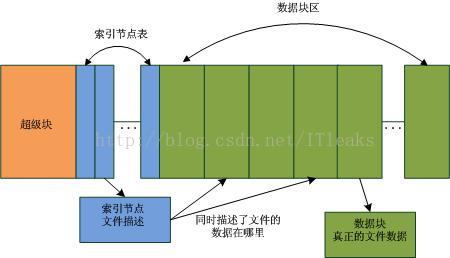
在Linux系统中,超级块描述了分区的信息,一个分区被分为两个部分,索引节点表和数据块区,这个在格式化的时候就定下来了。文件(目录也是文件的一种,只不过它的内容是描述目录下的文件的)由索引节点描述,索引节点描述了文件的修改时间,文件的名称,文件的数据块地址等等。并且,linux对于文件删除操作是个懒动作,删除文件时系统只是将文件对应的索引节点及其拥有的数据块置为free(将nlink=0),而并没有做其他清空的,只有当这个索引节点或者数据块被真正用到的时候才会修改里面的数据。这就为我们文件修复提供了可趁之机。由于系统中的索引节点是固定大小的,因此可以很轻松的遍历扫描系统中所有的索引节点,找出free的索引节点并检查其数据块是否已经被用,如果没有则可修复并修复。同时,由于索引节点里的时间等信息也是保留的,因此就可以根据时间来恢复特定的被删除的文件。
文件误删除后的注意事项
从上面的分析可知,误删文件后,尽量不要做大的数据操作,以避免被删除的文件的数据块被重新使用,导致数据完全丢失。
/********************************
* 本文来自博客 “爱踢门”
* 转载请标明出处:http://blog.csdn.net/itleaks
******************************************/
https://blog.csdn.net/dayancn/article/details/54692111的更多相关文章
- https://blog.csdn.net/u011489043/article/details/68488459
转自https://blog.csdn.net/u011489043/article/details/68488459 String 字符串常量 StringBuffer 字符串变量(线程安全) ...
- 程序员的沟通之痛https://blog.csdn.net/qq_35230695/article/details/80283720
个人理解: 一般刚工作的程序员总觉得技术最重要.但是当工作年限超过3年.或者岗位需要涉及汇报.需求对接等就会发现沟通非常重要.也许在大公司还不那么明显,但是在小公司.小团队或者创业,沟通甚至可以说是第 ...
- https://blog.csdn.net/uftjtt/article/details/79044186
https://blog.csdn.net/uftjtt/article/details/79044186
- 自动车牌识别(ALPR)---https://blog.csdn.net/ELEVEN_ZOU/article/details/80893579
1.基本功能:从一张或者一系列的图片中提取车牌信息,比如车牌号码.车牌颜色等信息. 2.功能扩展:车型.车品牌.车牌类型等. 3.应用方向:电子交易系统(停车自动收费.收费站自动支付等).交通执法.交 ...
- Nginx 配置location root 转自https://blog.csdn.net/rofth/article/details/78581617
nginx指定文件路径有两种方式root和alias,root与alias主要区别在于nginx如何解释location后面的uri,这会使两者分别以不同的方式将请求映射到服务器文件上. 最基本的区别 ...
- golang操作memcached 转自https://blog.csdn.net/weixin_37696997/article/details/78760397
go使用memcached需要第三方的驱动库,这里有一个库是memcached作者亲自实现的,代码质量效率肯定会有保障 1:安装 go get github.com/bradfitz/gomemcac ...
- 爬虫出现Forbidden by robots.txt(转载 https://blog.csdn.net/zzk1995/article/details/51628205)
先说结论,关闭scrapy自带的ROBOTSTXT_OBEY功能,在setting找到这个变量,设置为False即可解决. 使用scrapy爬取淘宝页面的时候,在提交http请求时出现debug信息F ...
- https://blog.csdn.net/doegoo/article/details/50749817
因为使用DiscuzX3.2进行系统的整合后,因为只是想在原J2EE的系统上增加论坛功能,而且J2EE中已经有一套用户的注册认证的体系,所以不需要在Discuz的系统中去注册以及登录功能,而是通过在J ...
- windows 安装lua-5.3.4 --引用自https://blog.csdn.net/wangtong01/article/details/78296369
版权声明:本文为博主原创文章,转载时请标明出处.http://blog.csdn.net/wangtong01 https://blog.csdn.net/wangtong01/article/det ...
随机推荐
- python tkinter Treeview 事件绑定
def trefun(event): sels= event.widget.selection()#event.widget获取Treeview对象,调用selection获取选择对象名称 for i ...
- Error #2148
参考:https://blog.csdn.net/watersevenmmfx/article/details/52980804 chrome flash 安全沙箱冲突 SecurityError: ...
- RN项目中使用react-native-elements报错: Unrecognized font family 'Material Icons'
查询了一些方案,但各自的环境不尽相同,最后在google中找到了答案.主要问题在于 (1)版本问题 (2)Xcode配置问题 报错如下 解决步骤: 1 . 首先需要正确安装 npm i -S reac ...
- python读取大文件
最近在学习python的过程中接触到了python对文件的读取.python读取文件一般情况是利用open()函数以及read()函数来完成: f = open(filename,'r') f.rea ...
- css解决无论页面长短footer永远置底
<!DOCTYPE html PUBLIC "-//W3C//DTD XHTML 1.0 Transitional//EN" "http://www.w3.org/ ...
- html5-css动画-2d
div{ width: 300px; height: 100px; margin: 50px; padding: 50px; background: green; ...
- codeforces 979B Treasure Hunt
题意: 给出三个字符串,每个字符串长度相同,给出n,要求在n轮内,每一个字符串必须改变一个字符. 问最后哪个字符串中拥有最多相同的字符,即美丽度最大. 思路: 首先,很不容易想到的一点是从a变到a,有 ...
- 20155228 实验五 Android开发基础
20155228 实验五 Android开发基础 实验内容 1.掌握Socket程序的编写: 2.掌握密码技术的使用: 3.设计安全传输系统. 实验要求 1.没有Linux基础的同学建议先学习< ...
- [DeploymentService:290066]Error occurred while downloading files from admin server for deployment request "0". Underlying error is: "null"
weblogic 莫名无法启动: <Apr , :: PM CST> <Error> <Deployer> <BEA-> <Failed to i ...
- web安全防范之SQL注入攻击、攻击原理和防范措施
SQL注入 攻击原理 在编写SQL语句时,如果直接将用户传入的数据作为参数使用字符串拼接的方式插入到SQL查询中,那么攻击者可以通过注入其他语句来执行攻击操作,这些攻击包括可以通过SQL语句做的任何事 ...