
https://blog.csdn.net/dayancn/article/details/54692111
Ubuntu恢复被删除的文件
昨天一不小心,执行了rm xx -rf,把一个项目删除了。然后就是各种悔恨,各种自责,这个项目可是一周的工作量啊。最后肯定得解决,于是google搜索发现了恢复神器extundelete,最后顺利恢复了所有被我无意中的删除的文件。感谢上天,感谢extundelete。下面将个人的经历总结下。
如何使用extundelete
1) 下载工具extundelete
Ubuntu下下载这个工具太简单了
- sudo apt-get install extundelete
2) 使用
使用这个也很简单。使用extundelete–help命令,可以告诉我们很多。
- Itleaks@ Itleaks::~$ extundelete --help
- Usage: extundelete [options] [--] device-file
- Options:
- ……………….
- --after dtime Only process entries deleted on or after 'dtime'.
- --before dtime Only process entries deleted before 'dtime'.
- Actions:
- …………
- --restore-file 'path' Will restore file 'path'. 'path' is relative to root
- of the partition and does not start with a '/' (it
- must be one of the paths returned by --dump-names).
- The restored file is created in the current
- directory as 'RECOVERED_FILES/path'.
- --restore-files 'path' Will restore files which are listed in the file 'path'.
- Each filename should be in the same format as an option
- to --restore-file, and there should be one per line.
- --output-dir 'path' Restore files in the output dir 'path'.
- By default the restored files are created under current directory 'RECOVERED_FILES'.
- --restore-all Attempts to restore everything.
- ………..
我们知道当我们不小心删除了有用的文件,我们一般是比较容易知道删除的时间的,因此,使用时间这个option可以很快并且精确的恢复出我们想要的文件。那这个dtime怎么生成。请参考如下命令:
- Itleaks@ Itleaks:~$ date -d "2014-06-01 23:02:00" +%s
- 1401634920
%s的意思是seconds since 1970-01-01 00:00:00 UTC,就是输入时间与1970-01-0100:00:00的时间差
然后就可以使用这个来恢复了
- sudo extundelete /dev/sda8 --after 1401634920--restore-all
现在我们来做个试验:具体操作如下
- Itleaks@ Itleaks:/tmp$ echo "recovery test"> itleaks.test
- Itleaks@ Itleaks:/tmp$ rm itleaks.test
- Itleaks@ Itleaks:/tmp$ date -d "2014-06-01 22:28:00" +%s
- 1401632880
- Itleaks@ Itleaks:/tmp$ sudo extundelete /dev/sda8 --after 1401632880 --restore-all
- Only show and process deleted entries if they are deleted on or after 1401632880 and before 9223372036854775807.
- WARNING: Extended attributes are not restored.
- WARNING: EXT3_FEATURE_INCOMPAT_RECOVER is set.
- The partition should be unmounted to undelete any files without further data loss.
- If the partition is not currently mounted, this message indicates
- it was improperly unmounted, and you should run fsck before continuing.
- If you decide to continue, extundelete may overwrite some of the deleted
- files and make recovering those files impossible. You should unmount the
- file system and check it with fsck before using extundelete.
- Would you like to continue? (y/n)
- y
- Loading filesystem metadata ... 378 groups loaded.
- Loading journal descriptors ...
- 27106 descriptors loaded.
- Searching for recoverable inodes in directory / ...
- 85 recoverable inodes found.
- Looking through the directory structure for deleted files ...
- ………………..
- Unable to restore inode 2360218 (etc/brltty/brl-fs-bumpers.kti): No undeleted copies found in the journal.
- Unable to restore inode 2359564 (etc/mtab~): No undeleted copies found in the journal.
- Restored inode 2883641 to file RECOVERED_FILES/tmp/itleaks.test
- Itleaks@ Itleaks:/tmp$ tree RECOVERED_FILES/
- RECOVERED_FILES/
- └── tmp
- └── itleaks.test
- 1 directory, 1 file
extundelete原理
这个是由于linuxext3文件系统的组织结构决定的,如下图:
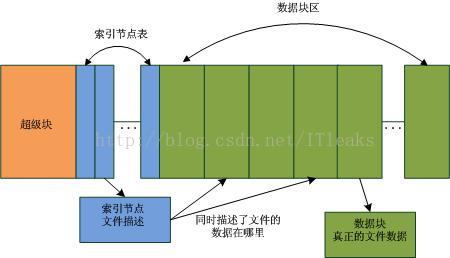
在Linux系统中,超级块描述了分区的信息,一个分区被分为两个部分,索引节点表和数据块区,这个在格式化的时候就定下来了。文件(目录也是文件的一种,只不过它的内容是描述目录下的文件的)由索引节点描述,索引节点描述了文件的修改时间,文件的名称,文件的数据块地址等等。并且,linux对于文件删除操作是个懒动作,删除文件时系统只是将文件对应的索引节点及其拥有的数据块置为free(将nlink=0),而并没有做其他清空的,只有当这个索引节点或者数据块被真正用到的时候才会修改里面的数据。这就为我们文件修复提供了可趁之机。由于系统中的索引节点是固定大小的,因此可以很轻松的遍历扫描系统中所有的索引节点,找出free的索引节点并检查其数据块是否已经被用,如果没有则可修复并修复。同时,由于索引节点里的时间等信息也是保留的,因此就可以根据时间来恢复特定的被删除的文件。
文件误删除后的注意事项
从上面的分析可知,误删文件后,尽量不要做大的数据操作,以避免被删除的文件的数据块被重新使用,导致数据完全丢失。
/********************************
* 本文来自博客 “爱踢门”
* 转载请标明出处:http://blog.csdn.net/itleaks
******************************************/
https://blog.csdn.net/dayancn/article/details/54692111的更多相关文章
- https://blog.csdn.net/u011489043/article/details/68488459
转自https://blog.csdn.net/u011489043/article/details/68488459 String 字符串常量 StringBuffer 字符串变量(线程安全) ...
- 程序员的沟通之痛https://blog.csdn.net/qq_35230695/article/details/80283720
个人理解: 一般刚工作的程序员总觉得技术最重要.但是当工作年限超过3年.或者岗位需要涉及汇报.需求对接等就会发现沟通非常重要.也许在大公司还不那么明显,但是在小公司.小团队或者创业,沟通甚至可以说是第 ...
- https://blog.csdn.net/uftjtt/article/details/79044186
https://blog.csdn.net/uftjtt/article/details/79044186
- 自动车牌识别(ALPR)---https://blog.csdn.net/ELEVEN_ZOU/article/details/80893579
1.基本功能:从一张或者一系列的图片中提取车牌信息,比如车牌号码.车牌颜色等信息. 2.功能扩展:车型.车品牌.车牌类型等. 3.应用方向:电子交易系统(停车自动收费.收费站自动支付等).交通执法.交 ...
- Nginx 配置location root 转自https://blog.csdn.net/rofth/article/details/78581617
nginx指定文件路径有两种方式root和alias,root与alias主要区别在于nginx如何解释location后面的uri,这会使两者分别以不同的方式将请求映射到服务器文件上. 最基本的区别 ...
- golang操作memcached 转自https://blog.csdn.net/weixin_37696997/article/details/78760397
go使用memcached需要第三方的驱动库,这里有一个库是memcached作者亲自实现的,代码质量效率肯定会有保障 1:安装 go get github.com/bradfitz/gomemcac ...
- 爬虫出现Forbidden by robots.txt(转载 https://blog.csdn.net/zzk1995/article/details/51628205)
先说结论,关闭scrapy自带的ROBOTSTXT_OBEY功能,在setting找到这个变量,设置为False即可解决. 使用scrapy爬取淘宝页面的时候,在提交http请求时出现debug信息F ...
- https://blog.csdn.net/doegoo/article/details/50749817
因为使用DiscuzX3.2进行系统的整合后,因为只是想在原J2EE的系统上增加论坛功能,而且J2EE中已经有一套用户的注册认证的体系,所以不需要在Discuz的系统中去注册以及登录功能,而是通过在J ...
- windows 安装lua-5.3.4 --引用自https://blog.csdn.net/wangtong01/article/details/78296369
版权声明:本文为博主原创文章,转载时请标明出处.http://blog.csdn.net/wangtong01 https://blog.csdn.net/wangtong01/article/det ...
随机推荐
- 增删改(DML)操作
增删改(DML)操作 1.1事务(transaction) 事务是数据库操作的最小单元,又ACID的特性,应该保证一个事务的sql语句要么同时成功,要么都不成功. Mybatis中配置了事务管理器,t ...
- UVa 202 Repeating Decimals(抽屉原理)
Repeating Decimals 紫书第3章,这哪是模拟啊,这是数论题啊 [题目链接]Repeating Decimals [题目类型]抽屉原理 &题解: n除以m的余数只能是0~m-1, ...
- redis基本命令
1指定配置文件启动 ./redis-server /opt/server/redis/conf/redis.conf vim redis.conf #配置文件requirepass #后面跟密码 ...
- python对缩进的严格要求
一般的编辑器都会默认Tab键为四格缩进,但是在python脚本中,Tab与直接4个tablespace空格是有区别的. 一般表现为报错信息如下: IndentationError: unindent ...
- webview相关知识
标签类 1.Web App 建议用的样式 用于覆盖 WebView 默认的样式,使得 App 看起来更像原生的 App,——“不露出马脚” /* document.documentElement.st ...
- ADC采样对MIC的干扰
使用EFM8SB的MCU做ADC采样,检测MIC Bias的电源,解码android耳机的线控.初始时, ADC的采样频率2KHz, 在录音时后播放,能固定的听到接近2K的一个噪声.示波器探测不到明显 ...
- Ajax 知识
Ajax 为什么要有ajax技术? 传统的web应用,一个简单的操作就要加载整个页面.浪费资源. Ajax 即“Asynchronous Javascript And XML”(异步JavaS ...
- 算法提高 c++_ch02_01 (强制类型转换)
编写一个程序,利用强制类型转换打印元音字母大小写10种形式的ASCII码. 输出的顺序为:大写的字母A,E,I,O,U的ASCII码,小写的字母a,e,i,o,u的ASCII码.所有的ASCII码都用 ...
- CentOS7 重启网卡Failed to start LSB: Bring up/down networking.解决方法
环境:MAC PD虚拟机安装centos7 修改完网卡配置,重启网络服务报错 使用提示命令查看:systemctl status network.service 发现报错为Failed to star ...
- SQLServer 比like好用的函数 charindex
比如查找用户名包含有"c"的所有用户, 可以用 use mydatabase select * from table1 where username like'%c%" ...