
[k8s]kube-dns架构图解
kubedns
DNS Policy
http://blog.fleeto.us/translation/configuring-private-dns-zones-and-upstream-nameservers-kubernetes
Kubernetes 目前在 Pod 定义中支持两个 DNS 策略:Default和ClusterFirst,dnsPolicy缺省为ClusterFirst:
如果dnsPolicy设置为Default,那么域名解析配置会从 Pod 所在节点继承而来。注意,本文所述功能在dnsPolicy设置为Default时无效。
如果dnsPolicy设置为ClusterFirst,DNS 查询会被发送到 kube-dns 服务。kube-dns 服务负责相应以集群域名为后缀(例如.cluster.local)的查询。其他的域名查询(例如 www.kubernetes.io )会被转发给来自节点定义的上级域名服务器。
https://kubernetes.io/docs/concepts/services-networking/dns-pod-service/#dns-policy
By default, DNS policy for a pod is ‘ClusterFirst’. So pods running with hostNetwork cannot resolve DNS names. To have DNS options set along with hostNetwork, you should specify DNS policy explicitly to ‘ClusterFirstWithHostNet’. Update the busybox.yaml as following:
apiVersion: v1

kind: Pod

metadata:

  name: busybox

  namespace: default

spec:

  containers:

  - image: busybox

    command:

      - sleep

      - "3600"

    imagePullPolicy: IfNotPresent

    name: busybox

  restartPolicy: Always

  hostNetwork: true

  dnsPolicy: ClusterFirstWithHostNet
组件架构看这个就够了
http://cizixs.com/2017/04/11/kubernetes-intro-kube-dns
设置细节看这个就够了
http://blog.fleeto.us/translation/configuring-private-dns-zones-and-upstream-nameservers-kubernetes
busybox你的忠实实验伴侣
命令看这里: https://kubernetes.io/docs/concepts/services-networking/dns-pod-service/#dns-policy
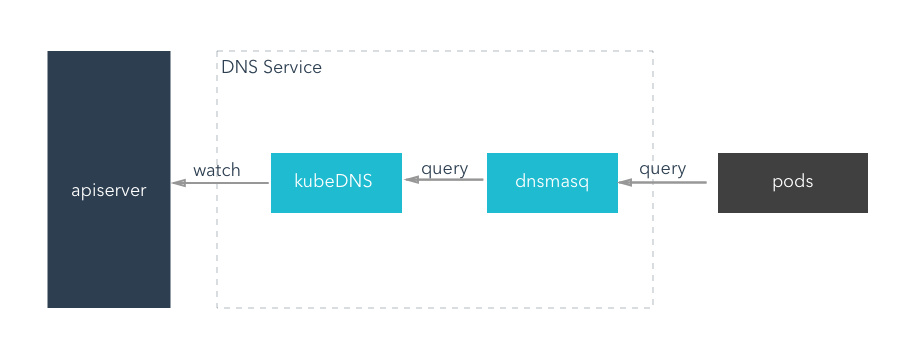
- 架构图:
应该是这样
老版本

新版本
参考:
http://cizixs.com/2017/04/11/kubernetes-intro-kube-dns
- kubedns架构有3个容器组成:
gcr.io/google_containers/k8s-dns-dnsmasq-nanny-amd64:1.14.1

gcr.io/google_containers/k8s-dns-kube-dns-amd64:1.14.1

gcr.io/google_containers/k8s-dns-sidecar-amd64:1.14.1
运行的Kubernetes DNS pod包含3个容器——kubedns、dnsmasq和一个叫做healthz的健康检查容器。kubedns进程监视Kubernetes master上Service和Endpoint的改变,并在内存中维护lookup 结构用于服务DNS请求。dnsmasq容器增加DNS缓存,从而提升性能。healthz容器提供一个单点的健康检查Endpoint,检查dnsmasq和kubedns的健康程度。
DNS pod以服务的形式暴露出来,它拥有一个静态IP。一旦被创建,kubelet就使用--cluster-dns=10.0.0.10标识,将DNS配置信息传递给每个容器。
DNS名称也需要域。本地域是可以配置的,在kubelet中,使用--cluster-domain=参数。
Kubernetes集群的DNS服务(基于SkyDNS库)支持forward lookup(A recoreds),service lookup(SRV records)和反向IP地址查找(PTR recoreds)。
- 前后版本对比: https://segmentfault.com/a/1190000007342180
- 存在的问题: 创建k8的dns的时候没看到dns的yml里配置有api的地址,不知道kube-dns组件是如何去找api的,但是通过
kubectl exec -it -n kube-system kube-dns-1446441763-14hdh -c kubedns env可以看到KUBERNETES_SERVICE_HOST一些环境变量KUBERNETES_SERVICE_HOST=10.233.0.1,但是环境变量是怎么注入进去的呢? 这个是个问题,没看到yml里有环境变量.
后来我查阅了下:
- 是docker link的一些机制.
https://docs.docker.com/compose/link-env-deprecated/
Compose uses Docker links to expose services’ containers to one another. Each linked container injects a set of environment variables, each of which begins with the uppercase name of the container.
To see what environment variables are available to a service, run docker-compose run SERVICE env.
name_PORT

Full URL, e.g. DB_PORT=tcp://172.17.0.5:5432

name_PORT_num_protocol

Full URL, e.g. DB_PORT_5432_TCP=tcp://172.17.0.5:5432

name_PORT_num_protocol_ADDR

Container’s IP address, e.g. DB_PORT_5432_TCP_ADDR=172.17.0.5

name_PORT_num_protocol_PORT

Exposed port number, e.g. DB_PORT_5432_TCP_PORT=5432

name_PORT_num_protocol_PROTO

Protocol (tcp or udp), e.g. DB_PORT_5432_TCP_PROTO=tcp

name_NAME

Fully qualified container name, e.g. DB_1_NAME=/myapp_web_1/myapp_db_1
k8s里说的比较清楚:
https://kubernetes.io/docs/concepts/services-networking/service/
Environment variables
When a Pod is run on a Node, the kubelet adds a set of environment variables for each active Service. It supports both Docker links compatible variables (see makeLinkVariables) and simpler {SVCNAME}_SERVICE_HOST and {SVCNAME}_SERVICE_PORT variables, where the Service name is upper-cased and dashes are converted to underscores.
For example, the Service "redis-master" which exposes TCP port 6379 and has been allocated cluster IP address 10.0.0.11 produces the following environment variables:
REDIS_MASTER_SERVICE_HOST=10.0.0.11

REDIS_MASTER_SERVICE_PORT=6379

REDIS_MASTER_PORT=tcp://10.0.0.11:6379

REDIS_MASTER_PORT_6379_TCP=tcp://10.0.0.11:6379

REDIS_MASTER_PORT_6379_TCP_PROTO=tcp

REDIS_MASTER_PORT_6379_TCP_PORT=6379

REDIS_MASTER_PORT_6379_TCP_ADDR=10.0.0.11
测了下,一个ns里有多个svc时候,新建一个pod,会注册所有svc到这个pod.
执行kubenernetes看执行过程
kubectl -v 9 get pods
Force Deletion
Force deletions do not wait for confirmation from the kubelet that the Pod has been terminated. Irrespective of whether a force deletion is successful in killing a Pod, it will immediately free up the name from the apiserver. This would let the StatefulSet controller create a replacement Pod with that same identity; this can lead to the duplication of a still-running Pod, and if said Pod can still communicate with the other members of the StatefulSet, will violate the at most one semantics that StatefulSet is designed to guarantee.
When you force delete a StatefulSet pod, you are asserting that the Pod in question will never again make contact with other Pods in the StatefulSet and its name can be safely freed up for a replacement to be created.
If you want to delete a Pod forcibly using kubectl version >= 1.5, do the following:
kubectl delete pods <pod> --grace-period=0 --force
If you’re using any version of kubectl <= 1.4, you should omit the --force option and use:
kubectl delete pods <pod> --grace-period=0
Always perform force deletion of StatefulSet Pods carefully and with complete knowledge of the risks involved.
What’s next
[k8s]kube-dns架构图解的更多相关文章
- [k8s]k8s架构图解
k8s架构图解 启动参数及证书梳理 master端必须要装flannel 注: flannel网络能确保各节点间 Pod 网段实现互通 master 节点与 node 节点上的 Pods 通过 Pod ...
- dial tcp 10.96.0.1:443: getsockopt: no route to host --- kubernetes(k8s)DNS 服务反复重启
kubernetes(k8s)DNS 服务反复重启解决: k8s.io/dns/pkg/dns/dns.go:150: Failed to list *v1.Service: Get https:// ...
- (转)dial tcp 10.96.0.1:443: getsockopt: no route to host --- kubernetes(k8s)DNS 服务反复重启
转:https://blog.csdn.net/shida_csdn/article/details/80028905 kubernetes(k8s)DNS 服务反复重启解决: k8s.io/dns/ ...
- 【K8s】Kubernetes架构理解
抽空学习了一下Kubernetes,感觉和大数据领域内集群的资源管理.任务调度等有异曲同工之处,简单总结一下备忘. [概念] Kubernetes是一个工业级的容器编排平台,单词有点长,常用K8s代称 ...
- MySQL基础篇(05):逻辑架构图解和InnoDB存储引擎详解
本文源码:GitHub·点这里 || GitEE·点这里 一.MySQL逻辑架构 1.逻辑架构图 基于下面的逻辑架构图,可以大致熟悉MySQL各个架构组件之间的协同工作关系. 很经典的C/S架构风格, ...
- Sentry(v20.12.1) K8S 云原生架构探索,SENTRY FOR JAVASCRIPT SDK 配置详解
系列 Sentry-Go SDK 中文实践指南 一起来刷 Sentry For Go 官方文档之 Enriching Events Snuba:Sentry 新的搜索基础设施(基于 ClickHous ...
- Sentry(v20.12.1) K8S 云原生架构探索, SENTRY FOR JAVASCRIPT 手动捕获事件基本用法
系列 Sentry-Go SDK 中文实践指南 一起来刷 Sentry For Go 官方文档之 Enriching Events Snuba:Sentry 新的搜索基础设施(基于 ClickHous ...
- Sentry(v20.12.1) K8S 云原生架构探索,SENTRY FOR JAVASCRIPT Source Maps 详解
系列 Sentry-Go SDK 中文实践指南 一起来刷 Sentry For Go 官方文档之 Enriching Events Snuba:Sentry 新的搜索基础设施(基于 ClickHous ...
- Sentry(v20.12.1) K8S 云原生架构探索,SENTRY FOR JAVASCRIPT 故障排除
系列 Sentry-Go SDK 中文实践指南 一起来刷 Sentry For Go 官方文档之 Enriching Events Snuba:Sentry 新的搜索基础设施(基于 ClickHous ...
- Sentry(v20.12.1) K8S 云原生架构探索,1分钟上手 JavaScript 性能监控
系列 Sentry-Go SDK 中文实践指南 一起来刷 Sentry For Go 官方文档之 Enriching Events Snuba:Sentry 新的搜索基础设施(基于 ClickHous ...
随机推荐
- linux 编译内核 /boot空间不足?
/boot空间一般分配100M的空间,本来是够用的,由于频繁的更新导致旧的不再使用的内核文件也保留在boot空间里,占着位置,所以把这些不用的内核文件下载掉boot空间就能释放出一部分, 具体做法为 ...
- Sensor传感器(摇一摇)
<ImageView android:layout_width="wrap_content" android:layout_height="wrap_content ...
- 在VS Code中对Python进行单元测试
在VS Code中对Python进行单元测试 Python扩展支持使用Python的内置unittest框架以及pytest和Nose进行单元测试.要使用pytest和Nose,必须将它们安装到当前的 ...
- Linux学习之文本处理命令(五)
---恢复内容开始--- Linux 系统之文本处理命令 (一)基于关键字搜索 (二)基于列处理文本 (三)文本统计 (四)文本排序 (五)删除重复行 (六)文本比较 (七)处理文本内容 (八)搜索替 ...
- Netty handler处理类无法使用@Autowired注入bean的解决方法
问题由来: 公司有个项目用到netty作为websocket的实现,最近打算部署双机,这使得原来在内存中的保存Channel信息的方案不再可行,需要转移到redis中,改造过程中发现通过@Autowi ...
- python 搭建一个简单的 搜索引擎
我把代码和爬好的数据放在了git上,欢迎大家来参考 https://github.com/linyi0604/linyiSearcher 我是在 manjaro linux下做的, 使用python3 ...
- NOIP 2000 乘积最大
分析: 这一题虽然是加强版的,但也就是数据范围比原题大了点儿,思路都一样,在原题的基础上加一个高精度乘法就OK了,下面说一下算法:看到题首先想到的就是动态规划,你会发现这一题极像一道经典题目---添加 ...
- BZOJ2366 : 多重历史
建立AC自动机,因为不存在某个串是另一个串的后缀,因此匹配到任意位置都只可能匹配一个串. 预处理出每个串出现的所有位置,总的出现次数为$O(m)$. 设$f[i][j]$表示考虑了前$i$个串,最后一 ...
- Docker machine(Docker 虚拟机)
安装docker [root@lianxi ~]# yum -y install docker 启动docker [root@lianxi ~]# systemctl start docker 下载D ...
- openvpn 的安装和使用方法
一.安装: 必备条件: 该计算机必须安装了网卡 1.像安装普通软件一样将 openvpn 这个软件安装好 2.到安装目录下/config 中,该目录下默认只有一个 README.txt,然后将企业给的 ...