
python脚本发送邮件
#!/usr/bin/python

#_*_ coding:utf-8 _*_

from email.MIMEText import MIMEText

from email.MIMEMultipart import MIMEMultipart

from email.MIMEBase import MIMEBase

from email import Utils, Encoders

from email.header import Header

import mimetypes

import sys

import smtplib

def SendMail(fromAddress, toAddress, usepassword,subject=None, content=None, attfile=None, \

             subtype='plain', charset='utf-8'):

    username = fromAddress

    #创建一个带附件的实例

    msg = MIMEMultipart()

    msg['From'] = fromAddress

    msg['To'] = toAddress

    if subject:

        #标题

        msg['Subject'] = subject

        msg['Date'] = Utils.formatdate(localtime=1)

    if content:

        #添加邮件内容

        txt = MIMEText(content, subtype, charset)

        msg.attach(txt)

    if attfile:

        #构造附件

        #注意:传入的参数attfile为unicode,否则带中文的目录或名称的文件读不出来

        #      basename 为文件名称,由于传入的参数attfile为unicode编码,此处的basename也为unicode编码

        basename = os.path.basename(attfile)

        print basename

        #注意:指定att的编码方式为gb2312

        att = MIMEText(open(attfile, 'rb').read(), 'base64', 'gb2312')

        att["Content-Type"] = 'application/octet-stream'

        #注意:此处basename要转换为gb2312编码,否则中文会有乱码。

        #      特别,此处的basename为unicode编码,所以可以用basename.encode('gb2312')

        #            如果basename为utf-8编码,要用basename.decode('utf-8').encode('gb2312')

        att["Content-Disposition"] = 'attachment; filename=%s' % basename.encode('gb2312')

        msg.attach(att)

    try:

    #smtp = smtplib

        smtp = smtplib.SMTP()

        #连接服务器

        smtp.connect('smtp.163.com', '25')

        #登录

        smtp.login(username, usepassword)

        #发送邮件

        smtp.sendmail(fromAddress, toAddress, msg.as_string())

        #退出

        smtp.quit()

        print('邮件发送成功email has send out !')

  #调用

if __name__ == "__main__":

   #注意:附件的路径字符串应为unicode编码

   #              发送者账号   接收者账号  密码         标题        内容                        附件

    SendMail('xxxxxxx', 'xxxxxxxx', 'xxxxxxx','编译结果','编译log文件已发送,请查看!',u'编译结果.h')
要实现发邮件的功能,必须通过网站登陆设置开启SMTP服务和授权码,比如以下是163邮箱的设置过程。
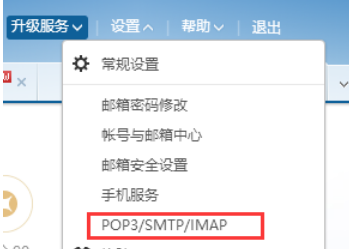
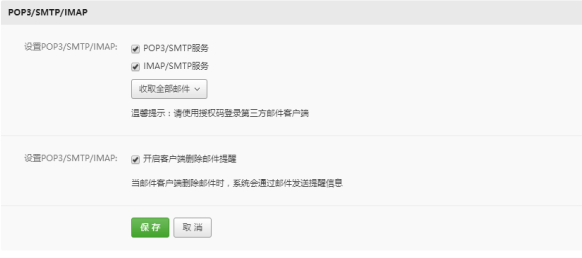

在脚本此处设置邮箱的相关内容:(注意:邮箱密码必须是你启用的授权码)

详情请访问以下网址:
http://www.runoob.com/python/python-email.html
python脚本发送邮件的更多相关文章
- Centos7 定时任务启动python脚本发送邮件
直接上python脚本: 2.我是把这个脚本放在home文件夹下面 3.在centos命令模式下: crontab -e 命令编辑启动脚本: 4.第一个命令意思是:每天9点到下午5点,每隔一个小时 ...
- 使用shell+python脚本实现系统监控并发送邮件
1.编辑shell脚本 [root@web03 ~/monitor_scripts]# cat inspect.sh #!/bin/bash # 设置磁盘的阀值 disk_max=90 # 设置监控i ...
- Zabbix调用外部脚本发送邮件:python编写脚本
Zabbix调用外部脚本发送邮件的时候,会在命令行传入两个参数,第一个参数就是要发送给哪个邮箱地址,第二个参数就是邮件信息,为了保证可以传入多个参数,所以假设有多个参数传入 #!/usr/bin/en ...
- 用Python自动发送邮件
用Python自动发送邮件 最近需要在服务器上处理一些耗时比较长的任务,因此想到利用python写一个自动发送邮件的脚本,在任务执行完毕后发送邮件通知我.以下代码以163邮箱为例: 开通163 ...
- Zabbix3.2邮件告警python脚本
一.概述及环境要求 1.概述 zabbix监控也起到重要作用,以下是使用python脚本发送告警邮件配置方法.之前使用过sendemail邮件报警但是发现邮件主题为中文时候会出现乱码的问题. 2.环境 ...
- zabbix增加手机短信、邮件监控的注意要点,SSL邮件发送python脚本
1.短信接口文档: URL http://xxx.com/interfaces/sendMsg.htm Method POST Description 文字短信调用接口 Request Param L ...
- 发邮件的python脚本
1. 编写一个最简单的发邮件的python脚本 #coding: utf-8 import smtplib from email.mime.text import MIMEText from em ...
- Jenkins自动执行python脚本输出测试报告
前言 在用python做自动化测试时,我们写好代码,然后需要执行才能得到测试报告,这时我们可以通过 Jenkins 来进一步完成自动化工作. 借助Jenkins,我们可以结合 Git/SVN 自动拉取 ...
- 阿里云zabbix的python脚本
由于阿里云只能用465端口.所以这个zabbix的脚本修改成了465端口的python脚本. 修改于https://www.jianshu.com/p/9d6941dabb47 #!/usr/bin/ ...
随机推荐
- React Native——组件FlatList
属性 添加头部组件 ListHeaderComponent属性用来给FlatList添加头部组件 简单使用: //ES6之前写法 _header = function () { return ( &l ...
- cf1000C Covered Points Count (差分+map)
考虑如果数字范围没有这么大的话,直接做一个差分数组就可以了 但现在变大了 所以要用一个map来维护 #include<bits/stdc++.h> #define pa pair<i ...
- intest
/* ============================================================================ Name : http.c Author ...
- A1060. Are They Equal
If a machine can save only 3 significant digits, the float numbers 12300 and 12358.9 are considered ...
- A1102. Invert a Binary Tree
The following is from Max Howell @twitter: Google: 90% of our engineers use the software you wrote ( ...
- 因缺失log4j.properties 配置文件导致flume无法正常启动。
因缺失log4j.properties 配置文件导致flume无法正常启动 作者:尹正杰 版权声明:原创作品,谢绝转载!否则将追究法律责任. 一.报错:log4j:WARN No appenders ...
- shell中使用>/dev/null 2>&1 丢弃信息
在一些Shell脚本中,特别是Crontab的脚本中,经常会看到 >/dev/null 2>&1这样的写法. 其实这个很好理解.我们分两部分解释. 1. >/dev/nul ...
- Linux 文件管理权限
这里呢我们需要掌握的是两个命令 chmod 和 chgrp和chown 视频地址:http://www.tudou.com/listplay/pA16IH7T_Sc/LuyHbR_7Yp0.html ...
- JUnit报错 java.lang.Exception:No tests found matching
将 @RunWith(SpringRunner.class)@SpringBootTestpublic class BusinessTest { @Test public void getList() ...
- js的各种验证
验证手机号格式是否正确 // 判断是否为手机号 isPoneAvailable: function (pone) { var myreg = /^[1][3,4,5,7,8][0-9]{9}$/; i ...