
swiftlint 你所要知道的所有!!

swiftin
Should the opening brace of a function or control flow statement be on a new line or not ?:) This and many other questions cross my mind when I think about coding style. I love the comment from Ray Wenderlich’s Swift style guide:
"You like braces on new lines @elephantronic ? This will strain our friendship!" …hehe, so it really does matter!:)
But coming back to the main subject: This year one of the items on my to do list is a task to learn more about static code analysis tools: linters, Sonar and everything else that can fight against bad smells. In our previous post Maciej mentioned more about code quality and about Codebeat. Today I would like to concentrate on SwitLint, which can help us keep cohesion in our code without straining friendships in our project team:)
SwiftLint checks the source code for programmatic as well as stylistic errors. This is most helpful in identifying some common and uncommon mistakes that are made during coding. SwiftLint is based on guidelines from Swift style guide. Simply saying it can just helps us with:
maintaining a higher level of code discipline,
increasing the reliability of the code.
Installation
- using brew:
|
1
2
3
4
|
$ brew install swiftlint
|
- or by downloading and installing a fresh release.
Necessary after installation check version using command swiftlint versionand compare it to the latest version available on website.
Running
We have two options:
- just type the following command in the Terminal:
|
1
2
3
4
|
$ swiftlint lint
|
- or we can integrate SwiftLint with Xcode:
 RunScript
Just for the test I have run SwiftLint with default options in my current project and I wish I had been using it from the beginning of the project :
SwiftLint Rules
All available rules which you can use are here.
If you want to have a possibility to control which rule is disabled/enabled and to set thresholds for warnings and errors for a given rule, just create a .swiftlint.yml file in your project directory:
 swiftlintYML
You can download the example configuration file from here.
Now by typing in the Terminal swiftlint rules you can check your settings:
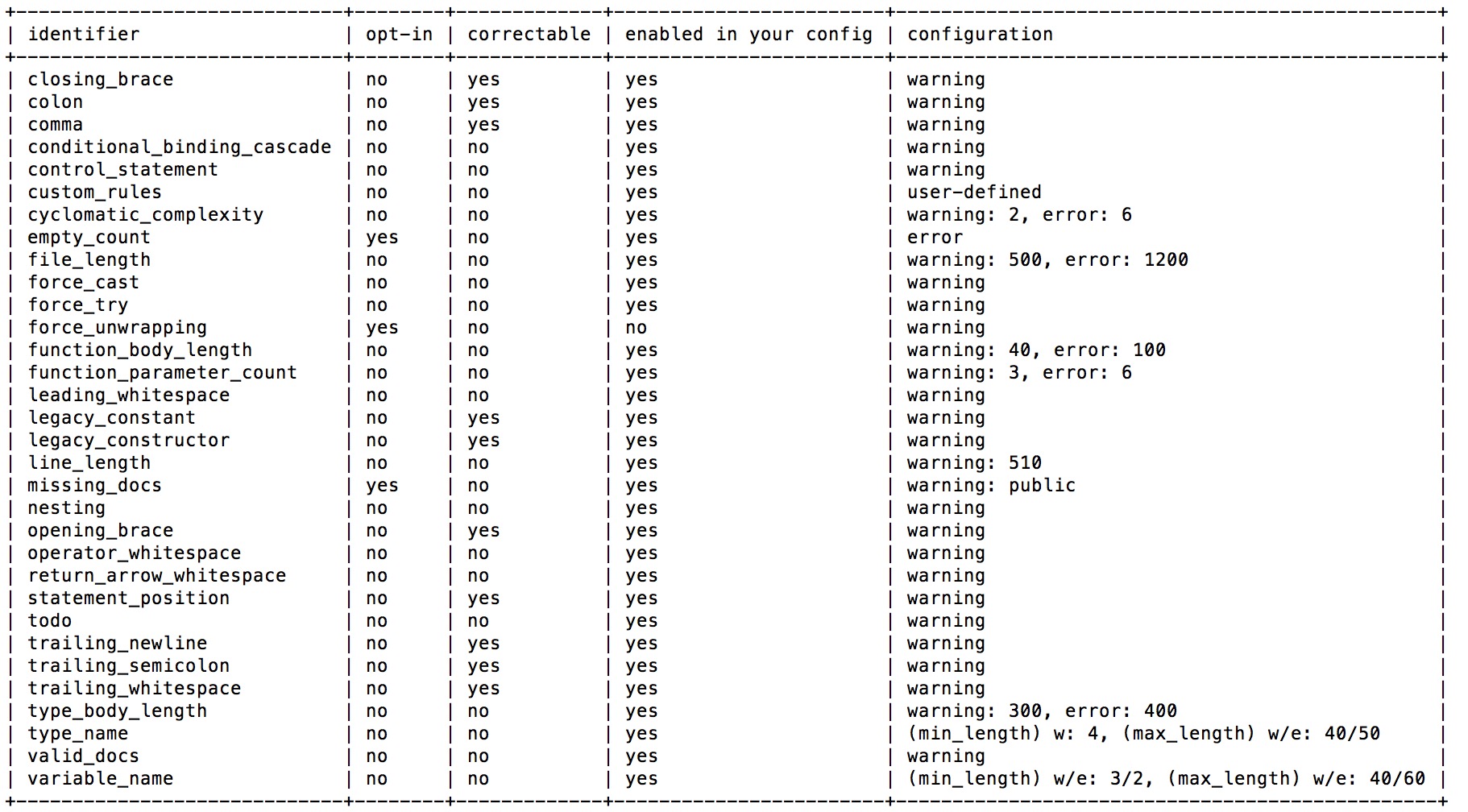 SwiftLintRules
Running Options
Sometimes running options can be very useful. Let’s focus on them:
-- pathThe path to the file or directory. For example if you want to lint only one file:
|
1
2
3
4
|
$ swiftlint autocorrect --path just_this_file.swift
|
-- configThe path to SwiftLint’s configuration file .swiftlint.yml:
|
1
2
3
4
|
$ swiftlint lint --config .swiftlint.yml
|
-- use-script-input-filesread SCRIPT_INPUT_FILE* environment variables as files. When using this parameter can be useful? For example when we only would like to lint modified files and new files tracked in our github repository. Example of usage which I found here:
|
1
2
3
4
5
6
7
8
9
10
11
12
13
14
15
16
17
18
19
20
|
if which swiftlint >/dev/null; then
count=0
for file_path in $(git ls-files -om --exclude-from=.gitignore | grep ".swift$"); do
export SCRIPT_INPUT_FILE_$count=$file_path
count=$((count + 1))
done
for file_path in $(git diff --cached --name-only | grep ".swift$"); do
export SCRIPT_INPUT_FILE_$count=$file_path
count=$((count + 1))
done
export SCRIPT_INPUT_FILE_COUNT=$count
swiftlint lint --use-script-input-files
else
echo "warning: SwiftLint not installed, download from https://github.com/realm/SwiftLint"
fi
|
|
1
2
3
4
5
6
7
8
|
- git ls-files: outputs the filenames in working directory
- o: (others: Show other (i.e. untracked) files in the output)
- m: (modified) Show modified files in the output
- exclude-from=.gitignore: it omits ignored files
- grep ".swift$" : search only .swift files
|
-- quietflag that prevents status messages like ‘Linting ‘ & ‘Done linting’ from being logged.-- reportergenerates report with selected format: JSON, Checkstyle, CSV, Xcode. For example:
|
1
2
3
4
|
$ swiftlint lint --reporter json
|
|
1
2
3
4
5
6
7
8
9
10
11
12
13
|
{
"reason" : "Opening braces should be preceded by a single space and on the same line as the declaration.",
"character" : 23,
"file" : "../ViewController.swift",
"rule_id" : "opening_brace",
"line" : 50,
"severity" : "Warning",
"type" : "Opening Brace Spacing"
},
...
|
Autocorrect
Very nice feature of SwiftLint is the auto-correction swiftlint autocorrect, which can automatically fix violations in your code. What type of violations can we fix?
- Closing brace. Closing brace with closing parenthesis should not have any whitespaces in the middle:
 closingBrace
- Colon. Colons should be next to the identifier when specifying a type:
 colonRule
- Comma Spacing. There should be no space before and one after any comma:
 commaRule
- Legacy Constant. Struct-scoped constants are preferred over legacy global constants:

Very nice article explaining the why.
- Legacy Constructor. Swift constructors are preferred over legacy convenience functions:

- Opening Brace Spacing. Opening braces should be preceded by a single space and on the same line as the declaration:

- Statement Position. Else and catch should be on the same line, one space after the previous declaration:

- Trailing Newline. Files should have a single trailing newline:

- Trailing Semicolon. Lines should not have trailing semicolons:

- Trailing Whitespace. Lines should not have trailing whitespace:

Cyclomatic Complexity
In SwiftLint you can find very nice rules, for example:
- File length rule: Files should not span too many lines.
- Function Parameter Count: Number of function parameters should be low.
- Type Body Length: Type bodies should not span too many lines.
- Type Name Rule: Type name should only contain alphanumeric characters, start with an uppercase character and span between 3 and 40 characters in length.
But when I first looked at the rules list my attention was captured by the Cyclomatic Complexity rule. What is this? Wiki says:
"is a software metric (measurement), used to indicate the complexity of a program. It is a quantitative measure of the number of linearly independent paths through a program’s source code."
This parameter just says how complex our functions are. To many ifs are not recommended. If you add 3rd nested if, you should wait a moment and reconsider your solution. This is my weakness, because sometimes I propose really overcomplicated solutions for quite easy problems: it can always be done much simpler… great rule for using by me:) How to add this bodyguard to your config file? Just add it on the end on .swiftlint.yml:
|
1
2
3
4
5
6
|
cyclomatic_complexity:
warning: 2 # two nested ifs are acceptable
error: 5 # six nested ifs shows warning, 6 causes compile error
|
swiftlint 你所要知道的所有!!的更多相关文章
- 你所不知道的setInterval
在你所不知道的setTimeout记载了下setTimeout相关,此篇则整理了下setInterval:作为拥有广泛应用场景(定时器,轮播图,动画效果,自动滚动等等),而又充满各种不确定性的这set ...
- 你所不知道的setTimeout
JavaScript提供定时执行代码的功能,叫做定时器(timer),主要由setTimeout()和setInterval()这两个函数来完成.它们向任务队列添加定时任务.初始接触它的人都觉得好简单 ...
- 你真的会玩SQL吗?你所不知道的 数据聚合
你真的会玩SQL吗?系列目录 你真的会玩SQL吗?之逻辑查询处理阶段 你真的会玩SQL吗?和平大使 内连接.外连接 你真的会玩SQL吗?三范式.数据完整性 你真的会玩SQL吗?查询指定节点及其所有父节 ...
- 你所不知道的linq(二)
上一篇说了from in select的本质,具体参见你所不知道的linq.本篇说下from...in... from... in... select 首先上一段代码,猜猜结果是什么? class P ...
- 【转】你所不知道的Android Studio调试技巧
这篇写Android studio debug技巧个人觉得写得不错,转自:http://www.jianshu.com/p/011eb88f4e0d# Android Studio目前已经成为开发An ...
- Android Service完全解析,关于服务你所需知道的一切(下)
转载请注册出处:http://blog.csdn.net/guolin_blog/article/details/9797169 在上一篇文章中,我们学习了Android Service相关的许多重要 ...
- Android Service完全解析,关于服务你所需知道的一切(上)
转载请注明出处:http://blog.csdn.net/guolin_blog/article/details/11952435 相信大多数朋友对Service这个名词都不会陌生,没错,一个老练的A ...
- SwiftLint——Swift代码检查及自动格式化工具
某软不给力,正在做的UWP项目停工了.官方说法是要等到RS2发布新的VOIP架构,再看看是不是给某软面子.虽然Beta用户中发出了几点愤怒的声音,但是木有用.有用的只能是某软的Skype for bu ...
- 你所不知道的SQL Server数据库启动过程,以及启动不起来的各种问题的分析及解决技巧
目前SQL Server数据库作为微软一款优秀的RDBMS,其本身启动的时候是很少出问题的,我们在平时用的时候,很少关注起启动过程,或者很少了解其底层运行过程,大部分的过程只关注其内部的表.存储过程. ...
随机推荐
- Go语言学习之6 反射详解
1.反射: 定义: 反射就是程序能够在运行时检查变量和值,求出它们的类型. 可以在运行时动态获取变量的相关信息 Import ( ...
- 如何抓取Amazon大图
https://www.douban.com/note/277033391/ 進入到日本Amazon看到某些商品有預覽圖可以放大欣賞,當你想要右鍵下載卻發現只得到空白圖或白邊圖.縮圖.切割圖,究竟原圖 ...
- BAT 大规模Hadoop集群实践
百度高级架构师马如悦:我的Hadoop 2.0 http://www.csdn.net/article/2011-04-28/296869 腾讯大规模Hadoop集群实践 腾讯 hadoop 基线版本 ...
- Hadoop – The Definitive Guide Examples,,IntelliJ
IntelliJ Project for Building Hadoop – The Definitive Guide Examples http://vichargrave.com/intellij ...
- 160. Intersection of Two Linked Lists(剑指Offer-两个链表的第一个公共结点)
题目: Write a program to find the node at which the intersection of two singly linked lists begins. Fo ...
- 『TensorFlow』第九弹_图像预处理_不爱红妆爱武装
部分代码单独测试: 这里实践了图像大小调整的代码,值得注意的是格式问题: 输入输出图像时一定要使用uint8编码, 但是数据处理过程中TF会自动把编码方式调整为float32,所以输入时没问题,输出时 ...
- shiro中记住我功能
Shiro提供了记住我(RememberMe)的功能,比如访问如淘宝等一些网站时,关闭了浏览器下次再打开时还是能记住你是谁,下次访问时无需再登录即可访问,基本流程如下: 1.首先在登录页面选中Reme ...
- readline与readlines之间的简单区别
首先来探望一下readline这位女同志: 偷窥一下user.txt内容: user password buqiuen 123456 xietingfeng 123456 一.readline例子: ...
- vivado实现模16的计数器
`timescale 1ns / 1ps module ctr_mod_16( clk, rst_n, count ); input clk, rst_n; :] count; wire clk, r ...
- vue中v-for和动态src问题及解决办法