
随鼠标轮动翻动层————jquery小练习
闲来无事在网站上看见一个网页制作的不错,就仿照做来看看。特此记录下来。
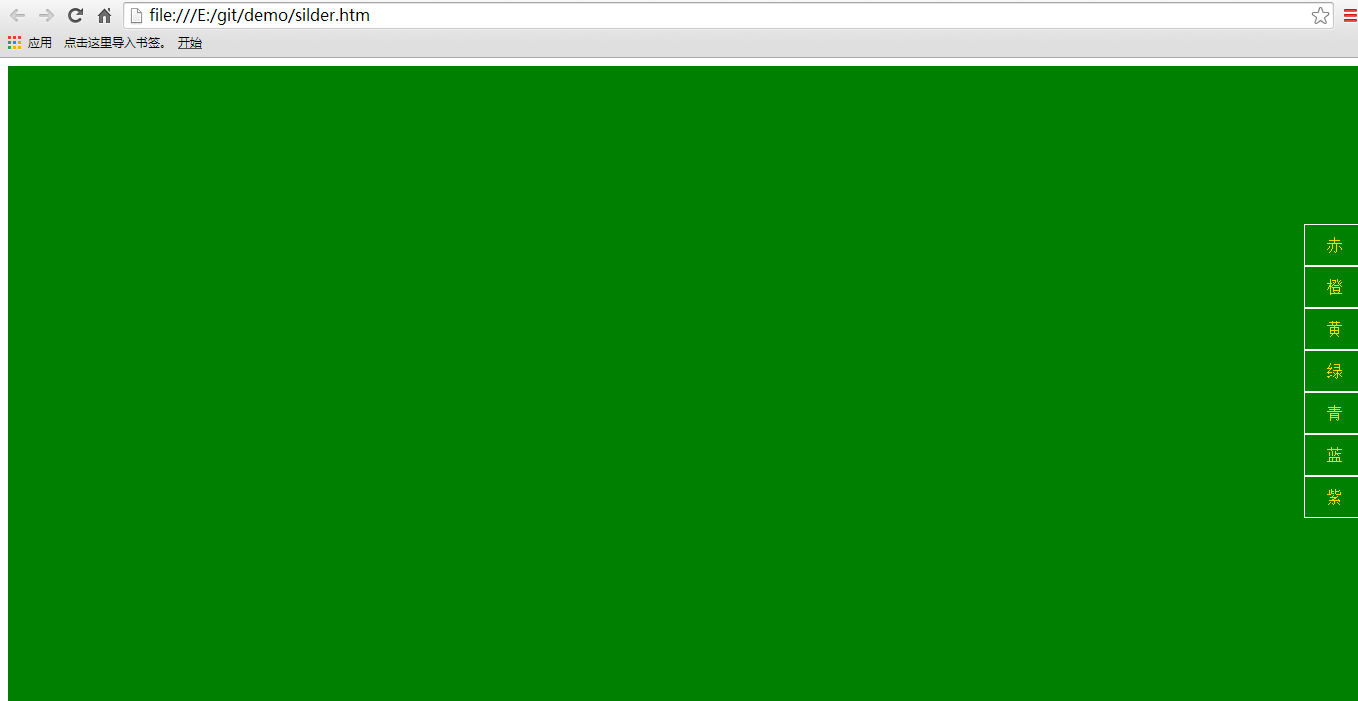
亮点:随鼠标上下滚动,展示页面随之不同,翻动效果。
功能点:鼠标向上,向下判断事件。
css 代码
     html {

            overflow-y: hidden;

        }

        .hide {

            display: none;

        }

        .show {

            display: block;

        }

        .box {

            height: 650px;

            width: 100%;

        }

        .foot {

            position: fixed;

            height: 100px;

            top: 150px;

            right: 0px;

        }

        ul li a:link {

            text-decoration: none;

            color:gold;

        }

        .foot ul li {

            display: block;

            width: 50px;

            height: 30px;

            border: solid 1px white;

            padding: 5px;

            text-align: center;

            vertical-align: middle;

            line-height: 30px;

            cursor: pointer;

        }

        .active {

            color: white;

        }

        #red {

            background-color: brown;

        }

        #orange {

            background-color: burlywood;

        }

        #yellow {

            background-color: yellow;

        }

        #green {

            background-color: green;

        }

        #blueness {

            background-color: chartreuse;

        }

        #blue {

            background-color: blue;

        }

        #purple {

            background-color: darkmagenta;

        }
js 代码
  var index1 = 0;

        var scrollFunc = function (e) {

            e = e || window.event;

            if (e.wheelDelta) {  //判断浏览器IE,谷歌滑轮事件

                if (e.wheelDelta > 0) { //当滑轮向上滚动时

                    //alert("滑轮向上滚动");

                    index1 = $("ul li a[class=active]").parent().index();

                    console.log(index1);

                    sliderIndex(index1, 0);

                }

                else { //当滑轮向下滚动时

                    //alert("滑轮向下滚动");

                    index1 = $("ul li a[class=active]").parent().index();

                    console.log(index1);

                    sliderIndex(index1, 1);

                }

            }

            //} else if (e.detail) {  //Firefox滑轮事件

            //    if (e.detail > 0) { //当滑轮向上滚动时

            //        alert("滑轮向上滚动");

            //    }

            //    if (e.detail < 0) { //当滑轮向下滚动时

            //        alert("滑轮向下滚动");

            //    }

            //}

        }

        //给页面绑定滑轮滚动事件

        //if (document.addEventListener) {//firefox

        //    document.addEventListener('DOMMouseScroll', scrollFunc, false);

        //}

        //滚动滑轮触发scrollFunc方法  //ie 谷歌

        window.onmousewheel = scrollFunc;

        function sliderIndex(index, type) {

            if (index == 0 && type == 0) {

                alert("到顶了!");

            }

            else if (index >= 0) {

                var num = 0;

                if (type == 0) {

                    num = index - 1;

                }

                else {

                    num = index + 1;

                }

                if (num == 7)

                    num = 0;

                $(".foot ul li a").removeClass("active");

                $(".foot ul li a:eq(" + num + ")").addClass("active");

                if (type==0)

                {

                    $("#main div:eq(" + num + ")").slideDown("slow");

                }

                else

                 $("#main div:eq(" + index + ")").slideUp("slow");

            }

        }

        $(function () {

            $(".foot ul li a").click(function () {

                $(".foot ul li a").removeClass("active");

                $(this).addClass("active");

                var box = $(this).attr("data-id");

                console.log(box);

                $("#" + box).slideUp("slow");

            })

        })
html 代码
 <div id="main">

        <div id="red" class="box"></div>

        <div id="orange" class="box"> </div>

        <div id="yellow" class="box"></div>

        <div id="green" class="box"> </div>

        <div id="blueness" class="box"></div>

        <div id="blue" class="box"> </div>

        <div id="purple" class="box"></div>

    </div>

    <div class="foot">

        <ul>

            <li data-id="red"> <a href="#red" class="active">赤</a> </li>

            <li data-id="orange"> <a href="#orange">橙 </a></li>

            <li data-id="yellow"> <a href="#yellow">黄</a> </li>

            <li data-id="green"> <a href="#green">绿</a> </li>

            <li data-id="blueness"> <a href="#blueness">青</a> </li>

            <li data-id="blue"> <a href="#blue">蓝</a> </li>

            <li data-id="purple"> <a href="#purple">紫</a></li>

        </ul>

    </div>
随鼠标轮动翻动层————jquery小练习的更多相关文章
- Jquery使用mouseenter和mouseleave实现鼠标经过弹出层且可以点击
<html xmlns="http://www.w3.org/1999/xhtml"> <head> <title>Jquery使用mousee ...
- jquery鼠标经过弹出层写法
jquery鼠标经过弹出层写法<pre><div class="navitem"><a href="/index.php?c=news&am ...
- jQuery小例
jQuery小例子 使用前,请先引用jquery 1,map遍历数组 2,jQuery对象与DOM对象才做元素和互转 3,prevall与nextall 4,jquery版的星星评分控件 5,jq ...
- 10个jQuery小技巧
收集的10个 jQuery 小技巧/代码片段,可以帮你快速开发. 1.返回顶部按钮 你可以利用 animate 和 scrollTop 来实现返回顶部的动画,而不需要使用其他插件. $('a.top' ...
- 人人必知的10个jQuery小技巧
收集的10个 jQuery 小技巧/代码片段,可以帮你快速开发. 1.返回顶部按钮 你可以利用 animate 和 scrollTop 来实现返回顶部的动画,而不需要使用其他插件. // Back t ...
- 程序员都会的 35 个 jQuery 小技巧
收集的35个 jQuery 小技巧/代码片段,可以帮你快速开发. 1. 禁止右键点击 $(document).ready(function(){ $(document).bind("cont ...
- 几个 jQuery 小提示和技巧
几个 jQuery 小提示和技巧 今天,我们将分享一些很有用的技巧和窍门给 jQuery 开发人员.jQuery 是最好的 JavaScript 库之一,用于简化动画,事件处理,支持 Ajax 和 H ...
- 必知的 15 个jQuery小技巧(干货)
jQuery小技巧(干活) 1.返回顶部按钮 你可以利用 animate 和 scrollTop 来实现返回顶部的动画,而不需要使用其他插件. $('a.top').click(function(){ ...
- 黑色半透明镂空遮罩指引效果实现jQuery小插件
/*! * by zhangxinxu(.com) 2017-05-18 * 新版上线时候的黑色半透明镂空遮罩指引效果实现jQuery小插件 * 兼容到IE8+ * MIT使用协议,使用时候保留版权 ...
随机推荐
- golang笔记——并发
go语言中的main函数也是运行在一个单独的goroutine中的,一般称为 main goroutine,main函数结束时,会打断其它 goroutine 的执行,但是其它 goroutine 不 ...
- bzoj1854 游戏
Description lxhgww最近迷上了一款游戏,在游戏里,他拥有很多的装备,每种装备都有2个属性,这些属性的值用[1,10000]之间的数表示.当他使用某种装备时,他只能使用该装备的某一个属性 ...
- druid 配置
连接池配置,以及相关配置 <bean id="logFilter" class="com.alibaba.druid.filter.logging.Slf4jLog ...
- 【bzoj3036】绿豆蛙的归宿
题目描述 随着新版百度空间的下线,Blog宠物绿豆蛙完成了它的使命,去寻找它新的归宿. 给出一个有向无环的连通图,起点为1终点为N,每条边都有一个长度.绿豆蛙从起点出发,走向终点.到达每一个顶点时,如 ...
- Java 串口通信
在Windows系统下,用Java开发串口通信相关的程序时,需要用到几个文件. (1)win32com.dll 要放在jdk\jre\bin目录下. (2)comm.jar 和javax.comm.p ...
- CPU的内部架构和工作原理 (转,相当不错)
http://blog.chinaunix.net/uid-23069658-id-3563960.html 一直以来,总以为CPU内部真是如当年学习<计算机组成原理>时书上所介绍的那样, ...
- 2.1WebApi的路由
这篇文章描述 ASP.NET Web API如何将 HTTP 请求通过路由去访问控制器. 如果你熟悉 ASP.NET MVC,Web API 路由是非常类似于 MVC 路由.主要的区别是 Web AP ...
- linux 最近使用的命令
vi 文件名 >> 按 i 键,进行编辑,编辑完,按ESC键,再按:q代表不保存退出,按:wq代表保存退出. ps aux|grep java >> 搜索目前启动的ja ...
- iOS界面跳转的一些优化方案
原文地址: http://blog.startry.com/2016/02/14/Think-Of-UIViewController-Switch/ iOS界面跳转的一些优化方案 App应用程序开发, ...
- nginx + tomcat配置负载均衡
目标:Nginx做为HttpServer,连接多个tomcat应用实例,进行负载均衡. 注:本例程以一台机器为例子,即同一台机器上装一个nginx和2个Tomcat且安装了JDK1.7. 1.安装Ng ...