
[Synthetic-data-with-text-and-image]
0 引言
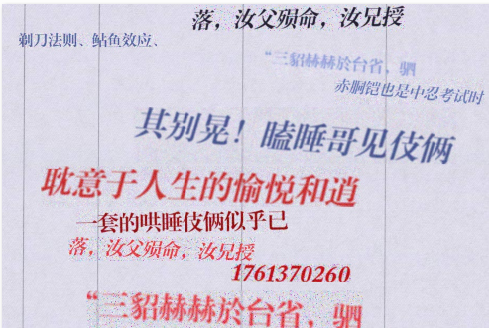
本文是之前为了解决如何将文字贴到图片上而编写的代码,默认是如发票一类的,所以并未考虑透视变换等。且采用的是pygame粘贴方式,之前也尝试过opencv的seamlessClone粘贴。
值得注意的是,通过修改参数,增加各种干扰操作(羽化,噪音等等),生成的数据集看似丰富,其实因为内在的数据分布还是十分单一,也就是用该数据集去作为ocr的模型训练集,得到的模型仍然无法在现实生活场景上使用。因为在现实世界中,你光照角度,拍摄角度,打印机用墨等等都是一种变量,而这些变量都会让现实世界的票据呈现的文字内在数据分布是十分丰富的。而通过简单的代码生成的数据分布却并不能覆盖,或者说重叠其中一部分。故而,通过代码生成数据集的方式是无法解决ocr现实数据集不够的问题的。
所需要的操作:
1 - 下载colors_new.cp;
2 - 将下面两份代码存成对应的get_color.py 和pygame_main.py;
3 - python 运行pygame_main.py即可。
# get_color.py

import cv2

import pickle as cp

import numpy as np

class ColorSample(object):

  def __init__(self):

    '''colors_new.cp来自https://github.com/JarveeLee/SynthText_Chinese_version/tree/master/data/models/colors_new.cp '''

     with open('colors_new.cp','rb') as f:

       self.colorsRGB = cp.load(f,encoding='latin-1')

       self.ncol = self.colorsRGB.shape[0]#4941

           # convert color-means from RGB to LAB for better nearest neighbour

           # computations:

       self.colorsLAB = np.r_[self.colorsRGB[:,0:3], self.colorsRGB[:,6:9]].astype('uint8')

       self.colorsLAB = np.squeeze(cv2.cvtColor(self.colorsLAB[None,:,:],cv2.COLOR_RGB2Lab))

  def sample_normal(self, col_mean, col_std):

      """

      sample from a normal distribution centered around COL_MEAN

      with standard deviation = COL_STD.

      """

      col_sample = col_mean + col_std * np.random.randn()

      return np.clip(col_sample, 0, 255).astype('uint8')

  def sample_from_data(self,bg_mat):

      """

      bg_mat : this is a nxmx3 RGB image.

      returns a tuple : (RGB_foreground, RGB_background)

      each of these is a 3-vector.

      """

      bg_orig = bg_mat.copy()

      bg_mat = cv2.cvtColor(bg_mat, cv2.COLOR_RGB2Lab)

      bg_mat = np.reshape(bg_mat, (np.prod(bg_mat.shape[:2]),3))

      bg_mean = np.mean(bg_mat,axis=0)

      norms = np.linalg.norm(self.colorsLAB-bg_mean[None,:], axis=1)

      # choose a random color amongst the top 3 closest matches:

      #nn = np.random.choice(np.argsort(norms)[:3])

      nn = np.argmin(norms)

      ## nearest neighbour color:

      data_col = self.colorsRGB[np.mod(nn,self.ncol),:]

      col1 = self.sample_normal(data_col[:3],data_col[3:6])

      col2 = self.sample_normal(data_col[6:9],data_col[9:12])

      if nn < self.ncol:

          return (col2, col1)

      else:

          # need to swap to make the second color close to the input backgroun color

          return (col1, col2)

if __name__ =='__main__':

  fg_col,bg_col = sample_from_data(bgi)
# -*- coding: utf-8 -*-

#pygame replace Image

import os

import cv2

import glob

import math

import random

import numpy as np

import os.path as osp

from xml.dom.minidom import Document

import multiprocessing as mp

import logging

from PIL import Image,ImageDraw,ImageFont

import secrets

import pygame

from pygame.locals import *

from pygame import freetype

import get_color

resultImgsDir = '/home/result_imgs'  # 生成的图片存放位置

resultXmlDir = '/home/result_xmls'    # 生产的xml存放位置

bgiDir = '/home/background_images' # 添加背景图片

gTtf= '/home/ttfs'  # 添加字体库

totalFile = '/home/zzc/data/synth_recepit_text/result_200.txt'  # 所需要添加的文字,一行一句(或者一行一个单词)

FORMAT = '%(asctime)-15s [%(processName)s] %(message)s'

logging.basicConfig(format = FORMAT)

gBlockSize = 20   #每一个进程一次处理的句子

ttfSize = [28,30,35,40,45,50,55,60,65]

#====test

#charset = [line.strip().split('\t')[1] for line in open('text/chars_gb2312').readlines()[:-1]]

def _addSaltNoise(block,level = 10):

    '''添加椒盐噪声 '''

    ran = np.random.randint(0,level,block.shape)

    salt = ran == 0

    pepper = ran == level

    block[salt]= 0

    block[pepper] = 255

    return block

def _addNoise(block,below=4,high =20):

    ''' 添加噪声'''

    randValue = np.random.randn(*block.shape)*np.random.randint(below,high)

    block = block+randValue

    block[block<0] = 0.0

    block[block>255] = 255.0

    block = block.astype('uint8')

    return block

def _feather(block, height):

    ''' 对图片进行羽化'''

    # determine the gaussian-blur std:

    if height <= 30 :

        bsz = 0.25

        ksz=1

    elif 30 < height < 50:

        bsz = max(0.30, 0.5 + 0.1*np.random.randn())

        ksz = 3

    else:

        bsz = max(0.5, 1.5 + 0.5*np.random.randn())

        ksz = 5#np.random.choice([1,3,5])#5

    return cv2.GaussianBlur(block,(ksz,ksz),bsz)

def _seamlessClone(obj,dst,center):

    ''' 进行前背景合成'''

    mask = 255 * np.ones(obj.shape, obj.dtype)

    #print('obj,shape:',obj.shape,' dst.shape:',dst.shape,' center:',center)

    try:

      mixed_clone = cv2.seamlessClone(obj, dst, mask, center, cv2.MIXED_CLONE)

    except Exception as e:

      print('exception:',obj.shape,dst.shape,mask.shape,center)

      raise e

    return mixed_clone

def _rander(bgiGame,string,rowStart,font,get_color):

    ''' 进行渲染'''

    isFailed = False

    width, height = bgiGame.get_size()

    '''sample the color '''

    bgiNp = pygame.surfarray.array3d(bgiGame)

    fg_col,bg_col = get_color.sample_from_data(bgiNp)

    #fg_col = fg_col +  np.random.randint(-3,3,[1,3])

    fg_col = fg_col.squeeze()

    '''change the property of font '''

    font.oblique = secrets.choice([False,True])

    font.rotation = secrets.choice(range(-5,5))

    test = font.render(string)

    txtwidth,txtheight = test[1].size

    if width-txtwidth < 0: isFailed = True

    colStart = secrets.randbelow(max(1, width-txtwidth))

    if rowStart+txtheight > height or colStart+txtwidth>width or isFailed:

        return bgiGame,rowStart,0,0,0

    '''render the text '''

    try:

      font.render_to(bgiGame,(colStart,rowStart), string, fg_col)

    except:

      print('fg_col',fg_col)

    '''surface 2 numpy '''

    bgiNp = pygame.surfarray.array3d(bgiGame)

    bgiNp = cv2.cvtColor(bgiNp.transpose([1,0,2]),cv2.COLOR_RGB2BGR)

    '''add noise and blur '''

    block = bgiNp[rowStart:rowStart+txtheight,colStart:colStart+txtwidth,:]

    block = _addNoise(block,4,20)

    if secrets.choice(range(4))==0:  block = _addSaltNoise(block,np.random.randint(70,80))

    block = _feather(block,txtheight)

    block = _addNoise(block,2,20)

    if secrets.choice(range(4))==0:  block = _addSaltNoise(block,np.random.randint(70,80))

    #=====

    bgiNp[rowStart:rowStart+txtheight,colStart:colStart+txtwidth,:] = block

    '''numpy 2 surface '''

    bgiNp = cv2.cvtColor(bgiNp.transpose([1,0,2]),cv2.COLOR_BGR2RGB)

    bgiGame = pygame.surfarray.make_surface(bgiNp)

    return bgiGame,rowStart,colStart,txtwidth,txtheight

    '''

    bgi = _seamlessClone(block,bgi,center)

    return bgi

    '''

def _paste(bgiGame,ttf,size,rowStart,curText,cols,get_color):

    #ttfont = ImageFont.truetype(ttf,size)

    ttfont = freetype.Font(ttf,size)

    curText = curText.strip()

    '''random the digit '''

    numberLength = 10

    digits = ['0','1','2','3','4','5','6','7','8','9']

    if secrets.randbelow(numberLength) == 0:

        #curText = ''.join([str(random.randint(0,9)) for _ in range(shouldMaxNumTxt)])

        curText = ''.join([secrets.choice(digits) for _ in range(numberLength)] )

        string = curText

        '''random the dot '''

        if secrets.randbelow(numberLength-2) == 0:

            dotInd = random.randint(1,numberLength-2)

            string = curText[:dotInd]+'.'+curText[dotInd+1:]

    else:

        string = curText

    '''如果maxNumText小于10,则跳过 '''

    numText = len(string)

    if numText != numberLength:

        string = ''

        return None,None,None,None

    bgiGame,rowStart,colStart,txtwidth,txtheight = _rander(bgiGame,string,rowStart,ttfont,get_color)

    return bgiGame,string,rowStart,colStart,txtwidth,txtheight

def _xml(doc,anno,string,xminT,yminT,xmaxT,ymaxT):

    ''' 生成对应的xml'''

    if not string: return

    body = doc.createElement('object')

    anno.appendChild(body)

    name = doc.createElement('name')

    nameText = doc.createTextNode('text')

    name.appendChild(nameText)

    body.appendChild(name)

    content = doc.createElement('textContent')

    contentText = doc.createTextNode(string)

    content.appendChild(contentText)

    body.appendChild(content)

    bndbox = doc.createElement('bndbox')

    xmin = doc.createElement('xmin')

    ymin = doc.createElement('ymin')

    xmax = doc.createElement('xmax')

    ymax = doc.createElement('ymax')

    xminText = doc.createTextNode(str(xminT))

    yminText = doc.createTextNode(str(yminT))

    xmaxText = doc.createTextNode(str(xmaxT))

    ymaxText = doc.createTextNode(str(ymaxT))

    xmin.appendChild(xminText)

    ymin.appendChild(yminText)

    xmax.appendChild(xmaxText)

    ymax.appendChild(ymaxText)

    bndbox.appendChild(xmin)

    bndbox.appendChild(ymin)

    bndbox.appendChild(xmax)

    bndbox.appendChild(ymax)

    body.appendChild(bndbox)

def paste(imgname,bgi,text,ttf,get_color):

    pygame.init()

    bgiGame = pygame.image.load(bgi)

    width,height = bgiGame.get_size()

    depth = bgiGame.get_bitsize()//8

    # 选择当前行的间距

    curRow = 0

    curRowInter = random.randint(3,7)

    curRow += curRowInter

    # 随机选择字体大小

    curTtfSize = random.choice(ttfSize)

    # 创建xml的文件头

    doc = Document()

    anno = doc.createElement('Annotations')

    doc.appendChild(anno)

    imgNameNode = doc.createElement('imgName')

    imgNameNode.appendChild(doc.createTextNode(imgname))

    anno.appendChild(imgNameNode)

    sizeNode = doc.createElement('size')

    widthNode = doc.createElement('width')

    widthNode.appendChild(doc.createTextNode(str(width)))

    sizeNode.appendChild(widthNode)

    heightNode = doc.createElement('height')

    heightNode.appendChild(doc.createTextNode(str(height)))

    sizeNode.appendChild(heightNode)

    depthNode = doc.createElement('depth')

    depthNode.appendChild(doc.createTextNode(str(depth)))

    sizeNode.appendChild(depthNode)

    anno.appendChild(sizeNode)

    # 循环的一行一行去将文字粘贴到对应的图片上

    curCol = 0; numTextDone = 0

    while curRow+curTtfSize <= width:

        # cur col point

        # cur row point

        '''paste the text on bgiGame '''

        if  curRow+curTtfSize <= width:

          # if curcols is bigger than 0.9*cols,then do not paste the line

           curText = secrets.choice(text)

           bgiGame,string,curRow,colStart,txtwidth,txtheight = _paste(bgiGame,ttf,curTtfSize,curRow,curText,width,get_color)

           if not string: continue

           numTextDone += 1

           _xml(doc,anno,string,xminT = colStart,yminT = curRow,xmaxT = colStart+txtwidth,ymaxT = curRow+txtheight)

           curRow += txtheight

           curRow += curRowInter

        # cur intervel

        curRowInter = random.randint(3,6)

        # cur ttf size

        curTtfSize = random.choice(ttfSize)

    bgi = pygame.surfarray.array3d(bgiGame).transpose([1,0,2])

    bgi = cv2.cvtColor(bgi,cv2.COLOR_RGB2BGR)

    return bgi, doc, numTextDone

def handle(indTexts):

    ind, texts = indTexts

    # 获取进程号

    pid = os.getpid()

    # 随机获取颜色

    getcolor = get_color.ColorSample()

    bgis = glob.glob( osp.join(bgiDir, '*.jpg') )

    #  随机选择当前一张背景图

    bgipath = random.choice(bgis)

    # 随机获取字体

    ttf = random.choice(ttfs)

    # 调用paste函数进行操作

    imgname = 'bgi{}_ind{}_pid{}_ttf{}.jpg'.format(osp.basename(bgipath),ind,pid,osp.basename(ttf))

    bgiNp,doc,numTextDone =  paste(imgname,bgipath,texts,ttf,getcolor)

    imgnamep = 'bgi{}_ind{}_{}Of{}_ttf{}.jpg'.format(osp.basename(bgipath),ind,numTextDone,len(texts),osp.basename(ttf))

    logging.warn(imgnamep)

    # 将图片和xml写入到对应位置

    cv2.imwrite(osp.join(resultImgsDir,imgname),bgiNp)

    xmlFileName = osp.join(resultXmlDir,'{}.xml'.format(imgname[:-4]))

    with open(xmlFileName, "w") as fxml:

        fxml.write(str(doc.toprettyxml(indent = "    ", newl = "\n", encoding = "utf-8"),encoding = 'utf-8'))

    pygame.quit()

    return

if __name__ == '__main__':

    ''' 1 - 先读取文字行,然后按照进程个数进行划分'''

    total = [line.strip() for line in open(totalFile)]

    numP = 30

    totalSP = []

    inter = math.ceil(len(total)/gBlockSize)

    for i in range(inter):

        totalSP.append(total[i::inter])

    '''2 - 开启多进程进行处理 '''

    print('begin',len(totalSP))

    p = mp.Pool(numP)

    p.map(handle, enumerate(totalSP))
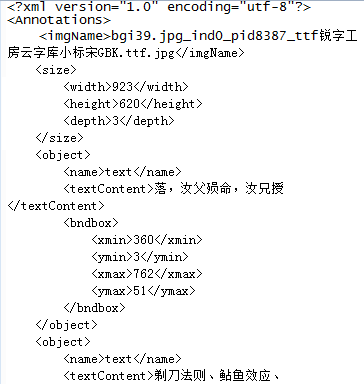
结果如图:
bgi39.jpg_ind0_pid8387_ttf锐字工房云字库小标宋GBK.ttf.jpg
bgi39.jpg_ind0_pid8387_ttf锐字工房云字库小标宋GBK.ttf.xml
下面是采用PIL和opencv的seamlessClone粘贴方式,只是PIL这个包进行文字粘贴的时候,不支持文字旋转,且简单的文字粘贴,好像pygame的结果和seamlessClone效果差不多。
# -*- coding: utf-8 -*-

import os

import cv2

import glob

import math

import random

import numpy as np

import os.path as osp

from xml.dom.minidom import Document

import multiprocessing as mp

import logging

from PIL import Image,ImageDraw,ImageFont

import pygame

from pygame.locals import *

from pygame import freetype

import get_color

resultImgsDir = 'crnn_result_imgs1'

resultXmlDir = 'crnn_result_xmls1'

bgiDir = 'bgi'

gTtf= 'ttfs'

totalFile = 'texts.txt'

FORMAT = '%(asctime)-15s [%(processName)s] %(message)s'

logging.basicConfig(format = FORMAT)

gBlockSize = 20#num of each process's sentences

ttfSize = [28,30,35,40,45,50,55,60,65]

def _addSaltNoise(block,level = 10):

    ran = np.random.randint(0,level,block.shape)

    salt = ran == 0

    pepper = ran == level

    block[salt]= 0

    block[pepper] = 255

    return block

def _addNoise(block):

    randValue = np.random.randn(*block.shape)*np.random.randint(2,20)

    block = block+randValue

    block[block<0] = 0.0

    block[block>255] = 255.0

    block = block.astype('uint8')

    return block

def _feather(block, height):

    # determine the gaussian-blur std:

    if height <= 30 :

        bsz = 0.25

        ksz=1

    elif 30 < height < 50:

        bsz = max(0.30, 0.5 + 0.1*np.random.randn())

        ksz = 3

    else:

        bsz = max(0.5, 1.5 + 0.5*np.random.randn())

        ksz = 5#np.random.choice([1,3,5])#5

    return cv2.GaussianBlur(block,(ksz,ksz),bsz)

def _seamlessClone(obj,dst,center):

    mask = 255 * np.ones(obj.shape, obj.dtype)

    #print('obj,shape:',obj.shape,' dst.shape:',dst.shape,' center:',center)

    try:

      mixed_clone = cv2.seamlessClone(obj, dst, mask, center, cv2.MIXED_CLONE)

    except Exception as e:

      print('exception:',obj.shape,dst.shape,mask.shape,center)

      raise e

    return mixed_clone

def _rander(rawbgi,string,bgr,point,font,get_color):

    bgi = Image.fromarray(rawbgi)

    draw = ImageDraw.Draw(bgi)

    curCol,curRow = point

    fg_col,bg_col = get_color.sample_from_data(rawbgi)

    fg_col = fg_col +  np.random.randint(-3,3,[1,3])

    draw.text((curCol,curRow),string, tuple(fg_col.squeeze()), font=font)

    width,height = font.getsize(string)

    region = curCol,curRow,curCol+width,curRow+height

    bgi = np.array(bgi)

    block = bgi[curRow:curRow+height,curCol:curCol+width,:]

    block = _addNoise(block)

    block = _feather(block,height)

    block = _addNoise(block)

    block = _addSaltNoise(block,50)

    #=====

    # bgi[curRow:curRow+height,curCol:curCol+width,:] = block

    # return bgi

    #cv2.imwrite('/home/zzc/tmp111.jpg',block)

    center = (curCol+curCol+width)//2,(curRow+curRow+height)//2

#    width, height, channels = bgi.shape

#    center = height//2,width//2

    bgi = _seamlessClone(block,bgi,center)

    return bgi

def _paste(bgi,ttf,size,curRow,curCol,curText,cols,get_color):

    ttfont = ImageFont.truetype(ttf,size)

    maxNumText = math.floor((cols-curCol)/size)

    curText = curText.strip()

    '''random the digit '''

    shouldMaxNumTxt = 10

    if random.randint(0,9)==9 and maxNumText >= 4:

        curText = ''.join([str(random.randint(0,9)) for _ in range(shouldMaxNumTxt)])

        string = curText

        '''random the dot '''

        if random.randint(0,7)==7:

            dotInd = random.randint(1,shouldMaxNumTxt-2)

            string = curText[:dotInd]+'.'+curText[dotInd+1:]

    else:

        startInd = random.randint(0,max(0,len(curText)-shouldMaxNumTxt-1))

        string = curText[startInd:startInd+shouldMaxNumTxt].strip()

        string= curText

    '''如果maxNumText小于10,则跳过 '''

    if maxNumText < 10 or len(curText)<10: string = ''

    numText = len(string)

    if numText == 10 :

        bgr = [random.randint(100,254) for i in range(3)]

        bgi = _rander(bgi,string,bgr,(curCol,curRow),ttfont,get_color)

    else:

        string = ''

    #=====

    '''get printed width height '''

    width,height = ttfont.getsize(string)

    return bgi,string,width,height

def _xml(doc,anno,string,xminT,yminT,xmaxT,ymaxT):

    if not string: return

    body = doc.createElement('object')

    anno.appendChild(body)

    name = doc.createElement('name')

    nameText = doc.createTextNode('text')

    name.appendChild(nameText)

    body.appendChild(name)

    content = doc.createElement('textContent')

    contentText = doc.createTextNode(string)

    content.appendChild(contentText)

    body.appendChild(content)

    bndbox = doc.createElement('bndbox')

    xmin = doc.createElement('xmin')

    ymin = doc.createElement('ymin')

    xmax = doc.createElement('xmax')

    ymax = doc.createElement('ymax')

    xminText = doc.createTextNode(str(xminT))

    yminText = doc.createTextNode(str(yminT))

    xmaxText = doc.createTextNode(str(xmaxT))

    ymaxText = doc.createTextNode(str(ymaxT))

    xmin.appendChild(xminText)

    ymin.appendChild(yminText)

    xmax.appendChild(xmaxText)

    ymax.appendChild(ymaxText)

    bndbox.appendChild(xmin)

    bndbox.appendChild(ymin)

    bndbox.appendChild(xmax)

    bndbox.appendChild(ymax)

    body.appendChild(bndbox)

def paste(imgname,bgi,text,ttf,ttfRandom,get_color):

    bgi = cv2.imread(bgi)

    rows,cols,depth = bgi.shape

 #   bgi = Image.fromarray(bgi)

 #   draw = ImageDraw.Draw(bgi)

    curRow = 0

    curRowInter = random.randint(3,7)

    curRow += curRowInter

    curTtfSize = random.randint(0,len(ttfRandom)-1)

    #create the xml head

    doc = Document()

    anno = doc.createElement('Annotations')

    doc.appendChild(anno)

    imgNameNode = doc.createElement('imgName')

    imgNameNode.appendChild(doc.createTextNode(imgname))

    anno.appendChild(imgNameNode)

    height,width,depth = rows,cols,depth

    sizeNode = doc.createElement('size')

    widthNode = doc.createElement('width')

    widthNode.appendChild(doc.createTextNode(str(width)))

    sizeNode.appendChild(widthNode)

    heightNode = doc.createElement('height')

    heightNode.appendChild(doc.createTextNode(str(height)))

    sizeNode.appendChild(heightNode)

    depthNode = doc.createElement('depth')

    depthNode.appendChild(doc.createTextNode(str(depth)))

    sizeNode.appendChild(depthNode)

    anno.appendChild(sizeNode)

    while curRow + ttfRandom[curTtfSize] <=rows:

        #cur col point

        curCol = random.randint(0,cols-1)

        #cur row point

        '''paste the text on bgi '''

        if curCol < cols*0.9 and curRow+ttfRandom[curTtfSize] <= rows:

          #if curcols is bigger than 0.9*cols,then do not paste the line

           curText = text[random.randint(0,len(text)-1)]

           bgi,string,width,height = _paste(bgi,ttf,ttfRandom[curTtfSize],curRow,curCol,curText,cols,get_color)

           if not string: continue

           _xml(doc,anno,string,xminT = curCol,yminT = curRow,xmaxT = curCol+width,ymaxT = curRow+height)

           curRow += curRowInter

           curRow += ttfRandom[curTtfSize]

        #cur intervel

        curRowInter = random.randint(3,7)

        #cur ttf size

        curTtfSize = random.randint(0,len(ttfRandom)-1)

    return np.array(bgi), doc

def handle(text):

    ind, text = text

    #pid

    pid = os.getpid()

    #background image

    getcolor = get_color.ColorSample()

    bgis = glob.glob( osp.join(bgiDir,'*.jpg') )

    #select one background image

    curBgi = random.randint(0,len(bgis)-1)

    bgi = bgis[curBgi]

    #ttf

    ttfs = glob.glob(osp.join(gTtf,'*.ttf'))

    curTtf = random.randint(0,len(ttfs)-1)

    ttf = ttfs[curTtf]

    #ttf size random

    ttfRandom = [1]+[ random.randint(0,1) for i in range(len(ttfSize)-1)]

    ttfRandom = [ran*size for ran,size in zip(ttfRandom, ttfSize)]

    ttfRandom = [i for i in ttfRandom if i != 0]

    imgname = '{}_{}_{}.jpg'.format(ind,pid,curTtf)

    bgi,doc =  paste(imgname,bgi,text,ttf,ttfRandom,getcolor)

    cv2.imwrite(osp.join(resultImgsDir,imgname),bgi)

    xmlFileName = osp.join(resultXmlDir,'{}.xml'.format(imgname[:-4]))

    with open(xmlFileName, "w") as fxml:

        fxml.write(str(doc.toprettyxml(indent = "    ", newl = "\n", encoding = "utf-8"),encoding = 'utf-8'))

    logging.warn('{}'.format(ind))

    return

if __name__ == '__main__':

    total = [line.strip() for line in open(totalFile)]

    numP = 30

    totalSP = []

    inter = math.ceil(len(total)/gBlockSize)

    for i in range(inter):

        totalSP.append(total[i::inter])

    print('begin')

    p = mp.Pool(numP)

    p.map(handle, enumerate(totalSP[:1000]))
[Synthetic-data-with-text-and-image]的更多相关文章
- 域迁移DA | Learning From Synthetic Data: Addressing Domain Shift for Se | CVPR2018
文章转自:微信公众号「机器学习炼丹术」 作者:炼丹兄(已授权) 联系方式:微信cyx645016617 论文名称:"Learning From Synthetic Data: Address ...
- 笔记:程序内存管理 .bss .data .rodata .text stack heap
1.未初始化的全局变量(.bss段) bss段用来存放 没有被初始化 和 已经被初始化为0 的全局变量.如下例代码: #include<stdio.h> int bss_array[102 ...
- BSS段 data段 text段 堆heap 和 栈stack
BSS段:BSS段(bss segment)通常是指用来存放程序中未初始化的全局变量的一块内存区域.BSS是英文Block Started by Symbol的简称.BSS段属于静态内存分配. 数 ...
- bss、data、text、heap(堆)与stack(栈)
bss段: bss段(bss segment)通常是指用来存放程序中未初始化的全局变量和静态变量(static)的一块内存区域. bss是英文Block Started by Symbol的简称. b ...
- 2016CVPR论文集
http://www.cv-foundation.org/openaccess/CVPR2016.py ORAL SESSION Image Captioning and Question Answe ...
- CVPR2016 Paper list
CVPR2016 Paper list ORAL SESSIONImage Captioning and Question Answering Monday, June 27th, 9:00AM - ...
- 【论文速读】Fangfang Wang_CVPR2018_Geometry-Aware Scene Text Detection With Instance Transformation Network
Han Hu--[ICCV2017]WordSup_Exploiting Word Annotations for Character based Text Detection 作者和代码 caffe ...
- Toward Scalable Systems for Big Data Analytics: A Technology Tutorial (I - III)
ABSTRACT Recent technological advancement have led to a deluge of data from distinctive domains (e.g ...
- Resumable Media Uploads in the Google Data Protocol
Eric Bidelman, Google Apps APIs team February 2010 Introduction The Resumable Protocol Initiating a ...
- Data Binding(数据绑定)用户指南
1)介绍 这篇文章介绍了如何使用Data Binding库来写声明的layouts文件,并且用最少的代码来绑定你的app逻辑和layouts文件. Data Binding库不仅灵活而且广泛兼容- 它 ...
随机推荐
- JS之iscroll.js的使用详解
入门 Scroll是一个类,每个需要使用滚动功能的区域均要进行初始化.每个页面上的iScroll实例数目在设备的CPU和内存能承受的范围内是没有限制的. 尽可能保持DOM结构的简洁.iScroll使用 ...
- Nginx 增加 Image 缩略图 功能
Nginx 增加 Image 缩略图功能,需要使用Nginx Image 缩略图 模块 官网地址:https://github.com/3078825/ngx_image_th ...
- SEIG Modbus 3.4 CVE-2013-0662 漏洞分析与利用
前言 Schneider Electric Modbus Serial Driver 会监听 27700 端口,程序在处理客户端发送的数据时会导致栈溢出. 测试环境: windows xp sp3 相 ...
- Related concepts of testing
根据是否知道源代码测试可以分为黑盒和白盒. 黑盒:功能测试. 白盒:知道源代码,要写测试代码. 根据测试的粒度. 方法测试: 单元测试: 集成测试: 系统测试: 根据测试的暴力程度. 压力测试:谷歌工 ...
- Hook技术--Activity的启动过程的拦截
1.寻找Hook点的原则 Android中主要是依靠分析系统源码类来做到的,首先我们得找到被Hook的对象,我称之为Hook点:什么样的对象比较好Hook呢?自然是容易找到的对象.什么样的对象容易找到 ...
- OkHttp3源码详解(二) 整体流程
1.简单使用 同步: @Override public Response execute() throws IOException { synchronized (this) { if (execut ...
- Kotlin入门(7)循环语句的操作
上一篇文章介绍了简单分支与多路分支的实现,控制语句除了这两种条件分支之外,还有对循环处理的控制,那么本文接下来继续阐述Kotlin如何对循环语句进行操作. Koltin处理循环语句依旧采纳了for和w ...
- OneAPM大讲堂 | 谁更快?JavaScript 框架性能评测
文章系国内领先的 ITOM 管理平台供应商 OneAPM 编译呈现. 网页性能是一个丰富且又复杂的话题.在本帖中,我们会将讨论的范围局限在前端 JavaScript 框架上,探究相对于另外一种框架而言 ...
- Info.plist的CFBundleIdentifier、CFBundleName、BundleDisplayName
plist关键字段: CFBundleIdentifier:应用包名.唯一标识 CFBundleVersion:文件版本号,可以每次发版本递增 CFBundleShortVersionString:a ...
- Win10 + MASM32 + EditPlus 汇编语言编程环境设置
下载安装MASM32汇编环境 官方下载站:MASM32 环境变量配置 配置MasmHome变量,值为masm32的安装目录: 配置include和lib变量 include : %MasmHome%\ ...