
[Synthetic-data-with-text-and-image]
0 引言
本文是之前为了解决如何将文字贴到图片上而编写的代码,默认是如发票一类的,所以并未考虑透视变换等。且采用的是pygame粘贴方式,之前也尝试过opencv的seamlessClone粘贴。
值得注意的是,通过修改参数,增加各种干扰操作(羽化,噪音等等),生成的数据集看似丰富,其实因为内在的数据分布还是十分单一,也就是用该数据集去作为ocr的模型训练集,得到的模型仍然无法在现实生活场景上使用。因为在现实世界中,你光照角度,拍摄角度,打印机用墨等等都是一种变量,而这些变量都会让现实世界的票据呈现的文字内在数据分布是十分丰富的。而通过简单的代码生成的数据分布却并不能覆盖,或者说重叠其中一部分。故而,通过代码生成数据集的方式是无法解决ocr现实数据集不够的问题的。
所需要的操作:
1 - 下载colors_new.cp;
2 - 将下面两份代码存成对应的get_color.py 和pygame_main.py;
3 - python 运行pygame_main.py即可。
# get_color.py

import cv2

import pickle as cp

import numpy as np

class ColorSample(object):

  def __init__(self):

    '''colors_new.cp来自https://github.com/JarveeLee/SynthText_Chinese_version/tree/master/data/models/colors_new.cp '''

     with open('colors_new.cp','rb') as f:

       self.colorsRGB = cp.load(f,encoding='latin-1')

       self.ncol = self.colorsRGB.shape[0]#4941

           # convert color-means from RGB to LAB for better nearest neighbour

           # computations:

       self.colorsLAB = np.r_[self.colorsRGB[:,0:3], self.colorsRGB[:,6:9]].astype('uint8')

       self.colorsLAB = np.squeeze(cv2.cvtColor(self.colorsLAB[None,:,:],cv2.COLOR_RGB2Lab))

  def sample_normal(self, col_mean, col_std):

      """

      sample from a normal distribution centered around COL_MEAN

      with standard deviation = COL_STD.

      """

      col_sample = col_mean + col_std * np.random.randn()

      return np.clip(col_sample, 0, 255).astype('uint8')

  def sample_from_data(self,bg_mat):

      """

      bg_mat : this is a nxmx3 RGB image.

      returns a tuple : (RGB_foreground, RGB_background)

      each of these is a 3-vector.

      """

      bg_orig = bg_mat.copy()

      bg_mat = cv2.cvtColor(bg_mat, cv2.COLOR_RGB2Lab)

      bg_mat = np.reshape(bg_mat, (np.prod(bg_mat.shape[:2]),3))

      bg_mean = np.mean(bg_mat,axis=0)

      norms = np.linalg.norm(self.colorsLAB-bg_mean[None,:], axis=1)

      # choose a random color amongst the top 3 closest matches:

      #nn = np.random.choice(np.argsort(norms)[:3])

      nn = np.argmin(norms)

      ## nearest neighbour color:

      data_col = self.colorsRGB[np.mod(nn,self.ncol),:]

      col1 = self.sample_normal(data_col[:3],data_col[3:6])

      col2 = self.sample_normal(data_col[6:9],data_col[9:12])

      if nn < self.ncol:

          return (col2, col1)

      else:

          # need to swap to make the second color close to the input backgroun color

          return (col1, col2)

if __name__ =='__main__':

  fg_col,bg_col = sample_from_data(bgi)
# -*- coding: utf-8 -*-

#pygame replace Image

import os

import cv2

import glob

import math

import random

import numpy as np

import os.path as osp

from xml.dom.minidom import Document

import multiprocessing as mp

import logging

from PIL import Image,ImageDraw,ImageFont

import secrets

import pygame

from pygame.locals import *

from pygame import freetype

import get_color

resultImgsDir = '/home/result_imgs'  # 生成的图片存放位置

resultXmlDir = '/home/result_xmls'    # 生产的xml存放位置

bgiDir = '/home/background_images' # 添加背景图片

gTtf= '/home/ttfs'  # 添加字体库

totalFile = '/home/zzc/data/synth_recepit_text/result_200.txt'  # 所需要添加的文字,一行一句(或者一行一个单词)

FORMAT = '%(asctime)-15s [%(processName)s] %(message)s'

logging.basicConfig(format = FORMAT)

gBlockSize = 20   #每一个进程一次处理的句子

ttfSize = [28,30,35,40,45,50,55,60,65]

#====test

#charset = [line.strip().split('\t')[1] for line in open('text/chars_gb2312').readlines()[:-1]]

def _addSaltNoise(block,level = 10):

    '''添加椒盐噪声 '''

    ran = np.random.randint(0,level,block.shape)

    salt = ran == 0

    pepper = ran == level

    block[salt]= 0

    block[pepper] = 255

    return block

def _addNoise(block,below=4,high =20):

    ''' 添加噪声'''

    randValue = np.random.randn(*block.shape)*np.random.randint(below,high)

    block = block+randValue

    block[block<0] = 0.0

    block[block>255] = 255.0

    block = block.astype('uint8')

    return block

def _feather(block, height):

    ''' 对图片进行羽化'''

    # determine the gaussian-blur std:

    if height <= 30 :

        bsz = 0.25

        ksz=1

    elif 30 < height < 50:

        bsz = max(0.30, 0.5 + 0.1*np.random.randn())

        ksz = 3

    else:

        bsz = max(0.5, 1.5 + 0.5*np.random.randn())

        ksz = 5#np.random.choice([1,3,5])#5

    return cv2.GaussianBlur(block,(ksz,ksz),bsz)

def _seamlessClone(obj,dst,center):

    ''' 进行前背景合成'''

    mask = 255 * np.ones(obj.shape, obj.dtype)

    #print('obj,shape:',obj.shape,' dst.shape:',dst.shape,' center:',center)

    try:

      mixed_clone = cv2.seamlessClone(obj, dst, mask, center, cv2.MIXED_CLONE)

    except Exception as e:

      print('exception:',obj.shape,dst.shape,mask.shape,center)

      raise e

    return mixed_clone

def _rander(bgiGame,string,rowStart,font,get_color):

    ''' 进行渲染'''

    isFailed = False

    width, height = bgiGame.get_size()

    '''sample the color '''

    bgiNp = pygame.surfarray.array3d(bgiGame)

    fg_col,bg_col = get_color.sample_from_data(bgiNp)

    #fg_col = fg_col +  np.random.randint(-3,3,[1,3])

    fg_col = fg_col.squeeze()

    '''change the property of font '''

    font.oblique = secrets.choice([False,True])

    font.rotation = secrets.choice(range(-5,5))

    test = font.render(string)

    txtwidth,txtheight = test[1].size

    if width-txtwidth < 0: isFailed = True

    colStart = secrets.randbelow(max(1, width-txtwidth))

    if rowStart+txtheight > height or colStart+txtwidth>width or isFailed:

        return bgiGame,rowStart,0,0,0

    '''render the text '''

    try:

      font.render_to(bgiGame,(colStart,rowStart), string, fg_col)

    except:

      print('fg_col',fg_col)

    '''surface 2 numpy '''

    bgiNp = pygame.surfarray.array3d(bgiGame)

    bgiNp = cv2.cvtColor(bgiNp.transpose([1,0,2]),cv2.COLOR_RGB2BGR)

    '''add noise and blur '''

    block = bgiNp[rowStart:rowStart+txtheight,colStart:colStart+txtwidth,:]

    block = _addNoise(block,4,20)

    if secrets.choice(range(4))==0:  block = _addSaltNoise(block,np.random.randint(70,80))

    block = _feather(block,txtheight)

    block = _addNoise(block,2,20)

    if secrets.choice(range(4))==0:  block = _addSaltNoise(block,np.random.randint(70,80))

    #=====

    bgiNp[rowStart:rowStart+txtheight,colStart:colStart+txtwidth,:] = block

    '''numpy 2 surface '''

    bgiNp = cv2.cvtColor(bgiNp.transpose([1,0,2]),cv2.COLOR_BGR2RGB)

    bgiGame = pygame.surfarray.make_surface(bgiNp)

    return bgiGame,rowStart,colStart,txtwidth,txtheight

    '''

    bgi = _seamlessClone(block,bgi,center)

    return bgi

    '''

def _paste(bgiGame,ttf,size,rowStart,curText,cols,get_color):

    #ttfont = ImageFont.truetype(ttf,size)

    ttfont = freetype.Font(ttf,size)

    curText = curText.strip()

    '''random the digit '''

    numberLength = 10

    digits = ['0','1','2','3','4','5','6','7','8','9']

    if secrets.randbelow(numberLength) == 0:

        #curText = ''.join([str(random.randint(0,9)) for _ in range(shouldMaxNumTxt)])

        curText = ''.join([secrets.choice(digits) for _ in range(numberLength)] )

        string = curText

        '''random the dot '''

        if secrets.randbelow(numberLength-2) == 0:

            dotInd = random.randint(1,numberLength-2)

            string = curText[:dotInd]+'.'+curText[dotInd+1:]

    else:

        string = curText

    '''如果maxNumText小于10,则跳过 '''

    numText = len(string)

    if numText != numberLength:

        string = ''

        return None,None,None,None

    bgiGame,rowStart,colStart,txtwidth,txtheight = _rander(bgiGame,string,rowStart,ttfont,get_color)

    return bgiGame,string,rowStart,colStart,txtwidth,txtheight

def _xml(doc,anno,string,xminT,yminT,xmaxT,ymaxT):

    ''' 生成对应的xml'''

    if not string: return

    body = doc.createElement('object')

    anno.appendChild(body)

    name = doc.createElement('name')

    nameText = doc.createTextNode('text')

    name.appendChild(nameText)

    body.appendChild(name)

    content = doc.createElement('textContent')

    contentText = doc.createTextNode(string)

    content.appendChild(contentText)

    body.appendChild(content)

    bndbox = doc.createElement('bndbox')

    xmin = doc.createElement('xmin')

    ymin = doc.createElement('ymin')

    xmax = doc.createElement('xmax')

    ymax = doc.createElement('ymax')

    xminText = doc.createTextNode(str(xminT))

    yminText = doc.createTextNode(str(yminT))

    xmaxText = doc.createTextNode(str(xmaxT))

    ymaxText = doc.createTextNode(str(ymaxT))

    xmin.appendChild(xminText)

    ymin.appendChild(yminText)

    xmax.appendChild(xmaxText)

    ymax.appendChild(ymaxText)

    bndbox.appendChild(xmin)

    bndbox.appendChild(ymin)

    bndbox.appendChild(xmax)

    bndbox.appendChild(ymax)

    body.appendChild(bndbox)

def paste(imgname,bgi,text,ttf,get_color):

    pygame.init()

    bgiGame = pygame.image.load(bgi)

    width,height = bgiGame.get_size()

    depth = bgiGame.get_bitsize()//8

    # 选择当前行的间距

    curRow = 0

    curRowInter = random.randint(3,7)

    curRow += curRowInter

    # 随机选择字体大小

    curTtfSize = random.choice(ttfSize)

    # 创建xml的文件头

    doc = Document()

    anno = doc.createElement('Annotations')

    doc.appendChild(anno)

    imgNameNode = doc.createElement('imgName')

    imgNameNode.appendChild(doc.createTextNode(imgname))

    anno.appendChild(imgNameNode)

    sizeNode = doc.createElement('size')

    widthNode = doc.createElement('width')

    widthNode.appendChild(doc.createTextNode(str(width)))

    sizeNode.appendChild(widthNode)

    heightNode = doc.createElement('height')

    heightNode.appendChild(doc.createTextNode(str(height)))

    sizeNode.appendChild(heightNode)

    depthNode = doc.createElement('depth')

    depthNode.appendChild(doc.createTextNode(str(depth)))

    sizeNode.appendChild(depthNode)

    anno.appendChild(sizeNode)

    # 循环的一行一行去将文字粘贴到对应的图片上

    curCol = 0; numTextDone = 0

    while curRow+curTtfSize <= width:

        # cur col point

        # cur row point

        '''paste the text on bgiGame '''

        if  curRow+curTtfSize <= width:

          # if curcols is bigger than 0.9*cols,then do not paste the line

           curText = secrets.choice(text)

           bgiGame,string,curRow,colStart,txtwidth,txtheight = _paste(bgiGame,ttf,curTtfSize,curRow,curText,width,get_color)

           if not string: continue

           numTextDone += 1

           _xml(doc,anno,string,xminT = colStart,yminT = curRow,xmaxT = colStart+txtwidth,ymaxT = curRow+txtheight)

           curRow += txtheight

           curRow += curRowInter

        # cur intervel

        curRowInter = random.randint(3,6)

        # cur ttf size

        curTtfSize = random.choice(ttfSize)

    bgi = pygame.surfarray.array3d(bgiGame).transpose([1,0,2])

    bgi = cv2.cvtColor(bgi,cv2.COLOR_RGB2BGR)

    return bgi, doc, numTextDone

def handle(indTexts):

    ind, texts = indTexts

    # 获取进程号

    pid = os.getpid()

    # 随机获取颜色

    getcolor = get_color.ColorSample()

    bgis = glob.glob( osp.join(bgiDir, '*.jpg') )

    #  随机选择当前一张背景图

    bgipath = random.choice(bgis)

    # 随机获取字体

    ttf = random.choice(ttfs)

    # 调用paste函数进行操作

    imgname = 'bgi{}_ind{}_pid{}_ttf{}.jpg'.format(osp.basename(bgipath),ind,pid,osp.basename(ttf))

    bgiNp,doc,numTextDone =  paste(imgname,bgipath,texts,ttf,getcolor)

    imgnamep = 'bgi{}_ind{}_{}Of{}_ttf{}.jpg'.format(osp.basename(bgipath),ind,numTextDone,len(texts),osp.basename(ttf))

    logging.warn(imgnamep)

    # 将图片和xml写入到对应位置

    cv2.imwrite(osp.join(resultImgsDir,imgname),bgiNp)

    xmlFileName = osp.join(resultXmlDir,'{}.xml'.format(imgname[:-4]))

    with open(xmlFileName, "w") as fxml:

        fxml.write(str(doc.toprettyxml(indent = "    ", newl = "\n", encoding = "utf-8"),encoding = 'utf-8'))

    pygame.quit()

    return

if __name__ == '__main__':

    ''' 1 - 先读取文字行,然后按照进程个数进行划分'''

    total = [line.strip() for line in open(totalFile)]

    numP = 30

    totalSP = []

    inter = math.ceil(len(total)/gBlockSize)

    for i in range(inter):

        totalSP.append(total[i::inter])

    '''2 - 开启多进程进行处理 '''

    print('begin',len(totalSP))

    p = mp.Pool(numP)

    p.map(handle, enumerate(totalSP))
结果如图:
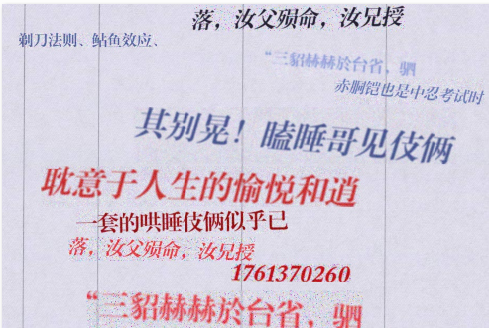
bgi39.jpg_ind0_pid8387_ttf锐字工房云字库小标宋GBK.ttf.jpg
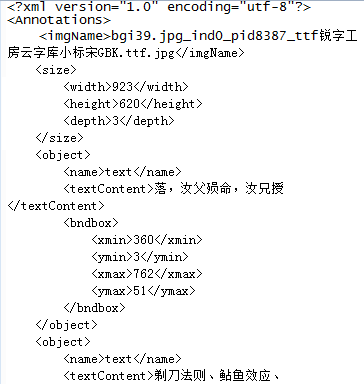
bgi39.jpg_ind0_pid8387_ttf锐字工房云字库小标宋GBK.ttf.xml
下面是采用PIL和opencv的seamlessClone粘贴方式,只是PIL这个包进行文字粘贴的时候,不支持文字旋转,且简单的文字粘贴,好像pygame的结果和seamlessClone效果差不多。
# -*- coding: utf-8 -*-

import os

import cv2

import glob

import math

import random

import numpy as np

import os.path as osp

from xml.dom.minidom import Document

import multiprocessing as mp

import logging

from PIL import Image,ImageDraw,ImageFont

import pygame

from pygame.locals import *

from pygame import freetype

import get_color

resultImgsDir = 'crnn_result_imgs1'

resultXmlDir = 'crnn_result_xmls1'

bgiDir = 'bgi'

gTtf= 'ttfs'

totalFile = 'texts.txt'

FORMAT = '%(asctime)-15s [%(processName)s] %(message)s'

logging.basicConfig(format = FORMAT)

gBlockSize = 20#num of each process's sentences

ttfSize = [28,30,35,40,45,50,55,60,65]

def _addSaltNoise(block,level = 10):

    ran = np.random.randint(0,level,block.shape)

    salt = ran == 0

    pepper = ran == level

    block[salt]= 0

    block[pepper] = 255

    return block

def _addNoise(block):

    randValue = np.random.randn(*block.shape)*np.random.randint(2,20)

    block = block+randValue

    block[block<0] = 0.0

    block[block>255] = 255.0

    block = block.astype('uint8')

    return block

def _feather(block, height):

    # determine the gaussian-blur std:

    if height <= 30 :

        bsz = 0.25

        ksz=1

    elif 30 < height < 50:

        bsz = max(0.30, 0.5 + 0.1*np.random.randn())

        ksz = 3

    else:

        bsz = max(0.5, 1.5 + 0.5*np.random.randn())

        ksz = 5#np.random.choice([1,3,5])#5

    return cv2.GaussianBlur(block,(ksz,ksz),bsz)

def _seamlessClone(obj,dst,center):

    mask = 255 * np.ones(obj.shape, obj.dtype)

    #print('obj,shape:',obj.shape,' dst.shape:',dst.shape,' center:',center)

    try:

      mixed_clone = cv2.seamlessClone(obj, dst, mask, center, cv2.MIXED_CLONE)

    except Exception as e:

      print('exception:',obj.shape,dst.shape,mask.shape,center)

      raise e

    return mixed_clone

def _rander(rawbgi,string,bgr,point,font,get_color):

    bgi = Image.fromarray(rawbgi)

    draw = ImageDraw.Draw(bgi)

    curCol,curRow = point

    fg_col,bg_col = get_color.sample_from_data(rawbgi)

    fg_col = fg_col +  np.random.randint(-3,3,[1,3])

    draw.text((curCol,curRow),string, tuple(fg_col.squeeze()), font=font)

    width,height = font.getsize(string)

    region = curCol,curRow,curCol+width,curRow+height

    bgi = np.array(bgi)

    block = bgi[curRow:curRow+height,curCol:curCol+width,:]

    block = _addNoise(block)

    block = _feather(block,height)

    block = _addNoise(block)

    block = _addSaltNoise(block,50)

    #=====

    # bgi[curRow:curRow+height,curCol:curCol+width,:] = block

    # return bgi

    #cv2.imwrite('/home/zzc/tmp111.jpg',block)

    center = (curCol+curCol+width)//2,(curRow+curRow+height)//2

#    width, height, channels = bgi.shape

#    center = height//2,width//2

    bgi = _seamlessClone(block,bgi,center)

    return bgi

def _paste(bgi,ttf,size,curRow,curCol,curText,cols,get_color):

    ttfont = ImageFont.truetype(ttf,size)

    maxNumText = math.floor((cols-curCol)/size)

    curText = curText.strip()

    '''random the digit '''

    shouldMaxNumTxt = 10

    if random.randint(0,9)==9 and maxNumText >= 4:

        curText = ''.join([str(random.randint(0,9)) for _ in range(shouldMaxNumTxt)])

        string = curText

        '''random the dot '''

        if random.randint(0,7)==7:

            dotInd = random.randint(1,shouldMaxNumTxt-2)

            string = curText[:dotInd]+'.'+curText[dotInd+1:]

    else:

        startInd = random.randint(0,max(0,len(curText)-shouldMaxNumTxt-1))

        string = curText[startInd:startInd+shouldMaxNumTxt].strip()

        string= curText

    '''如果maxNumText小于10,则跳过 '''

    if maxNumText < 10 or len(curText)<10: string = ''

    numText = len(string)

    if numText == 10 :

        bgr = [random.randint(100,254) for i in range(3)]

        bgi = _rander(bgi,string,bgr,(curCol,curRow),ttfont,get_color)

    else:

        string = ''

    #=====

    '''get printed width height '''

    width,height = ttfont.getsize(string)

    return bgi,string,width,height

def _xml(doc,anno,string,xminT,yminT,xmaxT,ymaxT):

    if not string: return

    body = doc.createElement('object')

    anno.appendChild(body)

    name = doc.createElement('name')

    nameText = doc.createTextNode('text')

    name.appendChild(nameText)

    body.appendChild(name)

    content = doc.createElement('textContent')

    contentText = doc.createTextNode(string)

    content.appendChild(contentText)

    body.appendChild(content)

    bndbox = doc.createElement('bndbox')

    xmin = doc.createElement('xmin')

    ymin = doc.createElement('ymin')

    xmax = doc.createElement('xmax')

    ymax = doc.createElement('ymax')

    xminText = doc.createTextNode(str(xminT))

    yminText = doc.createTextNode(str(yminT))

    xmaxText = doc.createTextNode(str(xmaxT))

    ymaxText = doc.createTextNode(str(ymaxT))

    xmin.appendChild(xminText)

    ymin.appendChild(yminText)

    xmax.appendChild(xmaxText)

    ymax.appendChild(ymaxText)

    bndbox.appendChild(xmin)

    bndbox.appendChild(ymin)

    bndbox.appendChild(xmax)

    bndbox.appendChild(ymax)

    body.appendChild(bndbox)

def paste(imgname,bgi,text,ttf,ttfRandom,get_color):

    bgi = cv2.imread(bgi)

    rows,cols,depth = bgi.shape

 #   bgi = Image.fromarray(bgi)

 #   draw = ImageDraw.Draw(bgi)

    curRow = 0

    curRowInter = random.randint(3,7)

    curRow += curRowInter

    curTtfSize = random.randint(0,len(ttfRandom)-1)

    #create the xml head

    doc = Document()

    anno = doc.createElement('Annotations')

    doc.appendChild(anno)

    imgNameNode = doc.createElement('imgName')

    imgNameNode.appendChild(doc.createTextNode(imgname))

    anno.appendChild(imgNameNode)

    height,width,depth = rows,cols,depth

    sizeNode = doc.createElement('size')

    widthNode = doc.createElement('width')

    widthNode.appendChild(doc.createTextNode(str(width)))

    sizeNode.appendChild(widthNode)

    heightNode = doc.createElement('height')

    heightNode.appendChild(doc.createTextNode(str(height)))

    sizeNode.appendChild(heightNode)

    depthNode = doc.createElement('depth')

    depthNode.appendChild(doc.createTextNode(str(depth)))

    sizeNode.appendChild(depthNode)

    anno.appendChild(sizeNode)

    while curRow + ttfRandom[curTtfSize] <=rows:

        #cur col point

        curCol = random.randint(0,cols-1)

        #cur row point

        '''paste the text on bgi '''

        if curCol < cols*0.9 and curRow+ttfRandom[curTtfSize] <= rows:

          #if curcols is bigger than 0.9*cols,then do not paste the line

           curText = text[random.randint(0,len(text)-1)]

           bgi,string,width,height = _paste(bgi,ttf,ttfRandom[curTtfSize],curRow,curCol,curText,cols,get_color)

           if not string: continue

           _xml(doc,anno,string,xminT = curCol,yminT = curRow,xmaxT = curCol+width,ymaxT = curRow+height)

           curRow += curRowInter

           curRow += ttfRandom[curTtfSize]

        #cur intervel

        curRowInter = random.randint(3,7)

        #cur ttf size

        curTtfSize = random.randint(0,len(ttfRandom)-1)

    return np.array(bgi), doc

def handle(text):

    ind, text = text

    #pid

    pid = os.getpid()

    #background image

    getcolor = get_color.ColorSample()

    bgis = glob.glob( osp.join(bgiDir,'*.jpg') )

    #select one background image

    curBgi = random.randint(0,len(bgis)-1)

    bgi = bgis[curBgi]

    #ttf

    ttfs = glob.glob(osp.join(gTtf,'*.ttf'))

    curTtf = random.randint(0,len(ttfs)-1)

    ttf = ttfs[curTtf]

    #ttf size random

    ttfRandom = [1]+[ random.randint(0,1) for i in range(len(ttfSize)-1)]

    ttfRandom = [ran*size for ran,size in zip(ttfRandom, ttfSize)]

    ttfRandom = [i for i in ttfRandom if i != 0]

    imgname = '{}_{}_{}.jpg'.format(ind,pid,curTtf)

    bgi,doc =  paste(imgname,bgi,text,ttf,ttfRandom,getcolor)

    cv2.imwrite(osp.join(resultImgsDir,imgname),bgi)

    xmlFileName = osp.join(resultXmlDir,'{}.xml'.format(imgname[:-4]))

    with open(xmlFileName, "w") as fxml:

        fxml.write(str(doc.toprettyxml(indent = "    ", newl = "\n", encoding = "utf-8"),encoding = 'utf-8'))

    logging.warn('{}'.format(ind))

    return

if __name__ == '__main__':

    total = [line.strip() for line in open(totalFile)]

    numP = 30

    totalSP = []

    inter = math.ceil(len(total)/gBlockSize)

    for i in range(inter):

        totalSP.append(total[i::inter])

    print('begin')

    p = mp.Pool(numP)

    p.map(handle, enumerate(totalSP[:1000]))
[Synthetic-data-with-text-and-image]的更多相关文章
- 域迁移DA | Learning From Synthetic Data: Addressing Domain Shift for Se | CVPR2018
文章转自:微信公众号「机器学习炼丹术」 作者:炼丹兄(已授权) 联系方式:微信cyx645016617 论文名称:"Learning From Synthetic Data: Address ...
- 笔记:程序内存管理 .bss .data .rodata .text stack heap
1.未初始化的全局变量(.bss段) bss段用来存放 没有被初始化 和 已经被初始化为0 的全局变量.如下例代码: #include<stdio.h> int bss_array[102 ...
- BSS段 data段 text段 堆heap 和 栈stack
BSS段:BSS段(bss segment)通常是指用来存放程序中未初始化的全局变量的一块内存区域.BSS是英文Block Started by Symbol的简称.BSS段属于静态内存分配. 数 ...
- bss、data、text、heap(堆)与stack(栈)
bss段: bss段(bss segment)通常是指用来存放程序中未初始化的全局变量和静态变量(static)的一块内存区域. bss是英文Block Started by Symbol的简称. b ...
- 2016CVPR论文集
http://www.cv-foundation.org/openaccess/CVPR2016.py ORAL SESSION Image Captioning and Question Answe ...
- CVPR2016 Paper list
CVPR2016 Paper list ORAL SESSIONImage Captioning and Question Answering Monday, June 27th, 9:00AM - ...
- 【论文速读】Fangfang Wang_CVPR2018_Geometry-Aware Scene Text Detection With Instance Transformation Network
Han Hu--[ICCV2017]WordSup_Exploiting Word Annotations for Character based Text Detection 作者和代码 caffe ...
- Toward Scalable Systems for Big Data Analytics: A Technology Tutorial (I - III)
ABSTRACT Recent technological advancement have led to a deluge of data from distinctive domains (e.g ...
- Resumable Media Uploads in the Google Data Protocol
Eric Bidelman, Google Apps APIs team February 2010 Introduction The Resumable Protocol Initiating a ...
- Data Binding(数据绑定)用户指南
1)介绍 这篇文章介绍了如何使用Data Binding库来写声明的layouts文件,并且用最少的代码来绑定你的app逻辑和layouts文件. Data Binding库不仅灵活而且广泛兼容- 它 ...
随机推荐
- jQuery js 中return false,e.preventDefault(),e.stopPropagation()的区别(事件冒泡)
有时候遇到冒泡事件很烦人,真的..... 1.e.stopPropagation()阻止事件冒泡 <head> <title></title> <script ...
- 理解微信小程序Wepy框架的三个事件交互$broadcast,$emit,$invoke
$broadcast: $broadcast事件是由父组件发起,所有子组件都会收到此广播事件,除非事件被手动取消.事件广播的顺序为广度优先搜索顺序,如上图,如果页面Page_Index发起一个$bro ...
- python之while循环/格式化输出/运算符/初始编码/成员变量
一.主要内容:1.while 循环 (难点)while 条件: 循环体 break: 直接跳出循环continue:停止当前本次循环,继续执行下一次循环.不会中断循环能让循环退出:(1)break ( ...
- CSS--选择符大全(常用css选择符)
(一)元素选择符 E(某个元素,如p) id(使用id,如#idName) class(使用class,如.myclass) 通配符:* (二)关系选择符 包含选择符:E F(E所有的F包含子代,孙代 ...
- 实践:配置keepalived实现主备热备份功能
图: 配置文件: 主服务器的配置如下: global_defs { router_id NodeA}vrrp_instance VI_1 { state MASTER #设置为主服务器 interfa ...
- loadrunner 场景设计-手工场景方案(Schedule)设计
场景设计-手工场景方案(Schedule)设计 by:授客 QQ:1033553122 A. 定义方案schedule 在 Scenario Schedule面板中,选择一个方案schedule, ...
- Django电商项目---完成用户中心(订单中心+收货地址)day7
完成用户中心(收货地址) df_user/views.py df_user/urls.py templates/df_user/user_center_site.html 界面显示 完成用户中心(全部 ...
- 【PAT】B1082 射击比赛(20 分)
水提水题,直接贴代码啦 #include<cstdio> #include<algorithm> using namespace std; struct ppp{ int id ...
- ccf题库中2016年4月2日俄罗斯方块问题
题目如下: 问题描述 俄罗斯方块是俄罗斯人阿列克谢·帕基特诺夫发明的一款休闲游戏. 游戏在一个15行10列的方格图上进行,方格图上的每一个格子可能已经放置了方块,或者没有放置方块.每一轮,都会有一个新 ...
- 二: python基础数据类型(int,
一.什么是数据类型?2018-12-20 20:57:3õ # (3) num = 0 while num < 10: num += 1 if num == 7: num += 1 # 7执 ...