
【代码笔记】Web-HTML-表格
一,效果图。
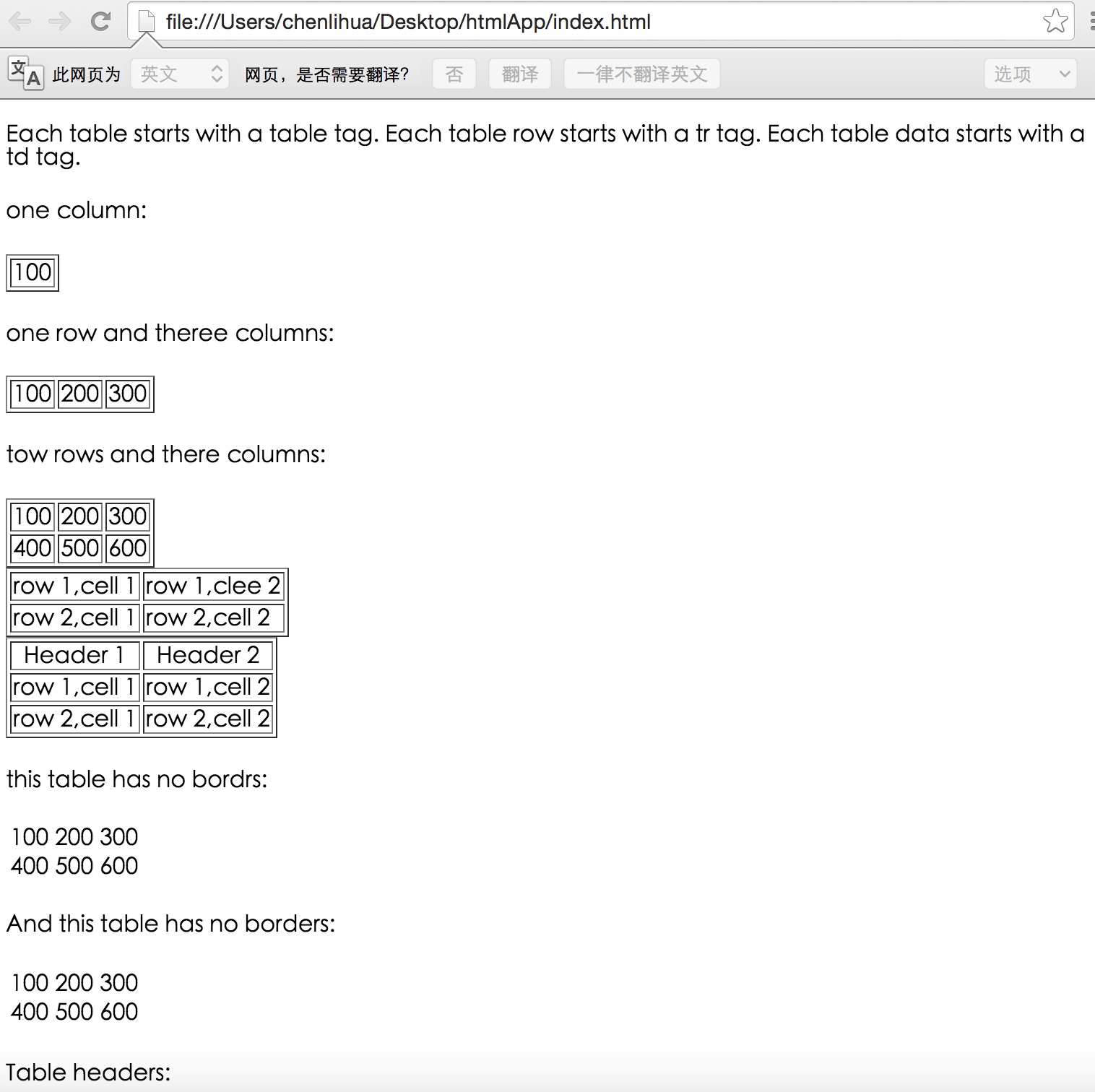


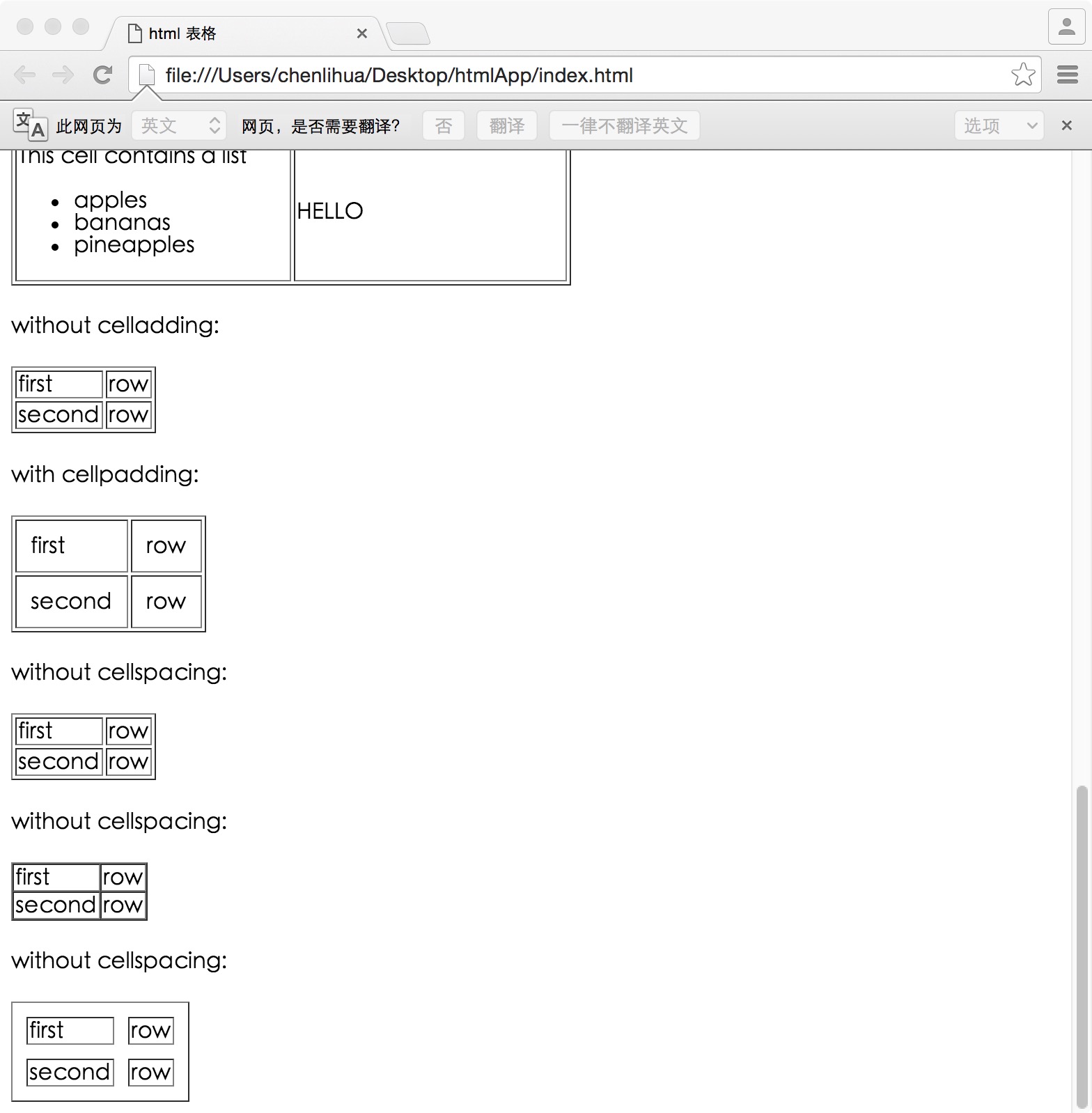
二,代码。

<!DOCTYPE html>

<html>

<head>

    <meta charset="utf-8">

    <title>html 表格</title>

</head>

<body>

    <!--表格-->

    <p>

        Each table starts with a table tag. Each table row starts with a tr tag. Each table data starts with a td tag.

    </p>

    <h4>one column:</h4>

    <table border="1">

        <tr>

            <td>100</td>

        </tr>

    </table>

    <h4>one row and theree columns:</h4>

    <table border="1">

        <tr>

            <td>100</td>

            <td>200</td>

            <td>300</td>

        </tr>

    </table>

    <h4>tow rows and there columns:<h4>

        <table border="1">

            <tr>

                <td>100</td>

                <td>200</td>

                <td>300</td>

            </tr>

            <tr>

                <td>400</td>

                <td>500</td>

                <td>600</td>

            </tr>

        </table>

        <!--表格实例-->

        <table border="1">

            <tr>

                <td>row 1,cell 1</td>

                <td>row 1,clee 2</td>

            </tr>

            <tr>

                <td>row 2,cell 1</td>

                <td>row 2,cell 2</td>

            </tr>

        </table>

         <!--表格表头-->

         <table border="1">

            <tr>

                <th>Header 1</th>

                <th>Header 2</th>

            </tr>

            <tr>

                <td>row 1,cell 1</td>

                <td>row 1,cell 2</td>

            </tr>

            <tr>

                <td>row 2,cell 1</td>

                <td>row 2,cell 2</td>

            </tr>

         </table>

<!--没有边框的表格-->

<h4>this table has no bordrs:</h4>

    <table>

        <tr>

            <td>100</td>

            <td>200</td>

            <td>300</td>

        </tr>

        <tr>

            <td>400</td>

            <td>500</td>

            <td>600</td>

        </tr>

    </table>

    <h4>And this table has no borders:</h4>

    <table border="0">

        <tr>

            <td>100</td>

            <td>200</td>

            <td>300</td>

        </tr>

        <td>400</td>

        <td>500</td>

        <td>600</td>

        <tr>

        </tr>

    </table>

    <!--表格中的表头-->

    <h4>Table headers:</h4>

    <table border="1">

        <tr>

            <th>Name</th>

            <th>telephone</th>

            <th>Telephone</th>

        </tr>

        <tr>

            <td>bill</td>

            <td>3333</td>

            <td>9999</td>

        </tr>

    </table>

    <h4>vertical headers:</h4>

    <table border="1">

        <tr>

            <th>first name:</th>

            <td>bill</td>

        </tr>

        <tr>

            <th>telephone:</th>

            <td>777</td>

        </tr>

        <tr>

            <th>telephone:</th>

            <td>999</td>

        </tr>

    </table>

    <!--带有标题的表格-->

    <table border="1">

        <caption>Monthly savings</caption>

        <tr>

            <th>month</th>

            <th>saving</th>

        </tr>

        <tr>

            <td>Jan</td>

            <td>$100</td>

        </tr>

        <tr>

            <td>feb</td>

            <td>$50</td>

        </tr>

    </table>

    <!--跨行或跨列的表格-->

    <h4>cell that spans tow columns:</h4>

    <table border="1">

        <tr>

            <th>name</th>

            <th colspan="2">telephone</th>

        </tr>

        <tr>

            <td>bill</td>

            <td>4444</td>

            <td>999</td>

        </tr>

    </table>

    <h4>cell that spans two rows:</h4>

    <table border="1">

        <tr>

            <th>first name:</th>

            <td>bill</td>

        </tr>

        <tr>

            <th rowspan="2">telephone:</th>

            <td>88888</td>

        </tr>

        <tr>

            <td>888888</td>

        </tr>

    </table>

    <!--表格内的标签-->

    <table border="1">

        <tr>

            <td>

                <p>This is a paragraph</p>

                <p>This is another paragraph</p>

            </td>

            <td>This cell contains a table:

                <table border="1">

                    <tr>

                        <td>A</td>

                        <td>B</td>

                    </tr>

                    <tr>

                        <td>C</td>

                        <td>D</td>

                    </tr>

                </table>

            </td>

        </tr>

        <tr>

            <td>This cell contains a list

                <ul>

                    <li>apples</li>

                    <li>bananas</li>

                    <li>pineapples</li>

                </ul>

            </td>

            <td>HELLO</td>

        </tr>

    </table>

    <!--单元格边距-->

    <h4>without celladding:</h4>

    <table border="1">

        <tr>

            <td>first</td>

            <td>row</td>

        </tr>

        <tr>

            <td>second</td>

            <td>row</td>

        </tr>

    </table>

    <h4>with cellpadding:</h4>

    <table border="1" cellpadding="10">

        <tr>

            <td>first</td>

            <td>row</td>

        </tr>

        <tr>

            <td>second</td>

            <td>row</td>

        </tr>

    </table>

    <!--单元格间距离-->

    <h4>without cellspacing:</h4>

    <table border="1">

        <tr>

            <td>first</td>

            <td>row</td>

        </tr>

        <tr>

            <td>second</td>

            <td>row</td>

        </tr>

    </table>

    <h4>without cellspacing:</h4>

    <table border="1" cellspacing="0">

        <tr>

            <td>first</td>

            <td>row</td>

        </tr>

        <tr>

            <td>second</td>

            <td>row</td>

        </tr>

    </table>

    <h4>without cellspacing:</h4>

    <table border="1" cellspacing="10">

        <tr>

            <td>first</td>

            <td>row</td>

        </tr>

        <tr>

            <td>second</td>

            <td>row</td>

        </tr>

    </table>

</body>

</html>
参考资料:《菜鸟教程》
【代码笔记】Web-HTML-表格的更多相关文章
- Web jquery表格组件 JQGrid 的使用 - 全部代码
系列索引 Web jquery表格组件 JQGrid 的使用 - 从入门到精通 开篇及索引 Web jquery表格组件 JQGrid 的使用 - 4.JQGrid参数.ColModel API.事件 ...
- 《编写高质量代码:Web 前端开发修炼之道》 笔记与读后感
编写高质量代码:Web 前端开发修炼之道/曹刘阳著. —北京:机械工业出版社,2010.5 第一版 涉及到的知识点: 1. CSS Sprites 在国内很多人叫css精灵,是一种网页图片应用处理方式 ...
- Web jquery表格组件 JQGrid 的使用 - 从入门到精通 开篇及索引
因为内容比较多,所以每篇讲解一些内容,最后会放出全部代码,可以参考.操作中总会遇到各式各样的问题,个人对部分问题的研究在最后一篇 问题研究 里.欢迎大家探讨学习. 代码都经过个人测试,但仍可能有各种未 ...
- Web jquery表格组件 JQGrid 的使用 - 11.问题研究
系列索引 Web jquery表格组件 JQGrid 的使用 - 从入门到精通 开篇及索引 Web jquery表格组件 JQGrid 的使用 - 4.JQGrid参数.ColModel API.事件 ...
- Web jquery表格组件 JQGrid 的使用 - 4.JQGrid参数、ColModel API、事件及方法
系列索引 Web jquery表格组件 JQGrid 的使用 - 从入门到精通 开篇及索引 Web jquery表格组件 JQGrid 的使用 - 4.JQGrid参数.ColModel API.事件 ...
- Web jquery表格组件 JQGrid 的使用 - 5.Pager翻页、搜索、格式化、自定义按钮
系列索引 Web jquery表格组件 JQGrid 的使用 - 从入门到精通 开篇及索引 Web jquery表格组件 JQGrid 的使用 - 4.JQGrid参数.ColModel API.事件 ...
- Web jquery表格组件 JQGrid 的使用 - 6.准备工作 & Hello JQGrid
系列索引 Web jquery表格组件 JQGrid 的使用 - 从入门到精通 开篇及索引 Web jquery表格组件 JQGrid 的使用 - 4.JQGrid参数.ColModel API.事件 ...
- Web jquery表格组件 JQGrid 的使用 - 7.查询数据、编辑数据、删除数据
系列索引 Web jquery表格组件 JQGrid 的使用 - 从入门到精通 开篇及索引 Web jquery表格组件 JQGrid 的使用 - 4.JQGrid参数.ColModel API.事件 ...
- Web jquery表格组件 JQGrid 的使用 - 8.Pager、新增数据、查询、刷新、查看数据
系列索引 Web jquery表格组件 JQGrid 的使用 - 从入门到精通 开篇及索引 Web jquery表格组件 JQGrid 的使用 - 4.JQGrid参数.ColModel API.事件 ...
- <Python Text Processing with NLTK 2.0 Cookbook>代码笔记
如下是<Python Text Processing with NLTK 2.0 Cookbook>一书部分章节的代码笔记. Tokenizing text into sentences ...
随机推荐
- Apktool下载与安装 windows环境
Apktool 下载与安装 百度网盘地址:https://pan.baidu.com/s/1slQBMOl (apktool 2.2.4版本) 更多版本可以从官网https://ibotpeache ...
- 还原是不可能还原的,这辈子都不可能还原(手动笑cry)
不好意思,我又把原厂避震换回border的绞牙了. 这套台湾绞牙已经陪伴了我第三个年头了,本次主要是调节了桶身高度,让车身升高了一下,现在是前面3指松将近4指.后面2指(以前是前面2指半.后面1指松2 ...
- zookeeper常用指令
zk服务 bin 目录下常用的脚本解释 zkCleanup 清理 Zookeeper 历史数据,包括日志文件和快照数据文件 zkCli Zookeeper 的一个简易客户端 zkEnv 设置 Zook ...
- System.Collections.Generic 源码阅读总结
ArrayList ,List ArrayList 和 List 都是不限制长度的集合类型 ,List相比ArrayList 就内部实现而言除了泛型本质没有太大区别.不过为避免装箱拆箱问题,尽可能使用 ...
- PHP错误处理函数register_shutdown_function
当程序在线上运行时,如果遇到BUG,想不在前端输出错误信息,同时能及时邮件通知开发者,register_shutdown_function函数就可以派上用场了. 注册一个会在脚本执行完成或者 exit ...
- 故事描述SVM----支持向量机/support vector machine (SVM)
作者:简之链接:https://www.zhihu.com/question/21094489/answer/86273196来源:知乎著作权归作者所有.商业转载请联系作者获得授权,非商业转载请注明出 ...
- 词向量:part 2 CBoW、Skip-Gram、Negative Sampling、Hierarchical Softmax、GloVe、fastText、doc2vec
- docker配置仓储库时出错:无法安全地用该源进行更新,所以默认禁用该源
在Ubuntu上安装docker,配置仓储库时第一次使用了阿里去的镜像,如下 sudo add-apt-repository "deb [arch=amd64] http://mirrors ...
- Java中IO流中的装饰设计模式(BufferReader的原理)
本文粗略的介绍下JavaIO的整体框架,重在解释BufferReader/BufferWriter的演变过程和原理(对应的设计模式) 一.JavaIO的简介 流按操作数据分为两种:字节流与字符流. 流 ...
- linux arm 交叉编译ACE(ubuntu16.04)
解压ace包 tar zxvf ACE_6.1.0.tar.gz 在终端设置环境变量 sudo gedit /etc/profile 在打开的内容添加 export ACE_ROOT=/home/xx ...