
【代码笔记】Web-HTML-表格
一,效果图。
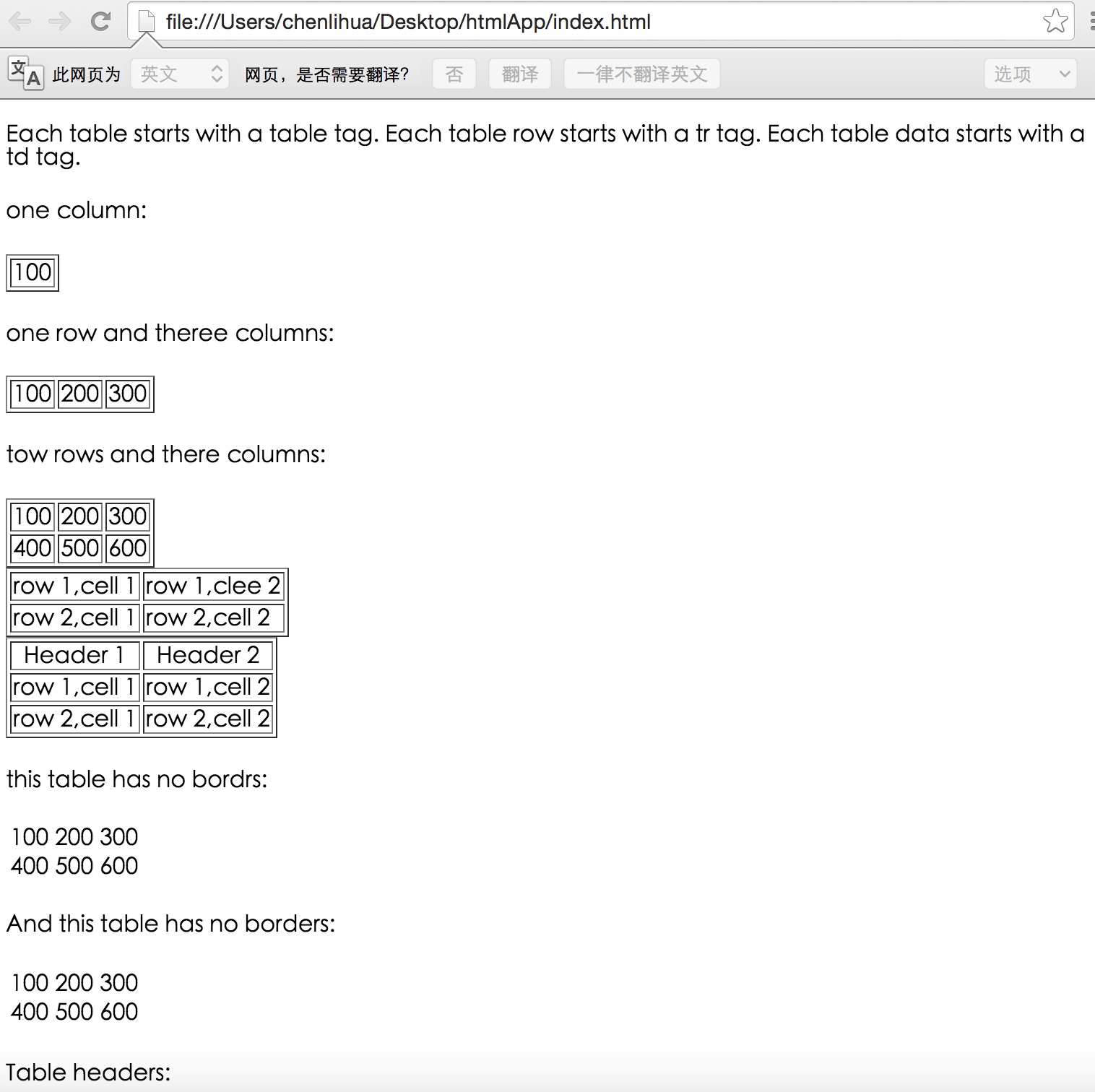


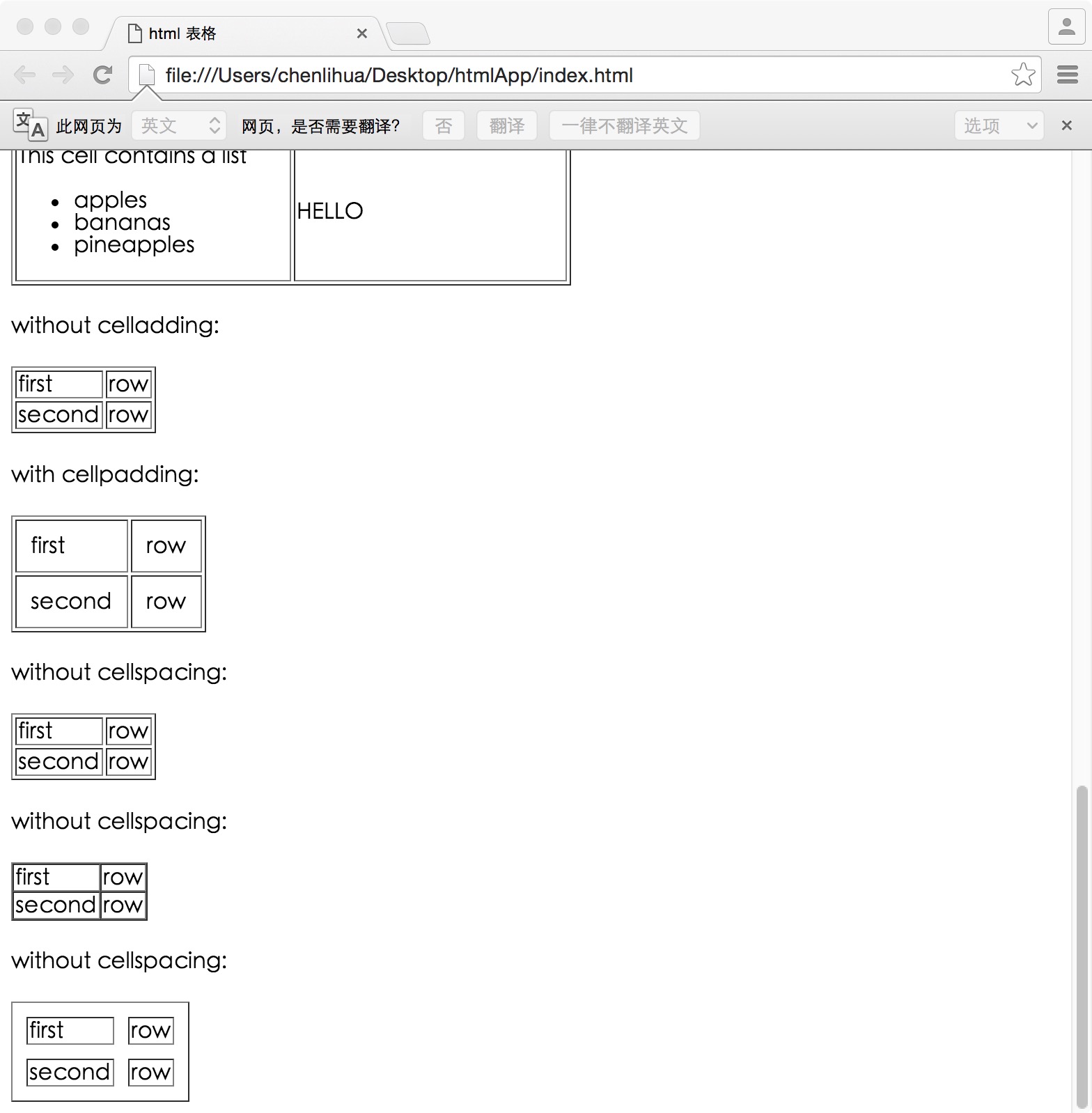
二,代码。

<!DOCTYPE html>

<html>

<head>

    <meta charset="utf-8">

    <title>html 表格</title>

</head>

<body>

    <!--表格-->

    <p>

        Each table starts with a table tag. Each table row starts with a tr tag. Each table data starts with a td tag.

    </p>

    <h4>one column:</h4>

    <table border="1">

        <tr>

            <td>100</td>

        </tr>

    </table>

    <h4>one row and theree columns:</h4>

    <table border="1">

        <tr>

            <td>100</td>

            <td>200</td>

            <td>300</td>

        </tr>

    </table>

    <h4>tow rows and there columns:<h4>

        <table border="1">

            <tr>

                <td>100</td>

                <td>200</td>

                <td>300</td>

            </tr>

            <tr>

                <td>400</td>

                <td>500</td>

                <td>600</td>

            </tr>

        </table>

        <!--表格实例-->

        <table border="1">

            <tr>

                <td>row 1,cell 1</td>

                <td>row 1,clee 2</td>

            </tr>

            <tr>

                <td>row 2,cell 1</td>

                <td>row 2,cell 2</td>

            </tr>

        </table>

         <!--表格表头-->

         <table border="1">

            <tr>

                <th>Header 1</th>

                <th>Header 2</th>

            </tr>

            <tr>

                <td>row 1,cell 1</td>

                <td>row 1,cell 2</td>

            </tr>

            <tr>

                <td>row 2,cell 1</td>

                <td>row 2,cell 2</td>

            </tr>

         </table>

<!--没有边框的表格-->

<h4>this table has no bordrs:</h4>

    <table>

        <tr>

            <td>100</td>

            <td>200</td>

            <td>300</td>

        </tr>

        <tr>

            <td>400</td>

            <td>500</td>

            <td>600</td>

        </tr>

    </table>

    <h4>And this table has no borders:</h4>

    <table border="0">

        <tr>

            <td>100</td>

            <td>200</td>

            <td>300</td>

        </tr>

        <td>400</td>

        <td>500</td>

        <td>600</td>

        <tr>

        </tr>

    </table>

    <!--表格中的表头-->

    <h4>Table headers:</h4>

    <table border="1">

        <tr>

            <th>Name</th>

            <th>telephone</th>

            <th>Telephone</th>

        </tr>

        <tr>

            <td>bill</td>

            <td>3333</td>

            <td>9999</td>

        </tr>

    </table>

    <h4>vertical headers:</h4>

    <table border="1">

        <tr>

            <th>first name:</th>

            <td>bill</td>

        </tr>

        <tr>

            <th>telephone:</th>

            <td>777</td>

        </tr>

        <tr>

            <th>telephone:</th>

            <td>999</td>

        </tr>

    </table>

    <!--带有标题的表格-->

    <table border="1">

        <caption>Monthly savings</caption>

        <tr>

            <th>month</th>

            <th>saving</th>

        </tr>

        <tr>

            <td>Jan</td>

            <td>$100</td>

        </tr>

        <tr>

            <td>feb</td>

            <td>$50</td>

        </tr>

    </table>

    <!--跨行或跨列的表格-->

    <h4>cell that spans tow columns:</h4>

    <table border="1">

        <tr>

            <th>name</th>

            <th colspan="2">telephone</th>

        </tr>

        <tr>

            <td>bill</td>

            <td>4444</td>

            <td>999</td>

        </tr>

    </table>

    <h4>cell that spans two rows:</h4>

    <table border="1">

        <tr>

            <th>first name:</th>

            <td>bill</td>

        </tr>

        <tr>

            <th rowspan="2">telephone:</th>

            <td>88888</td>

        </tr>

        <tr>

            <td>888888</td>

        </tr>

    </table>

    <!--表格内的标签-->

    <table border="1">

        <tr>

            <td>

                <p>This is a paragraph</p>

                <p>This is another paragraph</p>

            </td>

            <td>This cell contains a table:

                <table border="1">

                    <tr>

                        <td>A</td>

                        <td>B</td>

                    </tr>

                    <tr>

                        <td>C</td>

                        <td>D</td>

                    </tr>

                </table>

            </td>

        </tr>

        <tr>

            <td>This cell contains a list

                <ul>

                    <li>apples</li>

                    <li>bananas</li>

                    <li>pineapples</li>

                </ul>

            </td>

            <td>HELLO</td>

        </tr>

    </table>

    <!--单元格边距-->

    <h4>without celladding:</h4>

    <table border="1">

        <tr>

            <td>first</td>

            <td>row</td>

        </tr>

        <tr>

            <td>second</td>

            <td>row</td>

        </tr>

    </table>

    <h4>with cellpadding:</h4>

    <table border="1" cellpadding="10">

        <tr>

            <td>first</td>

            <td>row</td>

        </tr>

        <tr>

            <td>second</td>

            <td>row</td>

        </tr>

    </table>

    <!--单元格间距离-->

    <h4>without cellspacing:</h4>

    <table border="1">

        <tr>

            <td>first</td>

            <td>row</td>

        </tr>

        <tr>

            <td>second</td>

            <td>row</td>

        </tr>

    </table>

    <h4>without cellspacing:</h4>

    <table border="1" cellspacing="0">

        <tr>

            <td>first</td>

            <td>row</td>

        </tr>

        <tr>

            <td>second</td>

            <td>row</td>

        </tr>

    </table>

    <h4>without cellspacing:</h4>

    <table border="1" cellspacing="10">

        <tr>

            <td>first</td>

            <td>row</td>

        </tr>

        <tr>

            <td>second</td>

            <td>row</td>

        </tr>

    </table>

</body>

</html>
参考资料:《菜鸟教程》
【代码笔记】Web-HTML-表格的更多相关文章
- Web jquery表格组件 JQGrid 的使用 - 全部代码
系列索引 Web jquery表格组件 JQGrid 的使用 - 从入门到精通 开篇及索引 Web jquery表格组件 JQGrid 的使用 - 4.JQGrid参数.ColModel API.事件 ...
- 《编写高质量代码:Web 前端开发修炼之道》 笔记与读后感
编写高质量代码:Web 前端开发修炼之道/曹刘阳著. —北京:机械工业出版社,2010.5 第一版 涉及到的知识点: 1. CSS Sprites 在国内很多人叫css精灵,是一种网页图片应用处理方式 ...
- Web jquery表格组件 JQGrid 的使用 - 从入门到精通 开篇及索引
因为内容比较多,所以每篇讲解一些内容,最后会放出全部代码,可以参考.操作中总会遇到各式各样的问题,个人对部分问题的研究在最后一篇 问题研究 里.欢迎大家探讨学习. 代码都经过个人测试,但仍可能有各种未 ...
- Web jquery表格组件 JQGrid 的使用 - 11.问题研究
系列索引 Web jquery表格组件 JQGrid 的使用 - 从入门到精通 开篇及索引 Web jquery表格组件 JQGrid 的使用 - 4.JQGrid参数.ColModel API.事件 ...
- Web jquery表格组件 JQGrid 的使用 - 4.JQGrid参数、ColModel API、事件及方法
系列索引 Web jquery表格组件 JQGrid 的使用 - 从入门到精通 开篇及索引 Web jquery表格组件 JQGrid 的使用 - 4.JQGrid参数.ColModel API.事件 ...
- Web jquery表格组件 JQGrid 的使用 - 5.Pager翻页、搜索、格式化、自定义按钮
系列索引 Web jquery表格组件 JQGrid 的使用 - 从入门到精通 开篇及索引 Web jquery表格组件 JQGrid 的使用 - 4.JQGrid参数.ColModel API.事件 ...
- Web jquery表格组件 JQGrid 的使用 - 6.准备工作 & Hello JQGrid
系列索引 Web jquery表格组件 JQGrid 的使用 - 从入门到精通 开篇及索引 Web jquery表格组件 JQGrid 的使用 - 4.JQGrid参数.ColModel API.事件 ...
- Web jquery表格组件 JQGrid 的使用 - 7.查询数据、编辑数据、删除数据
系列索引 Web jquery表格组件 JQGrid 的使用 - 从入门到精通 开篇及索引 Web jquery表格组件 JQGrid 的使用 - 4.JQGrid参数.ColModel API.事件 ...
- Web jquery表格组件 JQGrid 的使用 - 8.Pager、新增数据、查询、刷新、查看数据
系列索引 Web jquery表格组件 JQGrid 的使用 - 从入门到精通 开篇及索引 Web jquery表格组件 JQGrid 的使用 - 4.JQGrid参数.ColModel API.事件 ...
- <Python Text Processing with NLTK 2.0 Cookbook>代码笔记
如下是<Python Text Processing with NLTK 2.0 Cookbook>一书部分章节的代码笔记. Tokenizing text into sentences ...
随机推荐
- JQuery下载及选择器总结
JQuery下载 JQuery只是一个JS函数库,要使用其中的方法还是要在JS文件中进行调用. 一般去https://mvnrepository.com/这个网站下载,搜索JQuery就能找到JS文件 ...
- iOS调用QQ发起临时会话
iOS调用QQ发起临时会话 iOS调用qq前先判断是否安装qq, 之后通过OpenURL打开对用的qq NSURL *url = [NSURL URLWithString:@"mqq://& ...
- React.js 三周 -- 入门到搭建团队基础项目
吐槽 公司自己的产品,由于历史遗留问题,前端一直是和java放到一个项目里写的. 导致了,前端就被死死的绑在了IDEA战车上.想要看页面效果,先起几个java服务.想要调试一个改动,重启个java服务 ...
- C3P0连接池、DBCP连接池
C3P0连接池: 配置文件:c3p0-config.xml <?xml version="1.0" encoding="UTF-8"?> <c ...
- ElasticSearch权威指南学习(结构化查询)
请求体查询 简单查询语句(lite)是一种有效的命令行adhoc查询.但是,如果你想要善用搜索,你必须使用请求体查询(request body search)API. 空查询 我们以最简单的 sear ...
- OpenGL ES: iOS 自定义 UIView 响应屏幕旋转
iOS下使用OpenGL 如果使用GLKit View 那么不用担心屏幕旋转的问题,说明如下: If you change the size, scale factor, or drawable pr ...
- SeaweedFS上手使用指南
SeaweedFS是基于go语言开发的高可用文件存储系统,主要特性 1.成存储上亿的文件(最终受制于你的硬盘大小)2.速度快,内存占用小 上手使用比fastDFS要简单很多,自带Rest API. S ...
- [视频]K8飞刀--WinRAR远程代码执行漏洞利用视频
[视频]K8飞刀--WinRAR远程代码执行漏洞利用视频 链接:https://pan.baidu.com/s/17_0kgNsDejJS0hvgLiMD7A 提取码:zkc2
- HDU 6022---MG loves set(K-D树)
题目链接 Problem Description MG is an intelligent boy. One day he was challenged by the famous master ca ...
- 【转】php结合redis实现高并发下的抢购、秒杀功能
抢购.秒杀是如今很常见的一个应用场景,主要需要解决的问题有两个:1 高并发对数据库产生的压力2 竞争状态下如何解决库存的正确减少("超卖"问题)对于第一个问题,已经很容易想到用缓存 ...