
Linux之shell脚本for、while、case语句的高级用法
1、case语句的用法:
[root@ELK-chaofeng test]# cat test3.sh

#!/bin/bash

while true ;do

read -p "please input the menu:cpu,mem,disk,quit: " variable

case $variable in

        cpu) lscpu

        break

        ;;

        mem) free -m

        break

        ;;

        disk) fdisk -l /dev/[shv]d[a-z][-]

        break

        ;;

        *) echo "error,again"

        ;;

esac

done
看一下效果

现在我们来编写一个服务框架:
[root@ELK-chaofeng init.d]# cat testservice

#!/bin/bash

#

#chkconfig:

#description: test service script

#

prog=$(basename $)

lockfile=/var/lock/subsys/${prog}

case $ in

start)

        if [ -f $lockfile ];then

                echo "service $prog is running"

        else

                touch $lockfile

                echo "service $prog start"

        fi

;;

stop)

        if [ -f $lockfile ];then

                rm -rf $lockfile

                echo "service $prog stop"

        else

                echo "service $prog stop"

        fi

;;

restart)

        if [ -f $lockfile ];then

                rm -rf $lockfile && touch $lockfile

                echo "service $prog restart"

        else

                touch $lockfile

                echo "service $prog start"

        fi

;;

status)

        if [ -f $lockfile ];then

                echo "service $prog is running"

        else

                echo "service $prog is not running"

        fi

;;

*)

        echo "usage: $prog {start|restart|stop|status}"

;;

esac
然后chkconfig添加至service服务管理。现在看一下效果:
[root@ELK-chaofeng init.d]# chkconfig --add testservice

[root@ELK-chaofeng init.d]# chkconfig --list testservice

Note: This output shows SysV services only and does not include native

      systemd services. SysV configuration data might be overridden by native

      systemd configuration.

      If you want to list systemd services use 'systemctl list-unit-files'.

      To see services enabled on particular target use

      'systemctl list-dependencies [target]'.

testservice     :off   :off   :on    :on    :on    :on    :off

[root@ELK-chaofeng init.d]# service testservice status

service testservice is running

[root@ELK-chaofeng init.d]# service testservice stop

service testservice stop

[root@ELK-chaofeng init.d]# service testservice start

service testservice start

[root@ELK-chaofeng init.d]# service testservice status

service testservice is running

[root@ELK-chaofeng init.d]# service testservice stop

service testservice stop

[root@ELK-chaofeng init.d]# service testservice status

service testservice is not running

[root@ELK-chaofeng init.d]# service testservice restart

service testservice start

[root@ELK-chaofeng init.d]# service testservice status

service testservice is running
case总结:
case支持glob风格的通配符:、
*:任意长度的任意字符;
?:任意单个字符;
[ ]:范围内任意单个字符;
a|b:a或b
现在我们使用函数来改写上面的脚本:
#!/bin/bash

#

#chkconfig:

#description: test service script

#

prog=$(basename $)

lockfile=/var/lock/subsys/${prog}

start(){

        if [ -f $lockfile ];then

                echo "service $prog is running"

        else

                touch $lockfile

                echo "service $prog start"

        fi

}

stop() {

        if [ -f $lockfile ];then

                rm -rf $lockfile

                echo "service $prog stop"

        else

                echo "service $prog stop"

        fi

}

        else

                touch $lockfile

                echo "service $prog start"

        fi

}

stop() {

        if [ -f $lockfile ];then

                rm -rf $lockfile

                echo "service $prog stop"

        else

                echo "service $prog stop"

        fi

}

status() {

        if [ -f $lockfile ];then

                echo "service $prog is running"

        else

                echo "service $prog is not running"

        fi

}

usage () {

        echo "usage: $prog {start|restart|stop|status}"

}

case $ in

start)

        start

;;

stop)

        stop

;;

restart)

        stop

        start

;;

status)

        status

;;

*)

        usage

;;

esac
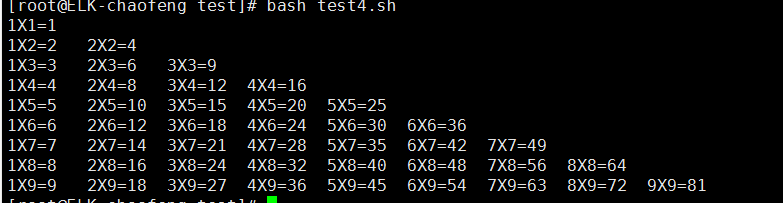
2、for语句的高级用法:
#!/bin/bash

# print *

for ((k=;k<=;k++));do

        for ((i=;i<=k;i++));do

                echo -e -n "${i}X${k}=$[${i}*${k}]\t"

        done

        echo ""    #huan hang

done
看一下效果:
3、while语句的高级用法
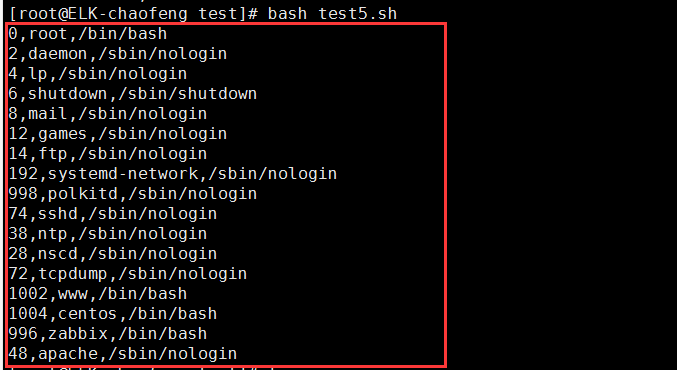
#!/bin/bash

while read VARIABLE;do

        userID=`echo $VARIABLE | cut -d':' -f `

        userUS=`echo $VARIABLE | cut -d':' -f `

        usershell=`echo $VARIABLE | cut -d':' -f `

        if [ $[$userID%] -eq  ];then

                echo "$userID,$userUS,$usershell"

        fi

done < /etc/passwd
看一下效果:
Linux之shell脚本for、while、case语句的高级用法的更多相关文章
- 常见shell脚本测试题 if/case语句
1.检查用户家目录中的 test.sh 文件是否存在,并且检查是否有执行权限2.提示用户输入100米赛跑的秒数,要求判断秒数大于0且小于等于10秒的进入选拔赛,大于10秒的都淘汰,如果输入其它字符则提 ...
- Shell脚本中执行sql语句操作mysql
对于自动化运维,诸如备份恢复之类的,DBA经常需要将SQL语句封装到shell脚本.本文描述了在Linux环境下mysql数据库中,shell脚本下调用sql语句的几种方法,供大家参考.对于脚本输出的 ...
- Linux/Unix shell 脚本中调用SQL,RMAN脚本
Linux/Unix shell脚本中调用或执行SQL,RMAN 等为自动化作业以及多次反复执行提供了极大的便利,因此通过Linux/Unix shell来完成Oracle的相关工作,也是DBA必不可 ...
- shell脚本编程之for语句、if语句使用介绍
介绍了shell脚本编程之for语句.if语句的使用方法. 上部: 面向过程: 顺序执行 选择执行: if, case 循环执行: for, while, until 一.for语句 格式: ...
- Linux常用Shell脚本珍藏【转载】
我们在运维中,尤其是linux运维,都知道脚本的重要性,脚本会让我们的 运维事半功倍,所以学会写脚本是我们每个linux运维必须学会的一门功课,这里收藏linux运维常用的脚本.如何学好脚本,最关键的 ...
- Shell脚本中执行sql语句操作mysql的5种方法【转】
对于自动化运维,诸如备份恢复之类的,DBA经常需要将SQL语句封装到shell脚本.本文描述了在Linux环境下mysql数据库中,shell脚本下调用sql语句的几种方法,供大家参考.对于脚本输出的 ...
- SHELL脚本中执行SQL语句操作MYSQL的5种方法
对于自动化运维,诸如备份恢复之类的,DBA经常需要将SQL语句封装到shell脚本.本文描述了在Linux环境下mysql数据库中,shell脚本下调用sql语句的几种方法,供大家参考.对于脚本输出的 ...
- shell脚本中select循环语句用法
shell脚本中select循环语句 1. 脚本中select的语法格式 select VAR in LIST do command1 command2 ... ... commandN done s ...
- 详解Linux交互式shell脚本中创建对话框实例教程_linux服务器
本教程我们通过实现来讲讲Linux交互式shell脚本中创建各种各样对话框,对话框在Linux中可以友好的提示操作者,感兴趣的朋友可以参考学习一下. 当你在终端环境下安装新的软件时,你可以经常看到信息 ...
随机推荐
- Java基础之基础语法
前言:Java内功心法之基础语法,看完这篇你向Java大神的路上又迈出了一步(有什么问题或者需要资料可以联系我的扣扣:734999078) 一个Java程序可以认为是一系列对象的集合,而这些对象通过调 ...
- Linux 强制安装 rpm 包
Linux 正常安装 rpm 的命令是: rpm -ivh xxx.rpm 重复安装时需加属性: 软件包重复安装将会失败,若仍需要安装必须加 --replacepkgs 属性 软件包的某个文件已在安装 ...
- Select2插件的隐藏、设置宽度
<select id="selPrinvice" class="Select2 select2-hidden-accessible" style=&quo ...
- [PHP] 算法-复制复杂链表的PHP实现
复杂链表的复制: 1.在旧链表中每个结点的后面复制出一个结点,隔代 2.把旧链表的随机指向部分,复制到新添加的结点上 3.把新结点从旧链表中拆分出来成新链表 1. linklist=head whil ...
- 【Java】HashMap源码分析——基本概念
在JDK1.8后,对HashMap源码进行了更改,引入了红黑树.在这之前,HashMap实际上就是就是数组+链表的结构,由于HashMap是一张哈希表,其会产生哈希冲突,为了解决哈希冲突,HashMa ...
- Matlab 如何输入矩阵
A=[1 2 3;4 5 6;7 8 9],每行之间用分号隔开 也可以用循环控制输入 n=input('请输入矩阵阶数:') for i=1:n for j=1:n a(i,j ...
- 分布式日志框架之ExceptionLess【二】:自行搭建帮助文档【译文】
原文地址:https://github.com/exceptionless/Exceptionless/wiki/Self-Hosting ExceptionLess自行托管环境搭建 一.测试环境 如 ...
- tortoisegit安装
1.下载tortoisegit:https://tortoisegit.org/download/ 2.下载git 64位 3. 双击开始安装,选择默认,点击下一步 4.接着是选择安装目录,可以保持默 ...
- JQuery瀑布流特效(练习)
<!doctype html><html lang="en"><head> <meta charset="UTF-8" ...
- JS点击按钮下载文件
通过form表单提交: 由于ajax函数的返回类型只有xml.text.json.html等类型,没有“流”类型,所以通过ajax去请求该接口是无法下载文件的,所以我们创建一个新的form元素来请求接 ...