
ABP框架系列之五十:(Swagger-UI-集成)
Introduction
From it's web site: "....with a Swagger-enabled API, you get interactive documentation, client SDK generation and discoverability."
从它的网站:“使API,你得到的交互式文档,客户端SDK的生成和发现。”
ASP.NET Core
Install Nuget Package
Install Swashbuckle.AspNetCore nuget package to your Web project.
Configure
Add configuration code for Swagger into ConfigureServices method of your Startup.cs
public IServiceProvider ConfigureServices(IServiceCollection services)

{

    //your other code...

      services.AddSwaggerGen(options =>

            {

                options.SwaggerDoc("v1", new Info { Title = "AbpZeroTemplate API", Version = "v1" });

                options.DocInclusionPredicate((docName, description) => true);

            });

    //your other code...

}
Then, add below code into Configure method of Startup.cs to use Swagger
public void Configure(IApplicationBuilder app, IHostingEnvironment env, ILoggerFactory loggerFactory)

{

    //your other code...

     app.UseSwagger();

            //Enable middleware to serve swagger - ui assets(HTML, JS, CSS etc.)

            app.UseSwaggerUI(options =>

            {

                options.SwaggerEndpoint("/swagger/v1/swagger.json", "AbpZeroTemplate API V1");

            }); //URL: /swagger

    //your other code...

}
Test
That's all. You can browse swagger ui under "/swagger".
ASP.NET 5.x
Install Nuget Package
Install Swashbuckle.Core nuget package to your WebApi project (or Web project).
Configure
Add configuration code for Swagger into Initialize method of your module. Example:
public class SwaggerIntegrationDemoWebApiModule : AbpModule

{

    public override void Initialize()

    {

        //your other code...

        ConfigureSwaggerUi();

    }

    private void ConfigureSwaggerUi()

    {

        Configuration.Modules.AbpWebApi().HttpConfiguration

            .EnableSwagger(c =>

            {

                c.SingleApiVersion("v1", "SwaggerIntegrationDemo.WebApi");

                c.ResolveConflictingActions(apiDescriptions => apiDescriptions.First());

            })

            .EnableSwaggerUi(c =>

            {

                c.InjectJavaScript(Assembly.GetAssembly(typeof(AbpProjectNameWebApiModule)), "AbpCompanyName.AbpProjectName.Api.Scripts.Swagger-Custom.js");

            });

    }

}
Notice that, we inject a javascript file named "Swagger-Custom.js" while configuring swagger ui. This script file is used to add CSRF token to requests while testing api services on swagger ui. You also need to add this file to your WebApi project as embedded resource and use it's Logical Name in InjectJavaScript method while injecting it.
IMPORTANT: The code above will be slightly different for your project (Namespace will not be AbpCompanyName.AbpProjectName... and AbpProjectNameWebApiModule will be YourProjectNameWebApiModule).
Content of the Swagger-Custom.js here:
var getCookieValue = function(key) {

    var equalities = document.cookie.split('; ');

    for (var i = 0; i < equalities.length; i++) {

        if (!equalities[i]) {

            continue;

        }

        var splitted = equalities[i].split('=');

        if (splitted.length !== 2) {

            continue;

        }

        if (decodeURIComponent(splitted[0]) === key) {

            return decodeURIComponent(splitted[1] || '');

        }

    }

    return null;

};

var csrfCookie = getCookieValue("XSRF-TOKEN");

var csrfCookieAuth = new SwaggerClient.ApiKeyAuthorization("X-XSRF-TOKEN", csrfCookie, "header");

swaggerUi.api.clientAuthorizations.add("X-XSRF-TOKEN", csrfCookieAuth);
See Swashbuckle documentation for more configuration options.
Test
That's all. Let's browse /swagger/ui/index:
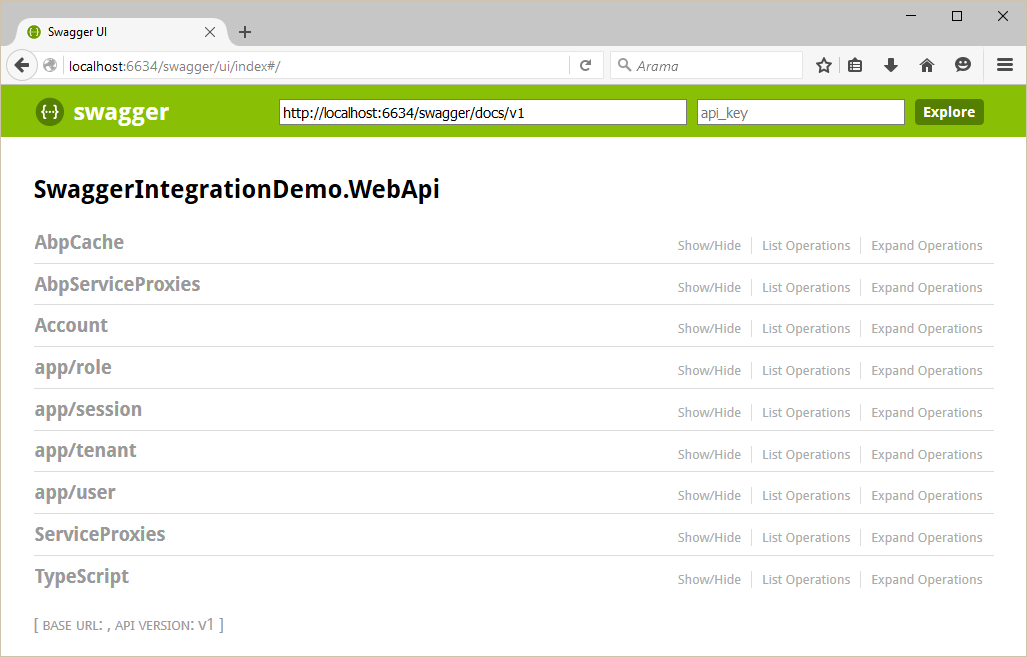

You can see all Web API Controllers (and also dynamic web api controllers) and test them.
ABP框架系列之五十:(Swagger-UI-集成)的更多相关文章
- ABP框架系列之五十四:(XSRF-CSRF-Protection-跨站请求伪造保护)
Introduction "Cross-Site Request Forgery (CSRF) is a type of attack that occurs when a maliciou ...
- ABP框架系列之五十二:(Validating-Data-Transfer-Objects-验证数据传输对象)
Introduction to validation Inputs of an application should be validated first. This input can be sen ...
- ABP框架系列之三十四:(Multi-Tenancy-多租户)
What Is Multi Tenancy? "Software Multitenancy refers to a software architecture in which a sing ...
- ABP框架系列之四十:(Notification-System-通知系统)
Introduction Notifications are used to inform users on specific events in the system. ASP.NET Boiler ...
- ABP框架系列之十六:(Dapper-Integration-Dapper集成)
Introduction Dapper is an object-relational mapper (ORM) for .NET. Abp.Dapper package simply integra ...
- ABP框架系列之三十八:(NHibernate-Integration-NHibernate-集成)
ASP.NET Boilerplate can work with any O/RM framework. It has built-in integration with NHibernate. T ...
- ABP框架系列之三十九:(NLayer-Architecture-多层架构)
Introduction Layering of an application's codebase is a widely accepted technique to help reduce com ...
- ABP框架系列之四十九:(Startup-Configuration-启动配置)
ASP.NET Boilerplate provides an infrastructure and a model to configure it and modules on startup. A ...
- ABP框架系列之十五:(Caching-缓存)
Introduction ASP.NET Boilerplate provides an abstraction for caching. It internally uses this cache ...
随机推荐
- Nios II Host-Based File System
Nios II Host-Based File System 允许运行在Nios II的程序,在Debug模式下,通过Altera download cable来读写PC上当前工程目录下(及其子目录) ...
- Avalon Master 外设
- File mapping
文件映射的三个功能: 1.File mapping allows the process to use both random input and output (I/O) and sequentia ...
- 201772020113李清华《面向对象程序设计(java)》第一周学习总结
201772020113<面向对象程序设计(java)>第一周学习总结 第一部分:课程准备部分 填写课程学习 平台注册账号, 平台名称 注册账号 博客园:www.cnblogs.com b ...
- ABAP-FTP-执行
1.界面 2.程序 ZFID0004_FTP_EXEC 主程序: *&------------------------------------------------------------- ...
- proposal-cancelable-promises
fetch 从来就没行过,最大的优势就是"新标准",但是 proposal-cancelable-promises 被 withdrawn,就导致了 fetch 发起的请求不可能被 ...
- Java Bug -- java.util.ConcurrentModificationException
java.util.ConcurrentModificationException at java.util.ArrayList$ArrayListIterator.next(ArrayList.ja ...
- 4、python常用基础类型介绍
1.字符串 str 描述性质的一种表示状态的例如名字 word='helloworld' print(type(word),word) <class 'str'> helloworld2. ...
- as3.0 嵌入字体的用法
var txt:TextField = new TextField();//创建文本 txt.embedFonts=true;//确定嵌入字体 var font:Font=new MyFont();/ ...
- TypeError: while_loop() got an unexpected keyword argument 'maximum_iterations'
错误: TypeError: while_loop() got an unexpected keyword argument 'maximum_iterations' 参照https://blog.c ...