
ABP框架系列之五十:(Swagger-UI-集成)
Introduction
From it's web site: "....with a Swagger-enabled API, you get interactive documentation, client SDK generation and discoverability."
从它的网站:“使API,你得到的交互式文档,客户端SDK的生成和发现。”
ASP.NET Core
Install Nuget Package
Install Swashbuckle.AspNetCore nuget package to your Web project.
Configure
Add configuration code for Swagger into ConfigureServices method of your Startup.cs
public IServiceProvider ConfigureServices(IServiceCollection services)

{

    //your other code...

      services.AddSwaggerGen(options =>

            {

                options.SwaggerDoc("v1", new Info { Title = "AbpZeroTemplate API", Version = "v1" });

                options.DocInclusionPredicate((docName, description) => true);

            });

    //your other code...

}
Then, add below code into Configure method of Startup.cs to use Swagger
public void Configure(IApplicationBuilder app, IHostingEnvironment env, ILoggerFactory loggerFactory)

{

    //your other code...

     app.UseSwagger();

            //Enable middleware to serve swagger - ui assets(HTML, JS, CSS etc.)

            app.UseSwaggerUI(options =>

            {

                options.SwaggerEndpoint("/swagger/v1/swagger.json", "AbpZeroTemplate API V1");

            }); //URL: /swagger

    //your other code...

}
Test
That's all. You can browse swagger ui under "/swagger".
ASP.NET 5.x
Install Nuget Package
Install Swashbuckle.Core nuget package to your WebApi project (or Web project).
Configure
Add configuration code for Swagger into Initialize method of your module. Example:
public class SwaggerIntegrationDemoWebApiModule : AbpModule

{

    public override void Initialize()

    {

        //your other code...

        ConfigureSwaggerUi();

    }

    private void ConfigureSwaggerUi()

    {

        Configuration.Modules.AbpWebApi().HttpConfiguration

            .EnableSwagger(c =>

            {

                c.SingleApiVersion("v1", "SwaggerIntegrationDemo.WebApi");

                c.ResolveConflictingActions(apiDescriptions => apiDescriptions.First());

            })

            .EnableSwaggerUi(c =>

            {

                c.InjectJavaScript(Assembly.GetAssembly(typeof(AbpProjectNameWebApiModule)), "AbpCompanyName.AbpProjectName.Api.Scripts.Swagger-Custom.js");

            });

    }

}
Notice that, we inject a javascript file named "Swagger-Custom.js" while configuring swagger ui. This script file is used to add CSRF token to requests while testing api services on swagger ui. You also need to add this file to your WebApi project as embedded resource and use it's Logical Name in InjectJavaScript method while injecting it.
IMPORTANT: The code above will be slightly different for your project (Namespace will not be AbpCompanyName.AbpProjectName... and AbpProjectNameWebApiModule will be YourProjectNameWebApiModule).
Content of the Swagger-Custom.js here:
var getCookieValue = function(key) {

    var equalities = document.cookie.split('; ');

    for (var i = 0; i < equalities.length; i++) {

        if (!equalities[i]) {

            continue;

        }

        var splitted = equalities[i].split('=');

        if (splitted.length !== 2) {

            continue;

        }

        if (decodeURIComponent(splitted[0]) === key) {

            return decodeURIComponent(splitted[1] || '');

        }

    }

    return null;

};

var csrfCookie = getCookieValue("XSRF-TOKEN");

var csrfCookieAuth = new SwaggerClient.ApiKeyAuthorization("X-XSRF-TOKEN", csrfCookie, "header");

swaggerUi.api.clientAuthorizations.add("X-XSRF-TOKEN", csrfCookieAuth);
See Swashbuckle documentation for more configuration options.
Test
That's all. Let's browse /swagger/ui/index:
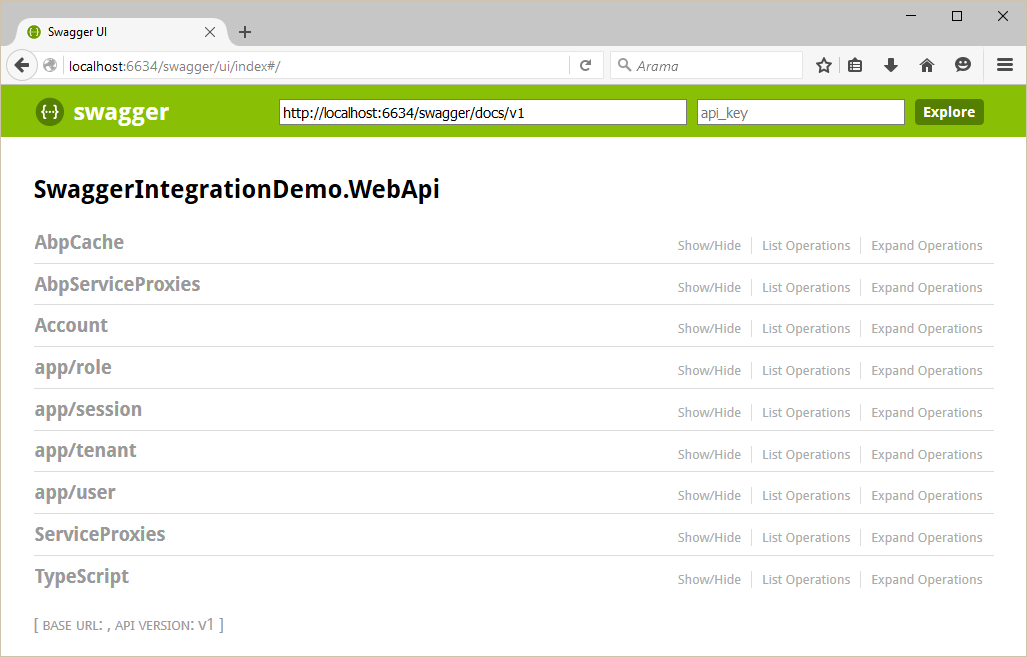

You can see all Web API Controllers (and also dynamic web api controllers) and test them.
ABP框架系列之五十:(Swagger-UI-集成)的更多相关文章
- ABP框架系列之五十四:(XSRF-CSRF-Protection-跨站请求伪造保护)
Introduction "Cross-Site Request Forgery (CSRF) is a type of attack that occurs when a maliciou ...
- ABP框架系列之五十二:(Validating-Data-Transfer-Objects-验证数据传输对象)
Introduction to validation Inputs of an application should be validated first. This input can be sen ...
- ABP框架系列之三十四:(Multi-Tenancy-多租户)
What Is Multi Tenancy? "Software Multitenancy refers to a software architecture in which a sing ...
- ABP框架系列之四十:(Notification-System-通知系统)
Introduction Notifications are used to inform users on specific events in the system. ASP.NET Boiler ...
- ABP框架系列之十六:(Dapper-Integration-Dapper集成)
Introduction Dapper is an object-relational mapper (ORM) for .NET. Abp.Dapper package simply integra ...
- ABP框架系列之三十八:(NHibernate-Integration-NHibernate-集成)
ASP.NET Boilerplate can work with any O/RM framework. It has built-in integration with NHibernate. T ...
- ABP框架系列之三十九:(NLayer-Architecture-多层架构)
Introduction Layering of an application's codebase is a widely accepted technique to help reduce com ...
- ABP框架系列之四十九:(Startup-Configuration-启动配置)
ASP.NET Boilerplate provides an infrastructure and a model to configure it and modules on startup. A ...
- ABP框架系列之十五:(Caching-缓存)
Introduction ASP.NET Boilerplate provides an abstraction for caching. It internally uses this cache ...
随机推荐
- winCVS 使用的一个小要点
对于版本管理软件CVS,可以在Linux中使用命令来管理. 但是 在windows 界面下,也可以使用 winCVS 工具来管理. 现在 讲一下 如何 在 winCVS 登陆 CVS 帐号 和 密码: ...
- Python笔记:深浅拷贝
1.赋值操作两者是同一数据,其内存地址一样.适用于list.dict.set数据类型. 2.copy是浅拷贝,只能拷贝嵌套数据的第一层数据,嵌套的数据与赋值操作相同,其内存地址一样,当一个被更改,其他 ...
- yarn 报错 requested virtual cores < 0, or requested virtual cores > max configured, requestedVirtualCores=6, maxVirtualCores=4 原因
INFO ApplicationMaster:54 - Final app status: FAILED, exitCode: 13, (reason: Uncaught exception: org ...
- CMake Error at cuda_compile_generated_warp.cu.o.cmake:264 (message)
今天,我来给大家分享一下opencv安装时报的错.然后讲错是怎么解决的. 为啥老是写一些环境搭建的博客?因为环境搭建琐碎而繁杂,希望写下来,帮助大家.让大家少走弯路. 专注主业,专注算法的实现和优化. ...
- python批量处理文件夹中文件的问题
用os模块读取文件夹中文件 原来的代码: import osfrom scipy.misc import imread filenames=os.listdir(r'./unprocess')for ...
- IDEA使用SpringBoot 、maven创建微服务的简单过程
使用IDEA新建一个简单的微服务 1. 打开IDEA,File -> New -> project 打开如下图1-1所示的对话框 图 1-1 2.点击"Next"按钮 ...
- 触发full gc的条件
1.调用System.gc 2.老年代空间不足 3.永生区空间不足 4.CMS GC时出现promotion failed和concurrent mode failure 5.统计得到的Minor G ...
- vue.js建立一个简单的表格
<%@ page language="java" contentType="text/html; charset=UTF-8" pageEncoding= ...
- Android Studio 3.1.3正式版的新坑。。。
Gradle编译时没问题,运行App时候出现: java.util.NoSuchElementException java.lang.RuntimeException: com.android.bui ...
- FTRL的理解
https://blog.csdn.net/ningyanggege/article/details/81133785