
I/O dempo
标准读取写入
package io_stream;

import java.io.BufferedInputStream;

import java.io.BufferedOutputStream;

import java.io.FileInputStream;

import java.io.FileNotFoundException;

import java.io.FileOutputStream;

import java.io.IOException;

public class FilePwd {

	public static void main(String[] args) {

		// TODO Auto-generated method stub

		fileIn();

	}

	public static void fileIn() {

//		FileInputStream r = null;

//		FileOutputStream w = null;

		try (BufferedInputStream r = new BufferedInputStream(new FileInputStream("src/file/file02.txt"));

			BufferedOutputStream w =new BufferedOutputStream(new FileOutputStream("src/file/pwd.txt")))

		{

			byte[] bytes = new byte[20];// 定义每次读取字节数量

			int temp;

			while ((temp = r.read()) != -1) {// 判断是否读完

				System.out.println(temp);

				w.write(temp);// 写入文件

                                w.write(temp^77);// 文件加密,解密时异或相同的数字即可

				//System.out.println("写入成功");

			}

		}catch (FileNotFoundException e) {

				e.printStackTrace();

		}catch (IOException e) {

			e.printStackTrace();

		}

	}

}
.read()返回的是整数类型,.write()整数类型时,写入对应ascll码的字符,并且只能写入整数类型和char类型
字符流:每次读取一个字符FileReader fr = new FileReader("word.txt");
缓冲字符流:每次读取一行字符,
字符流不能用于非文本文件,如图片
结构图
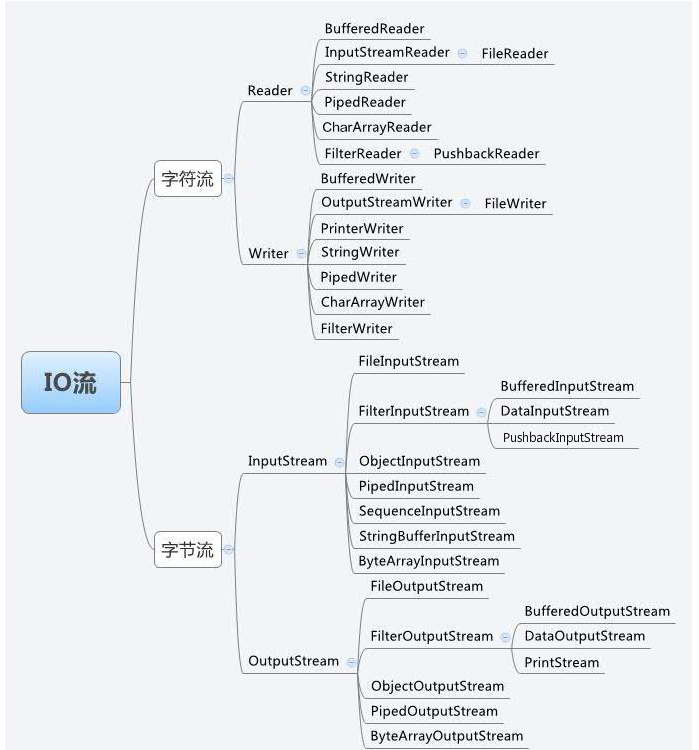
包装类
- 包装字节流为字符流
InputStreamReader isr = new InputStreamReader(System.in); // 将标准字节输入流包装成字符输入流, system.in为标准字节输入流

InputStreamReader isr1 = new InputStreamReader(new FileInputStream("a")); // 将标准字节输入流包装成字符输入流
- 包装普通流为高效缓冲流
字节:BufferedOutputStream bos = new BufferedOutputStream(new FileOutputStream("a"));
字符:BufferedReader br = new BufferedReader(new InputStreamReader(System.in)); // 包装成缓冲字符输入流
I/O dempo的更多相关文章
随机推荐
- git与github区别与简介
From: https://blog.csdn.net/skyxmstar/article/details/65631658 git和github是两个完全不同的概念. git 是一个版本管理工具,是 ...
- Spring Boot-基础教程
一.关于RESTfull API风格 import java.util.Date; /** * 实体类 */public class User { private int id; private St ...
- JAVA web端JS下载excel文件
JSP代码如下: JSP端引入jquery.easyui.min.js库: <script type="text/javascript" src="<c:ur ...
- 知识点:Mysql 基本用法之存储过程
存储过程 一. 介绍 存储过程包含了一系列可执行的sql语句,存储过程存放于MySQL中,通过调用它的名字可以执行其内部的一堆sql 使用存储过程的优点: 用于替代程序写的SQL语句,实现程序与sql ...
- 模拟实现简单ATM功能
- 可视化神器--Plotly
数据分析离不开数据可视化.我们最常用的就是pandas,matplotlib,pyecharts当然还有Tableau,看到一篇文章介绍plotly制图后我也跃跃欲试,查看了相关资料开始学习plotl ...
- ZIP压缩输入/输出流
ZIP是压缩文件的格式,使用ZIP可以节省空间 java将压缩/解压缩文件的方法都封装在java.util.zip包下,java实现了I/O数据流和网络数据流的单一接口,所以实现起来比较容易. 主要的 ...
- Mybatis的mapper文件中#和$的区别 以及 resultType和resultMap的区别
一般#{}用于传递查询的参数,一般用于从dao层传递一个string或者其他的参数过来,mybatis对这个参数会进行加引号的操作,将参数转变为一个字符串. SELECT * FROM employe ...
- dir函数
dir函数: dir() 是一个内置函数,用于列出对象的所有属性及方法 下面进行尝试: 用下面两个tests test2文件做实验 #创建一个类,两个常量,类中函数test1,类中属性, class ...
- CentOS(十二)--crontab命令的使用方法
crontab命令常见于Unix和Linux的操作系统之中,用于设置周期性被执行的指令.该命令从标准输入设备读取指令,并将其存放于"crontab"文件中,以供之后读取和执行. 在 ...