
[转]Anatomy of a Program in Memory
Memory management is the heart of operating systems; it is crucial for both programming and system administration. In the next few posts I'll cover memory with an eye towards practical aspects, but without shying away from internals. While the concepts are generic, examples are mostly from Linux and Windows on 32-bit x86. This first post describes how programs are laid out in memory.
Each process in a multi-tasking OS runs in its own memory sandbox. This sandbox is the virtual address space, which in 32-bit mode is always a 4GB block of memory addresses. These virtual addresses are mapped to physical memory by page tables, which are maintained by the operating system kernel and consulted by the processor. Each process has its own set of page tables, but there is a catch. Once virtual addresses are enabled, they apply to all softwarerunning in the machine, including the kernel itself. Thus a portion of the virtual address space must be reserved to the kernel:
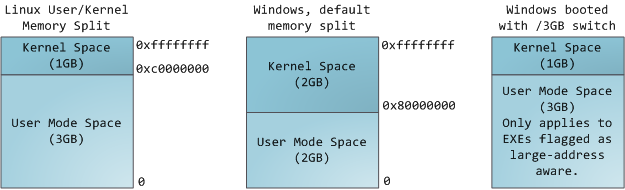
This does not mean the kernel uses that much physical memory, only that it has that portion of address space available to map whatever physical memory it wishes. Kernel space is flagged in the page tables as exclusive to privileged code (ring 2 or lower), hence a page fault is triggered if user-mode programs try to touch it. In Linux, kernel space is constantly present and maps the same physical memory in all processes. Kernel code and data are always addressable, ready to handle interrupts or system calls at any time. By contrast, the mapping for the user-mode portion of the address space changes whenever a process switch happens:
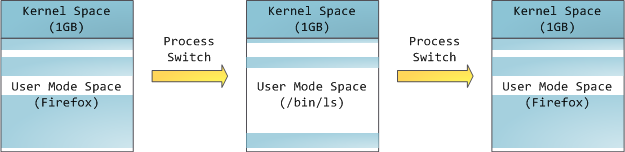
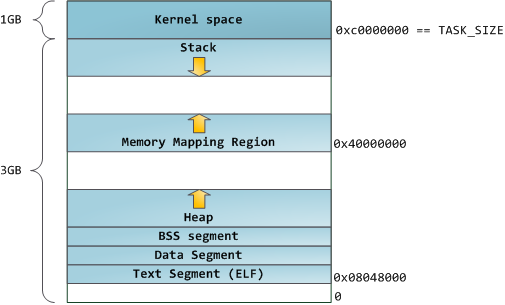
Blue regions represent virtual addresses that are mapped to physical memory, whereas white regions are unmapped. In the example above, Firefox has used far more of its virtual address space due to its legendary memory hunger. The distinct bands in the address space correspond to memory segments like the heap, stack, and so on. Keep in mind these segments are simply a range of memory addresses and have nothing to do with Intel-style segments. Anyway, here is the standard segment layout in a Linux process:
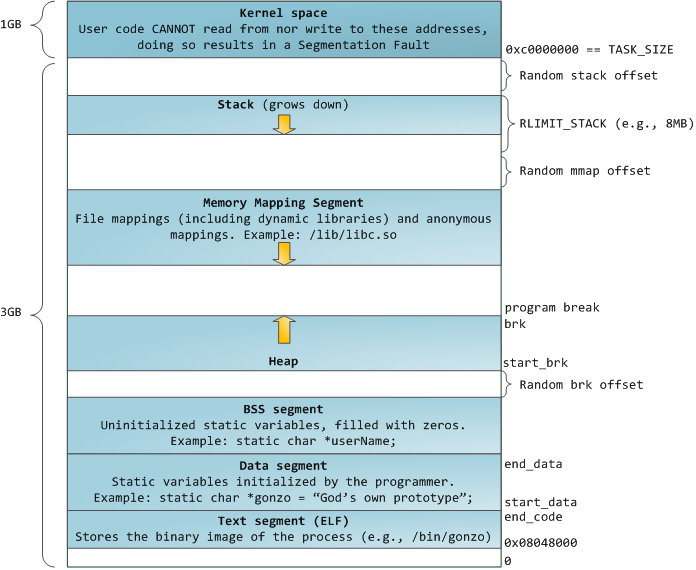
When computing was happy and safe and cuddly, the starting virtual addresses for the segments shown above were exactly the same for nearly every process in a machine. This made it easy to exploit security vulnerabilities remotely. An exploit often needs to reference absolute memory locations: an address on the stack, the address for a library function, etc. Remote attackers must choose this location blindly, counting on the fact that address spaces are all the same. When they are, people get pwned. Thus address space randomization has become popular. Linux randomizes the stack, memory mapping segment, and heap by adding offsets to their starting addresses. Unfortunately the 32-bit address space is pretty tight, leaving little room for randomization and hampering its effectiveness.
The topmost segment in the process address space is the stack, which stores local variables and function parameters in most programming languages. Calling a method or function pushes a new stack frame onto the stack. The stack frame is destroyed when the function returns. This simple design, possible because the data obeys strict LIFO order, means that no complex data structure is needed to track stack contents - a simple pointer to the top of the stack will do. Pushing and popping are thus very fast and deterministic. Also, the constant reuse of stack regions tends to keep active stack memory in the cpu caches, speeding up access. Each thread in a process gets its own stack.
It is possible to exhaust the area mapping the stack by pushing more data than it can fit. This triggers a page fault that is handled in Linux by expand_stack(), which in turn calls acct_stack_growth() to check whether it's appropriate to grow the stack. If the stack size is below RLIMIT_STACK (usually 8MB), then normally the stack grows and the program continues merrily, unaware of what just happened. This is the normal mechanism whereby stack size adjusts to demand. However, if the maximum stack size has been reached, we have a stack overflow and the program receives a Segmentation Fault. While the mapped stack area expands to meet demand, it does not shrink back when the stack gets smaller. Like the federal budget, it only expands.
Dynamic stack growth is the only situation in which access to an unmapped memory region, shown in white above, might be valid. Any other access to unmapped memory triggers a page fault that results in a Segmentation Fault. Some mapped areas are read-only, hence write attempts to these areas also lead to segfaults.
Below the stack, we have the memory mapping segment. Here the kernel maps contents of files directly to memory. Any application can ask for such a mapping via the Linux mmap() system call (implementation) or CreateFileMapping() / MapViewOfFile() in Windows. Memory mapping is a convenient and high-performance way to do file I/O, so it is used for loading dynamic libraries. It is also possible to create an anonymous memory mapping that does not correspond to any files, being used instead for program data. In Linux, if you request a large block of memory via malloc(), the C library will create such an anonymous mapping instead of using heap memory. 'Large' means larger than MMAP_THRESHOLD bytes, 128 kB by default and adjustable via mallopt().
Speaking of the heap, it comes next in our plunge into address space. The heap provides runtime memory allocation, like the stack, meant for data that must outlive the function doing the allocation, unlike the stack. Most languages provide heap management to programs. Satisfying memory requests is thus a joint affair between the language runtime and the kernel. In C, the interface to heap allocation is malloc() and friends, whereas in a garbage-collected language like C# the interface is the new keyword.
If there is enough space in the heap to satisfy a memory request, it can be handled by the language runtime without kernel involvement. Otherwise the heap is enlarged via the brk()system call (implementation) to make room for the requested block. Heap management is complex, requiring sophisticated algorithms that strive for speed and efficient memory usage in the face of our programs' chaotic allocation patterns. The time needed to service a heap request can vary substantially. Real-time systems have special-purpose allocators to deal with this problem. Heaps also become fragmented, shown below:

Finally, we get to the lowest segments of memory: BSS, data, and program text. Both BSS and data store contents for static (global) variables in C. The difference is that BSS stores the contents of uninitialized static variables, whose values are not set by the programmer in source code. The BSS memory area is anonymous: it does not map any file. If you say static int cntActiveUsers, the contents of cntActiveUsers live in the BSS.
The data segment, on the other hand, holds the contents for static variables initialized in source code. This memory area is not anonymous. It maps the part of the program's binary image that contains the initial static values given in source code. So if you say static int cntWorkerBees = 10, the contents of cntWorkerBees live in the data segment and start out as 10. Even though the data segment maps a file, it is a private memory mapping, which means that updates to memory are not reflected in the underlying file. This must be the case, otherwise assignments to global variables would change your on-disk binary image. Inconceivable!
The data example in the diagram is trickier because it uses a pointer. In that case, the contentsof pointer gonzo - a 4-byte memory address - live in the data segment. The actual string it points to does not, however. The string lives in the text segment, which is read-only and stores all of your code in addition to tidbits like string literals. The text segment also maps your binary file in memory, but writes to this area earn your program a Segmentation Fault. This helps prevent pointer bugs, though not as effectively as avoiding C in the first place. Here's a diagram showing these segments and our example variables:
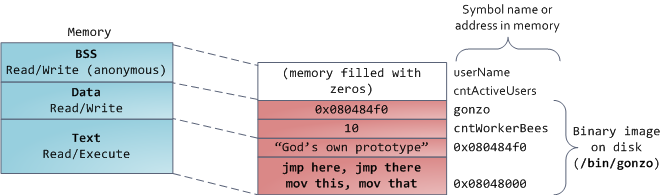
You can examine the memory areas in a Linux process by reading the file /proc/pid_of_process/maps. Keep in mind that a segment may contain many areas. For example, each memory mapped file normally has its own area in the mmap segment, and dynamic libraries have extra areas similar to BSS and data. The next post will clarify what 'area' really means. Also, sometimes people say "data segment" meaning all of data + bss + heap.
You can examine binary images using the nm and objdump commands to display symbols, their addresses, segments, and so on. Finally, the virtual address layout described above is the "flexible" layout in Linux, which has been the default for a few years. It assumes that we have a value for RLIMIT_STACK. When that's not the case, Linux reverts back to the "classic" layout shown below:
That's it for virtual address space layout. The next post discusses how the kernel keeps track of these memory areas. Coming up we'll look at memory mapping, how file reading and writing ties into all this and what memory usage figures mean.
(原文地址:Anatomy of a Program in Memory)
[转]Anatomy of a Program in Memory的更多相关文章
- 【翻译】Anatomy of a Program in Memory—剖析内存中的一个程序(进程的虚拟存储器映像布局详解)
[翻译]Anatomy of a Program in Memory—剖析内存中的一个程序(进程的虚拟存储器映像布局详解) . . .
- Anatomy of a Program in Memory.剖析程序的内存布局
原文标题:Anatomy of a Program in Memory 原文地址:http://duartes.org/gustavo/blog/ [注:本人水平有限,只好挑一些国外高手的精彩文章翻译 ...
- Anatomy of a Program in Memory
Memory management is the heart of operating systems; it is crucial for both programming and system a ...
- 【译】Getting Physical With Memory
当我们试图去了解复杂系统时,去除其抽象层,直接关注最底层,我们会更容易去理解.使用这种方法,我们来看一下内存和 I/O 接口的最简单和基础的层:处理器和总线的接口.这些细节是更上层问题的基础,例如线程 ...
- Understanding glibc malloc【待译】
今天尝试用Valgrind调试程序时,发现堆和栈的一些问题没有理解透彻,于是Google了下"Memory Layout C",接着就通过Memory Layout of C Pr ...
- 转:如何实现一个malloc
如何实现一个malloc 转载后排版效果很差,看原文! 任何一个用过或学过C的人对malloc都不会陌生.大家都知道malloc可以分配一段连续的内存空间,并且在不再使用时可以通过free释放掉. ...
- CPU与内存的那些事
下面是网上看到的一些关于内存和CPU方面的一些很不错的文章. 整理如下: 转: CPU的等待有多久? 原文标题:What Your Computer Does While You Wait 原文地址: ...
- What Your Computer Does While You Wait
转: CPU的等待有多久? 原文标题:What Your Computer Does While You Wait 原文地址:http://duartes.org/gustavo/blog/ [注:本 ...
- 转:CPU与内存的那些事
下面是网上看到的一些关于内存和CPU方面的一些很不错的文章. 整理如下: 转: CPU的等待有多久? 原文标题:What Your Computer Does While You Wait 原文地址: ...
随机推荐
- POJ 2912 Rochambeau(暴力)+【带权并查集】
<题目链接> 题目大意: n个人进行m轮剪刀石头布游戏(0<n<=500,0<=m<=2000),接下来m行形如x, y, ch的输入,ch='='表示x, y平局 ...
- Pandas学习2 --- 数据类型Series、DataFrame
为了更加清楚显示,请点击链接用Jupyter Notebook 查看:截图如下,
- 牛客练习赛35-背单词-线性DP
背单词 思路 :dp[ i ] [ 0 ]表示 第i 位放的元音 dp[ i ] [ 1 ]表示 第i 位放的辅音 ,cnt [ i ]含义是 长度为 i 的方案数. 转移 :dp[ i ] ...
- 一个用SAM维护多个串的根号特技
一个用SAM维护多个串的根号特技 基本介绍 在多个串的字符串题中,往往会出现一类题需要用到某个子串是否在一些母串中出现.此时对于 \(\text{parent}\) 树的 \(\text{right} ...
- SPOJ COT3.Combat on a tree(博弈论 Trie合并)
题目链接 \(Description\) 给定一棵\(n\)个点的树,每个点是黑色或白色.两个人轮流操作,每次可以选一个白色的点,将它到根节点路径上的所有点染黑.不能操作的人输,求先手是否能赢.如果能 ...
- Some Conclusions.
目录 DP 四边形不等式 数论 & 数学 数据结构 树链剖分 左偏树的性质及\(O(n)\)的构造 图论 树 二分图 竞赛图 平面图 双连通分量 字符串 后缀自动机 复杂度分析 没什么好写的. ...
- python基础一 ------利用生成器生成一个可迭代对象
#利用生成器生成一个可迭代对象#需求:生成可迭代对象,输出指定范围内的素数,利用生成器产生一个可迭代对象#生成器:本身是可迭代的,只是 yield 好比return返回,yield返回后函数冻结状态, ...
- no such file or directory, open '/node_modules/.staging/
报错 在使用npm过程中连续产生多行报错 no such file or directory, open '/node_modules/.staging/ 原因 npm版本配置不一致导致,可以尝试重新 ...
- 转载 转载 转载 数组a[],a,&a之间的区别
通俗理解:内存就是公寓房间,指针就是房间的门牌号,数组就是连续的公寓房间,数组名就是这组连续房间的起始地址,也就是第一个房间的地址. 例如int a[5] a是数组名,也就是第一个房间号 & ...
- C Windows控制台字符版本俄罗斯方块
//一个可以工作在Windows控制台字符界面下的俄罗斯方块 //工作在非图形模式,无需其他库依赖,单个C文件代码即可运行 //支持最高纪录,并且对于纪录进行了加密 //By wrule 2015年1 ...