
fetch 代替 XMLHttpRequest (json-server 模拟后台接口)
一、fetch 是 XMLHttpRequest 的替代方案。说白了就是除了 ajax 获取后台数据之外也可以用fetch 来获取。
二、fetch 的支持性还不是很好。挂载于BOM中可以通过浏览器直接访问。
1.支持情况
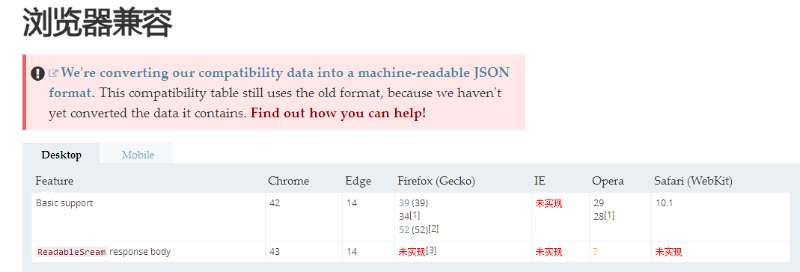
当然,如果不支持fetch也没有问题,可以使用第三方的ployfill来实现只会fetch:whatwg-fetch
三、JSON-SERVER模拟后台接口
1.初始化项目 npm init
2.安装JSON-SERVER: npm install --save-dev json-server
3.在跟目录下面创建一个db.json 写入
{

  "posts": [

    { "id": 1, "title": "json-server", "author": "typicode" }

  ],

  "comments": [

    { "id": 1, "body": "some comment", "postId": 1 }

  ],

  "profile": { "name": "typicode" }

}
4.在package.json 中添加一段代码
"scripts": {

  "server": "json-server db.json", // 新加行

  "test": "..."

}
5.npm run server
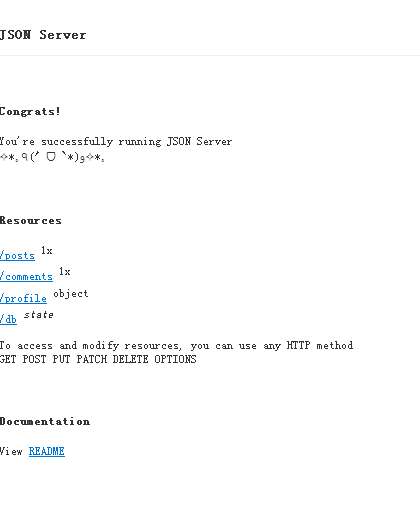
三个接口已经生成,支持post(新增) delete(删除) put(修改) get(查询);
关于JSON-SERVER 其他的配置我就不说了。有兴趣的自己去官网查看下。目前只是模拟一个后台接口。
四、GET请求。
1.
fetch('http://10.63.68.93:3000/profile', {

        method: 'GET'

    }).then((res)=>{

          return res.json()

    }).then(res => {

        console.log(res) //Object {name: "typicode"}

    })
2.get 请求参数的传递
把参数带在URL上面
 fetch('http://10.63.68.93:3000/profile?a=2&b=1', {

        method: 'GET'

    }).then((res)=>{

          return res.json()

    }).then(res => {

        console.log(res) //Object {name: "typicode"}

    })
五、POST请求
1.与GET请求类似,POST请求的指定也是在fetch的第二个参数中:
fetch('http://10.63.68.93:3000/comments', {

        method: 'POST'

    }).then((res)=>{

        return res.json()

    }).then(res => {

        console.log(res) //Object {name: "typicode"}

    })
2.POST请求的参数传递
var paramsString = "q=URLUtils.searchParams&topic=api"

    var searchParams = new URLSearchParams(paramsString);

    fetch('http://10.63.68.93:3000/posts', {

        method: 'POST',

        body: searchParams // 这里是请求对象   具体api 去看fetch 官网的 URLSearchParams

    }).then((res)=>{

        return res.json()

    }).then(res => {

        console.log(res)

    })
六、设置请求头
let myHeaders = new Headers();

myHeaders.append('Content-Type', 'text/xml');

myHeaders.get('Content-Type');

// should return 'text/xml'
var paramsString = "q=URLUtils.searchParams&topic=api"

    var searchParams = new URLSearchParams(paramsString);

    let myHeaders = new Headers();

    myHeaders.append('Content-Type', 'text/xml');

    myHeaders.get('Content-Type');

    /*

    myHeaders = new Headers({

  "Content-Type": "text/plain",

  "Content-Length": content.length.toString(),

  "X-Custom-Header": "ProcessThisImmediately",

});

     */

    // should return 'text/xml'

    fetch('http://10.63.68.93:3000/posts', {

        method: 'POST',

        headers:myHeaders,

        body: searchParams // 这里是请求对象   具体api 去看fetch 官网的 URLSearchParams

    }).then((res)=>{

        return res.json()

    }).then(res => {

        console.log(res)

    })
七、强制带cookie
默认情况下, fetch 不会从服务端发送或接收任何 cookies, 如果站点依赖于维护一个用户会话,则导致未经认证的请求(要发送 cookies,必须发送凭据头).
八、fetch 封装ajax请求
/**

 * 将对象转成 a=1&b=2的形式

 * @param obj 对象

 */

function obj2String(obj, arr = [], idx = 0) {

  for (let item in obj) {

    arr[idx++] = [item, obj[item]]

  }

  return new URLSearchParams(arr).toString()

}

/**

 * 真正的请求

 * @param url 请求地址

 * @param options 请求参数

 * @param method 请求方式

 */

function commonFetcdh(url, options, method = 'GET') {

  const searchStr = obj2String(options)

  let initObj = {}

  if (method === 'GET') { // 如果是GET请求,拼接url

    url += '?' + searchStr

    initObj = {

      method: method,

      credentials: 'include'

    }

  } else {

    initObj = {

      method: method,

      credentials: 'include',

      headers: new Headers({

        'Accept': 'application/json',

        'Content-Type': 'application/x-www-form-urlencoded'

      }),

      body: searchStr

    }

  }

  fetch(url, initObj).then((res) => {

    return res.json()

  }).then((res) => {

    return res

  })

}

/**

 * GET请求

 * @param url 请求地址

 * @param options 请求参数

 */

function GET(url, options) {

  return commonFetcdh(url, options, 'GET')

}

/**

 * POST请求

 * @param url 请求地址

 * @param options 请求参数

 */

function POST(url, options) {

  return commonFetcdh(url, options, 'POST')

}
fetch 代替 XMLHttpRequest (json-server 模拟后台接口)的更多相关文章
- 使用electron开发一个h5的客户端应用创建http服务模拟后台接口mock
使用electron开发一个h5的客户端应用创建http服务模拟后端接口mock 在上一篇<electron快速开始>里讲述了如何快速的开始一个electron的应用程序,既然electr ...
- vue-cli搭建项目模拟后台接口数据,webpack-dev-conf.js文件配置
webpack.dev.conf.js 首先第一步 const express = require('express');const app = express();var appData = req ...
- Vue学习之Vue模拟后台数据
前后端项目的开发,需要前端和后端同时进行开发,有时后端开发人员还未完成API接口可以提供给前端调用,因此就需要模拟前端请求后端接口,后端返回数据.一般开发中都是返回json数据格式来完成前后端的交互. ...
- vue项目中使用mockjs+axios模拟后台数据返回
自己写练手项目的时候常常会遇到一个问题,没有后台接口,获取数据总是很麻烦,于是在网上找了下,发现一个挺好用的模拟后台接口数据的工具:mockjs.现在把自己在项目中使用的方法贴出来 先看下项目的目 ...
- node模拟后台返回json书写格式报错--Unexpected token ' in JSON at position 1
最近在学习Node的知识,就尝试写了一个注册登陆的简单功能,但是自己在模拟后台返回值的时候,总是报错Unexpected token ' in JSON at position 1,查找原因之后,是因 ...
- 接口神器之 Json Server 详细指南
简介 json-server 是一款小巧的接口模拟工具,一分钟内就能搭建一套 Restful 风格的 api,尤其适合前端接口测试使用. 只需指定一个 json 文件作为 api 的数据源即可,使用起 ...
- Mock模拟后台数据接口--再也不用等后端的API啦
ok,在开发中经常需要从后台获取数据,那么有时候后台的数据接口并没有写好,所以这时候,就需要自己模拟数据接口,来实现前端逻辑, 今天数的就是阿里巴巴的一款mock产品,很好用的哦!!!! ok!这是我 ...
- 通过 Ajax 调取后台接口将返回的 json 数据绑定在页面上
第一步: 编写基础的 html 框架内容,并引入 jquery: <!doctype html> <html lang="en"> <head> ...
- ES6_Demo,模拟后台json数据展示
最近在学习ES6,下面,模拟后台传过来json数据,并在页面展示的一个小Demo. 页面简单的不可描述,只有一个button按钮 <button>点击获取json数据</button ...
随机推荐
- Arduino IDE for ESP8266 项目(2)wifi扫描
#include "ESP8266WiFi.h" void setup() { Serial.begin(115200); //设定WiFi为STA模式,如果先前已连接上AP,则与 ...
- 代码编辑器monaco-editor之基础使用
1.下载安装monaco-editor npm install monaco-editor 我的安装目录在 C://Windows//SystemApps//Microsoft.MicrosoftEd ...
- 超简单Mac安装Tomcat服务器
超简单Mac安装Tomcat服务器 1.首先下载tomcat 下载连接 2. 解压并改名 3.把Tomcat复制到系统中的资源库或者Library 4.打开shell,进入Tomcat下面的bin目录 ...
- nginx的反向代理proxy_pass指令
1. 首先什么是代理服务器?客户机发送请求时,不会直接发送到目的主机,而是先被代理服务器收到,代理服务器收到客服机的请求后,再向目的机发出,目的机就会返回数据给客户机,在返回给客户机之前,会被代理服务 ...
- C++多线程的使用
很多的时候会遇到多线程跑 ,接下来就写了一个 多线程的demo 废话不说直接上代码 #include <iostream> #include <pthread.h> //多线 ...
- [04] JSP标准动作
1.概述 JSP规范中定义了一系列的标准动作,Web容器按照规范进行了实现,可以解析并执行标准动作.而标准动作使用的是标准的xml语法,看上去也比较直观易懂,下面来看一个结构例子: <jsp:a ...
- C语言学习 例四
#inlude <studio.h> int main(){ int x,y; sanf("%d",&x); if (x<0) y=-1; els ...
- SQL Server聚合函数与聚合开窗函数 (转载)
以下面这个表的数据作为示例. 什么是聚合函数?聚合函数:聚合函数就是对一组值进行计算后返回单个值(即分组).聚合函数在计算时都会忽略空值(null).所有的聚合函数均为确定性函数.即任何时候使用一组相 ...
- win10 + VS2010 + OpenCV2.4.10重编译OpenCV开发环境搭建
win10 + VS2010 + OpenCV2.4.10重编译OpenCV开发环境搭建 重编译的优点:能够调试的时候看OpenCV的源码. 重编译要得到的东西:Debug版本号和Release版本号 ...
- Bootstrap栅栏布局里col-xs-*、col-sm-*、col-md-*、col-lg-*之间的区别及使用方法
原文:Bootstrap栅栏布局里col-xs-*.col-sm-*.col-md-*.col-lg-*之间的区别及使用方法 版权声明:本文为博主原创文章,未经博主允许不得转载. https://bl ...