
基于usb4java的usb通讯
下载java API及lib库地址:http://usb4java.org/index.html
1、导入所需要的库:
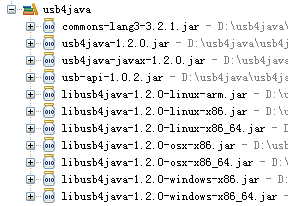
2、添加配置文件:文件名:javax.usb.properties;内容:javax.usb.services = org.usb4java.javax.Services
目录结构如下:
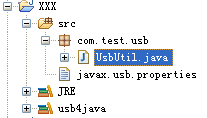
3、具体代码实现如下:
 package com.test.usb;

 import java.util.List;

 import javax.usb.UsbConfiguration;

 import javax.usb.UsbDevice;

 import javax.usb.UsbDeviceDescriptor;

 import javax.usb.UsbEndpoint;

 import javax.usb.UsbHostManager;

 import javax.usb.UsbHub;

 import javax.usb.UsbInterface;

 import javax.usb.UsbPipe;

 public class UsbUtil {

     private static short idVendor = (short)0x8888;

     private static short idProduct = (short)0x0006;

     public static void main(String[] args) {

         try {

             UsbPipe sendUsbPipe = new UsbUtil().useUsb();

             if (sendUsbPipe != null) {

                 byte[] buff = new byte[64];

                 for (int i = 0; i < 9; i++) {

                     buff[i] = (byte)i;

                     sendMassge(sendUsbPipe, buff);

                 }

             }

         } catch (Exception e) {

             e.printStackTrace();

         }

     }

     public UsbPipe useUsb() throws Exception{

         UsbInterface iface = linkDevice();

         if (iface == null) {

             return null;

         }

         UsbEndpoint receivedUsbEndpoint,sendUsbEndpoint;

         sendUsbEndpoint = (UsbEndpoint)iface.getUsbEndpoints().get(0);

         if (!sendUsbEndpoint.getUsbEndpointDescriptor().toString().contains("OUT")) {

             receivedUsbEndpoint = sendUsbEndpoint;

             sendUsbEndpoint = (UsbEndpoint)iface.getUsbEndpoints().get(1);

         } else {

             receivedUsbEndpoint = (UsbEndpoint)iface.getUsbEndpoints().get(1);

         }

         //发送:

         UsbPipe sendUsbPipe =  sendUsbEndpoint.getUsbPipe();

         sendUsbPipe.open();

         //接收

         final UsbPipe receivedUsbPipe =  receivedUsbEndpoint.getUsbPipe();

         receivedUsbPipe.open();

         new Thread(new Runnable() {

             public void run() {

                 try {

                     receivedMassge(receivedUsbPipe);

                 } catch (Exception e) {

                     e.printStackTrace();

                 }

             }

         }).start();

         return sendUsbPipe;

     }

     public UsbInterface linkDevice() throws Exception{

         UsbDevice device = null;

         if (device == null) {

              device = findDevice(UsbHostManager.getUsbServices()

                         .getRootUsbHub());

         }

         if (device == null) {

             System.out.println("设备未找到!");

             return null;

         }

         UsbConfiguration configuration = device.getActiveUsbConfiguration();

         UsbInterface iface = null;

         if (configuration.getUsbInterfaces().size() > 0) {

             iface = (UsbInterface)configuration.getUsbInterfaces().get(0);

         } else {

             return null;

         }

         iface.claim();

         return iface;

     }

     public void receivedMassge(UsbPipe usbPipe) throws Exception{

         byte[] b = new byte[64];

         int length = 0;

         while (true) {

             length = usbPipe.syncSubmit(b);//阻塞

             System.out.println("接收长度:" + length);

             for (int i = 0; i < length; i++) {

                 System.out.print(Byte.toUnsignedInt(b[i])+" ");

             }

         }

     }

     public static void sendMassge(UsbPipe usbPipe,byte[] buff)  throws Exception{

         usbPipe.syncSubmit(buff);//阻塞

         //usbPipe.asyncSubmit(buff);//非阻塞

     }

     public UsbDevice findDevice(UsbHub hub)

     {

         UsbDevice device = null;

         List list = (List) hub.getAttachedUsbDevices();

         for (int i = 0;i<list.size();i++)

         {

             device = (UsbDevice)list.get(i);

             UsbDeviceDescriptor desc = device.getUsbDeviceDescriptor();

             if (desc.idVendor() == idVendor && desc.idProduct() == idProduct) {return device;}

             if (device.isUsbHub())

             {

                 device = findDevice((UsbHub) device);

                 if (device != null) return device;

             }

         }

         return null;

     }

 }
注意点:发送和接收数据长度要与设备匹配
基于usb4java的usb通讯的更多相关文章
- 基于Linux的USB 主/从设备之间通讯的三种方式
转载:http://archive.eet-china.com/www.eet-china.com/ART_8800323770_617693_TA_eda530e7.HTM 随着简单易用的USB接口 ...
- .Net开发笔记(十五) 基于“泵”的TCP通讯(接上篇)
上一篇博客中说了基于“泵”的UDP通讯,附上了一个Demo,模拟飞鸽传书的功能,功能不太完善,主要是为了说明“泵”在编程中的应用.本篇文章我再附上一个关于TCP通讯的两个Demo,也都采用了“泵”模式 ...
- C#:基于WMI查询USB设备信息 及 Android设备厂商VID列表
/* ---------------------------------------------------------- 文件名称:WMIUsbQuery.cs 作者:秦建辉 MSN:splashc ...
- Android基于XMPP的即时通讯3-表情发送
这篇博文主要讲表情发送的一些东西. 参考:Android基于XMPP的即时通讯1-基本对话 1.准备好资源文件 采用的是emoji的表情,我打包好了,下载地址:http://files.cnblogs ...
- Android基于XMPP的即时通讯2-文件传输
本文是在上一篇博文Android基于XMPP的即时通讯1-基本对话的基础上,添加新的功能,文件传输 1.初始化文件传输管理类 public static FileTransferManager get ...
- C#:基于WMI查询USB设备
来源:http://blog.csdn.net/jhqin/article/details/6734673 /* ------------------------------------------- ...
- USB通讯协议 && 数据传输
USB2.0通讯协议(spalish) 1.包(packet) 包是USB系统中信息传输的基本单元,所有数据都是经过打包后在总线上传输的.USB包由五部分组成,同步字段(sync).包标识符(PI ...
- 基于“泵”的TCP通讯(接上篇)
基于“泵”的TCP通讯(接上篇) 上一篇博客中说了基于“泵”的UDP通讯,附上了一个Demo,模拟飞鸽传书的功能,功能不太完善,主要是为了说明“泵”在编程中的应用.本篇文章我再附上一个关于TCP通讯的 ...
- 基于libUSB的USB设备固件更新程序(下载数据)(转)
源:基于libUSB的USB设备固件更新程序(下载数据) 本文紧接上一篇日志:基于libUSB-Win32的USB设备固件更新程序(前言),相关背景以及起因等,此处不再赘述,如感兴趣请移步. libU ...
随机推荐
- ffmpeg中AVOption的实现分析
[时间:2017-10] [状态:Open] [关键词:ffmpeg,avutil,AVOption] 0 引言 AVOptions提供了一种通用的options机制,可以用于任意特定结构的对象. 本 ...
- MPU6050带字符驱动的i2c从设备驱动1
开干: 1.闲言碎语 这个驱动,越写觉的越简单,入门难,入门之后感觉还好.Linux开发还是比较友好的. 2.编写MPU6050带字符驱动的i2c从设备驱动 要实现的功能就是,将MPU6050作为字符 ...
- Linux 文件普通权限_011
一.文件权限10个字符对应类型和权限 二.Linux普通文件和Linux目录读.写.执行权限说明 标注:Linux 中的文件名是存在于父目录的block里面,并指向这个文件的inode节点 1.lin ...
- Android手机用wifi连接adb调试的方法
https://www.jianshu.com/p/dc6898380e38 0x0 前言 Android开发肯定要连接pc的adb进行调试,传统的方法是用usb与pc进行连接,操作简单即插即用,缺点 ...
- ABBYY PDF Transformer+功能概述
ABBYY PDF Transformer+是一个新的.全面的巧妙解决PDF文档的工具,它将泰比的光学字符识别(OCR)技术和Adobe®PDF技术完美结合,以确保实现便捷地处理任何类型的PDF文件, ...
- Linux下">/dev/null 2>&1 "相关知识说明
在学习Linux的过程中,常会看到一些终端命令或者程序中有">/dev/null 2>&1"出现,由于已经遇到了好几次了,为了理解清楚,不妨花点时间百度或者go ...
- python使用requests发送text/xml报文数据
def client_post_xmldata_requests(request_url,requestxmldata): #功能说明:发送请求报文到指定的地址并获取请求响应报文 #输入参数说明:接收 ...
- Rafy环境配置
如果现在项目已经创建好啦,要使用Rafy框架进行存储,这里我简单的总结下配置的环境步骤: 一.添加引用Rafy的SDK,如下几个; 二.新建文件夹Entities 在此文件夹下创建rafy实体以及仓库 ...
- 一种隐蔽性较高的Java ConcurrentModificationException异常场景
前言 在使用Iterator遍历容器类的过程中,如果对容器的内容进行增加和删除,就会出现ConcurrentModificationException异常.该异常的分析和解决方案详见博文<Jav ...
- Qt编写自定义控件4-旋转仪表盘
前言 旋转仪表盘,一般用在需要触摸调节设置值的场景中,其实Qt本身就提供了QDial控件具有类似的功能,本控件最大的难点不在于绘制刻度和指针等,而在于自动计算当前用户按下处的坐标转换为当前值,这个功能 ...