
GALV_maptravel研究分析(1)
强大的地图传送式插件~~
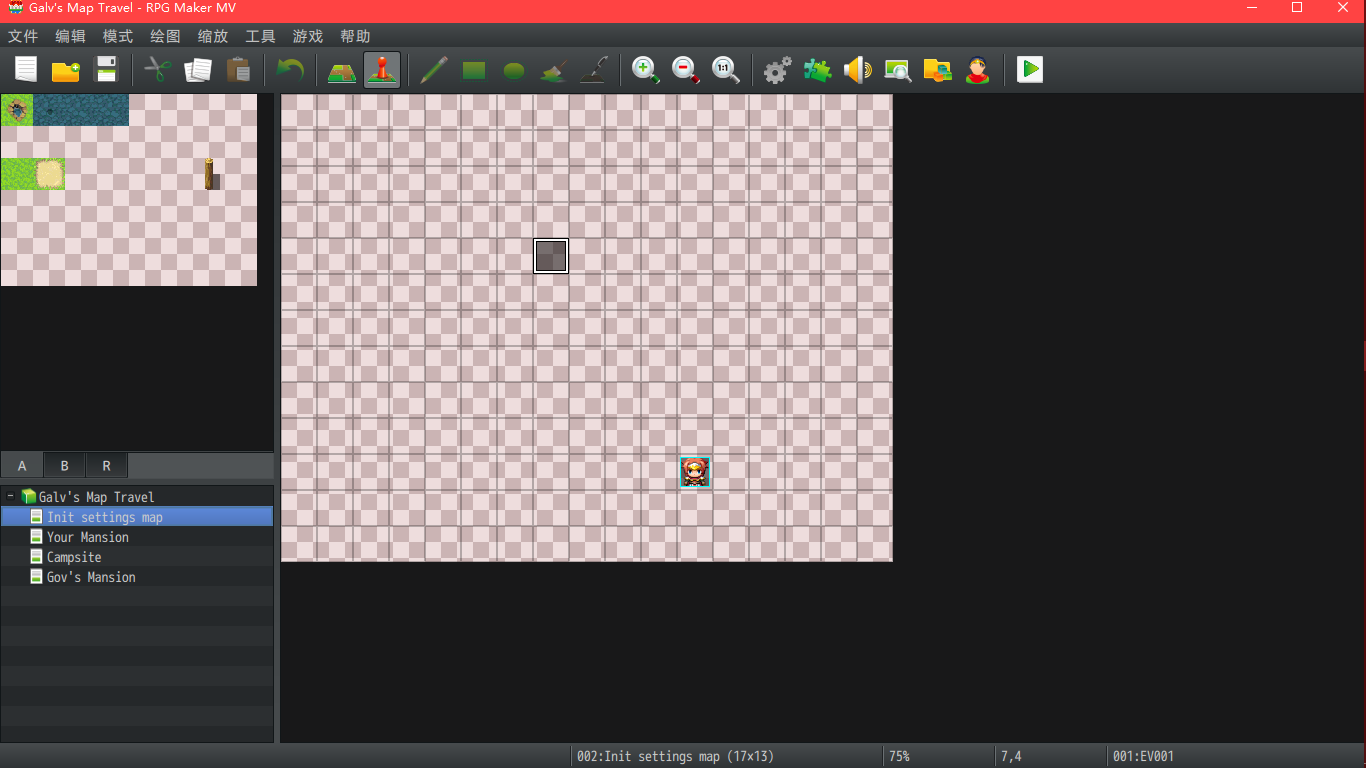
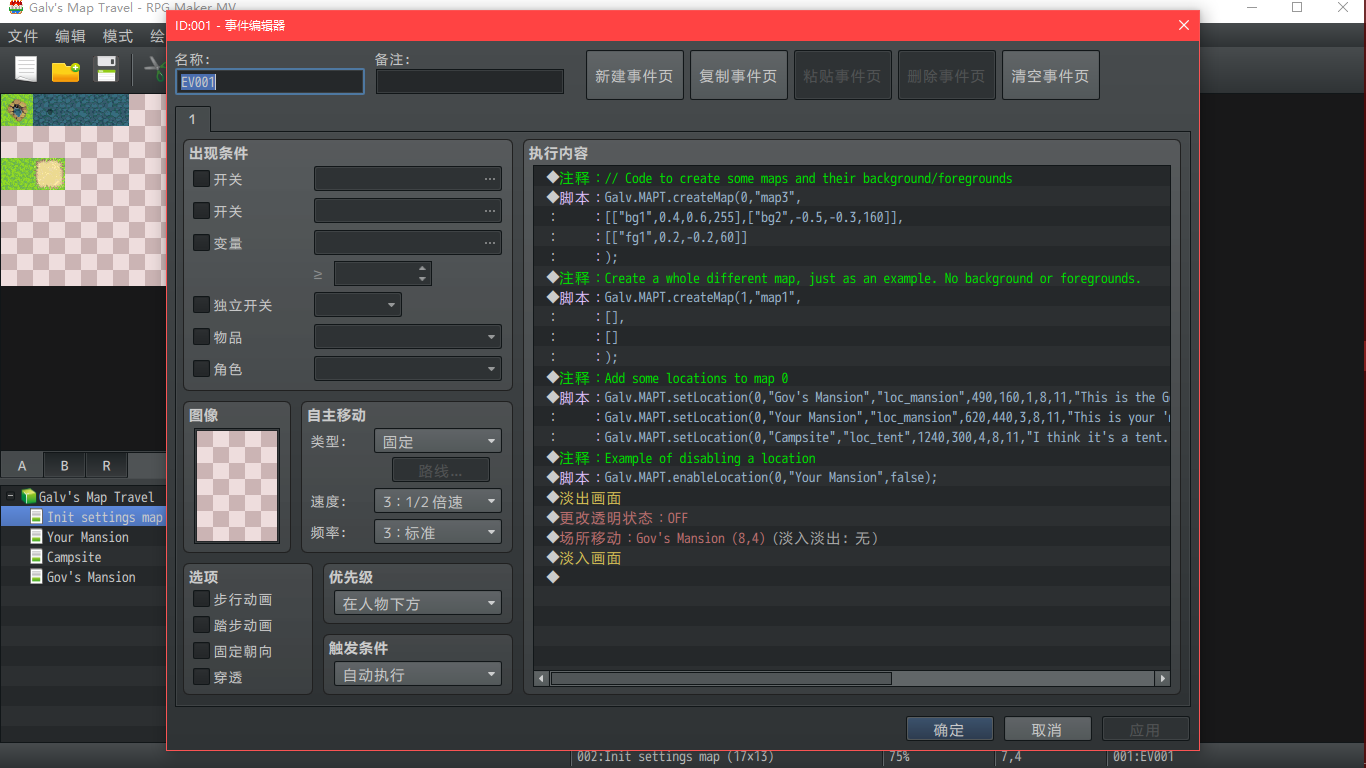
我以自带demo进行分析,本篇地图Init setting map
1.----------------------------------
实例 创建地图
Galv.MAPT.createMap(0,"map3",
[["bg1",0.4,0.6,255],["bg2",-0.5,-0.3,160]],
[["fg1",0.2,-0.2,60]]
);
语法
Galv.MAPT.createMap(id,"mapImage",[[bg],[bg]],[[fg],[fg]]);
INFO:
id = a unique number to identify the map you created 创建的地图编号
"mapImage" = the name of the map graphic to use from /img/maptravel/ 背景图名称(注意路径)
this image will determine the size of your map in the scene 此图片会影响你的地图尺寸
[bg] = an array to set up a background graphic behind the map image 一个数组,用于在地图图像后面设置背景图形
You can have as many bg arrays as desired each should have: 可以设置多个
["bgimage",xmove,ymove,opacity]
[fg] = works the same as bg arrays but instead for foreground images 原理与bg相同,但用于代替前景图
["fgimage",xmove,ymove,opacity]
注意,这里是两个大数组,内包含小数组
+++++++++++++++++++++++++++++++++华丽分割线+++++++++++++++++++++++++++++++++++++++++++++++++++
2.-----------------------------------
实例
Galv.MAPT.setLocation(0,"Gov's Mansion","loc_mansion",490,160,1,8,11,"This is the Governor's Mansion|It's just a test map with no actual mansion here");
Galv.MAPT.setLocation(0,"Your Mansion","loc_mansion",620,440,3,8,11,"This is your 'mansion' but you lost the key!|You can't get in!");
Galv.MAPT.setLocation(0,"Campsite","loc_tent",1240,300,4,8,11,"I think it's a tent. It looks like a tent|Yeah it's a tent.",1);
语法
Galv.MAPT.setLocation(id,"name","image",mx,my,tmid,tx,ty,"desc",f);
INFO:
id = the unique number identifying the map you created above 上级地图,上级地图!的ID,或者说包含地图
"name" = the name of the location (also used to reference it)
"image" = the name of the location graphic to use from /img/maptravel/ 显示在大地图上的图标
this graphic requires 3 rows in the spritesheet for:
top = normal, middle = active, bottom = disabled
mx = the x postion on your map graphic for the location
my = the y postion on your map graphic for the location
tmid = transfer map id - the in-game map id to transfer to 跳转目标地图的ID
tx = the in-game map x co-ordinate to transfer to 跳转后的的位置
ty = the in-game map y co-ordinate to transfer to
"desc" = a short description displayed when location is selected. 下方描述
Use the | symbol to specify a new line.
f = frames of animation in your location image. Don't include
this attribute to use the plugin setting default frames 动画针
Note that you can use this setLocation to overwrite a previously set one
using the same name if you want to change it to something else.
In addition to locations, you can add 'objects' that work in a similar
way but only have one row of graphics in the spritesheet and will not
appear in the location list.
+++++++++++++++++++++++++++++++++华丽分割线+++++++++++++++++++++++++++++++++++++++++++++++++++
3-----------------------------------
实例
Galv.MAPT.enableLocation(0,"Your Mansion",false);
语法
Galv.MAPT.enableLocation(id,"name",s); // s can be true or false to
// set the location "name" in the
// map id to enabled or disabled
GALV_maptravel研究分析(1)的更多相关文章
- GALV_maptravel研究分析(2)
本节地图:Gov's Mansion,Campsite,Yourmansion ++++++++++++++++++++华丽丽的分割线+++++++++++++++++++++++++++++++++ ...
- opencv的实用研究--分析轮廓并寻找边界点
opencv的实用研究--分析轮廓并寻找边界点 轮廓是图像处理中非常常见的.对现实中的图像进行采样.色彩变化.灰度变化之后,能够处理得到的是“轮廓”.它直接地反应你了需要分析对象的边界特 ...
- SQL中的Null深入研究分析
SQL中的Null深入研究分析 虽然熟练掌握SQL的人对于Null不会有什么疑问,但总结得很全的文章还是很难找,看到一篇英文版的, 感觉还不错. Tony Hoare 在1965年发明了 null 引 ...
- TCP异常关闭研究分析
版权声明:本文由谢代斌原创文章,转载请注明出处: 文章原文链接:https://www.qcloud.com/community/article/108 来源:腾云阁 https://www.qclo ...
- JVM虚拟机Class类文件研究分析
前言 为了研究Class文件,先编写一个最简单的代码: package com.courage; public class T0100_ByteCode01 { } 之所以说最简单,是因为这个类里面任 ...
- oracle AWR深入研究分析,如何使用
AWR的前身是statspack,当然现在还在,只不过大家都在使用AWR,因为它方便,简单,直观,形象. AWR是oracle内置工具,安装oracle时已经自动安装完毕,无需额外安装了. SELEC ...
- keystone 认证深度研究分析
一.Keystone Token深度概述 Keystone作为OpenStack项目基础认证模块,目前支持的token类型分别是uuid.pkiz.pki.fernet. 首先,简要叙述一下这四种类型 ...
- S5PV210的内存分配研究分析
S5PV210内存一般会使用SDRAM和DDR2 (DDR SDRAM),SDRAM的uboot启动网络已经有很多资料的,对于DDR2还有有很多疑惑,如果有错误的地方,请大家一定指出,醍醐灌顶,不胜感 ...
- 常用移动web开发框架研究分析
纯粹的总结一下移动web开发框架,移动web开发框架有jQuery Mobile .Sencha Touch等等,他们都来源于web开发,是成熟的框架,jQuery Mobile出自于jQuery家族 ...
随机推荐
- DatagramSocket(邮递员):对应数据报的Socket概念,不需要创建两个socket,不可使用输入输出流。
UDP编程: DatagramSocket(邮递员):对应数据报的Socket概念,不需要创建两个socket,不可使用输入输出流. DatagramPacket(信件):数据包,是UDP下进行传输数 ...
- View - RemoteViews
设计Android的工程师起名字还是挺规范的,而且一眼就知道是什么意思.RemoteViews,顾名思义,远程的View.Android为了能让进程A显示进程B的View,设计了这么一种View(其实 ...
- Mybatis面试题整理(超详细)
1.什么是Mybatis? (1)Mybatis是一个半ORM(对象关系映射)框架,它内部封装了JDBC,开发时只需要关注SQL语句本身,不需要花费精力去处理加载驱动.创建连接.创建statement ...
- UEditor在asp.netMVC4中的使用,包括上传功能,粘贴表格不显示边框问题
网页编程中在线编辑器的使用还是很重要的,最近研究了一下百度出的UEditor编辑器,把它结合到刚学的asp.netMVC+EF中,同时实现上传资料(包括图片,视频等)功能,下面就以一个最简单的新闻管理 ...
- MySQL设置密码复杂度
MySQL5.6.6版本之后增加了密码强度验证插件validate_password,相关参数设置的较为严格.使用了该插件会检查设置的密码是否符合当前设置的强度规则,若不满足则拒绝设置. 本文采用测试 ...
- Qt编写自定义控件4-旋转仪表盘
前言 旋转仪表盘,一般用在需要触摸调节设置值的场景中,其实Qt本身就提供了QDial控件具有类似的功能,本控件最大的难点不在于绘制刻度和指针等,而在于自动计算当前用户按下处的坐标转换为当前值,这个功能 ...
- 【Java核心技术】类型信息(Class对象 反射 动态代理)
1 Class对象 理解RTTI在Java中的工作原理,首先需要知道类型信息在运行时是如何表示的,这是由Class对象来完成的,它包含了与类有关的信息.Class对象就是用来创建所有“常规”对象的,J ...
- hibernate源码分析1
- TTL是什么意思?
TTL是一个ip协议的值,它告诉网络,数据包在网络中的时间是否太长而应被丢弃.有很多原因使包在一定时间内不能被传递到目的地. TTL 的初值通常是系统缺省值,是包头中的8位的域.TTL的最初设想是确定 ...
- 网站SEO优化问答精选【转载】
在接触seo的过程中,大家都会碰到很多这样或那样的问题,特别是一些seo新手由于知识有限会经常到很多地方问一些网站优化的问题,做seo时间慢慢变长之后,知识会慢慢地积累,之前的问题也会慢慢的都被解答. ...