
Servlet(10)—请求转发和请求重定向
请求转发与请求重定向
①区别:- 本质区别:请求转发只发出一次请求,请求重定向则发出两次请求。
- 请求转发:地址栏是初次发出请求的地址在最终的Servlet中,request对象和中转的那个request是同一个对象
只能转发给当前web应用的资源
/表示当前web应用的根目录 - 请求重定向:地址栏不再是初次发出的请求地址,地址栏为最后响应的那个地址在最终的Servlet中,request对象和中转的那个request不是同一个对象可以重定向到任何资源
/表示当前web站点的根目录
②源代码
- 请求的转发:
public class ForWardServlet extends HttpServlet {

private static final long serialVersionUID = 1l;

@Override

protected void doGet(HttpServletRequest req, HttpServletResponse resp)throws ServletException, IOException {

    System.out.println("ForWordServvlet's doGet");

    req.setAttribute("name", "abcd");

    System.out.println("ForWordServlet:" + req.getAttribute("name"));

//请求的转发

//调用HttpServletRequest的getRequestDispatcher(path)方法获取RequestDispatcher对象,

//调用getRequestDispatcher(path)需要填入转发的地址

    String path = "TestServlet";

    RequestDispatcher requestDispatcher = req.getRequestDispatcher(path);

//2.调用HttpSerlvetReuqest的forward(request, response)进行请求转发

    requestDispatcher.forward(req, resp);

    }

}- 请求的重定向
public class RedirectServlet extends HttpServlet {

                private static final long serialVersionUID = 1l;

                @Override

                protected void doGet(HttpServletRequest req, HttpServletResponse resp)

                        throws ServletException, IOException {

                    System.out.println("RedirectServlet's doGet");

                    req.setAttribute("name", "efgh");

                    System.out.println("RedirectSerlvet's name:" + req.getAttribute("name"));

                    //请求执行重定向,直接调用response的sendRedirect(path)方法,其中path为重定向的地址

                    String path = "testServlet";

                    resp.sendRedirect(path);

                }

            }
2 . 请求转发与重定向和对象、属性一块使用(实例)
a.jsp
<body>

    <h1>A page</h1>

    <!-- 方式一:include指令 -->

    <%@ include file="b_1.jsp" %>

    <!-- 方式二:jsp标签 -->

    <jsp:include page="b_2.jsp">

        <jsp:param value="1234" name="username"/>

    </jsp:include>

    <!-- 其作用与请求转发一致 -->

    <%-- <jsp:forward page="b_3.jsp">

        <jsp:param value="123" name="username"/>

    </jsp:forward> --%>

    <!-- 乱码问题 -->

    <form action="Attr_1.jsp" method="get">

        <input type="text" name="username" value="中文">

        <input type="submit" value="Submit">

    </form>

    <%

    //设置属性

    pageContext.setAttribute("pageContextAttr", "pageContextValue");

    request.setAttribute("requestAttr", "requestValue");

    session.setAttribute("sessionAttr", "sessionValue");

    application.setAttribute("applicationAttr", "applicationValue");

    %>

</body>
①Attr_1.jsp:
<h1>Attr_1 page</h1>

            <!-- 获取属性 -->

            pageContextAttr:<%= pageContext.getAttribute("pageContextAttr") %>

            <br><br>

            requestAttr:<%= request.getAttribute("requestAttr") %>

            <br><br>

            session:<%= session.getAttribute("sessionAttr") %>

            <br><br>

            application:<%= application.getAttribute("applicationAttr") %>

            <br><br>

            <a href="Attr_2_1.jsp">To Attr_2_1 Page</a>:请求转发到Attr_3.jsp

            <br><br>

            <a href="Attr_2_2.jsp">To Attr_2_2 Page</a>:请求重定向到Attr_3.jsp

            <br><br>

            <a href="Attr_2_3.jsp">To Attr_2_3 Page</a>:请求转发向到Attr_3.jsp,以获取request对象的属性值

    <br><br><br><br>

    <!-- 处理post请求的处理方式 -->

    <%

        request.setCharacterEncoding("UTF-8");

    %>

        username(处理post):<%= request.getParameter("username") %>

    <br><br><br>

    <!-- 乱码问题 -->

    <!-- 处理get请求处理方式 -->

    <%

        String val = request.getParameter("username");

        String username = new String(val.getBytes("UTF-8"), "UTF-8");

        out.println("username(处理get方法一):" + username);

    %>

    <!-- 这样处理get请求非常麻烦,可以在apache中server.xml中和eclipse中Servlet项目中的servlet.xml文件相同的位置

    设置usebodyEncoding的值 -->

    <br><br><br>

    username(处理get方法二):<%= request.getParameter("username") %>

        ②Attr_2_1.jsp:

            <h1>Attr_2_1 page</h1>

            <%

                //请求转发

                request.getRequestDispatcher("/Attr_3.jsp").forward(request, response);

            %>

        ③Attr_2_2.jsp:

            <h1>Attr_2_2 page</h1>

            <%

                //请求重定向

                response.sendRedirect("Attr_3.jsp");

            %>

        ④Attr_2_3.jsp:

            <h1>Attr_2_3 page</h1>

            <%

            //设置属性

            pageContext.setAttribute("pageContextAttr", "pageContextValue");

            request.setAttribute("requestAttr", "requestValue");

            session.setAttribute("sessionAttr", "sessionValue");

            application.setAttribute("applicationAttr", "applicationValue");

            %>

            <%

                //请求转发

                request.getRequestDispatcher("/Attr_3.jsp").forward(request, response);

            %>

            <br>

        ⑤Attr_3.jsp:

            <h1>Attr_3 page</h1>

            <!-- 获取属性 -->

            pageContextAttr:<%= pageContext.getAttribute("pageContextAttr") %>

            <br><br>

            requestAttr:<%= request.getAttribute("requestAttr") %>

            <br><br>

            session:<%= session.getAttribute("sessionAttr") %>

            <br><br>

            application:<%= application.getAttribute("applicationAttr") %>

        ⑥页面访问:

                            请求的页面                   到达的页面

                   ——>  Attr2_1.jsp ——>请求转发,    ——> Attr_3.jsp  转发到Attr_3.jsp之后的地址http://localhost:8080/Demo5/Attr_2_1.jsp

        Attr_1.jsp ——>  Attr2_2.jsp ——>请求重定向,   ——> Attr_3.jsp  到Attr_3.jsp之后的地址http://localhost:8080/Demo5/Attr_3.jsp

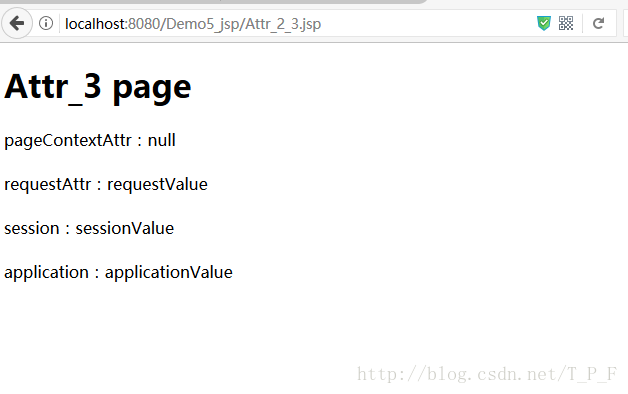
                   ——>  Attr2_3.jsp ——>请求转发 ——> Attr_3.jsp  (request对象获取requestAttr属性值,以证实request的属性范围),转发后的

                                                地址http://localhost:8080/Demo5/Attr_2_3.jsp
③Attr_2_1.jsp
<body>

    <h1>Attr_2_1 page</h1>

    <%

        //请求转发

        request.getRequestDispatcher("/Attr_3.jsp").forward(request, response);

    %>

</body>
④Attr_2_2.jsp
<body>

    <h1>Attr_2_2 page</h1>

    <%

        //请求重定向

        response.sendRedirect("Attr_3.jsp");

    %>

</body>
⑤Attr_2_3.jsp
<body>

    <h1>Attr_2_3 page</h1>

    <%

    //设置属性

    pageContext.setAttribute("pageContextAttr", "pageContextValue");

    request.setAttribute("requestAttr", "requestValue");

    session.setAttribute("sessionAttr", "sessionValue");

    application.setAttribute("applicationAttr", "applicationValue");

    %>

    <%

        //请求转发

        request.getRequestDispatcher("/Attr_3.jsp").forward(request, response);

    %>

    <br>

</body>
⑥Attr_3.jsp
<body>

    <h1>Attr_3 page</h1>

    <!-- 获取属性 -->

    pageContextAttr:<%= pageContext.getAttribute("pageContextAttr") %>

    <br><br>

    requestAttr:<%= request.getAttribute("requestAttr") %>

    <br><br>

    session:<%= session.getAttribute("sessionAttr") %>

    <br><br>

    application:<%= application.getAttribute("applicationAttr") %>

</body>
结果:
Attr_1.jsp中三个超链接的结果是
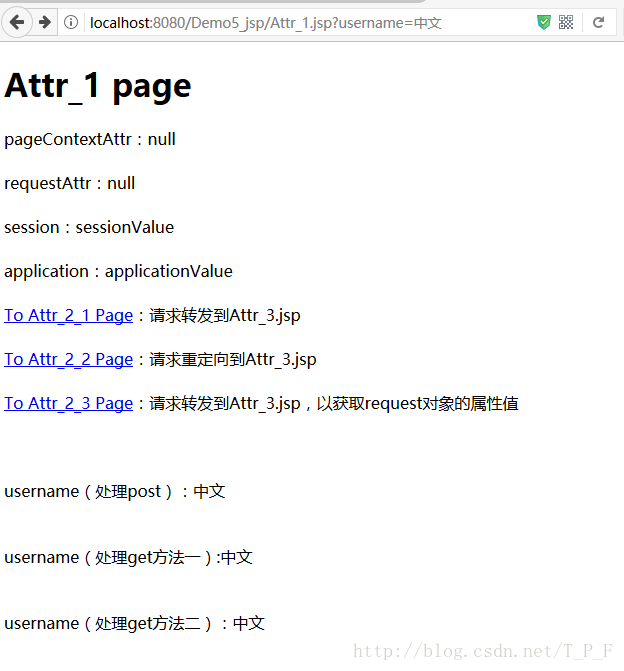
超链接1:
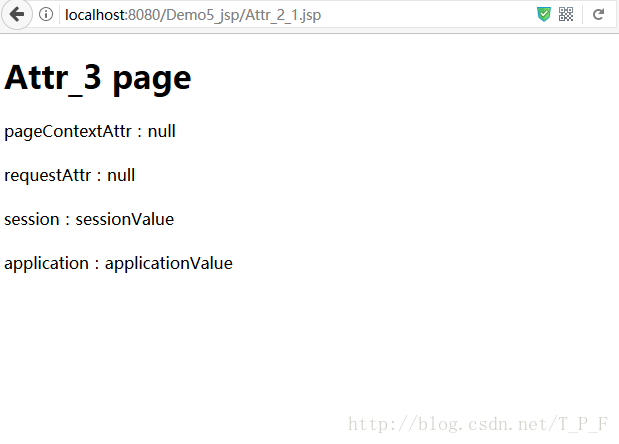
超链接2:
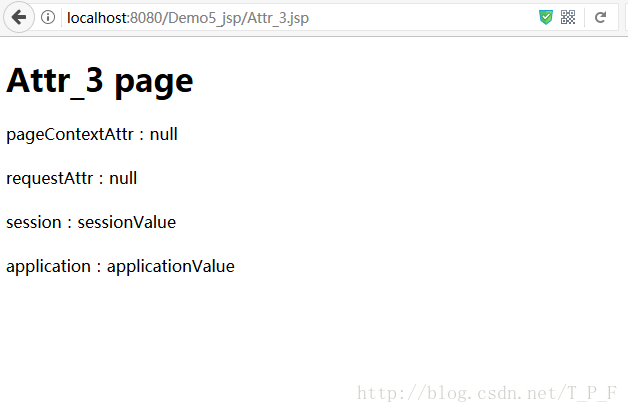
超链接3:
Servlet(10)—请求转发和请求重定向的更多相关文章
- 请求转发 和 URL 重定向
五 请求转发 和 URL 重定向 1 请求转发和重定向 干什么用? 是我们在java后台servlet中 由一个servlet跳转到 另一个 servlet/jsp 要使用的技术 前端发送请求到后台 ...
- JSTL、请求转发和URL重定向
JSTL 为什么要使用JSTL? 因为在JSP中写JAVA代码很麻烦,而JSTL可以简化在JSp中写JAva代码的流程 如何使用JSTL? 准备工作: ①将JSTL依赖的jar包导入工程的WEB-IN ...
- Java Web中请求转发和请求包含
1.都是在一个请求中跨越多个Servlet 2.多个Servlet在一个请求中,他们共享request对象.就是在AServle中setAttribute()保存数据在BServlet中由getAtt ...
- 20160326 javaweb 请求转发和请求包含
(1)请求转发: this.getServletContext().getRequestDispatcher("").forward(request,response); requ ...
- getRequestDispatcher 中请求转发和请求包含的使用说明
getRequestDispatcher() getRequestDispatcher() 包含两个方法,分别是请求转发和请求包含. RequestDispatcher rd = request.ge ...
- javaWeb中request请求转发和response重定向
1.访问资源 运用forward方法只能重定向到同一个Web应用程序中的一个资源. 而sendRedirect方法可以让你重定向到任何URL. 2.request.get Forward代码中的&q ...
- 请求转发(forward)和重定向(redirect)的区别
转发不会改变地址栏,重定向会. 转发是请求一次,重定向请求两次. 转发过程中只有一个request对象产生,重定向是两个. 转发不能转发到站外,重定向可以发送到站外. 重定向的第2个请求的请求方式是什 ...
- 请求转发和URL重定向的原理和区别
一.请求转发和重定向是在java后台servlet中,由一个servlet跳转到另一个servlet/jsp要使用的技术 使用方法 请求转发 req.getResquestDispatcher(se ...
- java请求转发,响应重定向的区别
请求转发:request.getRequestDispatcher().forward(); 例:request.getRequestDispatcher("/index.jsp" ...
随机推荐
- YOLO V2 代码分析
先介绍YOLO[转]: 第一个颠覆ross的RCNN系列,提出region-free,把检测任务直接转换为回归来做,第一次做到精度可以,且实时性很好. 1. 直接将原图划分为SxS个grid cell ...
- 从oracle导出数据成csv,将csv导入mongodb问题
- 求小于n且与n互质的数的个数
int eu(int n){ int ans=n; for(int i=2;i*i<=n;i++) { if(n%i==0) { ans=ans/i*(i-1); while(n%i==0)n/ ...
- 013 mysql中find_in_set()函数的使用
在工作中遇见过,对于新知识,在这里写一写文档. 1.作用 举个例子,也许不理解,在看完后面的SQL示例,再来看就明白了: 有个文章表里面有个type字段,它存储的是文章类型,有 1头条.2推荐.3热点 ...
- LoadRunner脚本参数化之设置条件与运行结果说明
性能测试中为什么需要进行参数化? 1.功能方面:首先要保证脚本的功能完善.可用性.(一般来说,参数化主要针对业务中的具备唯一性的数据.) 2.性能方面:一般来说,如果服务器存在缓存机制,在测试过程中, ...
- 20165235 2018-3 《Java程序设计》第5周学习总结
20165235 2018-3 <Java程序设计>第5周学习总结 教材学习内容总结 第六章 内部类与异常类 (一)内部类:1.java支持在一个类中定义另一个类,这个类叫内部类.2.内部 ...
- hive提前过滤重要性
hive提前过滤 create table sospdm.tmp_yinfei_test_01 ( id string ) partitioned by (statis_date string) ; ...
- HDU-1009的解题报告
Hdu-1009 题目链接:http://acm.hdu.edu.cn/showproblem.php?pid=1009 题意:Fatmouse准备M磅的猫食,准备与猫守卫仓库有他最爱吃的食品贸易,J ...
- Tallest Cow POJ - 3263 (区间点修改)
FJ's N (1 ≤ N ≤ 10,000) cows conveniently indexed 1..N are standing in a line. Each cow has a positi ...
- hust 1010 The Minimum Length(循环节)【KMP】
<题目链接> 题目大意: 有一个字符串A,一次次的重写A,会得到一个新的字符串AAAAAAAA.....,现在将这个字符串从中切去一部分得到一个字符串B,例如有一个字符串A="a ...