
ios 中pickerView用法之国旗选择
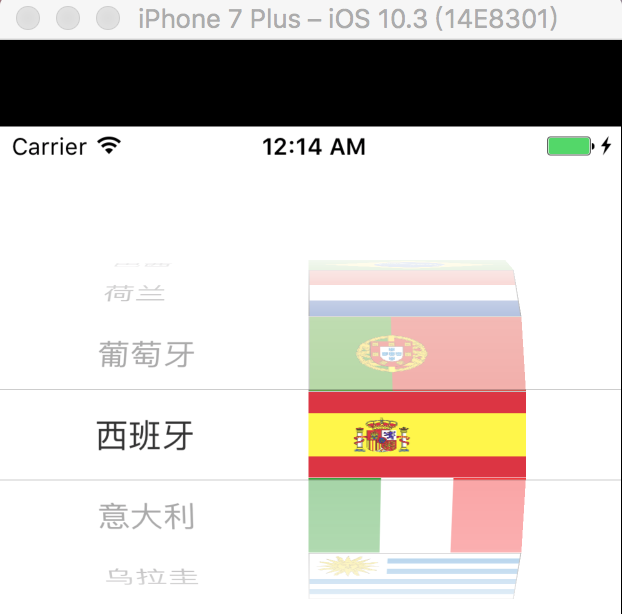
QRViewController控制器
//

//  QRViewController.m

//

#import "QRViewController.h"

#import "QRFlag.h"

#import "QRFlagView.h"

@interface QRViewController ()<UIPickerViewDataSource,UIPickerViewDelegate>

@property (nonatomic,strong) NSArray *flags;

@end

@implementation QRViewController

- (void)viewDidLoad {

    [super viewDidLoad];

}

/**

 *懒加载国旗数据

 */

- (NSArray *)flags

{

    if(_flags==nil){

        NSString *path=[[NSBundle mainBundle] pathForResource:@"flags" ofType:@"plist"];

        NSArray *arrayList=[NSArray arrayWithContentsOfFile:path];

        NSMutableArray *dictArray=[NSMutableArray array];

        for (NSDictionary *dict in arrayList) {

            QRFlag *flag=[QRFlag flagWithDict:dict];

            [dictArray addObject:flag];

        }

        _flags=dictArray;

    }

    return _flags;

}

#pragma mark - 设置数据源

/**

 *设置列数

 */

-(NSInteger)numberOfComponentsInPickerView:(UIPickerView *)pickerView

{

    return ;

}

/**

 *设置某一列的行

 */

- (NSInteger)pickerView:(UIPickerView *)pickerView numberOfRowsInComponent:(NSInteger)component

{

    return self.flags.count;

}

/**

 *设置某一列中的某一行的显示数据

 */

//- (NSString *)pickerView:(UIPickerView *)pickerView titleForRow:(NSInteger)row forComponent:(NSInteger)component

//{

//    QRFlag *flag=self.flags[row];

//    return flag.name;

//}

/**

 *  第component列的第row行显示怎样的view

 *  每当有一行内容出现在视野范围内,就会调用(调用频率高)

 */

-(UIView *)pickerView:(UIPickerView *)pickerView viewForRow:(NSInteger)row forComponent:(NSInteger)component reusingView:(UIView *)view

{

    QRFlagView *flagView=[QRFlagView flagViewWithResuingView:view];

    flagView.flag=self.flags[row];

    return flagView;

}

- (CGFloat)pickerView:(UIPickerView *)pickerView rowHeightForComponent:(NSInteger)component

{

    return [QRFlagView flogViewHeight];

}

@end
QRFlag模型类
#import <Foundation/Foundation.h>

@interface QRFlag : NSObject

@property (nonatomic,copy) NSString *name;

@property (nonatomic,copy) NSString *icon;

+(instancetype)flagWithDict:(NSDictionary *)dict;

- (instancetype)initWithDict:(NSDictionary *)dict;

@end

//===================

#import "QRFlag.h"

@implementation QRFlag

+(instancetype)flagWithDict:(NSDictionary *)dict

{

    return [[self alloc] initWithDict:dict];

}

- (instancetype)initWithDict:(NSDictionary *)dict

{

    if(self=[super init]){

        [self setValuesForKeysWithDictionary:dict];

    }

    return self;

}

@end
XIB控制器
#import <UIKit/UIKit.h>

@class QRFlag;

@interface QRFlagView : UIView

@property (nonatomic,strong) QRFlag *flag;

+ (instancetype)flagViewWithResuingView:(UIView *)resuingView;

+(CGFloat)flogViewHeight;

@end

//=================

#import "QRFlagView.h"

#import "QRFlag.h"

@interface QRFlagView()

@property (weak, nonatomic) IBOutlet UILabel *name;

@property (weak, nonatomic) IBOutlet UIImageView *icon;

@end

@implementation QRFlagView

+ (instancetype)flagViewWithResuingView:(UIView *)resuingView

{

    if(resuingView==nil)

    {

    NSBundle *bundle=[NSBundle mainBundle];

    NSArray *obj=[bundle loadNibNamed:@"QRFlag" owner:nil options:nil];

    return [obj lastObject];

    }else{

        return (QRFlag *)resuingView;

    }

}

+(CGFloat)flogViewHeight

{

    return ;

}

-(void)setFlag:(QRFlag *)flag

{

    self.name.text=flag.name;

    self.icon.image=[UIImage imageNamed:flag.icon];

}

@end
ios 中pickerView用法之国旗选择的更多相关文章
- ios中 pickerView的用法
今天是一个特殊的日子(Mac pro 敲的 爽... 昨天到的) // // QRViewController.m// #import "QRViewController.h" @ ...
- ios 中pickerView城市选择和UIDatePicker生日选择
代码详见压缩包
- ios中MKHorizMenu用法
下载地址 https://github.com/MugunthKumar/MKHorizMenuDemo直接 加入MKHorizMenu目录即可 下载包地址 http://pan.baidu.com/ ...
- ios 中手势用法
pan拖动手势 - (void)viewDidLoad { [super viewDidLoad]; [self Pan]; // Do any additional setup after load ...
- 【IOS】ios中NSUserDefault与android中的SharedPreference用法简单对比
以下内容为原创,欢迎转载,转载请注明 来自天天博客:http://www.cnblogs.com/tiantianbyconan/p/3405308.html 有Android开发经验的朋友对Shar ...
- iOS中block的用法 以及和函数用法的区别
ios中block的用法和函数的用法大致相同 但是block的用法的灵活性更高: 不带参数的block: void ^(MyBlock)() = ^{}; 调用的时候 MyBlock(); 带参数的 ...
- IOS第11天(2:UIPickerView自定义国旗选择)
国旗选择 #import "HMViewController.h" #import "HMFlag.h" #import "HMFlagView.h& ...
- iOS中Block的用法,举例,解析与底层原理(这可能是最详细的Block解析)
1. 前言 Block:带有自动变量(局部变量)的匿名函数.它是C语言的扩充功能.之所以是拓展,是因为C语言不允许存在这样匿名函数. 1.1 匿名函数 匿名函数是指不带函数名称函数.C语言中,函数是怎 ...
- iOS中UIPickerView常见属性和方法的总结
UIPickerView是iOS中的原生选择器控件,使用方便,用法简单,效果漂亮. @property(nonatomic,assign) id<UIPickerViewDataSource&g ...
随机推荐
- 牛客网 完数VS盈数
题目链接:https://www.nowcoder.com/practice/ccc3d1e78014486fb7eed3c50e05c99d?tpId=40&tqId=21351&t ...
- 生成树协议stp
生成树协议应用的原因是从逻辑上阻塞交换机在物理上形成的环路.大家都知道交换机工作在二层,也就是数据链路层,根据mac地址识别主机,对三层网络无法识别,因此交换机不能隔离广播.但是在日常的工作中,为了达 ...
- poj2142 The Balance
poj2142 The Balance exgcd 应分为2种情况分类讨论 显然我们可以列出方程 ax-by=±d 当方程右侧为-d时,可得 by-ax=d 于是我们就得到了2个方程: ax-by=d ...
- gcc、make编译
一 arm-linux-gcc 常用参数 https://www.cnblogs.com/zhangpengshou/p/3587751.html 二 arm-linux-objdump常用参数 ht ...
- 关于Could not read pom.xml和No plugin found for prefix 'tomcate7' in the current project
当时出现的错误: 有大神知道我这个错误怎么解决吗[ERROR] No plugin found for prefix 'tomcate7' in the current project and in ...
- 最新版的Chrome如何始终开启flash而不是先询问?
链接:https://www.zhihu.com/question/266170237/answer/342137190 设置Chrome启用Flash,修改配置之前先看Chrome的版本,不同版 ...
- 四:DRF项目开发的准备
一: 虚拟环境virtualenv 如果在一台电脑上, 想开发多个不同的项目, 需要用到同一个包的不同版本, 如果使用上面的命令, 在同一个目录下安装或者更新, 新版本会覆盖以前的版本, 其它的项目就 ...
- OLAP多维数据库备份
本人开发了一款OLAP多维数据库备份软件,现将其贡献博客园. 链接: https://pan.baidu.com/s/1oL8xVZfSUiUcvrvohxKVoQ 提取码: nmh5 操作方式: 1 ...
- nodejs点滴
1.exports与module.exports http://cnodejs.org/topic/5231a630101e574521e45ef8 因为require指向了module.export ...
- html网页如何使用哪种浏览器内核渲染的选择
众所周知,国内的浏览器基本都是双内核的(ie(Trident)+webkit):而且基本默认时都是用webkit内核.尽管IE浏览器体验差,但是有时也会需要用IE内核来渲染的(比如银行网站). 如果要 ...