
php建立简单的用户留言系统
php建立简单的用户留言系统
样例
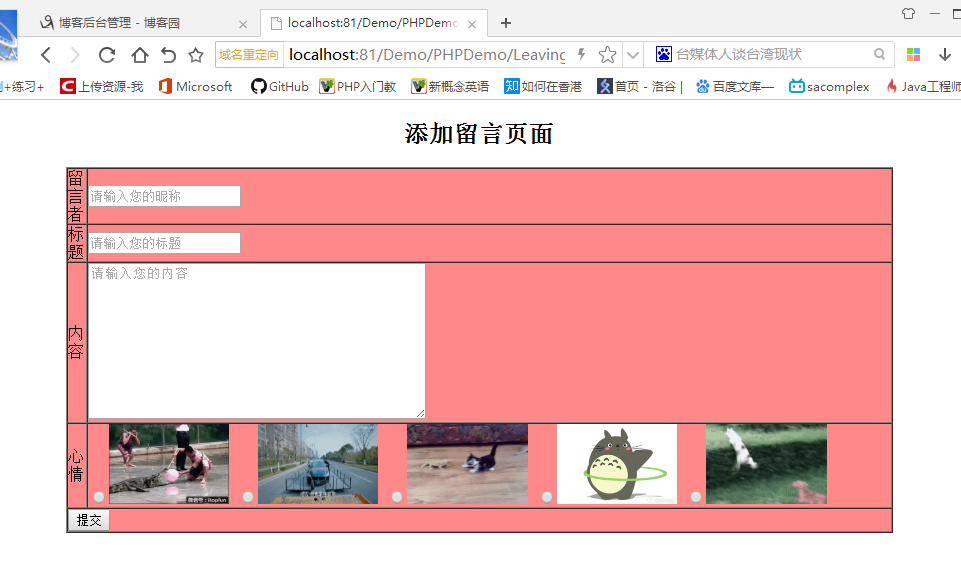
addMsg.php--添加留言页面
doAction.php--响应添加留言页面
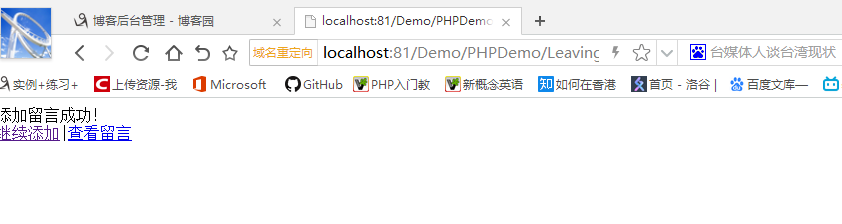 、
、
viewMsg.php--显示留言页面
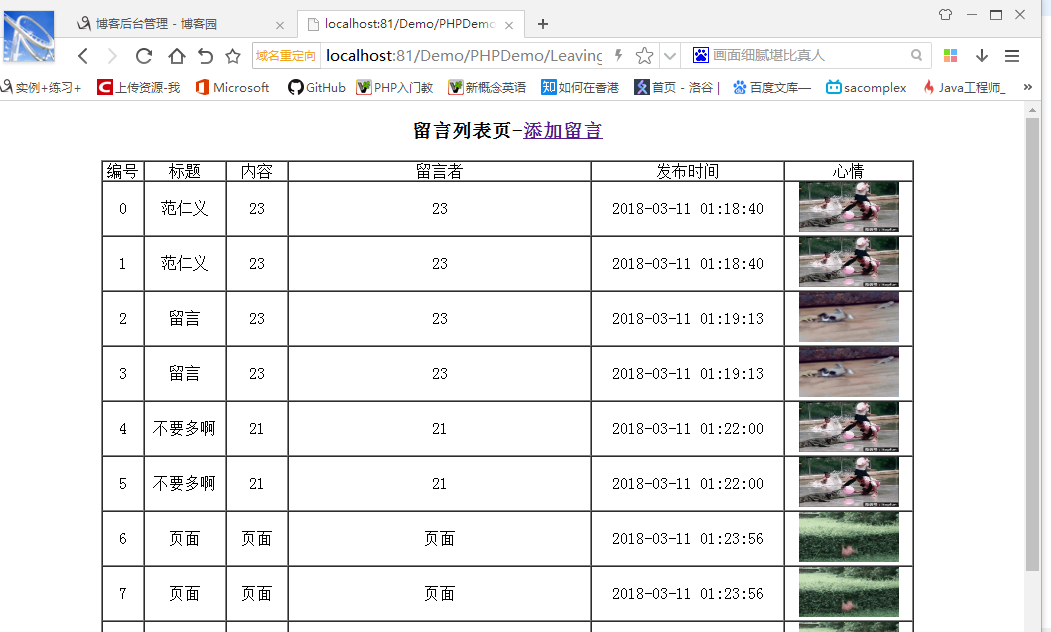
目录结构

addMsg.php--添加留言页面
doAction.php--响应添加留言页面
viewMsg.php--显示留言页面
message.txt--数据的本地化存储
代码
addMsg.php
 <!DOCTYPE html>

 <html>

 <head lang="en">

     <meta charset="UTF-8">

     <title></title>

 </head>

 <body>

     <h2 style="text-align: center;">添加留言页面</h2>

     <form action="doAction.php" method="get">

         <input type="hidden" name="act" value="add">

         <table style="margin: 0 auto;" border="1" width="80%"  cellpadding="0" cellspacing="0" bgcolor="#FF8888">

             <tr>

             <td>留言者</td>

             <td><input type="text" name="username" id="" placeholder="请输入您的昵称"/></td>

             </tr>

             <tr>

             <td>标题</td>

             <td><input type="text" name="title" id="" placeholder="请输入您的标题"/></td>

             </tr>

             <tr>

             <td>内容</td>

             <td><textarea name="content" rows="10" cols="45" placeholder="请输入您的内容"></textarea></td>

             </tr>

             <tr>

             <td>心情</td>

             <td>

                 <input type="radio" name="moon" value="g1.gif" cheched="cheched"/><img width="15%" height="80" alt="" src="img/g1.gif">

                 <input type="radio" name="moon" value="g2.gif" /><img width="15%" height="80" alt="" src="img/g2.gif">

                 <input type="radio" name="moon" value="g3.gif" /><img width="15%" height="80" alt="" src="img/g3.gif">

                 <input type="radio" name="moon" value="g4.gif" /><img width="15%" height="80" alt="" src="img/g4.gif">

                 <input type="radio" name="moon" value="g5.gif" /><img width="15%" height="80" alt="" src="img/g5.gif">

             </td>

             </tr>

             <tr>

             <td colspan="2"><input type="submit"></td>

             </tr>

         </table>

     </form>

 </body>

 </html>
9、get传值到action
10、hidden元素,便于页面传值
14、placeholder
27、radio元件和ima元件
28、colspan合并单元格
doAction.php
 <?php

 $username = isset($_GET['username'])?$_GET['username']:'';

 $title =  isset($_GET['title'])?$_GET['title']:'';

 $content =  isset($_GET['content'])?$_GET['content']:'';

 $moon =  isset($_GET['moon'])?$_GET['moon']:'';

 $time = date('Y-m-d h:i:s');

 $act = isset($_GET['act'])?$_GET['act']:'';

 $filename = 'message.txt';

 // echo $username.$title.$content.$moon;

 //来到doAction页面的时候先做一个判断1、message页面是否已经存在 2、文件里面有没有数据 3、有数据的话就把数据取出来

12 if(file_exists($filename)&&filesize($filename)>0){

     //从message.txt里面取数据

     $str = file_get_contents($filename);

     //通过反序列化把字符串转化成我们的二维数组

     $arr = unserialize($str);

 }

 if ($act == 'add') {

     $arr[]=array(

        'username'=>$username,

        'title'=>$title,

        'content'=>$content,

        'moon'=>$moon,

        'time'=>$time

     );

     $data = serialize($arr);

     // print_r($arr);

     //判断是否添加成功了

     if(file_put_contents($filename, $data)){

         echo '添加留言成功!<br/><a href="addMsg.php">继续添加</a>|<a href="viewMsg.php">查看留言</a>';

     }else{

         echo '添加留言失败!';

     }

 }
2、$_GET取其它页面get方式传过来的值,isset确定是否为null,所以配合三元运算符使用
12、如果文件存在并且文件不为空,那就是message.txt中拿到数据
13、file_get_contents从文件中拿到字符串
14、拿到的字符串反序列化就是数组的数据,unserialize
19、如果是添加数据页面,那就添加数据
20、二维数组赋值
27、序列化
30、将序列化的数据存储到本地的文本文件中去
viewMsg.php
 <?php

     $filename = 'message.txt';

     if(file_exists($filename)&&filesize($filename)>0){

         //从message.txt里面取数据

         $str = file_get_contents($filename);

         //通过反序列化把字符串转化成我们的二维数组

         $userInfo = unserialize($str);

     }else{

         $userInfo = null;

     }

 ?>

 <!DOCTYPE html>

 <html>

 <head lang="en">

     <meta charset="UTF-8">

     <title></title>

     <script src="jquery-2.2.3.js" type="text/javascript"></script>

 </head>

 <body>

     <h3 style="text-align:center;">留言列表页-<a href="addMsg.php">添加留言</a></h3>

     <table style="margin: 0 auto;" border="1" width="80%" cellpadding="0" cellspacing="0" backcolor="blue">

         <tr style="text-align:center;">

         <td>编号</td>

         <td>标题</td>

         <td>内容</td>

         <td>留言者</td>

         <td>发布时间</td>

         <td>心情</td>

         </tr>

         <?php

             foreach ($userInfo as $key=>$val){

         ?>

         <tr style="text-align:center;">

         <td><?php echo $key?></td>

         <td><?php echo $val['username'];?></td>

         <td><?php echo $val['title'];?></td>

         <td><?php echo $val['content'];?></td>

         <td><?php echo $val['time'];?></td>

         <td><img width="100" height="50" alt="" src="img/<?php echo $val['moon'];?>"></td>

         </tr>

         <?php }  ?>

     </table>

 </body>

 </html>
5、留言页的数据从文本中拿出
31、foreach遍历数组的内容然后显示到留言页面
message.txt
a:13:{i:0;a:5:{s:8:"username";s:9:"范仁义";s:5:"title";s:2:"23";s:7:"content";s:2:"23";s:4:"moon";s:6:"g1.gif";s:4:"time";s:19:"2018-03-11 01:18:40";}i:1;a:5:{s:8:"username";s:9:"范仁义";s:5:"title";s:2:"23";s:7:"content";s:2:"23";s:4:"moon";s:6:"g1.gif";s:4:"time";s:19:"2018-03-11 01:18:40";}i:2;a:5:{s:8:"username";s:6:"留言";s:5:"title";s:2:"23";s:7:"content";s:2:"23";s:4:"moon";s:6:"g3.gif";s:4:"time";s:19:"2018-03-11 01:19:13";}i:3;a:5:{s:8:"username";s:6:"留言";s:5:"title";s:2:"23";s:7:"content";s:2:"23";s:4:"moon";s:6:"g3.gif";s:4:"time";s:19:"2018-03-11 01:19:13";}i:4;a:5:{s:8:"username";s:12:"不要多啊";s:5:"title";s:2:"21";s:7:"content";s:2:"21";s:4:"moon";s:6:"g1.gif";s:4:"time";s:19:"2018-03-11 01:22:00";}i:5;a:5:{s:8:"username";s:12:"不要多啊";s:5:"title";s:2:"21";s:7:"content";s:2:"21";s:4:"moon";s:6:"g1.gif";s:4:"time";s:19:"2018-03-11 01:22:00";}i:6;a:5:{s:8:"username";s:6:"页面";s:5:"title";s:6:"页面";s:7:"content";s:6:"页面";s:4:"moon";s:6:"g5.gif";s:4:"time";s:19:"2018-03-11 01:23:56";}i:7;a:5:{s:8:"username";s:6:"页面";s:5:"title";s:6:"页面";s:7:"content";s:6:"页面";s:4:"moon";s:6:"g5.gif";s:4:"time";s:19:"2018-03-11 01:23:56";}i:8;a:5:{s:8:"username";s:7:"页面2";s:5:"title";s:7:"页面2";s:7:"content";s:7:"页面2";s:4:"moon";s:6:"g5.gif";s:4:"time";s:19:"2018-03-11 01:33:45";}i:9;a:5:{s:8:"username";s:0:"";s:5:"title";s:0:"";s:7:"content";s:0:"";s:4:"moon";s:0:"";s:4:"time";s:19:"2018-03-11 01:36:11";}i:10;a:5:{s:8:"username";s:0:"";s:5:"title";s:0:"";s:7:"content";s:0:"";s:4:"moon";s:0:"";s:4:"time";s:19:"2018-03-11 01:36:27";}i:11;a:5:{s:8:"username";s:6:"测试";s:5:"title";s:6:"测试";s:7:"content";s:6:"测试";s:4:"moon";s:6:"g4.gif";s:4:"time";s:19:"2018-03-11 01:48:53";}i:12;a:5:{s:8:"username";s:9:"样例一";s:5:"title";s:9:"样例一";s:7:"content";s:45:"样例一样例一样例一样例一样例一";s:4:"moon";s:6:"g4.gif";s:4:"time";s:19:"2018-03-11 04:25:39";}}
总结
php做网站真的比Java块很多方便很多。
php建立简单的用户留言系统的更多相关文章
- Springboot - 建立简单的用户登录系统
在开始编码前,先建立几个Package(可以按个人习惯命名),如图 1.Controllers 用于存放控制器类 2.Models 用于存放数据实体类 3.Repositories 用于存放数据库操作 ...
- Servlet --简单用户留言系统
1.创建用户表和留言表 2.编写数据库连接工具类 public class SqlserverDBConn { private Statement stmt; private Connection c ...
- 【译】建立属于你的个人高效系统——效率专家 Mike Vardy 教你如何设置一个简单的个人高效系统
原文:http://mux.baidu.com/?p=5300 百度MUX 已经有太多的高效系统供人使用,而对于那些刚刚开始,想寻求更好方法完成他们任务,项目,目标的人来说,要做一个高效系统却是相当艰 ...
- django初探-创建简单的博客系统
django第一步 1. django安装 pip install django print(django.get_version()) 查看django版本 2. 创建项目 打开cmd,进入指定目录 ...
- linux用户权限 -> 系统用户管理
用户基本概述: Linux用户属于多用户操作系统,在windows中,可以创建多个用户,但不允许同一时间多个用户进行系统登陆,但是Linux可以同时支持多个用户同时登陆操作系统,登陆后互相之间并不影响 ...
- django初探-创建简单的博客系统(一)
django第一步 1. django安装 pip install django print(django.get_version()) 查看django版本 2. 创建项目 打开cmd,进入指定目录 ...
- Asp.Net MVC+BootStrap+EF6.0实现简单的用户角色权限管理10
今天把用户的菜单显示和页面的按钮显示都做好了,下面先来个效果图 接下来说下我实现的方法: 首先我在每个方法前面都加了这个属性, /// <summary> /// 表示当前Action请求 ...
- 纯jsp用户登录系统
用纯jsp技术实现用户登录系统,需要用到三个.jsp文件.在文本目录下新建三个.jsp文件,分别命名为login.jsp,logincl.jsp和wel.jsp. 1.login.jsp文件用来放界面 ...
- 基于Servlet、JSP、JDBC、MySQL的一个简单的用户注冊模块(附完整源代码)
近期看老罗视频,做了一个简单的用户注冊系统.用户通过网页(JSP)输入用户名.真名和password,Servlet接收后通过JDBC将信息保存到MySQL中.尽管是个简单的不能再简单的东西,但麻雀虽 ...
随机推荐
- Java 基本的递归写法
1.首先我们得有一个树状结构的表,类似这种结构.必须得有 id,pid 其他的根据需要来. 我们叫它treeTbl表吧.这里pid为0的表示是顶级节点. 2.接着select * from tree ...
- sql学习--update
两种修改形式 第一种:静态插入 ,notes='began career selling ...balabala' where jc='johnny ca' 第二种: --注意别名和on后边的表连接不 ...
- React Component(dva)
Stateless Functional Components(3种方式) class App extends React.Component function App() const App= Re ...
- ArcGIS API For Android Errors汇总
API客户端异常错误的发生通常是由于不正确的方法参数,对象状态依赖,或网络条件. //*******推荐使用方法,按下Ctrl+F搜索错误代码,再查看与代码对应的解释.********// ArcGI ...
- 关于VM虚拟机在使用网络时与锐捷网络冲突的解决问题
在使用NAT网络模式的时候,锐捷会因为冲突强制关闭NAT服务,导致虚拟机无法上网,解决的办法是让NAT服务一直保持启动,写一个bat脚本来一直检测服务是否在运行,并且进行启动操作. 当不需要用虚拟机的 ...
- NET MVC FileResult 导出/下载 文件/Excel
参考http://www.cnblogs.com/ldp615/archive/2010/09/17/asp-net-mvc-file-result.html 1.引入NPOI 2.代码 using ...
- (转)openlayers实现在线编辑
http://blog.csdn.net/gisshixisheng/article/details/46054949 概述: 在前面有篇博文讲述了基于Arcgis for js和wkt实现在线数据的 ...
- HDU_1729_sg函数(dfs)
Stone Game Time Limit: 5000/1000 MS (Java/Others) Memory Limit: 65535/32768 K (Java/Others)Total ...
- CorelDRAW图片导出变色,如何解决?
很多小伙伴反映说CDR颜色导出不准确,特别是CorelDRAW X4以及之前的版本,那么CDR导出变色的问题是怎么导致的,如何解决呢,本文小编分享一些自己的心得. 一:出现问题. 比如下面这个问题,明 ...
- uni-app强大的前端框架,h5,原生app(两大系统),微信小程序
最近发现一款强大的前端框架,它叫uni-app 这是一款通用的框架可以打包app,h5,微信小程序, 说说要弄这个工具需要会那些技能吧, 要熟悉vue,微信小程序.这样这个框架用的就是很快上手了 模块 ...