
An Overview of Cisco IOS Versions and Naming
An Overview of Cisco IOS Versions and Naming
http://www.ciscopress.com/articles/article.asp?p=2106547
- By Sean Wilkins.
- Article is provided courtesy of Cisco Press.
- Date: Jun 28, 2013.


Article Information
Article Description
Version and naming structure used by Cisco for their IOS images is often confusing. Although the naming used for some of the newer devices is changing to a simpler structure, it will be a while before all the different versions are consolidated. This article covers these different releases and aims to give a single location where network engineers can look to figure out what the different releases mean
One thing that is often confusing to any network engineer (regardless of level) is the version and naming structure used by Cisco for their IOS images. Although the naming used for some of the newer devices is changing to a simpler structure, it will be a while before all the different versions are consolidated. This article covers these different releases and aims to give a single location where network engineers can look to figure out what the different releases mean. Although this is not an exhaustive list of every Cisco version, it does cover the most commonly used versions.
IOS Releases
One term that is often used is the IOS release type. With versions of IOS earlier than 15, a specific image could be considered one of the following four different release types:
Early Deployment (ED): These releases provide both new features and new platform support in addition to bug fixes.
Limited Deployment (LD): These releases do not include any new features or platform support but do include bug fixes. LD releases are between an ED release and a GD release.
General Deployment (GD): These releases can be used anywhere in a customer network with the same feature and functionality requirements. These tend to be stable on almost all platforms.
Maintenance Deployment (MD): These releases are used to provide additional support for bug fixes and ongoing software maintenance.
With IOS 15 and later, both the LD and GD deployments will be retired. New releases will be considered either ED or MD. The IOS train paths have also been consolidated. With earlier versions of IOS, the different ED (T trains; for instance, 12.4T) and MD (not T trains; for instance, 12.4) has different code bases. With IOS 15 and later, the code bases will be consolidated. MD releases (called M releases, or extended release) will be released and have a 44-month support window, whereas ED (T releases, or standard release) will have a 18-month support window.
IOS Versions
A number of different versions exist within each release of IOS. This article takes a look at a few of these and how what they are used for.
12
With IOS Version 12, many different sub-versions of IOS exist, including specialized support for specific platforms; the next few sections cover a couple of the most common.
IOS Version 12 has a few different ways to notate version, including those shown in Figure 1.
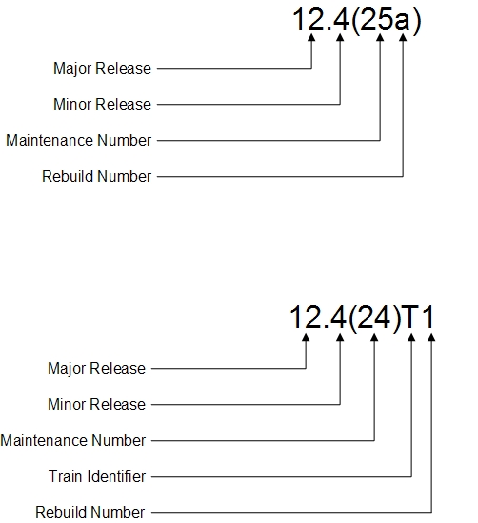
Figure 1 IOS Version 12 Version Notation
12
The 12 base versions are also referred to as the mainline release of a version. These releases tend to be the most stable and include support for most of the available platforms. Other more specialized versions of IOS are rolled into the mainline as an update when they have been sufficiently tested. (They go through the release process shown in the previous section.)
12T
The T train is used to add the newest features and platforms. After the software has been tested thoroughly, it is rolled into the mainline release.
12S, 12SB, 12SR
Many different IOS versions provide support for specific platforms. The ones shown in the section name are an incomplete list but do show some of the common examples. The 12S, 12SB, and 12SR versions tend to provide support for Cisco’s 7200, 7300, 7400, 7500, and 10000 platforms.
15
The way that different versions are referenced with IOS Version 15 is similar to that of IOS Version 12.
IOS Version 15 has a notation that is similar to IOS Version 12 and is shown in Figure 2.
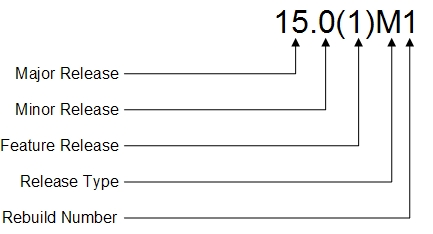
Figure 2 IOS Version 15 Version Notation
15M
As with IOS version 12, IOS Version 15M provides a mainline release and is also referred to as a maintenance release.
15T
As with IOS version 12T, version 15T is focused on new features and platforms and is supported for a shorter amount of time than the maintenance releases. After 15T releases have been tested thoroughly, they are wrapped into the next 15M release.
15X, 15S, 15SY, 15SG, 15SE
As with IOS Version 12, IOS Version 15 is going to have a number of different versions that are specific to new equipment that needs to support new features (specific to the platform). For IOS Version15, some of those currently available are Version 15X (special or early deployment), 15S (7600), 15Y (Sup-2T-10GE – Catalyst 6500), 15SG (Sup-CS-S2T – Catalyst 6500), and 15SE (2960, 3560, 3650, and 3750 platforms).
IOS Package Naming
The way that Cisco has named their IOS packages has changed over time. With IOS Version 12.3 though 15, this has remained relatively constant. Figure 3 shows the eight different packages that are available.
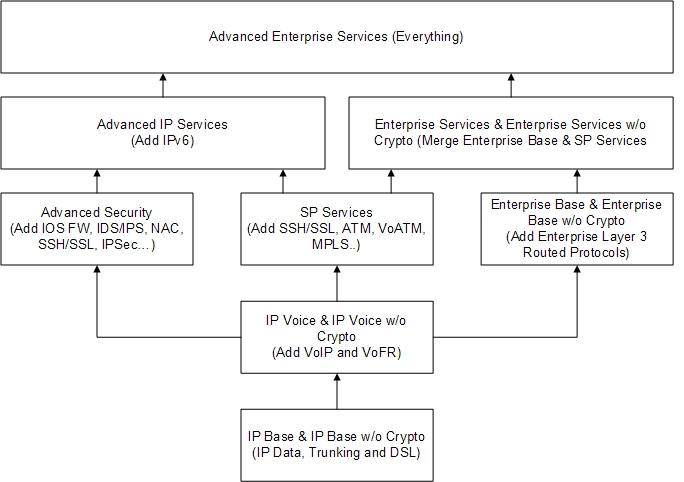
Figure 3 IOS Software Packaging (Routers and Switches)
Of course, this can get confusing. In an effort to make the software licensing process simpler and provide operational savings, the way that packages are created has changed with the new Integrated Service Routers (ISR) Generation 2. With these devices, a universal image is shipped on each one. The functionality provided by the image is dictated by the features enabled with a license key.
Figure 4 shows the four different packages that are available.
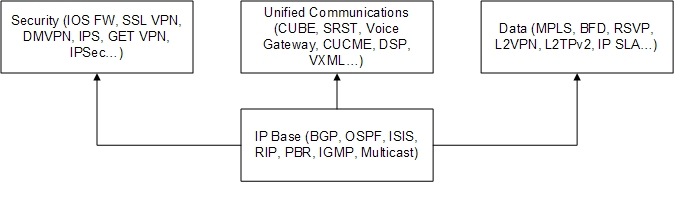
Figure 4 IOS Software Packaging (ISR G2 Routers)
Each of these are then able to be added together to obtain the features required in each situation (for example, UC + Security or Data + Security).
Summary
Well, leave it up to development to have a structure that makes sense to only a small number of people. This certainly seems to have happened with the various iterations of IOS. This article should enable current and new network engineers to break down what every image provides so that future IOS version selection becomes easier. Let’s hope that going forward the model being used for the newer ISR G2 will be used. At the very least, this will make the selection of the most appropriate IOS image feature package possible without considerable time spend with Cisco presales.
An Overview of Cisco IOS Versions and Naming的更多相关文章
- Cisco IOS images
Cisco IOS images for Dynamips - GNS3http://docs.gns3.com/1-kBrTplBltp9P3P-AigoMzlDO-ISyL1h3bYpOl5Q8m ...
- error items-9022:missing required icon file.the bundle does not contain an app icon for iPhone/iPad Touch of exactly '120x120' pixels,in.pen format for ios versions >= 7.0
error items-9022:missing required icon file.the bundle does not contain an app icon for iPhone/iPad ...
- Cisco IOS Debug Command Reference I through L
debug iapp through debug ip ftp debug iapp : to begin debugging of IAPP operations(in privileged EXE ...
- Cisco IOS Software Activation Command Reference
clear license agent : to clear license agent statistics counters or connection statistics (in privil ...
- Cisco IOS basic system management command reference
absolute : to specify an absolute time for a time-range (in time-range configuration mode) no absolu ...
- Cisco IOS Security command Guide
copy system:running-config nvram:startup-config : to save your configuration changes to the startup ...
- Cisco IOS Debug Command Reference Command E through H
debug eap through debug he-module subslot periodic debug eap : to display information about Extensib ...
- Cisco IOS debug command reference Command A through D
debug aaa accounting through debug auto-config debug aaa accounting : to display information on acco ...
- Cisco IOS Basic CLI Configuration : Switch Port Command
Cisco IOS Basic CLI Configuration : Switch Port Command 1. Basic Switch>en Switch#conf t Enter c ...
随机推荐
- Linux下搭建JSP环境
Linux下搭建JSP环境 作为一名Java EE系统架构工程师,经常需要搭配和建立JSP(Java Server Pages)的开发环境和运行环境,所以本人在平时的工作中积累了一些在Linu ...
- ubuntu搭建交叉编译环境makeinfo: command not found
解决办法:sudo apt-get install texinfo
- 1.字符设备驱动------Linux中断处理体系结构
一.中断处理体系结构的初始化 Linux内核将所有的中断统一编号,使用一个irq_desc结构数组来描述这些中断;每个数组项对应一个中断,也可能是一组中断,它们共用相同的中断号,里面记录了中断的名称. ...
- 第二十八天 月出惊山鸟 —Spring的AOP
6月13日,阴转细雨."人闲桂花落.夜静春山空. 月出惊山鸟.时鸣春涧中." 无论在面向过程还是在面向对象里,奇妙的"纯"字,似乎永远都充满了无限的可能性.除了 ...
- Web 组件是什么
Web 组件是什么 一.总结 这篇下面的内容多看 1.组件化的目的:高内聚,低耦合,便于多人同时开发 2.各种前端框架(前端组件化)让写前端不要太简单: 3.组件编程最最最最简单实例: <lin ...
- 10. Spring Boot JDBC 连接数据库
转自:https://blog.csdn.net/catoop/article/details/50507516
- CSS3常用属性及用法
1.transition: 过渡属性,可以替代flash和javascript的效果 兼容性:Internet Explorer 9 以及更早的版本,不支持 transition 属性. Chrome ...
- [appium]-9宫格解锁方法
from appium.webdriver.common.touch_action import TouchAction TouchAction(self.driver).press(x=228,y= ...
- amazeui学习笔记--css(常用组件4)--关闭按钮Close
amazeui学习笔记--css(常用组件4)--关闭按钮Close 一.总结 1.关闭按钮基本用法:关闭按钮样式,可以结合其他不同组件使用.对 <a> 或者 <button> ...
- 学习 Perl(一) —— 安装及 hello world
所谓存在的即是合理的,尤其适用于琳琅满目的编程语言界.每种编程语言在设计之初均只为解决特定领域的特定问题而生,没有语言擅长所有的领域能够完美地解决所有的问题. 这里推荐一本经典的 perl 入门书:P ...