
CNN tflearn处理mnist图像识别代码解说——conv_2d参数解释,整个网络的训练,主要就是为了学那个卷积核啊。
官方参数解释:
Convolution 2D
tflearn.layers.conv.conv_2d (incoming, nb_filter, filter_size, strides=1, padding='same', activation='linear', bias=True, weights_init='uniform_scaling', bias_init='zeros', regularizer=None, weight_decay=0.001, trainable=True, restore=True, reuse=False, scope=None, name='Conv2D')
Input
4-D Tensor [batch, height, width, in_channels].
Output
4-D Tensor [batch, new height, new width, nb_filter].
Arguments
- incoming:
Tensor. Incoming 4-D Tensor. - nb_filter:
int. The number of convolutional filters. - filter_size:
intorlist of int. Size of filters. - strides: 'int
or list ofint`. Strides of conv operation. Default: [1 1 1 1]. - padding:
strfrom"same", "valid". Padding algo to use. Default: 'same'. - activation:
str(name) orfunction(returning aTensor) or None. Activation applied to this layer (see tflearn.activations). Default: 'linear'. - bias:
bool. If True, a bias is used. - weights_init:
str(name) orTensor. Weights initialization. (see tflearn.initializations) Default: 'truncated_normal'. - bias_init:
str(name) orTensor. Bias initialization. (see tflearn.initializations) Default: 'zeros'. - regularizer:
str(name) orTensor. Add a regularizer to this layer weights (see tflearn.regularizers). Default: None. - weight_decay:
float. Regularizer decay parameter. Default: 0.001. - trainable:
bool. If True, weights will be trainable. - restore:
bool. If True, this layer weights will be restored when loading a model. - reuse:
bool. If True and 'scope' is provided, this layer variables will be reused (shared). - scope:
str. Define this layer scope (optional). A scope can be used to share variables between layers. Note that scope will override name. - name: A name for this layer (optional). Default: 'Conv2D'.
代码:
# 64 filters net = tflearn.conv_2d(net, 64, 3, activation='relu')
其中的filter(卷积核)就是
[1 0 1
0 1 0
1 0 1],size=3
因为设置了64个filter,那么卷积操作后有64个卷积结果作为输入的特征(feature map)。难道后面激活函数就是因为选择部分激活???


图的原文:http://cs231n.github.io/convolutional-networks/
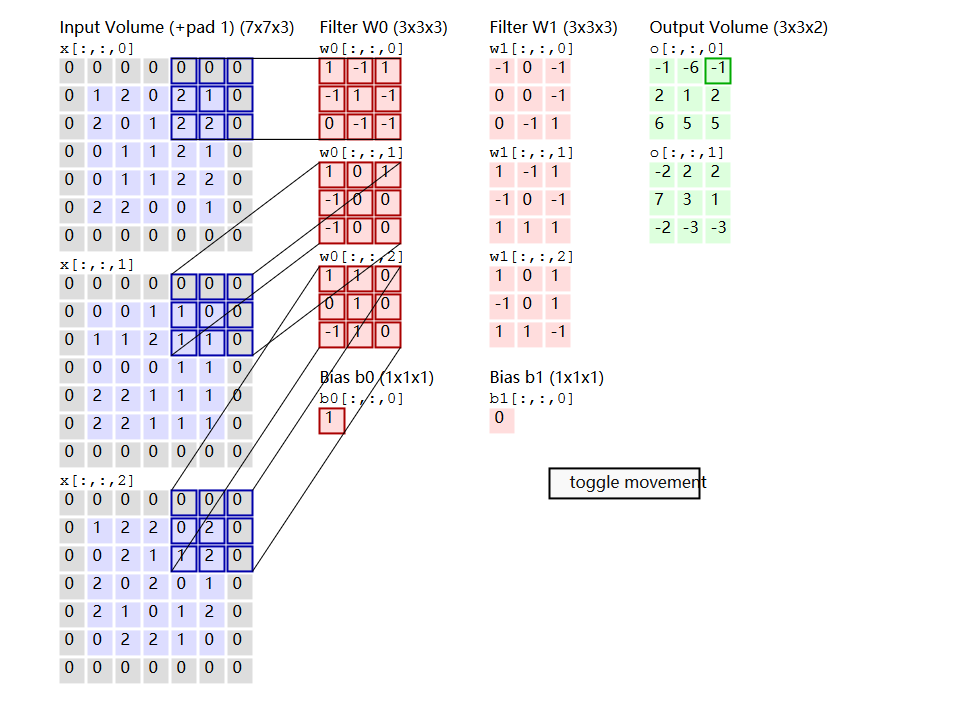
如果一个卷积层有4个feature map,那是不是就有4个卷积核?
是的。
这4个卷积核如何定义?
通常是随机初始化再用BP算梯度做训练。如果数据少或者没有labeled data的话也可以考虑用K-means的K个中心点,逐层做初始化。
卷积核是学习的。卷积核是因为权重的作用方式跟卷积一样,所以叫卷积层,其实你还是可以把它看成是一个parameter layer,需要更新的。
--------------------------------------------------------------------------------------------------
下面内容摘自:http://blog.csdn.net/bugcreater/article/details/53293075
- from __future__ import division, print_function, absolute_import
- import tflearn
- from tflearn.layers.core import input_data, dropout, fully_connected
- from tflearn.layers.conv import conv_2d, max_pool_2d
- from tflearn.layers.normalization import local_response_normalization
- from tflearn.layers.estimator import regression
- #加载大名顶顶的mnist数据集(http://yann.lecun.com/exdb/mnist/)
- import tflearn.datasets.mnist as mnist
- X, Y, testX, testY = mnist.load_data(one_hot=True)
- X = X.reshape([-1, 28, 28, 1])
- testX = testX.reshape([-1, 28, 28, 1])
- network = input_data(shape=[None, 28, 28, 1], name='input')
- # CNN中的卷积操作,下面会有详细解释
- network = conv_2d(network, 32, 3, activation='relu', regularizer="L2")
- # 最大池化操作
- network = max_pool_2d(network, 2)
- # 局部响应归一化操作
- network = local_response_normalization(network)
- network = conv_2d(network, 64, 3, activation='relu', regularizer="L2")
- network = max_pool_2d(network, 2)
- network = local_response_normalization(network)
- # 全连接操作
- network = fully_connected(network, 128, activation='tanh')
- # dropout操作
- network = dropout(network, 0.8)
- network = fully_connected(network, 256, activation='tanh')
- network = dropout(network, 0.8)
- network = fully_connected(network, 10, activation='softmax')
- # 回归操作
- network = regression(network, optimizer='adam', learning_rate=0.01,
- loss='categorical_crossentropy', name='target')
- # Training
- # DNN操作,构建深度神经网络
- model = tflearn.DNN(network, tensorboard_verbose=0)
- model.fit({'input': X}, {'target': Y}, n_epoch=20,
- validation_set=({'input': testX}, {'target': testY}),
- snapshot_step=100, show_metric=True, run_id='convnet_mnist')
关于conv_2d函数,在源码里是可以看到总共有14个参数,分别如下:
1.incoming: 输入的张量,形式是[batch, height, width, in_channels]

2.nb_filter: filter的个数

3.filter_size: filter的尺寸,是int类型

4.strides: 卷积操作的步长,默认是[1,1,1,1]

5.padding: padding操作时标志位,"same"或者"valid",默认是“same”

6.activation: 激活函数(ps:这里需要了解的知识很多,会单独讲)

7.bias: bool量,如果True,就是使用bias
8.weights_init: 权重的初始化

9.bias_init: bias的初始化,默认是0,比如众所周知的线性函数y=wx+b,其中的w就相当于weights,b就是bias

10.regularizer: 正则项(这里需要讲解的东西非常多,会单独讲)

11.weight_decay: 权重下降的学习率

12.trainable: bool量,是否可以被训练

13.restore: bool量,训练的模型是否被保存

14.name: 卷积层的名称,默认是"Conv2D"
关于max_pool_2d函数,在源码里有5个参数,分别如下:
1.incoming ,类似于conv_2d里的incoming
2.kernel_size:池化时核的大小,相当于conv_2d时的filter的尺寸
3.strides:类似于conv_2d里的strides
4.padding:同上
5.name:同上
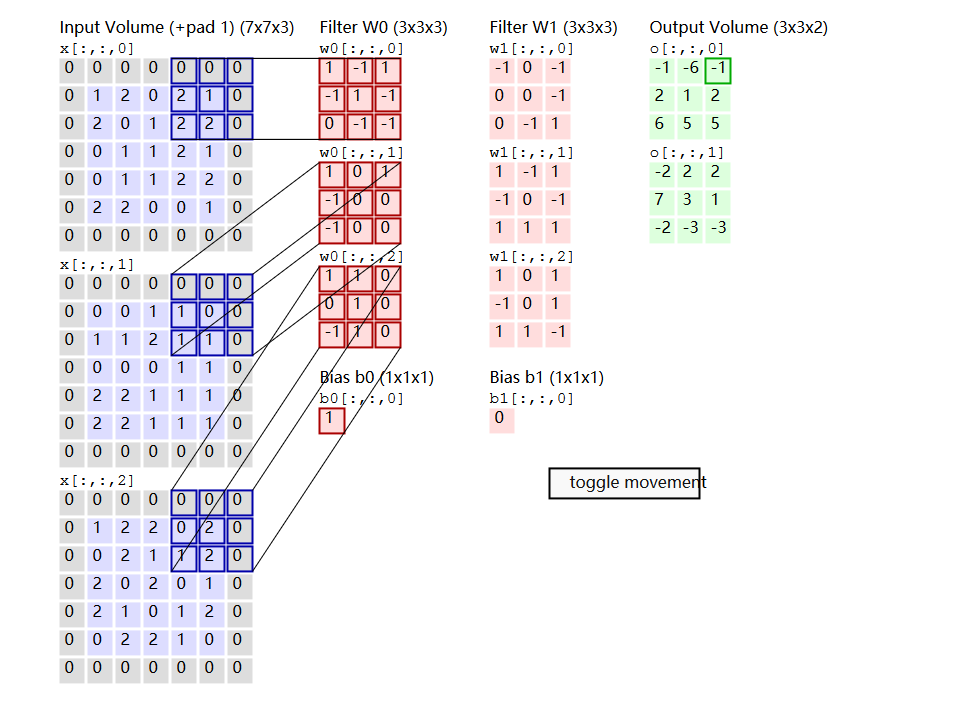
看了这么多参数,好像有些迷糊,我先用一张图解释下每个参数的意义。
其中的filter就是
[1 0 1
0 1 0
1 0 1],size=3,由于每次移动filter都是一个格子,所以strides=1.
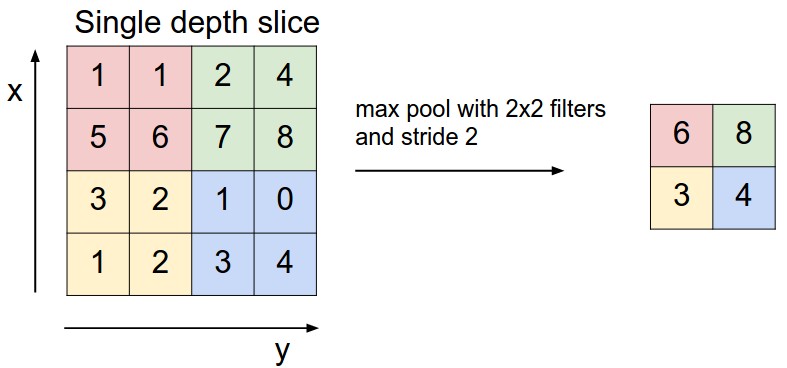
关于最大池化可以看看下面这张图,这里面 strides=1,kernel_size =2(就是每个颜色块的大小),图中示意的最大池化(可以提取出显著信息,比如在进行文本分析时可以提取一句话里的关键字,以及图像处理中显著颜色,纹理等),关于池化这里多说一句,有时需要平均池化,有时需要最小池化。

下面说说其中的padding操作,做图像处理的人对于这个操作应该不会陌生,说白了,就是填充。比如你对图像做卷积操作,比如你用的3×3的卷积核,在进行边上操作时,会发现卷积核已经超过原图像,这时需要把原图像进行扩大,扩大出来的就是填充,基本都填充0。

Convolution Demo. Below is a running demo of a CONV layer. Since 3D volumes are hard to visualize, all the volumes (the input volume (in blue), the weight volumes (in red), the output volume (in green)) are visualized with each depth slice stacked in rows. The input volume is of size W1=5,H1=5,D1=3, and the CONV layer parameters are K=2,F=3,S=2,P=1. That is, we have two filters of size 3×3, and they are applied with a stride of 2. Therefore, the output volume size has spatial size (5 - 3 + 2)/2 + 1 = 3. Moreover, notice that a padding of P=1
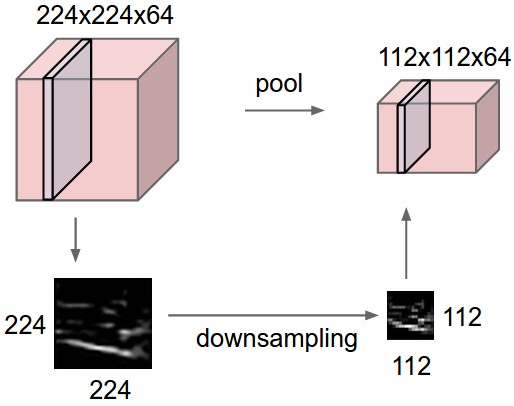
General pooling. In addition to max pooling, the pooling units can also perform other functions, such as average pooling or even L2-norm pooling. Average pooling was often used historically but has recently fallen out of favor compared to the max pooling operation, which has been shown to work better in practice.
CNN tflearn处理mnist图像识别代码解说——conv_2d参数解释,整个网络的训练,主要就是为了学那个卷积核啊。的更多相关文章
- 吴裕雄--天生自然TensorFlow高层封装:使用TFLearn处理MNIST数据集实现LeNet-5模型
# 1. 通过TFLearn的API定义卷机神经网络. import tflearn import tflearn.datasets.mnist as mnist from tflearn.layer ...
- 【深度学习系列3】 Mariana CNN并行框架与图像识别
[深度学习系列3] Mariana CNN并行框架与图像识别 本文是腾讯深度学习系列文章的第三篇,聚焦于腾讯深度学习平台Mariana中深度卷积神经网络Deep CNNs的多GPU模型并行和数据并行框 ...
- CNN算法解决MNIST数据集识别问题
网络实现程序如下 import tensorflow as tf from tensorflow.examples.tutorials.mnist import input_data # 用于设置将记 ...
- 完整java开发中JDBC连接数据库代码和步骤[申明:来源于网络]
完整java开发中JDBC连接数据库代码和步骤[申明:来源于网络] 地址:http://blog.csdn.net/qq_35101189/article/details/53729720?ref=m ...
- RFID系统 免费开源代码 开发,分享[申明:来源于网络]
RFID系统 免费开源代码 开发,分享[申明:来源于网络] 地址:http://www.codeforge.cn/s/0/RFID%E7%B3%BB%E7%BB%9F
- explain the past and guide the future 好的代码的标准:解释过去,指引未来;
好的代码的标准:解释过去,指引未来: Design philosophies | Django documentation | Django https://docs.djangoproject.co ...
- 抓住“新代码”的影子 —— 基于GoAhead系列网络摄像头多个漏洞分析
PDF 版本下载:抓住“新代码”的影子 —— 基于GoAhead系列网络摄像头多个漏洞分析 Author:知道创宇404实验室 Date:2017/03/19 一.漏洞背景 GoAhead作为世界上最 ...
- 使用 MNIST 图像识别数据集
机器学习领域中最迷人的主题之一是图像识别 (IR). 使用红外系统的示例包括使用指纹或视网膜识别的计算机登录程序和机场安全系统的扫描乘客脸寻找某种通缉名单上的个人.MNIST 数据集是可用于实验的简单 ...
- 代码解说Android Scroller、VelocityTracker
在编写自己定义滑动控件时经常会用到Android触摸机制和Scroller及VelocityTracker.Android Touch系统简单介绍(二):实例具体解释onInterceptTouchE ...
随机推荐
- 道里云SDN云网络技术:使云能够“众筹”
容器云来了! 容器云的网络规模将比虚拟机云的情况扩大10-100倍,容器云与虚拟机云互联需求也将使云网络管控复杂度成数倍增长.SDN业界迎来了空前挑战.本报告分享道里云公司SDN技术:怎样将云的 ...
- Cocos Code IDE
https://www.cnblogs.com/luorende/p/6464181.html http://www.cocoachina.com/bbs/read.php?tid-464164.ht ...
- 0x22 迭代加深
poj2248 真是个新套路.还有套路剪枝...大到小和判重 #include<cstdio> #include<iostream> #include<cstring&g ...
- category的概念
category 的意思应该是为基类添加一个子类的声明方法 可以在创建基类对象的时候访问到子类的对象方法 category 可以说是 类的扩展 也可以说是 将类分成了几个模块 需要注意的是 在cate ...
- 如何解决“因为计算机中丢失php_mbstring.dll”
配置编译环境时,php.exe报系统错误,无法启动此程序,因为计算机中丢失php_mbstring.dll. 在C:\Windows找到php.ini文件,ctrl+f找到extension=php_ ...
- iframe刷新以及自适应高度
A页面中的iframe链接到B页面在B页面调用这个可以刷新父页面的iframe self.location.reload(); <iframe src="admin-list.htm ...
- composer的一些操作
版本更新 命令行下:composer self-update 设置中国镜像 composer config -g repo.packagist composer https://packagist.p ...
- input[type='file']获取上传文件路径案例
最近在项目时,需要获取用户的上传文件的路径,便写了一个demo: <body> <input type="file" name="" valu ...
- 关于在bootstrap的tab栏中渲染echats图表,切换tab时echats不显示问题
在开发过程中遇到这样个问题: 利用bootstrap中的tab栏,每当点击tab栏的导航时,echats仅仅只渲染第一个tab的内容,切换tab时,echats图表不显示. 其html代码为: < ...
- listview添加的头部布局超过一屏头部内容显示不全
headView的实际高度超过一个屏幕,但是显示的结果只有一个屏幕,超过一个屏幕高度意外的部分显示不全. 只使用了listView.getRefreshable().addHeadView(headV ...