
Using VNC on a debian/Ubuntu server with a OS X Mac
I got a brand new MacBook Pro 13" 2016. I used to work on GNU/Linux for decades.
I don't want to change my working environment and life style. So I am going to connect to my work station remotely. This is why I need VNC.
VNC is a stand protocol. We can find some free/opensource VNC software for both client and server.
There are two I mainly use, tightvnc and tigervnc.
You can use any VNC client to connect to a VNC server. But some VNC producers promote their own products to give you better experience.
1. Install VNC client
VNC client option 1)
If you are on mac, you can go http://www.tightvnc.com to download a tightvnc client. It is developed using Java. So for a OS X user, you would need to install Java first.
VNC client option 2)
Or, you can download tigervnc http://tigervnc.org
2. Install VNC server on Linux server
For debian to install tightvncserver
`sudo apt-get install tightvncsever -y`
For tiger vnc server, you can go the site http://tigervnc.org , and download the latest server package for your system.
3. Settings on VNC server
3.1) create a VNC password using
`vncpasswd`
3.2 ) create a VNC startup file at path /home/yourname/.vnc/xstartup
`touch /home/yourname/.vnc/xstartup `
`chmod a+x /home/yourname/.vnc/xstartup`
3.3 ) edit it
#!/bin/sh

export XKL_XMODMAP_DISABLE=

# Uncomment the following two lines for normal desktop:

unset SESSION_MANAGER

unset DBUS_SESSION_BUS_ADDRESS

#exec /etc/X11/xinit/xinitrc &

[ -x /etc/vnc/xstartup ] && exec /etc/vnc/xstartup

[ -r $HOME/.Xresources ] && xrdb $HOME/.Xresources

xsetroot -solid grey

vncconfig -iconic &

x-terminal-emulator -geometry 80x24++  -title "$VNCDESKTOP Desktop" &

x-window-manager &

#x-window-manager

#kde-session &

#/etc/X11/Xsession

dbus-launch startxfce4

#startkde

#dbus-launch startkde #&
I used KDE before. But KDE crashed a lot. So I used xfce4 for instead as the desktop environment.
4. Start the VNC server
# for tightvnc server

tightvncserver -geometry 800x600 :

# for tigervnc server

tigervncserver -geometry 800x600 :

# to kill the server

tightvncserver -kill :

# or

tigervncserver -kill :
5. Connect to the VNC server from your Mac
java -jar tightvnc-jviewer.jar

Then input the VNC password you ever stored.
Honestly, using tiger VNC client and tiger VNC server gives me the best VNC experience.

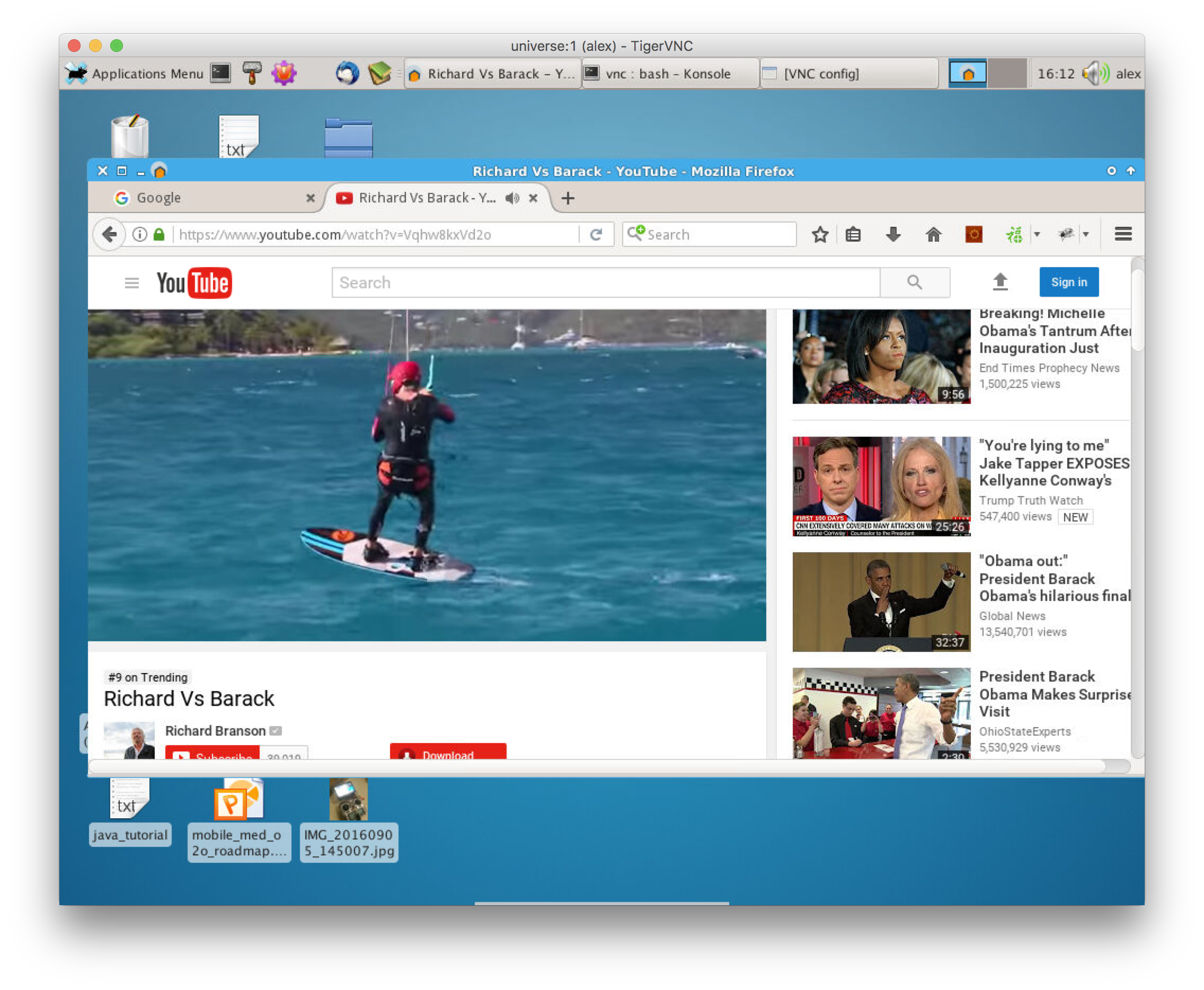
You can even watch videos using tiger VNC. Isn't it awesome?
Using VNC on a debian/Ubuntu server with a OS X Mac的更多相关文章
- Debian/Ubuntu server上安装安全更新
原始链接:http://serverfault.com/questions/270260/how-do-you-use-apt-get-to-only-install-critical-securit ...
- 在Ubuntu Server上源码安装OpenERP 8.0,并配置wsgi和nginx运行环境
原文: How to install OpenERP 8.0 Alpha on a fresh Debian / Ubuntu server. OpenERP的安装,可以有多种方式,通过添加源,到 h ...
- 实战Ubuntu Server上配置LXDE+VNC环境
1.安装x-window 使用apt-get 安装 xorg sudo apt-get install xorg 如果提示以下内容,就说明需要update下源列表,使用sudo apt-get upd ...
- 配置我的Ubuntu Server记(包括桌面及VNC,SSH,NTP,NFS服务) good
跟老板申请买了一台配置相对较好的计算机回来做GPU计算,当然,不能独享,所以做成服务器让大家都来用. 这篇日志用来记录配置过程中遇到的一些问题,以方便下次不需要到处谷歌度娘. 安装Server版系统 ...
- Ubuntu Server安装R和Rstudio(zz)
Ubuntu Server安装R和Rstudio 发表于 技术天堂 2014-03-15 21:03 字数: 534 阅读量: 205 R是一个在科研领域很常用的工具,经常用R的年轻人或者经常上统计之 ...
- 服务器操作系统应该选择 Debian/Ubuntu 还是 CentOS?
来自 http://www.zhihu.com/question/19599986 服务器操作系统应该选择 Debian/Ubuntu 还是 CentOS? 想选择一个 Linux 发行版作为服务器. ...
- Debian/Ubuntu手动编译安装MongoDB C++11驱动及驱动测试
本文章仅限cnblogs网站内转载!请某网站自觉,遵纪守法,尊重原创! 系统环境情况: 最小化.无桌面环境 新安装的Debian 8 Server 版本操作系统虚拟机一台 手动编译安装MongoDB ...
- 为部署ASP.NET Core准备:使用Hyper-V安装Ubuntu Server 16.10
概述 Hyper-V是微软的一款虚拟化产品,和VMWare一样采用的hypervisor技术.它已经被内嵌到Win10系统内,我们只需要进行简单的安装即可.但是前提是要确保你的机器已经启用虚拟化,可以 ...
- [原创]在HP DL380 G7服务器上部署基于Ubuntu Server 16.04 和 VirtualBox的云平台
对于一线开发人员来说,一提到虚拟机平台,往往会让人联想到在价格昂贵的服务器上部署VMware vSphere之类软件来实现. 笔者作为一个资深码农,也是一直梦寐着在自己家中打造一个真正的家庭私有云,秒 ...
随机推荐
- DEA上安装和使用checkstyle,findbugs,visualVM,PMD插件
##安装插件步骤: 1.打开settings 2.选择plugins 3.点击"Browse repositories" 4.搜索对应内插件,点击"install&quo ...
- Risk Adaptive Information Flow Based Access Control
Systems and methods are provided to manage risk associated with access to information within a given ...
- xml报错(xsd):Failed to read schema document
<ehcache xmlns:xsi="http://www.w3.org/2001/XMLSchema-instance" xsi:noNamespaceSchemaLoc ...
- Android 4.0新增Space及GridLayout初谈
Android 4.0的SDK已经发布,在众多的新增特性中,其中对开发者来说比较重要的特性之一,是新增的两种界面布局方式:Space和Gridlayout,它们跟以往Android版本的sdk有什么不 ...
- wpf控件开发基础(3) -属性系统(2)
原文:wpf控件开发基础(3) -属性系统(2) 上篇说明了属性存在的一系列问题. 属性默认值,可以保证属性的有效性. 属性验证有效性,可以对输入的属性进行校验 属性强制回调, 即不管属性有无发生变化 ...
- Eclipse中设置自定义文档签名
今天第一次认真学习eclipse的使用,看到自定义文档签名,步骤如下: 1.点击window->preferences->java->Code Style->Code Temp ...
- Archlinux 下Intel + NVIDIA 双显卡3D 游戏配置(dota2@steam)
下午打了几场dota2 感觉流畅度还算非常不错的,写点东西记录一下.用Archlinux 的一般来说都会用搜索引擎,所以仅仅说下须要注意的地方就可以. 1. steam 自带的OpenGL 库是过时的 ...
- WPF 图形绘制 及各种线帽、箭头的实现
原文:WPF 图形绘制 及各种线帽.箭头的实现 /// <summary> /// 矩形类 /// </summary> public sealed ...
- 细数Windows 的那些小技巧!
以下整理自知乎 Windows 有哪些你相见恨晚的技巧?和Quora(英文版) What are some secret tricks you should know about Windows? 等 ...
- Java 阅读TXT文件
public class GenCategoryAttrItemHandler { private final static String INPUT_FILE_PATH = "input/ ...