
Kali的源得数字验证问题
装上之后第一件事就是执行apt-get update && apt-get upgrade,结果却出现了这样的错误
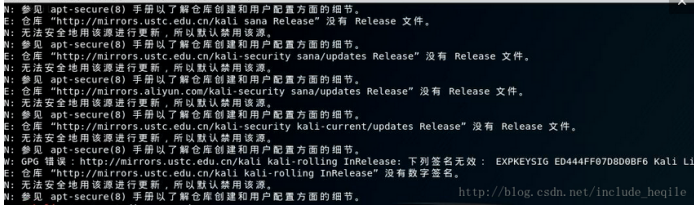
我添加的是中科大的更新源,在浏览器中是可以正常打开的:
deb http://mirrors.ustc.edu.cn/kali kali-rolling main non-free contrib
deb-src http://mirrors.ustc.edu.cn/kali kali-rolling main non-free contrib
#中科大
deb http://mirrors.ustc.edu.cn/kali kali-rolling main non-free contrib
deb-src http://mirrors.ustc.edu.cn/kali kali-rolling main non-free contrib
#阿里云
#deb http://mirrors.aliyun.com/kali kali-rolling main non-free contrib
#deb-src http://mirrors.aliyun.com/kali kali-rolling main non-free contrib
#清华大学
#deb http://mirrors.tuna.tsinghua.edu.cn/kali kali-rolling main contrib non-free
#deb-src https://mirrors.tuna.tsinghua.edu.cn/kali kali-rolling main contrib non-free
#浙大
#deb http://mirrors.zju.edu.cn/kali kali-rolling main contrib non-free
#deb-src http://mirrors.zju.edu.cn/kali kali-rolling main contrib non-free
#东软大学
#deb http://mirrors.neusoft.edu.cn/kali kali-rolling/main non-free contrib
#deb-src http://mirrors.neusoft.edu.cn/kali kali-rolling/main non-free contrib
#官方源
#deb http://http.kali.org/kali kali-rolling main non-free contrib
#deb-src http://http.kali.org/kali kali-rolling main non-free contrib
#重庆大学
#deb http://http.kali.org/kali kali-rolling main non-free contrib
#deb-src http://http.kali.org/kali kali-rolling main non-free contrib
可是添加到 /etc/apt/source.list之后,执行apt-update就会出现上面的错误提示
在多方搜索无果之后,我决定静下心来认真阅读一下kali中提供的文档,根据上面的提示, 我查看了apt-secure(8)——>命令man 8 apt-secure
DESCRIPTION
Starting with version 0.6, APT contains code that does signature
checking of the Release file for all repositories. This ensures that
data like packages in the archive can't be modified by people who have
no access to the Release file signing key. Starting with version 1.1
APT requires repositories to provide recent authentication information
for unimpeded usage of the repository. Since version 1.5 changes in the
information contained in the Release file about the repository need to
be confirmed before APT continues to apply updates from this
repository.
Note: All APT-based package management front-ends like apt-get(8),
aptitude(8) and synaptic(8) support this authentication feature, so
this manpage uses APT to refer to them all for simplicity only.
首先阅读一下apt-secure的描述,读完之后我们可以知道,之所以一直更新不成功,是因为没有签名或者是有签名但是apt没有对应的key的package是不被信任的,安全起见,默认是不会采用这种源来进行更新的
继续往下阅读
UNSIGNED REPOSITORIES
If an archive has an unsigned Release file or no Release file at all
current APT versions will refuse to download data from them by default
in update operations and even if forced to download front-ends like
apt-get(8) will require explicit confirmation if an installation
request includes a package from such an unauthenticated archive.
You can force all APT clients to raise only warnings by setting the
configuration option Acquire::AllowInsecureRepositories to true.
Individual repositories can also be allowed to be insecure via the
sources.list(5) option allow-insecure=yes. Note that insecure
repositories are strongly discouraged and all options to force apt to
continue supporting them will eventually be removed. Users also have
the Trusted option available to disable even the warnings, but be sure
to understand the implications as detailed in sources.list(5).
第二段的标题正是没有签名的仓库,这正是我们需要的说明
You can force all APT clients to raise only warnings by setting the
configuration option Acquire::AllowInsecureRepositories to true.
这句话就是解决问题的关键,虽然国内的源没有签名,或者签名过期(失效),但是我们可以强制apt进行更新,忽略仓库的安全性,而想要达到这个目的,我们就需要对APT的配置文件进行修改
我搜索了apt.conf这个关键字,但相关网页都是英文的,硬着头皮读完之后发现我的kali中并没有apt.conf文件,在我的/etc/apt目录下,只有一个apt.conf.d目录,cd进该目录:

那么多配置文件,我也不知道到底该改哪一个,然后又去百度了一会儿,看到了这篇文章
https://wiki.debian.org/AptConf
然后我就抱着试一试的心态打开了70debconf文件,按照前面man文档的指导,在里面输入了Acquire::AllowInsecureRepositories “true”;
然后执行apt-config dump,查看apt的对应配置有无生效

Acquire::AllowInsecureRepositories的属性值由最初的”0”变成了”true”
说明更改配置成功,然后赶紧敲入apt-get update && apt-get upgrade
Kali的源得数字验证问题的更多相关文章
- kali换源及安装docker
kali换源及安装docker 以管理员身份运行. 换源,记得先备份, cp /etc/apt/sources.list /etc/apt/sources.list.bak 然后修改/etc/apt/ ...
- 超简单的js数字验证
<!DOCTYPE html PUBLIC "-//W3C//DTD XHTML 1.0 Transitional//EN" "http://www.w3.or ...
- kali 更新源
个人收集的kali 更新源: 修改更新源: vim /etc/apt/sources.list 更新源列表包: #apt-get update 更新系统软件: #apt-get upgrade #官方 ...
- javascript数字验证输入
javascript数字验证功能: <html> <body> <p>请输入数字.如果输入值不是数字,浏览器会弹出提示框.</p> <input ...
- Debian 8添加kali更新源并安装metasploit
一.Debian 8添加kali更新源 中科大kali更新源: deb http://mirrors.ustc.edu.cn/kali kali-rolling main non-free contr ...
- Atitit 验证 数字验证 非空验证的最佳算法 h5
Atitit 验证 数字验证 非空验证的最佳算法 h5 <td><select class="searchBox-select" style=" ...
- jquery纯数字验证
$(document).ready(function(){ //纯数字验证,只让输入数字,比如-号等都不然输入. $('#user-defined').unbind(); $('#user-de ...
- kali更新源相关 -- 没有release文件、签名无效、404
kali更新源相关 -- 没有release文件.签名无效.404 这个随笔主要是处理Mac下使用VMare虚拟机安装Kali时候我遇到的一些关于更新源的问题 (因为本人为了这个问题折腾了四五个小时, ...
- 几个有用的javascript(日期比较,数字验证,数字和汉字长度计算)
1:日期大Js代码 //人员失效职位日期是否小于组织失效日期 function perDateInvalidate(){ var flag = true; //组织失效日期 var orgDate = ...
随机推荐
- UI Framework-1: views Windowing
views Windowing views provides support for creating dialog boxes and other kinds of windows through ...
- GPU Command Buffer
For Developers > Design Documents > GPU Command Buffer This are mostly just notes on the ...
- SPFA的小优化
标签:闲扯 SPFA的小优化 1. 向队尾加入元素时,如果它比对首还优,就把把它直接和队首交换. 拿一个双端队列来实现 (手写 , head ,tail STLdeque亲测及其慢) 这个小优化其 ...
- CodeForcesEducationalRound40-D Fight Against Traffic 最短路
题目链接:http://codeforces.com/contest/954/problem/D 题意 给出n个顶点,m条边,一个起点编号s,一个终点编号t 现准备在这n个顶点中多加一条边,使得st之 ...
- [洛谷P1343]地震逃生
题目大意:有n个点m条单向边,每条边有一个容量.现有x人要分批从1走到n,问每批最多能走多少人,分几批运完(或输出无法运完). 解题思路:一看就是网络流的题目.每批最多能走多少人,即最大流.分几批运完 ...
- 【转载】GitHub详细教程
1 Git详细教程 1.1 Git简介 1.1.1 Git是何方神圣? Git是用C语言开发的分布版本控制系统.版本控制系统可以保留一个文件集合的历史记录,并能回滚文件集合到另一个状态(历 ...
- ArcGIS api for javascript——使用图层定义显示地图
描述 本例展示如何使用图层定义来限制显示在地图上的图层信息.为了了解本例做了什么,看看用于这个地图的ESRI_Census_USA服务的服务目录页是有帮助的.检查地图中的图层列表.现在注意这行代码限制 ...
- traits的介绍
traits基本利用了上一篇文章的思想,通过局部特化,来返回针对特定类型的信息. 可以自己实现traits,约定俗成了,返回特性信息. 也可以利用iterator的traits信息. iterator ...
- [Recompose] Create Stream Behaviors to Push Props in React Components with mapPropsStream
Rather than using Components to push streams into other Components, mapPropsStream allows you to cre ...
- MAC 文件加密
MAC 文件加密 (2011-10-08 00:08:52) 标签: 杂谈 分类: MAC技巧篇 我们都有一些私密的文件需要保存,在苹果操作系统下,如何为这些文件或文件夹设置密码呢? 利用系统自带的创 ...