
C# WPF QQ新消息托盘悬浮窗效果实现
今天在做一个项目的时候需要这么一个效果,但是网上找了一会发现并没有现成的给我参考(复制),但是呢,我千(到)辛(处)万(抄)苦(袭)想(复)破(制)头(粘)脑(贴)终于还是给做出来了~嘿嘿嘿
QQ新消息悬浮窗即:QQ有新消息时托盘图标会闪动,此时移动鼠标到托盘图标上就会显示一个弹框了,那么呢我把这个弹框称为“QQ新消息托盘悬浮窗”。当鼠标从托盘图标移走后弹框隐藏,我们要做的效果就是这样的。
项目效果图:
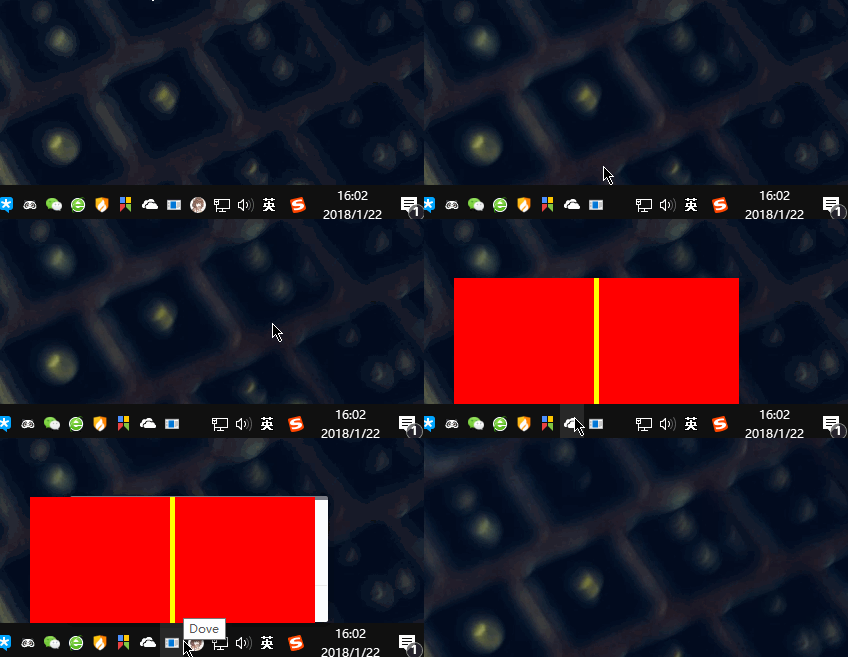
涉及到的内容主要有:Popup,win32api,DispatcherTimer(定时器)。
新建wpf项目,命名为qqnotifybar
MainWindow.xaml代码:
<Window x:Class="qqnotifybar.MainWindow"

        xmlns="http://schemas.microsoft.com/winfx/2006/xaml/presentation"

        xmlns:x="http://schemas.microsoft.com/winfx/2006/xaml"

        xmlns:d="http://schemas.microsoft.com/expression/blend/2008"

        xmlns:mc="http://schemas.openxmlformats.org/markup-compatibility/2006"

        xmlns:local="clr-namespace:qqnotifybar"

        mc:Ignorable="d"

        Title="MainWindow" Height="350" Width="525">

    <Grid>

        <Popup Name="NotifyBar" AllowsTransparency="True" Placement="Absolute">

            <Grid Name="NotifyBar_Grid" Width="285" Height="126" Background="Red">

                <!--为了能更清晰地看到托盘图标是否在弹框的中间位置加一个Grid-->

                <Grid Background="Yellow" Width="5" Height="126" HorizontalAlignment="Center"></Grid>

            </Grid>

        </Popup>

    </Grid>

</Window>
后台代码:
using System;

using System.Collections.Generic;

using System.Linq;

using System.Reflection;

using System.Runtime.InteropServices;

using System.Text;

using System.Threading.Tasks;

using System.Windows;

using System.Windows.Controls;

using System.Windows.Data;

using System.Windows.Documents;

using System.Windows.Forms;

using System.Windows.Input;

using System.Windows.Media;

using System.Windows.Media.Imaging;

using System.Windows.Navigation;

using System.Windows.Shapes;

using System.Windows.Threading;

namespace qqnotifybar

{

    /// <summary>

    /// MainWindow.xaml 的交互逻辑

    /// </summary>

    public partial class MainWindow : Window

    {

        //winform托盘图标组件

        NotifyIcon notifyicon;

        //计时器

        DispatcherTimer notifybar_timer;

        //鼠标是否在通知栏内变量

        bool NotifyBar_IsMouseEnter = false;

        public MainWindow()

        {

            InitializeComponent();

            //初始化托盘图标

            notifyicon = new NotifyIcon();

            notifyicon.Icon = System.Drawing.Icon.ExtractAssociatedIcon(System.Windows.Forms.Application.ExecutablePath);

            notifyicon.Text = "Dove";

            notifyicon.Visible = true;

            notifyicon.MouseMove += notifyicon_mousemove;

            //初始化计时器

            notifybar_timer = new DispatcherTimer();

            notifybar_timer.Interval = TimeSpan.FromSeconds();

            notifybar_timer.Tick += notifybar_timer_tick;

            //给弹框中的grid加上鼠标移入移出事件

            NotifyBar_Grid.MouseEnter += NotifyBar_MouseEnter;

            NotifyBar_Grid.MouseLeave += NotifyBar_MouseLeave;

        }

        #region win32api

        #region 获取鼠标指针相对于屏幕的坐标

        [StructLayout(LayoutKind.Sequential)]

        public struct POINT

        {

            public int x;

            public int y;

            public POINT(int x, int y)

            {

                this.x = x;

                this.y = y;

            }

        }

        [DllImport("user32.dll", CharSet = CharSet.Auto)]

        public static extern bool GetCursorPos(out POINT pt);

        #endregion

        #region 获取托盘图标的位置

        //代码来自于:http://blog.csdn.net/haoqi9999/article/details/76527981?locationNum=6&fps=1

        public class RG

        {

            public int Left { get; set; }

            public int Top { get; set; }

            public int Widht { get; set; }

            public int Height { get; set; }

            public RG(int left, int top, int widht, int height)

            {

                Left = left;

                Top = top;

                Widht = widht;

                Height = height;

            }

            public override string ToString()

            {

                return "Left:" + Left + ",Top:" + Top + ",Width:" + Widht + ",Height:" + Height;

            }

        }

        public static RG GetIconRect(NotifyIcon icon)

        {

            RECT rect = new RECT();

            NOTIFYICONIDENTIFIER notifyIcon = new NOTIFYICONIDENTIFIER();

            notifyIcon.cbSize = Marshal.SizeOf(notifyIcon);

            //use hWnd and id of NotifyIcon instead of guid is needed

            notifyIcon.hWnd = GetHandle(icon);

            notifyIcon.uID = GetId(icon);

            int hresult = Shell_NotifyIconGetRect(ref notifyIcon, out rect);

            //rect now has the position and size of icon

            return new RG(rect.left, rect.top, rect.right - rect.left, rect.bottom - rect.top);

        }

        [StructLayout(LayoutKind.Sequential)]

        private struct RECT

        {

            public Int32 left;

            public Int32 top;

            public Int32 right;

            public Int32 bottom;

        }

        [StructLayout(LayoutKind.Sequential)]

        private struct NOTIFYICONIDENTIFIER

        {

            public Int32 cbSize;

            public IntPtr hWnd;

            public Int32 uID;

            public Guid guidItem;

        }

        [DllImport("shell32.dll", SetLastError = true)]

        private static extern int Shell_NotifyIconGetRect([In]ref NOTIFYICONIDENTIFIER identifier, [Out]out RECT iconLocation);

        private static FieldInfo windowField = typeof(NotifyIcon).GetField("window", System.Reflection.BindingFlags.NonPublic | System.Reflection.BindingFlags.Instance);

        private static IntPtr GetHandle(NotifyIcon icon)

        {

            if (windowField == null) throw new InvalidOperationException("[Useful error message]");

            NativeWindow window = windowField.GetValue(icon) as NativeWindow;

            if (window == null) throw new InvalidOperationException("[Useful error message]");  // should not happen?

            return window.Handle;

        }

        private static FieldInfo idField = typeof(NotifyIcon).GetField("id", System.Reflection.BindingFlags.NonPublic | System.Reflection.BindingFlags.Instance);

        private static int GetId(NotifyIcon icon)

        {

            if (idField == null) throw new InvalidOperationException("[Useful error message]");

            return (int)idField.GetValue(icon);

        }

        #endregion

        #endregion

        #region 操作通知栏

        //定时器方法

        private void notifybar_timer_tick(object sender, EventArgs e)

        {

            POINT pt = new POINT();

            //获取鼠标的位置

            GetCursorPos(out pt);

            //获取托盘图标的位置

            RG rg = GetIconRect(notifyicon);

            if (pt.x > rg.Left && pt.x < (rg.Left + rg.Widht) && pt.y > rg.Top && pt.y < (rg.Top + rg.Height))

            {

                //鼠标指针还在托盘图标中,不需要处理

            }

            else

            {

                //鼠标移除托盘图标区域

                //停止计时器

                notifybar_timer.Stop();

                //判断指针是否移入了弹框popup的区域

                if (NotifyBar_IsMouseEnter == false)

                {

                    //不是则关闭popup

                    NotifyBar.IsOpen = false;

                }

            }

        }

        //托盘图标鼠标移入

        private void notifyicon_mousemove(object sender, System.Windows.Forms.MouseEventArgs e)

        {

            //鼠标移入托盘图标后显示弹框

            NotifyBar.IsOpen = true;

            //如果计时器没有启动则启动

            if (notifybar_timer.IsEnabled == false)

            {

                notifybar_timer.Start();

            }

            //获取托盘图标位置

            RG rg = GetIconRect(notifyicon);

            //计算弹框的位置,使其在托盘图标的正上方中间的位置

            //弹框(popup)距离屏幕上方的位置 = 托盘距离屏幕上方位置 - 弹框的实际高度

            NotifyBar.VerticalOffset = rg.Top - NotifyBar_Grid.ActualHeight;

            //这里计算使弹框在托盘图标中间的位置

            NotifyBar.HorizontalOffset = rg.Left - (NotifyBar_Grid.ActualWidth / ) + (rg.Widht / );

        }

        private void NotifyBar_MouseEnter(object sender, System.Windows.Input.MouseEventArgs e)

        {

            //鼠标移入弹框GRID区域了

            NotifyBar_IsMouseEnter = true;

        }

        private void NotifyBar_MouseLeave(object sender, System.Windows.Input.MouseEventArgs e)

        {

            //鼠标离开了弹框的GRID区域

            //判断鼠标是否曾经移入到弹框GRID区域中过

            if (NotifyBar_IsMouseEnter)

            {

                //是,关闭。

                NotifyBar.IsOpen = false;

            }

            //重置鼠标是否移入弹框GRID区域变量值

            NotifyBar_IsMouseEnter = false;

        }

        #endregion

    }

}
代码已经写有超级详细的注释了,博客就不多废话了。核心代码(获取托盘图标位置)的来源也在代码注释标注了,下面也是给大家打包了项目方便下载。
提醒:在正式项目中要将popup换成新的window,因为当popup所在窗体不具备焦点时,popup内的控件无法正常交互。2018年1月23日09:33:08
项目下载:
C# WPF QQ新消息托盘悬浮窗效果实现的更多相关文章
- Android桌面悬浮窗效果实现,仿360手机卫士悬浮窗效果
大家好,今天给大家带来一个仿360手机卫士悬浮窗效果的教程,在开始之前请允许我说几句不相干的废话. 不知不觉我发现自己接触Android已有近三个年头了,期间各种的成长少不了各位高手的帮助,总是有很多 ...
- 简易的可拖动的桌面悬浮窗效果Demo
首先,我们需要知道,悬浮窗分为两种:Activity级别的悬浮窗,系统级别的悬浮窗 Activity级别的悬浮窗跟随所属Activity的生命周期而变化,而系统级别的悬浮窗则可以脱离Activity而 ...
- Android仿360手机卫士悬浮窗效果
请看下图: 首先是一个小的悬浮窗显示的是当前使用了百分之多少的内存,点击一下小悬浮窗,就会弹出一个大的悬浮窗,可以一键加速.好,我们现在就来模拟实现一下 ...
- Android 桌面悬浮窗效果实现,仿360手机卫士悬浮窗效果
首先是一个小的悬浮窗显示的是当前使用了百分之多少的内存,点击一下小悬浮窗,就会弹出一个大的悬浮窗,可以一键加速.好,我们现在就来模拟实现一下类似的效果. 先谈一下基本的实现原理,这种桌面悬浮窗的效果很 ...
- Qt实现悬浮窗效果
当鼠标移动到头像控件时,显示悬浮窗,当鼠标离开时,悬浮窗隐藏. 1.控件选择 悬浮窗可以从QDialog派生,并将窗口的属性设置为无边框 this->setWindowFlags(this- ...
- 小程序 movable-area 实现悬浮窗效果
最近做一个小程序 实现页面内悬浮窗的效果 给自己制定两个方案: 1.通过一个自定义的组件,通过触摸事件进行实现: 2.使用微信的movable移动组件实现: 第一种方案: 结果:实现了 悬浮窗和自动靠 ...
- Android WindowManager实现悬浮窗效果 (一)——与当前Activity绑定
最近有学生做毕业设计,想使用悬浮窗这种效果,其实很简单,我们可以通过系统服务WindowManager来实现此功能,本章我们来试验一下在当前Activity之上创建一个悬浮的view. 第一步:认识W ...
- Android BGABadgeView:新消息/未接来电/未读消息/新通知圆球红点提示(1)
Android BGABadgeView:新消息/未接来电/未读消息/新通知圆球红点提示(1) 现在很多的APP会有新消息/未接来电/未读消息/新通知圆球红点提示,典型的以微信.QQ新消息提示为 ...
- Android 悬浮窗
悬浮窗是一种比较常见的需求.例如把视频通话界面缩小成一个悬浮窗,然后用户可以在其他界面上处理事情. 本文给出一个简单的悬浮窗实现.可缩小activity和还原大小.可悬浮在其他activity上.使用 ...
随机推荐
- 0、驱动及应用小技巧、uboot指令及环境变量配置、linux常用命令
(内核make menuconfig之后,通过insmod安装的驱动都应该重新make,可能会出现一些莫名的问题) (nor flash/SDRAM/DM9000都受内存控制器控制,需要配置内存控制器 ...
- Java中使用org.json和json-lib解析JSON
文章目录 [隐藏] 一.JavaProject中org.json解析JSON 1.JSON的org.son-api下载 1)JSON网址 2)JSON的java解析org.json-api网址 3) ...
- 今天竟然有人模仿我的QQ号进行骗钱
今天下午,CoderGeek同学告诉我,有个叫"小雷FansUnion"的QQ正在找他要钱,他直接和我这个正宗的"小雷FansUnion"探听虚实.这时才发现, ...
- SpringMVC接受参数若干问题
最近2年在工作问题总结中,好几次遇到了SpringMVC接收参数的问题,今天特别总结下. SpringMVC接收参数的方法: Html参数输入: <input name="stat ...
- 怎样收缩超大的SharePoint_Config数据库
前言 在已经执行了2年多的SharePointserver上,发现SharePoint_Config的数据库文件越来越大,已经达到90几个GB,收缩能够减小20几个GB,可是一周以后又会恢复到90几个 ...
- Android 监听软键盘按键的三种方式
前言: 我们在Android手机上面有时候会遇到监听手机软键盘按键的时候,例如:我们在浏览器输入url完毕后可以点击软键盘右下角的“Go”按键加载url页面:在点击搜索框的时候,点击右下角的searc ...
- AngularJS之watch
简介 首先apply方法会触发evel方法,当evel方法解析成功后,会去触发digest方法,digest方法会触发watch方法. 在digest执行时,如果watch观察的的value与上一次执 ...
- 在线生成 QR Code
http://tool.oschina.net/qr 在线生成二维码(QR码)-采用ZXing与d-project
- js 进阶 10 js选择器大全
js 进阶 10 js选择器大全 一.总结 一句话总结:和css选择器很像 二.JQuery选择器 原生javaScript中,只能使用getELementById().getElementByNam ...
- jQuery Mobile手机网站案例
jQuery Mobile手机网站案例 一.总结 一句话总结:jQuery Mobile是纯手机框架,和amazeui和bootstrap都可以做手机网站. 1.另一款文本编辑器? jd编辑器 二.j ...