
Resolving Problems installing the Java JCE Unlimited Strength Jurisdiction Policy Files package--转
原文地址:https://www.ca.com/us/services-support/ca-support/ca-support-online/knowledge-base-articles.tec1698523.html
Introduction/Summary:
The base Java JVM and SDK installs from Oracle are limited in strength for the cryptographic functions that they can perform. Oracle also provide a patch the "Java JCE Unlimited Strength Jurisdiction Policy Files" patch which when applied to the base JDK or JVM install allows for unlimited strength cryptographic functions.
Background:
Although the patch is a simple zip file there are often problems associated with installing it and installing it in the right location. This article covers how to do the install of the patch, and also some of the mis-install pitfalls that can occur.
Environment:
all (windows, linux, solaris)
Instructions:
- Have an existing Java JRE or JDK Installation.
First you will need a Java, either the Java Runtime (JVM) or the Java Development KIt (JDK) installation.
Many of the Siteminder (SSO) components require a specific 32bit rather than a 64bit version of the JDK/JRE so it is worth verifying you have the correct one installed. - Download the "JCE Unlimited Strength Jurisdiction Policy Files"
The "JCE Unlimited Strength Jurisdiction Policy Files" are available as a .zip file from :http://www.oracle.com/technetwork/java/javase/downloads/index.html
Only the version is applicable (ie., the one jce_policy-8.zip applies to both the 32bit and 64bit editions of java 8 ) .
The version of the Jurisdiction file depends on the version of Java you have installed, as per:
- Java 8 : jce_policy-8.zip
- Java 7 : UnlimitedJCEPolicyJDK7.zip
- Java 6 : jce-policy-6.zip
- etc.
- The contents of the .zip file:
The zip file contain two jar files : local_policy.jar, US_export_policy.jar a README.txt and a COPYRIGHT.html file
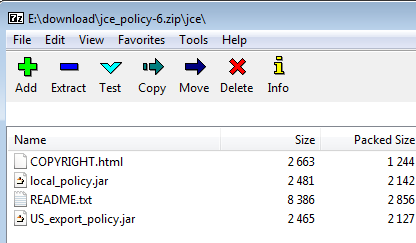
The two .jar files are the important ones. - Determine the version of java to install the .jar files
We need to apply these .jar files into the actual JDK that is being run.
As well as 64bit and 32bit version of java, appearing under directories C:\Program Files\Java and C:\Program Files (x86)\ respectively, a user may also have several minor versions of java installed and both JRE and JDK's installed. The same is true of Unix/Linux installs as well.
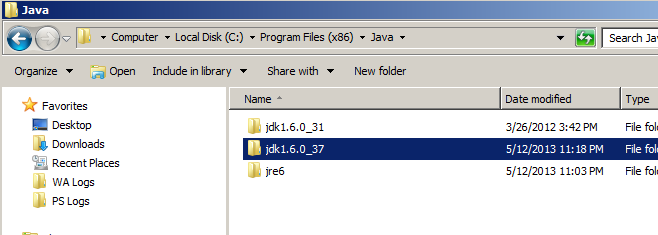
Note: There are two directories, both a JDK and a JRE directory: jdk1.6.0_37 and jre6 both have an embedded jre and it is good policy to update both.
Note2: There can also be several JDK/JRE versions installed - not necessarily in the expected directories.Technically we only need to update the one that we are going to run, but it is good policy to update both the JDK and JRE, and a number of support cases have been solved because the JDK/JRE version being run was not the expected one, and solved once the correct version was updated.
Below we cover updating the JDK and the JRE.
- Update the distribution policy .jar files in the JDK distribution.
We need to copy the two .jar files from the "JCE Unlimited Strength Jurisdiction Policy Files" zip file, and replace the ones in the JDK distribution of the JRE. : /jdk1.6.0_37/jre/lib/security directories.
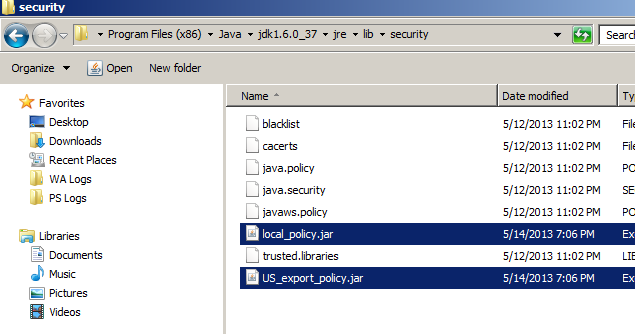
Note: Make sure you replace the .jar files. There have been cases where the .zip file was uncompressed from the cmd line, and the new .jar files were left in a sub-directory, rather than replacing the existing ones. This can easily be done on unix systems.
- Update the distribution policy .jar files in the JRE distribution.
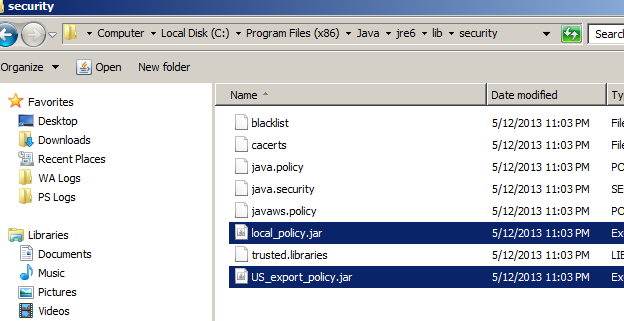
We need to copy the two .jar files from the "JCE Unlimited Strength Jurisdiction Policy Files" zip file, and replace the ones in the distribution for the JRE distribution /jre6/lib/security directories.
- How can I check they have been installed correctly?
Fails with Strong Crypto operations:
If it is not correctly installed the main problem will be that strong cryptography will be disabled usually giving an error when you want to use it.Add -verbose to java startup:
If you add "-verbose" to the java startup printed to stdout will be a list of the absolute path to the .jar file where it loads each .class file. This is also useful to determine which JDK/JRE is actually loaded, so you can ensure you've patched the right version.Some programs will also check at their startup and tell you if Unlimited Cryptography is available.
- Program to Check if installed Correctly
Attached to this article is a simple java program that will check if unlimited strength cryptography is enabled. The core function is as follows:
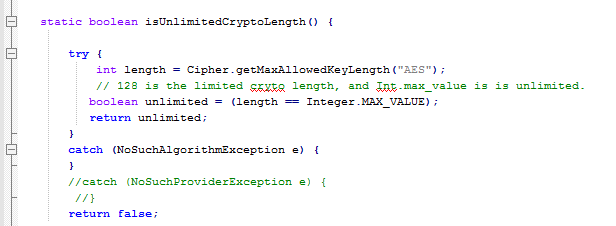
Where it gets the max length of the key allowed for AES encryption and compares that to the unlimited number (Integer.MAX_VALUE).
Additional Information:
Within CA Single Sign On, as well as install of the "Unlimited Strength Jurisdiction Policy Files" there can be issued with installing the RSA JSafe components cryptoj.jar and cryptoJFIPS.jar - these will be the topic of another knowledge base article.
Resolving Problems installing the Java JCE Unlimited Strength Jurisdiction Policy Files package--转的更多相关文章
- JAVA刚碰见的问题( java.lang.SecurityException: The jurisdiction policy files are not signed by a trusted signer)
原文:刚碰见的问题 1. failed to load the jni shared library jre bin server jvm.dll 解决:这个主要是eclipse的版本和安装的jdk ...
- 安装 Java Cryptography Extension (JCE) Unlimited Strength
http://www.oracle.com/technetwork/java/javase/downloads/jce8-download-2133166.html cp ./* /usr/java/ ...
- java程序后台报错java.net.SocketException: Too many open files
问题描述: 今天一个同事反映程序有问题,让帮忙查看后台日志,发现后台日志报错的信息如下: java.net.SocketException: Too many open files at java.n ...
- 转:JAVA.NET.SOCKETEXCEPTION: TOO MANY OPEN FILES解决方法
最近随着网站访问量的提高把web服务器移到linux下了,在移服务器的第二天,tomcat频繁的报 java.net.SocketException: Too many open files错误,错误 ...
- java.io.IOException: Too many open files
1.描述: 每日一样,例行打开hadoop集群的cloudera manager的管理界面.发现出现了多个bad health的服务.那么出现的这个问题就是查看该服务运行的日志,对应的该服务当中,会包 ...
- java 文件操作(二)---Files和Path
自从java 7以来,引入了FIles类和Path接口.他们两封装了用户对文件的所有可能的操作,相比于java 1的File类来说,使用起来方便很多.但是其实一些本质的操作还是很类似的.主要需要知道的 ...
- 高并发连接导致打开文件过多:java.io.IOException: Too many open files 解决方法
用 CentOS 做 API 接口服务器供其他终端调用时,并发量高会报错:java.io.IOException: Too many open files. 其原因是在 Linux 下默认的Socke ...
- Java之旅_面向对象_包(Package)
http://www.runoob.com/java/java-package.html 包的作用: 1.把功能相似或相关的类或接口组织在同一个包中,方便类的查找和使用. 2.如同文件夹一样,包也采用 ...
- 异常:java.io.IOException: Too many open files:
原因: 操作系统的中打开文件的最大句柄数受限所致,常常发生在很多个并发用户访问服务器的时候.因为为了执行每个用户的应用服务器都要加载很多文件(new一个socket就需要一个文件句柄),这就会导致打开 ...
随机推荐
- Redis学习笔记(三) 基本命令:Key操作
参考:http://doc.redisfans.com/ del key 删除给定的一个或多个Key(多个key用空格隔开),删除成功返回1,当key不存在时,返回0:例:del no-exist-k ...
- inotify-tools+rsync实时同步文件安装和配置
服务器A:论坛的主服务器,运行DZ X2论坛程序;服务器B:论坛从服务器,需要把X2的图片附件和MySQL数据实时从A主服务器实时同步到B服务器.MySQL同步设置会在下一编中说到.以下是用于实时同步 ...
- Vue 菜单栏点击实现高亮显示
步骤: 遍历对象(goods)获取菜单栏每一项的对象(item)和下标(index) 添加点击事件toggle(),传入下标参数:@click="fn1();fn2()" 动态切换 ...
- Element-ui组件--pagination分页的使用
一般在写前端页面时,经常会遇到分页这样的效果,element-ui中便有这样的插件,用vue框架使用的很方便,在此做一总结: <template> <div class=" ...
- Linux 搭建互信后,仍需要密码验证
修改ssh配置文件: vi /etc/ssh/sshd_config PermitRootLogin no 注释掉
- Sql Server远程还原
1.假设备份文件xxxx.bak大小约300G,还原后所占用的空间为900G 2.磁盘空间只有1T,若将备份文件拷贝过来,空间剩余700G,无法成功还原,因此通过远程方式还原. 例子如下: SQLSE ...
- 页面定制CSS代码初探(五):给每篇文章最后加上'<完>'
前言 我刚写博客的时候,有几篇是手动在最后加了个<完> 今天在看别人CSS布局时,发现很多::before和::after标签,因为没学过CSS,从名字看大概是前边/后边 加上某个东西的意 ...
- CDR入门教程-CorelDRAW排版教程
CorelDRAW是一个绘制矢量图,排版的软件.今天给大家带来一片教程就是关于排版的.大家快来试试吧. CDR下载:http://pan.baidu.com/s/1cD4buQ 步骤一:新建一个A4文 ...
- Mac 如何寻找Mac自带的IDLE
Mac 如何寻找Mac自带的IDLE 每次要打开IDLE时,需要如下动作:打开terminal --> 输入idle --> 回车,就自动打开IDLE了 图标如下: 选择在“Finder中 ...
- Pyhton学习——Day61
class Pagination(object): def __init__(self,totalCount,currentPage,perPageItemNum=10,maxPageNum=7): ...