
Url Rewrite 再说Url 重写
前几天看到园子里一篇关于 Url 重写的文章《获取ISAPI_Rewrite重写后的URL》, URL-Rewrite 这项技术早已不是一项新技术了,这个话题也已经被很多人讨论过多次。搜索一下URL-Rewrite可以找到很多URL-Rewrite方面的文章和组件,自己以前也多次接触过这个东东,也来说说吧。 ScottGu 有一篇非常经典的 URL-Rewrite Blog
Tip/Trick: Url Rewriting with ASP.NET http://weblogs.asp.net/scottgu/archive/2007/02/26/tip-trick-url-rewriting-with-asp-net.aspx
为什么要进行URL-Rewrite
ScottGu的blog中给出了两个重要的原因:
1.保证WebApplication在进行结构调整,移动页面位置时,用户收藏的URL不会因此而成为死链。
2. SEO优化。
摘引自ScottGu Blog 的原文
---------------------------------------------------------------------------
Why does URL mapping and rewriting matter?
The most common scenarios where developers want greater flexibility with URLs are:
1) Handling cases where you want to restructure the pages within your web application, and you want to ensure that people who have bookmarked old URLs dont break when you move pages around. Url-rewriting enables you to transparently forward requests to the new page location without breaking browsers.
2) Improving the search relevancy of pages on your site with search engines like Google, Yahoo and Live. Specifically, URL Rewriting can often make it easier to embed common keywords into the URLs of the pages on your sites, which can often increase the chance of someone clicking your link. Moving from using querystring arguments to instead use fully qualified URLs can also in some cases increase your priority in search engine results. Using techniques that force referring links to use the same case and URL entrypoint (for example: weblogs.asp.net/scottgu instead of weblogs.asp.net/scottgu/default.aspx) can also avoid diluting your pagerank across multiple URLs, and increase your search results.
In a world where search engines increasingly drive traffic to sites, extracting any little improvement in your page ranking can yield very good ROI to your business. Increasingly this is driving developers to use URL-Rewriting and other SEO (search engine optimization) techniques to optimize sites (note that SEO is a fast moving space, and the recommendations for increasing your search relevancy evolve monthly). For a list of some good search engine optimization suggestions, Id recommend reading the SSW Rules to Better Google Rankings, as well as MarketPositions article on how URLs can affect top search engine ranking.
---------------------------------------------------------------------------
第一点原因中所描述的场景,在Web站点改版中经常碰到。Web站点改版经常会调整一些页面的位置,QueryString中参数的结构等等。很可能使原来用户在收藏夹中收藏的链接成为死链。在这种场景下URL-Rewrite像是软件架构技术中的一个中间层的概念,URL-Rewrite对外公开的URL是被重写过的,这个URL被用户收藏,不会变,当Web站点调整,内部Page的位置改变了,使得内部实际的URL地址也改变了,这时修改内部的重写规则,让原来对外公开的URL重写到新的内部URL上。从而保证了对外URL不变,其实对内已经完成了页面位置的调整。虽然URL-Rewrite可以做到防止死链的产生,但是大多数站点在改版或调整时,不会使用URL-Rewrite来防止死链的产生,一般会直接修改404 The page cannot be found 页面,把404出错页面改成一个更加友好的提示页面,并且会在几秒钟之后跳转到网站首页。
第二点原因是SEO了,如果您的站点是个内部OA ERP CRM这种站点,只需要自己内部人员来访问。其实完全可以不用做SEO,因为这种站点根本不需要搜索引擎来收录,也不需要别人通过搜索引擎找到这个站点,所以这种站点完全没有必要进行SEO优化。如果您的站点是个商业站点,新闻站点,娱乐站点,越多人访问越好的站点,SEO优化是非常重要,此时通过URL-Rewrite进行SEO优化也就非常必要了。随着搜索引擎逐渐成为人们查找信息,索取资源的首选工具,搜索引擎对一个站点的影响也就愈来愈大,下面是 zhangsichu.com 9-1~9-10 这段时间内的第三方来路数据统计。
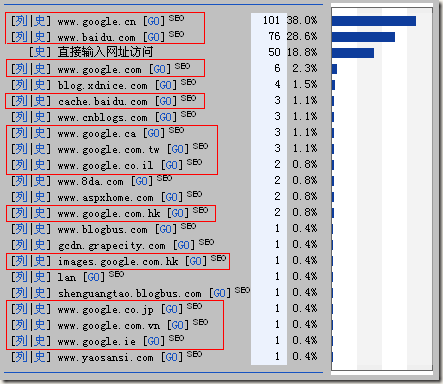
来路统计是通过记录httpheader中的Referer,来得知用户在浏览这个页面之前所在的那个页面。从而得出用户是通过那个页面到达这个页面的。
在266个独立IP中,有200个IP是来自搜索引擎的。也就是说,用户先通过搜索引擎的搜索结果,然后来到zhangsichu.com的用户有200个。占到了75.2%。一大半的人是通过搜索来的。充分说明了SEO对站点的重要,在这种情况下,就必须做URL-Rewrite进行SEO优化了。
如果您的站点既不需要考虑URL兼容防止死链问题,也不需要进行SEO优化,就完全没有必要进行URL-Rewrite。URL-Rewrite是一个对性能有害的处理过程。
常用的URL-Rewrite方案
URL-Rewrite既可以发生在Web服务器(IIS/Apache)一级,也可以发生在Web应用程序一级(Asp.Net/Jsp/PHP/…)。
1.Web应用程序级别的URL-Rewrite
在Web应用程序级别的URL-Rewrite。有三个比较著名的现成组件。
1) 微软提供的 URL-Rewrite http://msdn2.microsoft.com/zh-cn/library/ms972974.aspx
2) Open Source的 UrlRewriter.NET http://urlrewriter.net/
3) UrlRewriting http://www.urlrewriting.net/en/Download.aspx
这种组件内部核心的工作原理: 都是在自己的Web Application的web.config中添加httpModule。用这个httpModule来处理重写。(其实也可继承System.Web.HttpApplication,在Application_BeginRequest中插入一个自己的方法处理重写)
其中核心的处理代码,下面的代码摘引自UrlRewriter.NET组件。
1)从IHttpModule继承得到一个自己的HttpModule,这个HttpModule需要在web.config中配置,说明所有的请求都要经过这个HttpModule。
public sealed class RewriterHttpModule : IHttpModule { /// <summary> /// Initialises the module. /// </summary> /// <param name="context">The application context.</param> void IHttpModule.Init(HttpApplication context) { context.BeginRequest += new EventHandler(BeginRequest); }…private void BeginRequest(object sender, EventArgs e) { // Add our PoweredBy header HttpContext.Current.Response.AddHeader(Constants.HeaderXPoweredBy, Configuration.XPoweredBy); _rewriter.Rewrite(); }} |
2)读取重写规则,判断是否需要重写,确定如何重写,进行重写。
public void Rewrite() { string originalUrl = ContextFacade.GetRawUrl().Replace("+", " "); RawUrl = originalUrl; // Create the context RewriteContext context = new RewriteContext(this, originalUrl, ContextFacade.GetHttpMethod(), ContextFacade.MapPath, ContextFacade.GetServerVariables(), ContextFacade.GetHeaders(), ContextFacade.GetCookies()); // Process each rule. ProcessRules(context); // Append any headers defined. AppendHeaders(context); // Append any cookies defined. AppendCookies(context); // Rewrite the path if the location has changed. ContextFacade.SetStatusCode((int)context.StatusCode); if ((context.Location != originalUrl) && ((int)context.StatusCode < 400)) { if ((int)context.StatusCode < 300) { // Successful status if less than 300 _configuration.Logger.Info(MessageProvider.FormatString(Message.RewritingXtoY, ContextFacade.GetRawUrl(), context.Location)); // Verify that the url exists on this server. HandleDefaultDocument(context);// VerifyResultExists(context); ContextFacade.RewritePath(context.Location); } else { // Redirection _configuration.Logger.Info(MessageProvider.FormatString(Message.RedirectingXtoY, ContextFacade.GetRawUrl(), context.Location)); ContextFacade.SetRedirectLocation(context.Location); } } else if ((int)context.StatusCode >= 400) { HandleError(context); } else if (HandleDefaultDocument(context)) { ContextFacade.RewritePath(context.Location); } // Sets the context items. SetContextItems(context); } |
这种重写是ASP.NET Pipeline级别的重写,可以重写一切Asp.net接管的请求。
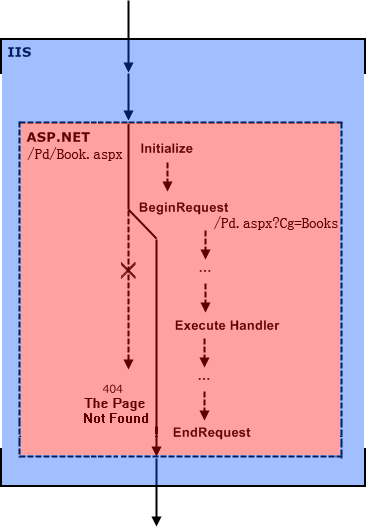
在这里对/Pd/Book.aspx的请求被重写到了 /Pd.aspx?Cg=books.
Web应用程序级别的URL-Rewrite只能重写Web应用程序接管的请求。它没有办法处理.js .jpg的重写。原因是这些请求到达IIS后,IIS根本就没有把这些请求分发到Asp.Net,所以这些请求就不会发生重写的处理和操作。在IIS中可以配置,对哪些后缀的请求是被IIS分发到Asp.Net的。
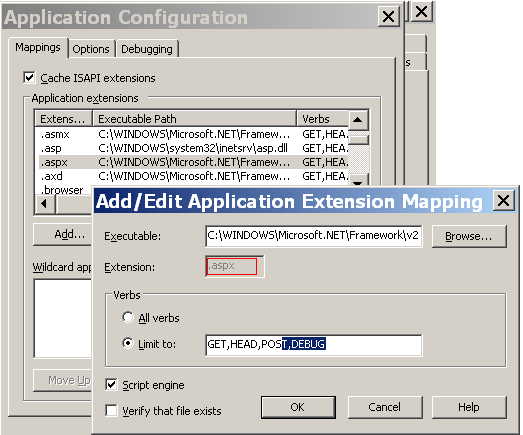
如果您一定要在Asp.Net级别对.js的请求进行重写,可以在这里指定.js的请求由Asp.Net接管,但是这时您需要自己处理.js的Response。Web服务器级别的URL-Rewrite可以比较好的解决这方面的问题吧。
2. Web服务器级别的URL-Rewrite
Apache服务器
Apache服务器原生支持了URL-Rewrite。在config中打开LoadModule rewrite_module modules/mod_rewrite.so 然后配置重写的正则表达式。例如:
摘引自Apache2.2中文参考手册 中文手册 Apache-UrlRewrite
---------------------------------------------描述: 这个规则的目的是强制使用特定的主机名以代替其他名字。比如,你想强制使用www.example.com代替example.com,就可以在以下方案的基础上进行修改: 解决方案: 对运行在非80端口的站点RewriteCond %{HTTP_HOST} !^fully\.qualified\.domain\.name [NC]RewriteCond %{HTTP_HOST} !^$RewriteCond %{SERVER_PORT} !^80$RewriteRule ^/(.*) http://fully.qualified.domain.name:%{SERVER_PORT}/$1 [L,R]对运行在80端口的站点RewriteCond %{HTTP_HOST} !^fully\.qualified\.domain\.name [NC]RewriteCond %{HTTP_HOST} !^$RewriteRule ^/(.*) http://fully.qualified.domain.name/$1 [L,R]--------------------------------------------------------------------------- |
IIS6/IIS7 Web服务器
IIS7新的“管道模式”其实是把ASP.NET中的某些概念与IIS进行了更加深度的集成。在IIS7 Program Manager: Mike Volodarsky的Blog中有一篇文章分析了这方面的内容:
Breaking Changes for ASP.NET 2.0 applications running in Integrated mode on IIS 7.0
IIS7的“经典模式”与IIS 6基本上是如出一辙的。
在IIS6 + Asp.Net应用程序级的URL-Rewrite,只能在请求被分配到Asp.Net引擎后才能发生重写操作。在IIS7这一点被改变了。IIS7可以对没有后缀名的请求进行重写,Asp.Net和IIS7进行了深度的集成。IIS7可以在 IIS 请求管道的任何地方执行一个HttpModule,下面是一个IIS7下Asp.Net的重写配置:
摘引自ScottGu的Blog
<?xml version="1.0" encoding="UTF-8"?><configuration><configSections><section name="rewriter"requirePermission="false"type="Intelligencia.UrlRewriter.Configuration.RewriterConfigurationSectionHandler, Intelligencia.UrlRewriter" /></configSections><system.web><httpModules><add name="UrlRewriter" type="Intelligencia.UrlRewriter.RewriterHttpModule, Intelligencia.UrlRewriter" /></httpModules> </system.web><system.webServer><modules runAllManagedModulesForAllRequests="true"><add name="UrlRewriter" type="Intelligencia.UrlRewriter.RewriterHttpModule" /></modules><validation validateIntegratedModeConfiguration="false" /></system.webServer><rewriter><rewrite url="~/products/(.+)" to="~/products.aspx?category=$1" /></rewriter></configuration> |
其中:<rewrite url="~/products/(.+)" to="~/products.aspx?category=$1" />这条规则中的~/products/(.+)这条正则表达式。匹配了/products/下的所有链接。
IIS6服务器级别下的重写需要使用ISAPI Filters Rewrite来实现。
ISAPI Filters有两个非常著名工程:
1)Helicon Techs ISAPI Rewrite: http://www.isapirewrite.com/ 提供一个99美元(可免费试用30天)的ISAPI URL重写产品完整版,以及一个免费的轻量级版本。
2)Ionics ISAPI Rewrite: http://cheeso.members.winisp.net/IIRF.aspx 全免费开源组件。
在 ISAPI Filter编程重写URL 中有说明。
服务器级的重写与应用程序级的重写最大的区别在于他们发生的时机不同。下图是在服务器级把/Pd/Book.aspx重写到/Pd.aspx?Cg=books
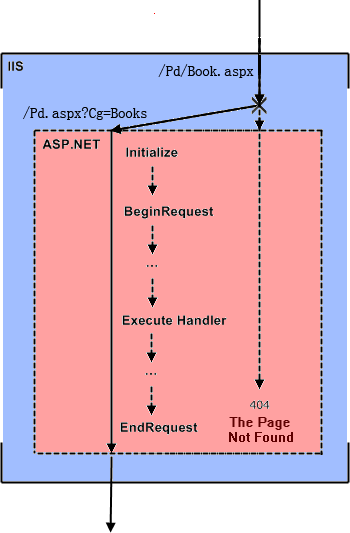
请求还没有到Asp.Net引擎,就被重写了。
3.Asp.Net级别上重写的一些小细节问题(部分内容源自ScottGu 的Blog)
如果页面中存在form且form是runat=server的<form runat="server">,那么这个页面在重写后form的action是原始URL,不是重写后干净的URL。例如/Pd/Book.aspx重写到/Pd.aspx?Cg=books这个场景。实际用户浏览器访问的地址是/Pd/Book.aspx,在服务器级被重写后请求变成了/Pd.aspx?Cg=books,在这种情况下form的action会被render成/Pd.aspx?Cg=books,其实这时更加想要action被render成/Pd/Book.aspx,让页面PostBack到同一位置。在某些情况下action被render成/Pd.aspx?Cg=books是不会对正常工作有影响的,只要/Pd.aspx?Cg=books不被重写规则匹配上,/Pd.aspx?Cg=books会被正确发回到Asp.Net引擎。但是浏览器上的地址栏会变化,暴露出真正的地址。如果这个URL被某个别的规则匹配,那就必须要求form的action被正确的Render成/Pd/Book.aspx,这种统一的重写后的URL。
解决办法:
1)自己包装form控件。把url写在某个hidden field里同postback一起回来,render时修改action为hidden field里的url.
2)使用JavaScript在form submit前修改action例如 window.document.forms[0].action = window.location;
3)使用ASP.NET 2.0 Control Adapter(源自ScottGu 的Blog)
这种重写是当在使用Asp.Net应用程序一级的重写时,使用Context.Request.RawUrl填写form的action,当使用IIS应用服务器一级的重写时把干净的URL记录在Request.ServerVariables["HTTP_X_REWRITE_URL"]中,使用Request.ServerVariables["HTTP_X_REWRITE_URL"]填写form的action,填写form action 的过程都是通过Control Adapter对form Control扩展,override form控件的 WriteAttribute方法,在Render时重新指定form的action。
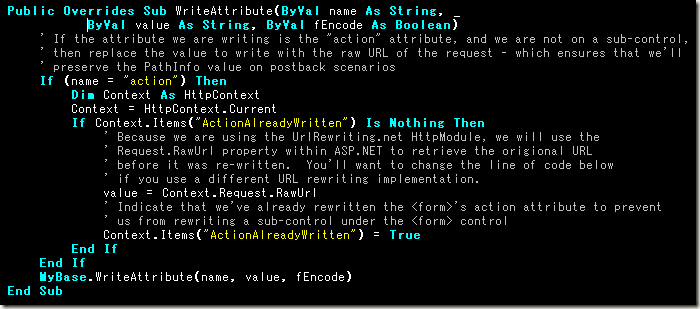
重写后路径兼容问题
在/Pd/Book.aspx重写到/Pd.aspx?Cg=books的场景中,页面中如果有相对位置的资源,如某个img的src=”../logo.gif”或src=”logo.gif”。这时浏览器请求这些资源基准的位置是/pd/也就是说src=”../logo.gif”请求的路径是/logo.gif,src=”logo.gif”请求的路径是/pd/logo.gif。但是其实这些资源的基准位置是 / 因为原始的URL是/Pd.aspx?Cg=books。这时就会发生资源找不到的情况。
1)使用服务器端的img使用 ~ 路径可以解决这个问题(源自ScottGu的Blog)。
2)使用<base href=" http://xxx/ "></base>标签,这个标签需要写在head里。告诉页面,页面中所有相对路径的基准路径是http://xxx/ ,从而解决重写后路径失效的问题。
base标签的说明: http://www.w3school.com.cn/tags/tag_base.asp
到这里,URL-Rewrite的问题讨论完了。在实际项目中肯定还会遇到各种不同的问题,不过解决的思路,估计会是上面这些技术的组合和扩展,希望通过上面对URL-Rewrite问题的讨论,会对遇到的新问题能起到一些帮助的作用。
Url Rewrite 再说Url 重写的更多相关文章
- IIS URL Rewrite(URL 重写)-使用教程
IIS URL Rewrite(URL 重写)-使用教程 作者:vkvi 来源:千一网络(原创) 日期:2011-8-17 http://www.cftea.com/c/2011/08/9CRXOL ...
- windows服务器下IIS7 安装URL Rewrite(URL重写)模块
URL Rewrite Module是一个基于规则的URL重写引擎,用于在URL被Web服务器处理之前改变请求的URL.对于动态Web应用程序,它可以为用户和seo/seo.html" ta ...
- url rewrite优化url的可读性
1.下载urlrewrite,官方下载地址:http://tuckey.org/urlrewrite/ 2.解压缩文件,将jar放入项目,并创建urlrewrite.xml: 3.将filter添加到 ...
- URL重写IIS7(URL Rewrite Module) 比之前的urlrewrite更方便使用
原文发布时间为:2011-02-24 -- 来源于本人的百度文章 [由搬家工具导入] 微软在IIS7中添加了URL的重写模块,并且免费使用,可以导入.htaccess规则,确实是个不错的选择 URL ...
- url rewrite导致的500.19 0x8007000d
https://stackoverflow.com/questions/13532447/http-error-500-19-iis-7-5-error-0x8007000d It seems you ...
- URL Rewrite(四种重定向策略)
目录 一:Rewrite基本概述 1.Rewrite简介 2.Rewrite基本概述 3.Rewrite作用 4.什么是URL? 二:rewrite语法 三:Rewrite标记Flag 1.last和 ...
- IIS URL Rewrite – Installation and Use
IIS URL Rewrite – Installation and Use Posted by Nick LeFevre | Leave a reply IIS URL Rewrite Instal ...
- 在IIS 中如何配置URL Rewrite,并且利用出站规则保持被重写的Cookie的域
Url Rewrite配置 xx.aa.com/bb/test1.aspx 会重写到 bb.aa.com/test1.aspx 具体怎么配置入站 出站规则 结果:
- Nginx – rewrite 配置 URL重写及301跳转原理图
Nginx – rewrite 配置 URL重写 官网:http://nginx.org/en/docs/http/ngx_http_rewrite_module.html 语法:rewrite re ...
随机推荐
- 用phpmailer发送邮件提示SMTP Error: Could not connect to SMTP host解决办法
之前做项目的时候做了一个用phpmailer发送邮件的功能<CI框架结合PHPmailer发送邮件>,昨天步署上线(刚开始用新浪云,嫌贵,换成阿里了),测试的时候,发送邮件却意外报错了.. ...
- Reminders在电商推荐中的价值
原论文在UMAP'16.文章并没有太高深的模型,比较接地气:但其观点与结论很独到,并且在工业界具有很强的实际操作价值. 针对推荐系统的研究大多关注在挖掘用户并不知道但是却与其兴趣相关的物品.不过每个推 ...
- mac cocos2dx android
1. localhost:proj.android mxhd4$ ./build_native.sh 报错 Compile++ thumb : cocosdenshion_static <= ...
- JQuery学习(4-2-phpserver端1)
主要内容:介绍图片的上传过程,涉及PHP跟JQuery: 1. 读取配置文件,连接MySQL数据库. 配置文件主要实username和password. 3-5.php <?php /* * v ...
- Android安全专项-利用androguard分析微信
androguard Androguard经常使用API学习1 安装 做 Android 安全測试之前你应该知道的工具 (一) 分析 ./androlyze.py -s进入分析的交互界面 然后运行 a ...
- MobileNets总结
Google在2017年上半年发表了一篇关于可以运行在手机等移动设备上的神经网络结构--MobileNets.MobileNets是基于深度可分离卷积(depthwise separable conv ...
- 基于Metronic的Bootstrap开发框架经验总结(18)-- 在代码生成工具Database2Sharp中集成对Bootstrap-table插件的分页及排序支持
在我们开发系统界面,包括Web和Winform的都一样,主要的界面就是列表展示主界面,编辑查看界面,以及一些辅助性的如导入界面,选择界面等,其中列表展示主界面是综合性的数据展示界面,一般往往需要对记录 ...
- 微信小程序豆瓣电影项目的改造过程经验分享
在学习微信小程序开发过程中,一部分的难点是前端逻辑的处理,也就是对前端JS的代码编辑:一部分的难点是前端界面的设计展示:本篇随笔基于一个豆瓣电影接口的小程序开源项目进行重新调整,把其中遇到的相关难点和 ...
- REST设计规则
1.简介 REST(Representational State Transfer), 表述性状态转移是Roy Fielding博士在2000年他的博士论文中提出来的一种软件架构风格. REST只是一 ...
- spring mvc对静态资源的访问
如果我们的项目使用的是springmvc,在web.xml中会有一段这的配置. <servlet> <servlet-name>springMvc</servlet-na ...