
像写C#一样编写java代码
JDK8提供了非常多的便捷用法和语法糖,其编码效率几乎接近于C#开发,maven则是java目前为止最赞的jar包管理和build工具,这两部分内容都不算多,就合并到一起了。

愿编写java代码的过程如:Fast & Furious

鸟枪换炮咯,走起!J Java 7发布于2011年,Java 8发布于2014年,Java 9还远么?
在javase8中,lambda表达式的形式基本好C#中一致,Stream和LINQ类似,Future<T>和Task<T>类似,可以这样说,javase8大体达到了C#编码的便捷程度哈!帅帅哒
- Lambda(和.NET一样)
|
功能 |
示例 |
|
函数式接口 |
Arrays.sort(words, (first, second) -> Integer.compare(first.length(), second.length())); BiFunction<String, String, Integer> comp = (first, second) -> Integer.compare(first.length(), second.length()); 常见的函数式接口(推荐使用),和C#Action<T>,Function<T, R>类似 Runnable,Supplier<T>,Consumer<T>, Function<T, R>, Predicate<T> |
|
方法引用 |
Arrays.sort(words, String::compareToIgnoreCase); |
|
构造器引用 |
list.stream().collect(Collectors.toList()); |
|
默认方法,接口中的静态方法 |
不太推荐 |
|
概念 |
所有的lambda表达式都符合闭包,且是延迟执行的 |
- Stream
|
功能 |
示例 |
|
创建Stream |
Stream<String> song = Stream.of("Shanghai", "Beijing"); |
|
filter,map,flatmap方法 |
分别对应C#中Linq的where,select和selectMany |
|
常见操作 |
去除重复: .distince() 排序.sorted(), 反向.reversed() 聚合方法 .max(), findFirst(), .findAny(), .anyMatch() 聚合操作 .reduce((x,y)->x+y) 分组和分片: .groupingBy(), mapping(), joining() 并行流: .parallel() |
|
Optional类型 |
Optional<T>是对T类型封装,它不会返回null,使得引用更安全 |
- 时间日期
在1.8以前,主要使用joda-time库来处理一些比较复杂的时间日期操作,现在有官方的api了。
|
功能 |
示例 |
|
时间线Instant |
Instant start = Instant.now(); Thread.sleep(1000); Instant end = Instant.now(); Duration timeElapsed = Duration.between(start, end); long millis = timeElapsed.toMillis(); |
|
本地日期LocalDate |
LocalDate today = LocalDate.now(); LocalDate oneDay = LocalDate.of(2017, 7, 9); LocalDate addDay = LocalDate.now().plusDays(10); |
|
日期校正器TemporalAdjueters |
获取2017年5月的第一个周二 LocalDate time = LocalDate.of(2017, 5, 1) .with(TemporalAdjusters.nextOrSame(DayOfWeek.TUESDAY)); |
|
本地时间LocalTime |
LocalTime time = LocalTime.of(16, 37, 11); |
|
带时区的时间ZonedDateTime |
ZonedDateTime applloTime = ZonedDateTime.of(2017, 5, 9, 16, 40, 11, 0, ZoneId.of("America/New_York")); |
|
格式化和解析DateTimeFormatter |
用于替代过去的DateFormat,SimpleDateFormat |
|
遗留代码的互操作 |
Instant start = Instant.now();其他类型的操作类似 Date oldDate = Date.from(start); |
- 并发
|
功能 |
示例 |
|
原子值 |
AtomicLong nextNumber = new AtomicLong(); nextNumber.incrementAndGet(); |
|
ConcurrentHashMap的改进 |
ConcurrentMap<String, Integer> map = new ConcurrentHashMap(); map.putIfAbsent("age", 100); map.compute("name", (k, v) -> v == null ? 1 : v + 1); map.merge("age", 1, (oldValue, newValue) -> oldValue + newValue); 批量数据操作:reduceValue, reduceKeys |
|
并行数组操作 |
String[] people = new String[]{"xionger", "shuaishuaida"}; Arrays.parallelSort(people); |
|
Future,和.NET的Task<T>类似 |
CompletableFuture<String> contents = CompletableFuture.supplyAsync(() -> getAsync()); 这部分知识之后再加强 |
- 杂项
|
功能 |
示例 |
|
字符串 |
String joined = String.join("/", "user", "local", "bin"); |
|
数字扩展 |
Long testValue = Integer.toUnsignedLong(Integer.MAX_VALUE); |
|
新的数值函数 |
int result = Math.floorMod(Math.toIntExact(100L), 3); |
|
新增集合方法 |
list.forEach((item) -> System.out.println(item)); Map: remove, putIfAbsent, computeIf, merge 排序:Arrays.sort(people, Comparator.comparing(Person::getAge)); |
|
使用文件 |
这儿看到try-with-resource,等价于using,java代码也可以和.net一样简介 try (Stream<String> lines = Files.lines(path)) { Optional<String> pwd = lines.filter(s -> s.contains("pwd")).findFirst();} |
|
Base64编码 |
Base64.Encoder encoder = Base64.getMimeEncoder(); try (OutputStream output = Files.newOutputStream(encoderPath)) { Files.copy(originalPath, encoder.wrap(output));} |
|
注解 |
通过在注解上添加@Repeatable,使得注解可多次使用 可以使用基于类型的注解 private @NonNull List<String> names = new ArrayList<>(); 方法参数反射,可以反射获取参数的名称 |
|
Java7 |
使用Path接口来代替File类 Path absolute = Paths.get("/", "home", "shanghai "); Files.write(absolute, content.getBytes(StandardCharsets.UTF_8)); |
Tip: demo项目

Maven使用起来相对比较简单,其配置均写在setting.xml中,主要的配置项包括镜像的选择和本地仓库的选择,如下所示。
 <?xml version="1.0" encoding="UTF-8"?>
 <settings xmlns="http://maven.apache.org/SETTINGS/1.0.0"
 xmlns:xsi="http://www.w3.org/2001/XMLSchema-instance"
 xsi:schemaLocation="http://maven.apache.org/SETTINGS/1.0.0 http://maven.apache.org/xsd/settings-1.0.0.xsd">
 <localRepository>E:\javaAssist\maven\repository</localRepository>
 <pluginGroups>
 </pluginGroups>
 <proxies>
 </proxies>
 </servers>
 <mirrors>
 <!-- 阿里云仓库 -->
 <mirror>
 <id>alimaven</id>
 <mirrorOf>central</mirrorOf>
 <name>aliyun maven</name>
 <url>http://maven.aliyun.com/nexus/content/repositories/central/</url>
 </mirror>
 <!-- 中央仓库1 -->
 <mirror>
 <id>repo1</id>
 <mirrorOf>central</mirrorOf>
 <name>Human Readable Name for this Mirror.</name>
 <url>http://repo1.maven.org/maven2/</url>
 </mirror>
 <!-- 中央仓库2 -->
 <mirror>
 <id>repo2</id>
 <mirrorOf>central</mirrorOf>
 <name>Human Readable Name for this Mirror.</name>
 <url>http://repo2.maven.org/maven2/</url>
 </mirror>
 </mirrors>
 <profiles>
 </profiles>
 </settings>
其他常见的包括Eclipse中maven的配置,这部分只需要指定好Installations和UserSetting就好。
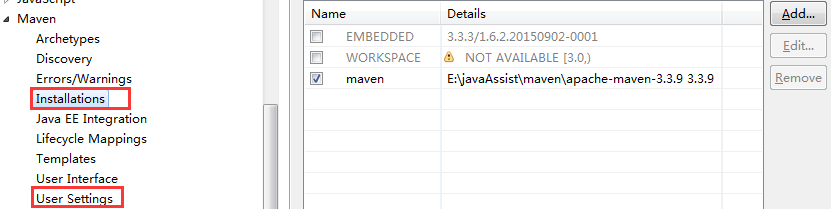
Maven编译的常见命令如下所示
| 命令 | 诠释 |
| mvn package | 生成target目录,编译、测试代码,生成测试报告,生成jar/war文件 |
| mvn tomcat:run | 运行项目于tomcat[jetty等server也OK]上 |
| mvn compile | 编译 |
| mvn test | 编译并测试 |
| mvn clean | 清空生成的文件 |
| mvn install -X | 想要查看完整的依赖踪迹,包含那些因为冲突或者其它原因而被拒绝引入的构件,打开 Maven 的调试标记运行 |
| Maven的Scope | |
| compile | 编译范围,默认的范围 |
| provided | 已提供范围,比如有些web相关jar,tomcat中有,但本地没有时使用 |
| runtime | 运行时范围,比如编译时只需要slf4j-api,运行时才需要具体的实现jar |
| test | 测试范围,例如junit,spring-test |
Maven示例
 <project xmlns="http://maven.apache.org/POM/4.0.0" xmlns:xsi="http://www.w3.org/2001/XMLSchema-instance"
     xsi:schemaLocation="http://maven.apache.org/POM/4.0.0 http://maven.apache.org/maven-v4_0_0.xsd">
     <modelVersion>4.0.0</modelVersion>
     <groupId>com.bjorktech.cayman</groupId>
     <artifactId>cm-web</artifactId>
     <packaging>war</packaging>

     <parent>
         <artifactId>cayman</artifactId>
         <groupId>com.bjorktech</groupId>
         <version>1.0.0-SNAPSHOT</version>
     </parent>

     <properties>
         <!-- Web -->
         <jsp.version>2.3.1</jsp.version>
         <jstl.version>1.2</jstl.version>
         <servlet.version>3.1.0</servlet.version>
         <!-- <project.reporting.outputEncoding>UTF-8</project.reporting.outputEncoding> -->
     </properties>

     <dependencies>
         <dependency>
             <groupId>org.springframework</groupId>
             <artifactId>spring-webmvc</artifactId>
         </dependency>
         <!-- <dependency> <groupId>javax</groupId> <artifactId>javaee-web-api</artifactId>
             <version>7.0</version> <scope>provided</scope> </dependency> -->
         <dependency>
             <groupId>javax.servlet</groupId>
             <artifactId>jstl</artifactId>
             <version>${jstl.version}</version>
         </dependency>
         <dependency>
             <groupId>javax.servlet</groupId>
             <artifactId>javax.servlet-api</artifactId>
             <version>${servlet.version}</version>
             <scope>provided</scope>
         </dependency>
         <dependency>
             <groupId>javax.servlet.jsp</groupId>
             <artifactId>javax.servlet.jsp-api</artifactId>
             <version>${jsp.version}</version>
             <scope>provided</scope>
         </dependency>
         <!-- tx -->
         <dependency>
             <groupId>org.springframework</groupId>
             <artifactId>spring-tx</artifactId>
         </dependency>
         <!-- aop -->
         <dependency>
             <groupId>org.springframework</groupId>
             <artifactId>spring-aop</artifactId>
         </dependency>
         <dependency>
             <groupId>org.aspectj</groupId>
             <artifactId>aspectjweaver</artifactId>
         </dependency>
         <dependency>
             <groupId>org.aspectj</groupId>
             <artifactId>aspectjrt</artifactId>
             <version>1.8.5</version>
         </dependency>
         <!-- mybatis -->
         <dependency>
             <groupId>org.mybatis</groupId>
             <artifactId>mybatis</artifactId>
         </dependency>
         <dependency>
             <groupId>com.google.guava</groupId>
             <artifactId>guava</artifactId>
         </dependency>
         <dependency>
             <groupId>joda-time</groupId>
             <artifactId>joda-time</artifactId>
         </dependency>
         <!-- log -->
         <dependency>
             <groupId>org.slf4j</groupId>
             <artifactId>slf4j-api</artifactId>
         </dependency>
         <dependency>
             <groupId>ch.qos.logback</groupId>
             <artifactId>logback-access</artifactId>
         </dependency>
         <dependency>
             <groupId>ch.qos.logback</groupId>
             <artifactId>logback-classic</artifactId>
         </dependency>
         <dependency>
             <groupId>ch.qos.logback</groupId>
             <artifactId>logback-core</artifactId>
         </dependency>
         <!-- <dependency> <groupId>org.apache.logging.log4j</groupId> <artifactId>log4j-api</artifactId>
             </dependency> <dependency> <groupId>org.apache.logging.log4j</groupId> <artifactId>log4j-core</artifactId>
             </dependency> <dependency> <groupId>org.apache.logging.log4j</groupId> <artifactId>log4j-slf4j-impl</artifactId>
             </dependency> -->
         <!-- 本地tomcat -->
         <!-- <dependency> <groupId>org.apache.tomcat</groupId> <artifactId>tomcat-servlet-api</artifactId>
             </dependency> -->
         <!-- json -->
         <dependency>
             <groupId>com.fasterxml.jackson.dataformat</groupId>
             <artifactId>jackson-dataformat-xml</artifactId>
             <version>2.5.3</version>
         </dependency>
         <dependency>
             <groupId>com.fasterxml.jackson.core</groupId>
             <artifactId>jackson-databind</artifactId>
             <version>2.5.3</version>
         </dependency>
         <!-- 文件上传 -->
         <dependency>
             <groupId>commons-fileupload</groupId>
             <artifactId>commons-fileupload</artifactId>
             <version>1.3.1</version>
         </dependency>
         <dependency>
             <groupId>commons-io</groupId>
             <artifactId>commons-io</artifactId>
             <version>2.3</version>
         </dependency>
         <!-- 老式soap -->
         <dependency>
             <groupId>javax.xml.rpc</groupId>
             <artifactId>javax.xml.rpc-api</artifactId>
             <version>1.1.1</version>
         </dependency>
         <dependency>
             <groupId>org.apache.axis</groupId>
             <artifactId>axis</artifactId>
             <version>1.4</version>
         </dependency>
         <!-- axis依赖包 -->
         <dependency>
             <groupId>commons-discovery</groupId>
             <artifactId>commons-discovery</artifactId>
             <version>0.2</version>
             <exclusions>
                 <exclusion>
                     <artifactId>commons-logging</artifactId>
                     <groupId>commons-logging</groupId>
                 </exclusion>
             </exclusions>
         </dependency>
         <dependency>
             <groupId>wsdl4j</groupId>
             <artifactId>wsdl4j</artifactId>
             <version>1.6.3</version>
         </dependency>
         <!-- xml解析 -->
         <dependency>
             <groupId>dom4j</groupId>
             <artifactId>dom4j</artifactId>
             <version>1.6.1</version>
         </dependency>
         <!-- 测试 -->
         <dependency>
             <groupId>org.springframework</groupId>
             <artifactId>spring-test</artifactId>
         </dependency>
         <dependency>
             <groupId>junit</groupId>
             <artifactId>junit</artifactId>
         </dependency>
     </dependencies>
     <build>
         <finalName>cm-web</finalName>
         <plugins>
             <plugin>
                 <groupId>org.apache.maven.plugins</groupId>
                 <artifactId>maven-compiler-plugin</artifactId>
             </plugin>
             <plugin>
                 <groupId>org.apache.maven.plugins</groupId>
                 <artifactId>maven-war-plugin</artifactId>
                 <configuration>
                     <!-- 无web.xml不报错 -->
                     <failOnMissingWebXml>false</failOnMissingWebXml>
                 </configuration>
             </plugin>
         </plugins>
     </build>
 </project>
参考资料
- Cay, S, Horstmann. 写给大忙人看的JavaSE8[M]. 北京:电子工业出版社, 2015.
像写C#一样编写java代码的更多相关文章
- JAVA语言之怎样写出高性能的Java代码?
本文主要向大家介绍了JAVA语言之怎样写出高性能的 Java 代码?通过具体的内容向大家展示,希望对大家学习JAVA语言有所帮助. 在这篇文章中,我们将讨论几个有助于提升Java应用程序性能的方法.我 ...
- Jmeter自定义编写Java代码调用socket通信
一.前言 最近需要测试一款手机游戏的性能,找不到啥录制脚本的工具,然后,另外想办法.性能测试实际上就是对服务器的承载能力的测试,和各种类型的手机客户端没有啥多大关系,手机再好,服务器负载不了,也不能够 ...
- 如何更规范化编写Java 代码
如何更规范化编写Java 代码 Many of the happiest people are those who own the least. But are we really so happy ...
- 写了那么多年 Java 代码,终于 debug 到 JVM 了
继上篇文章 原创 | 全网最新最简单的 openjdk13 代码编译 之后,我们有了自己编译后的 jdk 和 hotspot,如下图所示.接下来就来干一番事情. 搭建调试环境 1.下载 CLion 软 ...
- 【原创】怎样才能写出优雅的 Java 代码?这篇文章告诉你答案!
本文已经收录自 JavaGuide (59k+ Star):[Java学习+面试指南] 一份涵盖大部分Java程序员所需要掌握的核心知识. 本文比较简短,基本就是推荐一些对于写好代码非常有用的文章或者 ...
- 如何更规范化的编写JAVA 代码
如何更规范的编写JAVA代码 一.MyBatis 不要为了多个查询条件而写 1 = 1 当遇到多个查询条件,使用where 1=1 可以很方便的解决我们的问题,但是这样很可能会造成非常大的性能损失, ...
- 通过编写Java代码让Jvm崩溃
在书上看到一个作者提出一个问题"怎样通过编写Java代码让Jvm崩溃",我看了之后也不懂.带着问题查了一下,百度知道里面有这样一个答案: 1 package jvm; 2 3 pu ...
- 请阐述调用Activity有哪几种方法,并写出相关的Java代码
请阐述调用Activity有哪几种方法,并写出相关的Java代码. 答案:可以采用两种方式调用Activity:显示调用和隐式调用.显示调用直接指定了Activity,代码如下: Intent int ...
- 【eclipse jar包】在编写java代码时,为方便编程,常常会引用别人已经实现的方法,通常会封装成jar包,我们在编写时,只需引入到Eclipse中即可。
Eclipse中导入外部jar包 在编写java代码时,为方便编程,常常会引用别人已经实现的方法,通常会封装成jar包,我们在编写时,只需引入到Eclipse中即可. 工具/原料 Eclipse 需要 ...
随机推荐
- Boost库安装(实测vs2012)
1.下载boost库,我这边下载的是目前最新的:boost_1_63_0.7z 2.解压到本地目录:我这边是:D:\Program Files 3.cmd窗口,以管理员权限打开,执行D:\Progra ...
- linux系统和Windows系统共存
最近接触了linux系统,因为对linux系统一直存在一种敬畏之心,所以决定研究研究 那么今天我在这里呢是要和大家分享一下在Windows存在的情况下安装双系统linux 那么第一步呢,就是斤BIOS ...
- UWP Composition API - New FlexGrid 锁定行列
如果之前看了 UWP Jenkins + NuGet + MSBuild 手把手教你做自动UWP Build 和 App store包 这篇的童鞋,针对VS2017,需要对应更新一下配置,需要的童鞋点 ...
- iOSiOS开发之数据存储之NSKeyedArchiver
1.概述 NSKeyedArchiver归档和plist文件存储不同的是NSKeyedArchiver可以直接保存对象.如果对象是NSString.NSDictionary.NSArray.NSDat ...
- dev机上数据库中批量生成table
我的低效方法: 通过本地php脚本进行create: <?php //0-63 header("Content-type:text/html;charset=utf-8"); ...
- 《InsideUE4》UObject(五)类型系统信息收集
在一起!在一起! 引言 前文中我们阐述了类型系统构建的第一个阶段:生成.UHT分析源码的宏标记并生成了包含程序元信息的代码,继而编译进程序,在程序启动的时候,开始启动类型系统的后续构建阶段.而本文我们 ...
- 开源一个vue2的tree组件
一直打算偷懒使用个现成的树组件,但是在github上找了一大圈没有找到真正满足应用开发的树组件,所以没办法只能自己写了一个,开源出来希望可以帮助到需要的人,同时如果大家觉得好用,我可以顺带骗骗★(希望 ...
- bootstrap file input 官方文档翻译
file Input官方文档 中文翻译 file input 特性 1.这个插件会把简单的html文件变成一个更好用的文件选择输入控件,通过一个html的文件输入框,能兼容那些不支持jquery或js ...
- Omi新成员omi-router正式发布
原文链接-https://github.com/AlloyTeam/omi/blob/master/tutorial omi-router omi-router是Omi框架专属的router插件,文件 ...
- Android中的java层的线程暂停和恢复实现
/** * 基础线程对象. * * @author jevan * @version (1.0 at 2013-6-17) * @version (1.1 at 2013-7-2) 增加on ...