
Ta-lib函数功能列表
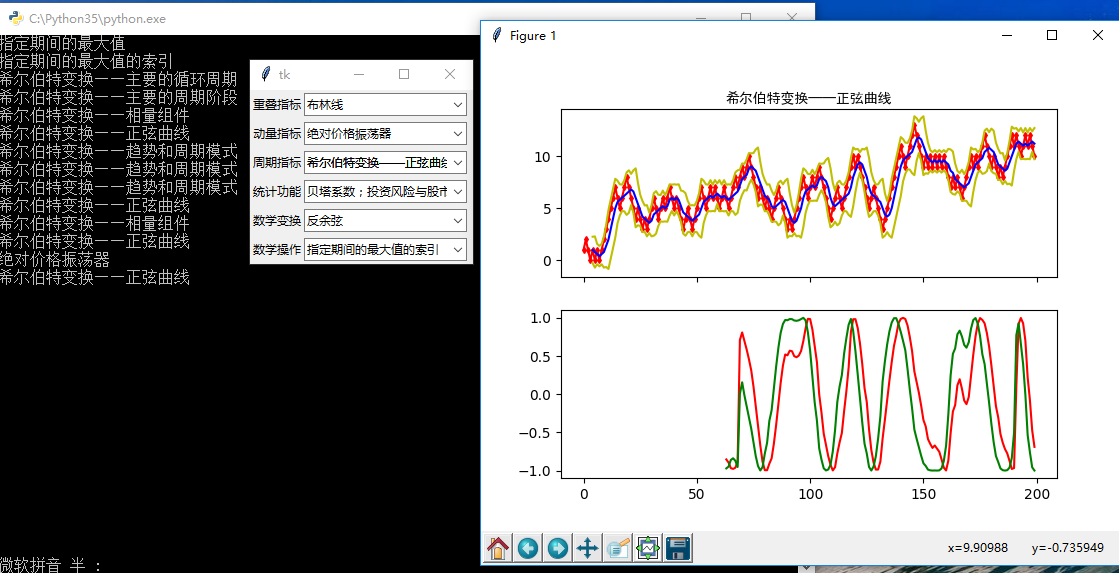
import tkinter as tk
from tkinter import ttk
import matplotlib.pyplot as plt

import numpy as np
import talib as ta

series = np.random.choice([1, -1], size=200)
close = np.cumsum(series).astype(float)

# 重叠指标
def overlap_process(event):
    print(event.widget.get())
    overlap = event.widget.get()

    upperband, middleband, lowerband = ta.BBANDS(close, timeperiod=5, nbdevup=2, nbdevdn=2, matype=0)
    fig, axes = plt.subplots(2, 1, sharex=True)
    ax1, ax2 = axes[0], axes[1]
    axes[0].plot(close, 'rd-', markersize=3)
    axes[0].plot(upperband, 'y-')
    axes[0].plot(middleband, 'b-')
    axes[0].plot(lowerband, 'y-')
    axes[0].set_title(overlap, fontproperties="SimHei")

    if overlap == '布林线':
        pass
    elif overlap == '双指数移动平均线':
        real = ta.DEMA(close, timeperiod=30)
        axes[1].plot(real, 'r-')
    elif overlap == '指数移动平均线 ':
        real = ta.EMA(close, timeperiod=30)
        axes[1].plot(real, 'r-')
    elif overlap == '希尔伯特变换——瞬时趋势线':
        real = ta.HT_TRENDLINE(close)
        axes[1].plot(real, 'r-')
    elif overlap == '考夫曼自适应移动平均线':
        real = ta.KAMA(close, timeperiod=30)
        axes[1].plot(real, 'r-')
    elif overlap == '移动平均线':
        real = ta.MA(close, timeperiod=30, matype=0)
        axes[1].plot(real, 'r-')
    elif overlap == 'MESA自适应移动平均':
        mama, fama = ta.MAMA(close, fastlimit=0, slowlimit=0)
        axes[1].plot(mama, 'r-')
        axes[1].plot(fama, 'g-')
    elif overlap == '变周期移动平均线':
        real = ta.MAVP(close, periods, minperiod=2, maxperiod=30, matype=0)
        axes[1].plot(real, 'r-')
    elif overlap == '简单移动平均线':
        real = ta.SMA(close, timeperiod=30)
        axes[1].plot(real, 'r-')
    elif overlap == '三指数移动平均线(T3)':
        real = ta.T3(close, timeperiod=5, vfactor=0)
        axes[1].plot(real, 'r-')
    elif overlap == '三指数移动平均线':
        real = ta.TEMA(close, timeperiod=30)
        axes[1].plot(real, 'r-')
    elif overlap == '三角形加权法 ':
        real = ta.TRIMA(close, timeperiod=30)
        axes[1].plot(real, 'r-')
    elif overlap == '加权移动平均数':
        real = ta.WMA(close, timeperiod=30)
        axes[1].plot(real, 'r-')
    plt.show()

# 动量指标
def momentum_process(event):
    print(event.widget.get())
    momentum = event.widget.get()

    upperband, middleband, lowerband = ta.BBANDS(close, timeperiod=5, nbdevup=2, nbdevdn=2, matype=0)
    fig, axes = plt.subplots(2, 1, sharex=True)
    ax1, ax2 = axes[0], axes[1]
    axes[0].plot(close, 'rd-', markersize=3)
    axes[0].plot(upperband, 'y-')
    axes[0].plot(middleband, 'b-')
    axes[0].plot(lowerband, 'y-')
    axes[0].set_title(momentum, fontproperties="SimHei")

    if momentum == '绝对价格振荡器':
        real = ta.APO(close, fastperiod=12, slowperiod=26, matype=0)
        axes[1].plot(real, 'r-')
    elif momentum == '钱德动量摆动指标':
        real = ta.CMO(close, timeperiod=14)
        axes[1].plot(real, 'r-')
    elif momentum == '移动平均收敛/散度':
        macd, macdsignal, macdhist = ta.MACD(close, fastperiod=12, slowperiod=26, signalperiod=9)
        axes[1].plot(macd, 'r-')
        axes[1].plot(macdsignal, 'g-')
        axes[1].plot(macdhist, 'b-')
    elif momentum == '带可控MA类型的MACD':
        macd, macdsignal, macdhist = ta.MACDEXT(close, fastperiod=12, fastmatype=0, slowperiod=26, slowmatype=0, signalperiod=9, signalmatype=0)
        axes[1].plot(macd, 'r-')
        axes[1].plot(macdsignal, 'g-')
        axes[1].plot(macdhist, 'b-')
    elif momentum == '移动平均收敛/散度 固定 12/26':
        macd, macdsignal, macdhist = ta.MACDFIX(close, signalperiod=9)
        axes[1].plot(macd, 'r-')
        axes[1].plot(macdsignal, 'g-')
        axes[1].plot(macdhist, 'b-')
    elif momentum == '动量':
        real = ta.MOM(close, timeperiod=10)
        axes[1].plot(real, 'r-')
    elif momentum == '比例价格振荡器':
        real = ta.PPO(close, fastperiod=12, slowperiod=26, matype=0)
        axes[1].plot(real, 'r-')
    elif momentum == '变化率':
        real = ta.ROC(close, timeperiod=10)
        axes[1].plot(real, 'r-')
    elif momentum == '变化率百分比':
        real = ta.ROCP(close, timeperiod=10)
        axes[1].plot(real, 'r-')
    elif momentum == '变化率的比率':
        real = ta.ROCR(close, timeperiod=10)
        axes[1].plot(real, 'r-')
    elif momentum == '变化率的比率100倍':
        real = ta.ROCR100(close, timeperiod=10)
        axes[1].plot(real, 'r-')
    elif momentum == '相对强弱指数':
        real = ta.RSI(close, timeperiod=14)
        axes[1].plot(real, 'r-')
    elif momentum == '随机相对强弱指标':
        fastk, fastd = ta.STOCHRSI(close, timeperiod=14, fastk_period=5, fastd_period=3, fastd_matype=0)
        axes[1].plot(fastk, 'r-')
        axes[1].plot(fastd, 'r-')
    elif momentum == '三重光滑EMA的日变化率':
        real = ta.TRIX(close, timeperiod=30)
        axes[1].plot(real, 'r-')

    plt.show()

# 周期指标
def cycle_process(event):
    print(event.widget.get())
    cycle = event.widget.get()

    upperband, middleband, lowerband = ta.BBANDS(close, timeperiod=5, nbdevup=2, nbdevdn=2, matype=0)
    fig, axes = plt.subplots(2, 1, sharex=True)
    ax1, ax2 = axes[0], axes[1]
    axes[0].plot(close, 'rd-', markersize=3)
    axes[0].plot(upperband, 'y-')
    axes[0].plot(middleband, 'b-')
    axes[0].plot(lowerband, 'y-')
    axes[0].set_title(cycle, fontproperties="SimHei")

    if cycle == '希尔伯特变换——主要的循环周期':
        real = ta.HT_DCPERIOD(close)
        axes[1].plot(real, 'r-')
    elif cycle == '希尔伯特变换,占主导地位的周期阶段':
        real = ta.HT_DCPHASE(close)
        axes[1].plot(real, 'r-')
    elif cycle == '希尔伯特变换——相量组件':
        inphase, quadrature = ta.HT_PHASOR(close)
        axes[1].plot(inphase, 'r-')
        axes[1].plot(quadrature, 'g-')
    elif cycle == '希尔伯特变换——正弦曲线':
        sine, leadsine = ta.HT_SINE(close)
        axes[1].plot(sine, 'r-')
        axes[1].plot(leadsine, 'g-')
    elif cycle == '希尔伯特变换——趋势和周期模式':
        integer = ta.HT_TRENDMODE(close)
        axes[1].plot(integer, 'r-')

    plt.show()

# 统计功能
def statistic_process(event):
    print(event.widget.get())
    statistic = event.widget.get()

    upperband, middleband, lowerband = ta.BBANDS(close, timeperiod=5, nbdevup=2, nbdevdn=2, matype=0)
    fig, axes = plt.subplots(2, 1, sharex=True)
    ax1, ax2 = axes[0], axes[1]
    axes[0].plot(close, 'rd-', markersize=3)
    axes[0].plot(upperband, 'y-')
    axes[0].plot(middleband, 'b-')
    axes[0].plot(lowerband, 'y-')
    axes[0].set_title(statistic, fontproperties="SimHei")

    if statistic == '线性回归':
        real = ta.LINEARREG(close, timeperiod=14)
        axes[1].plot(real, 'r-')
    elif statistic == '线性回归角度':
        real = ta.LINEARREG_ANGLE(close, timeperiod=14)
        axes[1].plot(real, 'r-')
    elif statistic == '线性回归截距':
        real = ta.LINEARREG_INTERCEPT(close, timeperiod=14)
        axes[1].plot(real, 'r-')
    elif statistic == '线性回归斜率':
        real = ta.LINEARREG_SLOPE(close, timeperiod=14)
        axes[1].plot(real, 'r-')
    elif statistic == '标准差':
        real = ta.STDDEV(close, timeperiod=5, nbdev=1)
        axes[1].plot(real, 'r-')
    elif statistic == '时间序列预测':
        real = ta.TSF(close, timeperiod=14)
        axes[1].plot(real, 'r-')
    elif statistic == '方差':
        real = ta.VAR(close, timeperiod=5, nbdev=1)
        axes[1].plot(real, 'r-')

    plt.show()

# 数学变换
def math_transform_process(event):
    print(event.widget.get())
    math_transform = event.widget.get()

    upperband, middleband, lowerband = ta.BBANDS(close, timeperiod=5, nbdevup=2, nbdevdn=2, matype=0)
    fig, axes = plt.subplots(2, 1, sharex=True)
    ax1, ax2 = axes[0], axes[1]
    axes[0].plot(close, 'rd-', markersize=3)
    axes[0].plot(upperband, 'y-')
    axes[0].plot(middleband, 'b-')
    axes[0].plot(lowerband, 'y-')
    axes[0].set_title(math_transform, fontproperties="SimHei")

    if math_transform == '反余弦':
        real = ta.ACOS(close)
        axes[1].plot(real, 'r-')
    elif math_transform == '反正弦':
        real = ta.ASIN(close)
        axes[1].plot(real, 'r-')
    elif math_transform == '反正切':
        real = ta.ATAN(close)
        axes[1].plot(real, 'r-')
    elif math_transform == '向上取整':
        real = ta.CEIL(close)
        axes[1].plot(real, 'r-')
    elif math_transform == '余弦':
        real = ta.COS(close)
        axes[1].plot(real, 'r-')
    elif math_transform == '双曲余弦':
        real = ta.COSH(close)
        axes[1].plot(real, 'r-')
    elif math_transform == '指数':
        real = ta.EXP(close)
        axes[1].plot(real, 'r-')
    elif math_transform == '向下取整':
        real = ta.FLOOR(close)
        axes[1].plot(real, 'r-')
    elif math_transform == '自然对数':
        real = ta.LN(close)
        axes[1].plot(real, 'r-')
    elif math_transform == '常用对数':
        real = ta.LOG10(close)
        axes[1].plot(real, 'r-')
    elif math_transform == '正弦':
        real = ta.SIN(close)
        axes[1].plot(real, 'r-')
    elif math_transform == '双曲正弦':
        real = ta.SINH(close)
        axes[1].plot(real, 'r-')
    elif math_transform == '平方根':
        real = ta.SQRT(close)
        axes[1].plot(real, 'r-')
    elif math_transform == '正切':
        real = ta.TAN(close)
        axes[1].plot(real, 'r-')
    elif math_transform == '双曲正切':
        real = ta.TANH(close)
        axes[1].plot(real, 'r-')

    plt.show()

# 数学操作
def math_operator_process(event):
    print(event.widget.get())
    math_operator = event.widget.get()

    upperband, middleband, lowerband = ta.BBANDS(close, timeperiod=5, nbdevup=2, nbdevdn=2, matype=0)
    fig, axes = plt.subplots(2, 1, sharex=True)
    ax1, ax2 = axes[0], axes[1]
    axes[0].plot(close, 'rd-', markersize=3)
    axes[0].plot(upperband, 'y-')
    axes[0].plot(middleband, 'b-')
    axes[0].plot(lowerband, 'y-')
    axes[0].set_title(math_operator, fontproperties="SimHei")

    if math_operator == '指定的期间的最大值':
        real = ta.MAX(close, timeperiod=30)
        axes[1].plot(real, 'r-')
    elif math_operator == '指定的期间的最大值的索引':
        integer = ta.MAXINDEX(close, timeperiod=30)
        axes[1].plot(integer, 'r-')
    elif math_operator == '指定的期间的最小值':
        real = ta.MIN(close, timeperiod=30)
        axes[1].plot(real, 'r-')
    elif math_operator == '指定的期间的最小值的索引':
        integer = ta.MININDEX(close, timeperiod=30)
        axes[1].plot(integer, 'r-')
    elif math_operator == '指定的期间的最小和最大值':
        min, max = ta.MINMAX(close, timeperiod=30)
        axes[1].plot(min, 'r-')
        axes[1].plot(max, 'r-')
    elif math_operator == '指定的期间的最小和最大值的索引':
        minidx, maxidx = ta.MINMAXINDEX(close, timeperiod=30)
        axes[1].plot(minidx, 'r-')
        axes[1].plot(maxidx, 'r-')
    elif math_operator == '合计':
        real = ta.SUM(close, timeperiod=30)
        axes[1].plot(real, 'r-')

    plt.show()

root = tk.Tk()

# 第一行:重叠指标
rowframe1 = tk.Frame(root)
rowframe1.pack(side=tk.TOP, ipadx=3, ipady=3)
tk.Label(rowframe1, text="重叠指标").pack(side=tk.LEFT)

overlap_indicator = tk.StringVar() # 重叠指标
combobox1 = ttk.Combobox(rowframe1, textvariable=overlap_indicator)
combobox1['values'] = ['布林线','双指数移动平均线','指数移动平均线 ','希尔伯特变换——瞬时趋势线',
                       '考夫曼自适应移动平均线','移动平均线','MESA自适应移动平均','变周期移动平均线',
                       '简单移动平均线','三指数移动平均线(T3)','三指数移动平均线','三角形加权法 ','加权移动平均数']
combobox1.current(0)
combobox1.pack(side=tk.LEFT)

combobox1.bind('<<ComboboxSelected>>', overlap_process)

# 第二行:动量指标
rowframe2 = tk.Frame(root)
rowframe2.pack(side=tk.TOP, ipadx=3, ipady=3)
tk.Label(rowframe2, text="动量指标").pack(side=tk.LEFT)

momentum_indicator = tk.StringVar() # 动量指标
combobox2 = ttk.Combobox(rowframe2, textvariable=momentum_indicator)
combobox2['values'] = ['绝对价格振荡器','钱德动量摆动指标','移动平均收敛/散度','带可控MA类型的MACD',
                       '移动平均收敛/散度 固定 12/26','动量','比例价格振荡器','变化率','变化率百分比',
                       '变化率的比率','变化率的比率100倍','相对强弱指数','随机相对强弱指标','三重光滑EMA的日变化率']

combobox2.current(0)
combobox2.pack(side=tk.LEFT)

combobox2.bind('<<ComboboxSelected>>', momentum_process)

# 第三行:周期指标
rowframe3 = tk.Frame(root)
rowframe3.pack(side=tk.TOP, ipadx=3, ipady=3)
tk.Label(rowframe3, text="周期指标").pack(side=tk.LEFT)

cycle_indicator = tk.StringVar() # 周期指标
combobox3 = ttk.Combobox(rowframe3, textvariable=cycle_indicator)
combobox3['values'] = ['希尔伯特变换——主要的循环周期','希尔伯特变换——主要的周期阶段','希尔伯特变换——相量组件',
                       '希尔伯特变换——正弦曲线','希尔伯特变换——趋势和周期模式']

combobox3.current(0)
combobox3.pack(side=tk.LEFT)

combobox3.bind('<<ComboboxSelected>>', cycle_process)

# 第四行:统计功能
rowframe4 = tk.Frame(root)
rowframe4.pack(side=tk.TOP, ipadx=3, ipady=3)
tk.Label(rowframe4, text="统计功能").pack(side=tk.LEFT)

statistic_indicator = tk.StringVar() # 统计功能
combobox4 = ttk.Combobox(rowframe4, textvariable=statistic_indicator)
combobox4['values'] = ['贝塔系数;投资风险与股市风险系数','皮尔逊相关系数','线性回归','线性回归角度',
                       '线性回归截距','线性回归斜率','标准差','时间序列预测','方差']

combobox4.current(0)
combobox4.pack(side=tk.LEFT)

combobox4.bind('<<ComboboxSelected>>', statistic_process)

# 第五行:数学变换
rowframe5 = tk.Frame(root)
rowframe5.pack(side=tk.TOP, ipadx=3, ipady=3)
tk.Label(rowframe5, text="数学变换").pack(side=tk.LEFT)

math_transform = tk.StringVar() # 数学变换
combobox5 = ttk.Combobox(rowframe5, textvariable=math_transform_process)
combobox5['values'] = ['反余弦','反正弦','反正切','向上取整','余弦','双曲余弦','指数','向下取整',
                       '自然对数','常用对数','正弦','双曲正弦','平方根','正切','双曲正切']

combobox5.current(0)
combobox5.pack(side=tk.LEFT)

combobox5.bind('<<ComboboxSelected>>', math_transform_process)

# 第六行:数学操作
rowframe6 = tk.Frame(root)
rowframe6.pack(side=tk.TOP, ipadx=3, ipady=3)
tk.Label(rowframe6, text="数学操作").pack(side=tk.LEFT)

math_operator = tk.StringVar() # 数学操作
combobox6 = ttk.Combobox(rowframe6, textvariable=math_operator_process)
combobox6['values'] = ['指定期间的最大值','指定期间的最大值的索引','指定期间的最小值','指定期间的最小值的索引',
                       '指定期间的最小和最大值','指定期间的最小和最大值的索引','合计']

combobox6.current(0)
combobox6.pack(side=tk.LEFT)

combobox6.bind('<<ComboboxSelected>>', math_operator_process)

root.mainloop()
原文:http://www.cnblogs.com/hhh5460/p/5602357.html
Ta-lib函数功能列表的更多相关文章
- 2-3 Sass的函数功能-列表函数
列表函数主要包括一些对列表参数的函数使用,主要包括以下几种: length($list):返回一个列表的长度值: nth($list, $n):返回一个列表中指定的某个标签值 join($list1, ...
- dir()函数:罗列出参数所有的功能列表
#coding=utf-8import sysprint dir(sys)#罗列出参数中所有的功能列表sys.__doc__#调用参数中的函数 #dir()函数扩展展详解python中dir()函数不 ...
- Python3:sorted()函数及列表中的sort()函数
一.sort,sorted函数介绍: Sort函数是list列表中的函数,而sorted可以对list或者iterator进行排序. 下面我们使用help来查看他们的用法及功能: sort: ...
- 2-2 Sass的函数功能-字符串与数字函数
Sass的函数简介 在 Sass 中除了可以定义变量,具有 @extend.%placeholder 和 mixins 等特性之外,还自备了一系列的函数功能.其主要包括: 字符串函数 数字函数 列表函 ...
- python协程函数应用 列表生成式 生成器表达式
协程函数应用 列表生成式 生成器表达式 一.知识点整理: 1.可迭代的:对象下有_iter_方法的都是可迭代的对象 迭代器:对象._iter_()得到的结果就是迭代器 迭代器的特性: 迭代器._n ...
- 【UEFI】---BIOS中对Guid的使用以及Lib函数的使用总结
---恢复内容开始--- BIOS发展至今传统的汇编实现早已被抛弃,UEFI作为目前一套主流的标准定义接口,被广泛使用.之前被一些有关GUID和一些Lib函数的使用以及跨Pkg调用给折腾的不行,每次改 ...
- Android 手机卫士--设置界面&功能列表界面跳转逻辑处理
在<Android 手机卫士--md5加密过程>中已经实现了加密类,这里接着实现手机防盗功能 本文地址:http://www.cnblogs.com/wuyudong/p/5941959. ...
- oracle实现split函数功能
转载: http://blog.csdn.net/jojo52013145/article/details/6758279在实际的应用中,为了让PL/SQL 函数返回数据的多个行,必须通过返回一个 R ...
- 模拟实现兼容低版本IE浏览器的原生bind()函数功能
模拟实现兼容低版本IE浏览器的原生bind()函数功能: 代码如下: if(!Function.prototype.bind){ Function.prototype.bind=function( ...
随机推荐
- Java8学习(3)- Lambda 表达式
猪脚:以下内容参考<Java 8 in Action> 本次学习内容: Lambda 基本模式 环绕执行模式 函数式接口,类型推断 方法引用 Lambda 复合 上一篇Java8学习(2) ...
- 【菜鸟入门】安装配置eclipse 并编写运行第一个Java程序
不得不吐槽一下,安装配置这eclipse真是太费劲了...下面总结一下,以便下次再安装 本人 win10系统,64位机 一.在官网下载eclipse安装包 文件名:eclipse-inst-win64 ...
- 51nod_1490: 多重游戏(树上博弈)
题目链接 该题实质上是一个树上博弈的问题.要定义四种状态--2先手必胜 1先手必败 3可输可赢 0不能控制 叶子结点为先手必胜态: 若某结点的所有儿子都是先手必败态,则该结点为先手必胜态: 若某结点的 ...
- tensorflow l2_normalize函数
1.l2_normalize函数 tf.nn.l2_normalize(x, dim, epsilon=1e-12, name=None) 解释:这个函数的作用是利用 L2 范数对指定维度 dim 进 ...
- 关于javacc的认识
http://www.cnblogs.com/Gavin_Liu/archive/2009/03/07/1405029.html
- 配置SSH隧道访问Ubuntu服务器上的MongoDB
为了数据安全,在MongoDB的配置文件里,一般会把默认的27017端口port改为自定义的端口号,然后把允许访问的IP设为127.0.0.1(即主机本身).但是这样就会在开发的过程查看数据时带来麻烦 ...
- How to create a jump server in AWS VPC
本来是写的Word文档,给其他国家的同时看的,所以一开始就是英文写的,也没打算翻译成为中文了,顺便抱怨下,网上资料找了很久的资料都没有看到介绍怎么在单机环境下搭建RD Gateway的,写本文的目的是 ...
- vue指令v-else-if示例解析
表示 v-if 的 "else if 块".可以链式调用. <div id="app"> <p v-if="isRender&quo ...
- asp.net mvc项目远程发布到windows server服务器
文章参考 自学MVC看这里——全网最全ASP.NET MVC 教程汇总 图文详解远程部署ASP.NET MVC 5项目 配置Web部署处理程序 设备及环境 一台装有windows server 201 ...
- Jmeter关联,正则表达式提取器使用
一.Jmeter关联的方式: Jmeter中关联可以在需要获取数据的请求上 右键-->后置处理器 选择需要的关联方式,如下图有很多种方法可以提取动态变化数据: 二.正则表达式提取器: 1.比如 ...