
linux_base_commond_two
1.linux privilege commond
a.throught ll commond can get follow picture
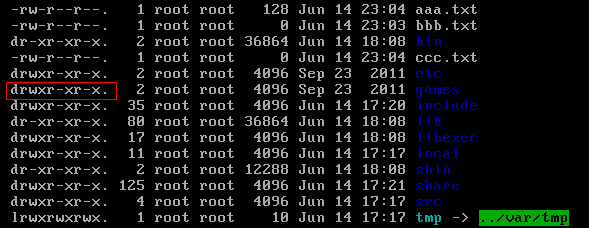
d directory - file l link , after nine number is three numbers a group
a.first group is user(属主) privileges b. second group is group(属组) privileges c.third group is other privileges
r read privilege 4 w writer privilege 2 x expression executalbe 1
b.modify privilege
chmod u=rwx, g=rw, o=r a.txt
chmod 764 a.txt
2.install soft commond
a.install JDK
NOTE:soft commond with rpm is equal to windows soft assisantor
1) look up current linux system whether or not installed JDK
rpm -qa |grep java
2)uninstalling jdk soft from one look up
rpm -e --nodeps unstall_soft_name

3)upload JDK to linux through SSH soft
4)decompression JDK soft
tar –xvf jdk-7u71-linux-i586.tar.gz –C /usr/local
5)config JDK environment variable,open /etc/profile and add following content
|
#set java environment JAVA_HOME=/usr/local/jdk1.7.0_71 CLASSPATH=.:$JAVA_HOME/lib.tools.jar PATH=$JAVA_HOME/bin:$PATH export JAVA_HOME CLASSPATH PATH |
6)reflush /etc/profile
source /etc/profile
b.installed MYSQL
1.look up centos with MYSQL
rpm -qa | grep mysql
2.unstall mysql
3.upload mysql to linux
4.decompression mysql
tar -xvf MySQL-5.6.22-1.el6.i686.rpm-bundle.tar -C /usr/local/mysql
5.installing mysql on /usr/local/mysql directory
install server-side:rpm -ivh MySQL-server-5.6.22-1.el6.i686.rpm
install client-side:rpm -ivh MySQL-client-5.6.22-1.el6.i686.rpm
6.startup mysql
service mysql start
7.link mysql services into system services and set start with boot
join system services:chkconfing --add mysql
auto start :chkconfig mysql on
8.login mysql
installed mysql will generate a random password in /root/.mysql_secret
mysql -u root -p
9.modify mysql password
set password=password('root')
10.started remote login
in default situation ,mysql isn't support to remote login,so you need set it. enabling remote login.
login mysql that you input follow command
grant all privileges on *.* to 'root' @'%' identified by 'root';
flush privileges;
11.open access ports 3306
/sbin/iptables -I INPUT -p tcp --dport 3306 -j ACCEPT
/etc/rc.d/init.d/iptables save ---(keep firewall all the time)
c.installed Tomcat
1.upload tomcat into linux
2.decompression tomcat into /usr/local
3.open ports 8080
/sbin/iptables -I INPUT -p tcp --dport 8080 -j ACCEPT
/etc/rc.d/init.d/iptables save
4.launch an close tomcat
in the bin directory: ./startup.sh
in the bin drecrory: ./shutdown.sh
linux_base_commond_two的更多相关文章
随机推荐
- Python虚拟环境virtualenv
用意 virtualenv可以搭建虚拟且独立的python运行环境, 使得单个项目的运行环境与其它项目独立起来. 安装 virtualenv本质上是个python包, 使用pip安装 pip inst ...
- CentOS6.5下安装mfs分布式存储(转)
MFS文件系统的组成 1. 元数据服务器.在整个体系中负责管理管理文件系统,目前MFS只支持一个元数据服务器master,这是一个单点故障,需要一个性能稳定的服务器来充当.希望今后MFS能支持多个m ...
- 结对编程-四则运算生成程序-GUI界面
201421123118 张中结 201421123098 胡丹丹 a.需求分析 这个程序做成GUI(可以是Windows PC 上的,也可以是Mac.Linux,web,手机上的),成为一个有基本功 ...
- 201521123085 《Java程序设计》第5周学习总结
1. 本周学习总结 1.1 尝试使用思维导图总结有关多态与接口的知识点. 2. 书面作业 1. 代码阅读:Child压缩包内源代码 1.1 com.parent包中Child.java文件能否编译通过 ...
- 201521123102 《Java程序设计》第4周学习总结
1. 本周学习总结 2. 书面作业 Q1.注释的应用 使用类的注释与方法的注释为前面编写的类与方法进行注释,并在Eclipse中查看.(截图) 类的注释: 方法的注释: Q2.面向对象设计(大作业1- ...
- 201521123001《Java程序设计》第2周学习总结
本周学习总结 码云可以很方便地储存我们写好的代码,不用在写代码的时候担心没带U盘 Java中有许多已经写好的具有特定功能的一段独立小程序,不需要每一个函数都自己编写 Java的float型和C语言的不 ...
- 201521123020《Java程序设计》第2周学习总结
一.学习总结 学习了运算符的基本使用方法: 学习了string这个特殊的类型: 学习了数组的使用方法. 二.书面作业 1.使用Eclipse关联jdk源代码,并查看String对象的源代码(截图)? ...
- 解决vsftp无法启动问题(转)
[root@node11 ~]# service vsftpd restartShutting down vsftpd: [F ...
- Could not chdir to home directory /home/USER: Permission denied
Could not chdir to home directory /home/USER: Permission denied 2 years ago davidzhang We changed t ...
- 本地不安装oracle,plsql照样用起来
对于配置有限的电脑,不安装oracle需要使用plsql怎么设置才可以使用呢 一.首先下载一个instantclient (Oracle提供的一个较为轻量级的客户包) 据说plsql不支持64位的in ...