
java-web中生成文档(一)
基于Java的解决方案也是很多的,包括使用Jacob、Apache POI、Java2Word、iText等各种方式,其实在从Office 2003开始,就可以将Office文档转换成XML文件,这样只要将需要填入的内容放上${}占位符,就可以使用像Freemarker这样的模板引擎将出现占位符的地方替换成真实数据,这种方式较之其他的方案要更为简单。
举个项目中实际的例子,先编辑一个word文挡
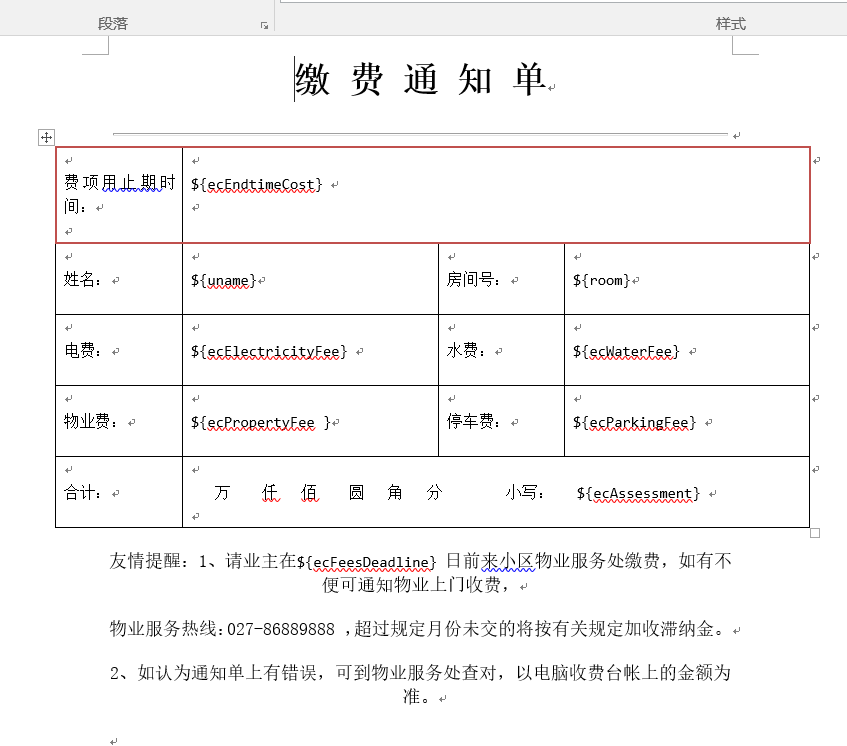
1:将文档另存为成xml格式:

2:另存之后建议用 Editplus、Notepad++、Sublime等工具打开查看一下,因为有的时候你写的占位符可能会被拆开,这样Freemarker就无法处理 了。处理成如下图所示:

3:然后另存为.ftl格式(选择支持所有的格式),好了非代码的部分完成,开始搭建自己的项目,我使用的服务器是Tomcat 7.0.52,myelcipse2014;如果是eclipse需要配置web.xml支持servlet3的注解,在搭建项目之前需要向项目中加入freemarker的JAR文件,可以通过下面的链接获得Freemarker的最新版本:http://freemarker.org/freemarkerdownload.html
我搭建的是一个maven 的项目,进入当中找到pom文件所需有的配置文件http://mvnrepository.com/artifact/org.freemarker/freemarker
4.完成jsp的网页代码,当中要明白name的命名一定是与ftl文件中的值是对应的,这样才能取到值。上传jsp代码
<%@ page language="java" import="java.util.*" pageEncoding="UTF-8"%>
<%
String path = request.getContextPath();
String basePath = request.getScheme()+"://"+request.getServerName()+":"+request.getServerPort()+path+"/";
%>
<%@taglib prefix="c" uri="http://java.sun.com/jsp/jstl/core" %>
<html xmlns="http://www.w3.org/1999/xhtml">
<head>
<base href="<%=basePath%>">
<meta http-equiv="pragma" content="no-cache">
<meta http-equiv="cache-control" content="no-cache">
<meta http-equiv="expires" content="0">
<meta http-equiv="keywords" content="keyword1,keyword2,keyword3">
<meta http-equiv="description" content="This is my page">
<style type="text/css">
* { font-family: "微软雅黑"; }
.textField { border:none; border-bottom: 1px solid gray; text-align: center; }
#file { border:1px solid black; width: 80%; margin:0 auto; }
h1 input{ font-size:72px; }
td textarea { font-size: 14px; }
.key { width:125px; font-size:20px; }
</style>
<meta http-equiv="Content-Type" content="text/html; charset=utf-8" />
<title>缴 费 通 知 单</title>
</head>
<body>
<form action="saveDocServlet.s" method="post">
<div id="file" align="center">
<h1>缴 费 通 知 单</h1>
<hr/>
<table width="750" border="1">
<tr><td width="120" class="key">费项到期时间</td>
<td height="39" colspan="3"><input type="text" name="ecEndtimeCost" class="textField" value="${param.ecEndtimeCost }" style="border:0px"/><span style="text-align:right">日</span></td>
</tr>
<tr>
<td class="key">姓名</td>
<td width="212"><input type="text" name="uname" class="textField" value="${param.uname}" style="border:0px"/></td>
<td width="80" class="key">房号:</td>
<td width="355">
<input type="text" name="room" value="${param.room}" style="border:0px"/>
</td>
</tr>
<tr>
<td class="key">电费:</td>
<td><input type="text" name="ecElectricityFee" class="textField" style="border:0px" value="${param.ecElectricityFee }"/>元</td>
<td class="key">水费:</td>
<td><input type="text" name="ecWaterFee" class="textField" style="border:0px" value="${param.ecWaterFee }"/>元</td>
</tr>
<tr>
<td class="key">物业管理费:</td>
<td><input type="text" name="ecPropertyFee" class="textField" style="border:0px" value="${param.ecPropertyFee }"/>元</td>
<td class="key">停车费:</td>
<td><input type="text" name="ecParkingFee" class="textField" style="border:0px" value="${param.ecParkingFee }"/>元</td>
</tr>
<tr>
<td height="39" colspan="4" class="key">
合计金额: <input name="text" style="border: 0px; width:5px " /> 万 <input name="text" style="border: 0px; width:5px " /> 仟<input name="text" style="border: 0px; width:5px " /> 佰 <input name="text" style="border: 0px; width:5px " /> 拾 <input name="text" style="border: 0px; width:5px " /> 元 <input style="border: 0px; width:5px " /> 角 <input name="text" style="border: 0px; width:5px " /> 分 小写:<input name="ecAssessment" style="border: 0px; " value="${param.ecAssessment }" /> 元
</td>
</tr>
</table>
<p >友情提醒:1、请业主在<input name="ecFeesDeadline" style="border: 0px; " value="${param.ecFeesDeadline }" /> 日前来小区物业服务处缴费,如有不便可通知物业上门收费,</p>
<p >物业服务热线:027-86889888 ,超过规定月份未交的将按有关规定加收滞纳金。</p>
<p>2、如认为通知单上有错误,可到物业服务处查对,以电脑收费台帐上的金额为准。</p>
</br>
<p style=" position:relative left:600px"> <input name="text" style="border: 0px; width:25px " /> 年<input name="text" style="border: 0px; width:25px " /> 月 <input name="text" style="border: 0px; width:25px " /> 日</p>
</div>
<div align="center" style="margin-top:15px;">
<input type="submit" value="保存Word文档" />
</div>
</form>
</body>
</html>
(注意param这个el表达式对象不能用到word文档取值,保证name的值一致就行)
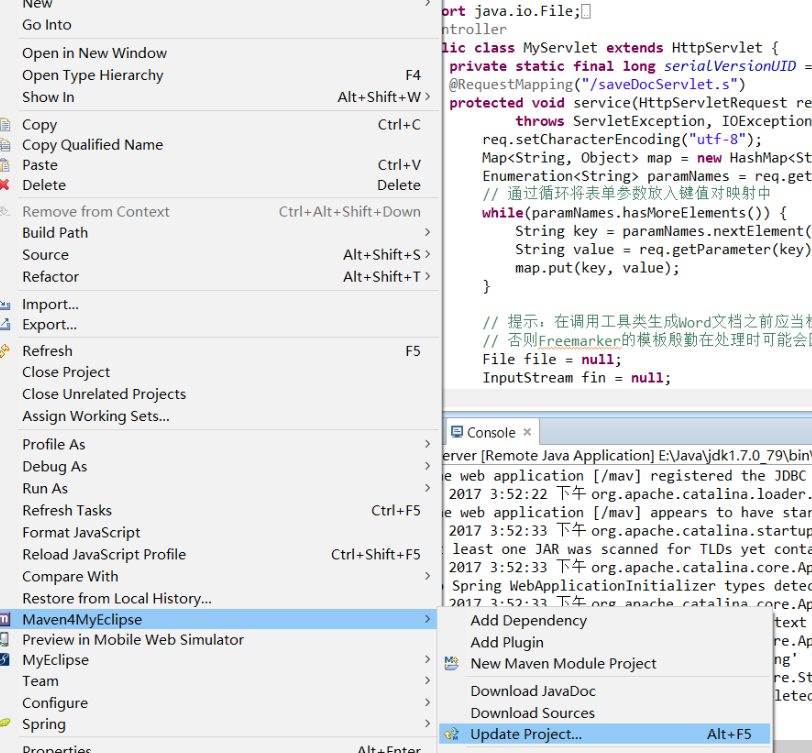
我在把spring-mvc中的控制器代码,给一份;如果你用servlet去写也可以,但是要支持webservice注解的需要用到servlet3.0,这是就需要去web.xml容器中写配置文件
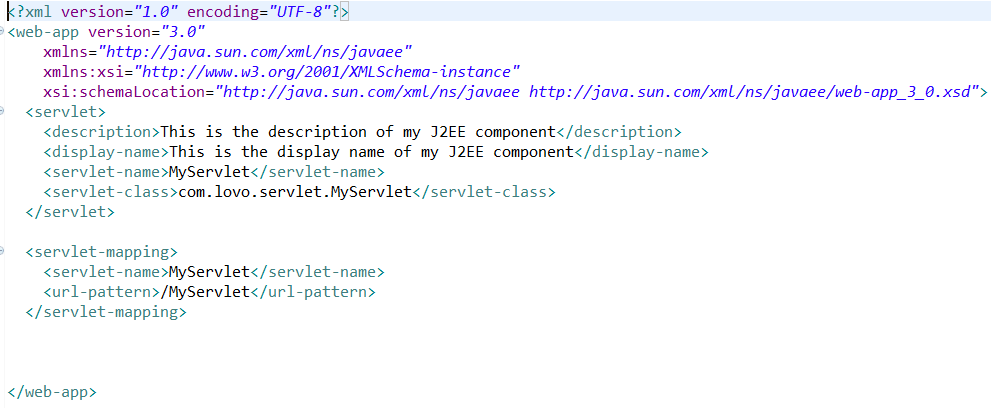
如果不支持就麻烦了,所以我使用springmvc的核心控制器写的,不多说了给代码
package com.controller.zy;

import java.io.File;
import java.io.FileInputStream;
import java.io.IOException;
import java.io.InputStream;
import java.util.Enumeration;
import java.util.HashMap;
import java.util.Map;

import javax.servlet.ServletException;
import javax.servlet.ServletOutputStream;
import javax.servlet.http.HttpServlet;
import javax.servlet.http.HttpServletRequest;
import javax.servlet.http.HttpServletResponse;

import org.springframework.stereotype.Controller;
import org.springframework.web.bind.annotation.RequestMapping;

import com.lovo.util.WordGenerator;
@Controller
public class MyServlet extends HttpServlet {
    private static final long serialVersionUID = 1L;
    @RequestMapping("/saveDocServlet.s")
    protected void service(HttpServletRequest req, HttpServletResponse resp)
            throws ServletException, IOException {
        req.setCharacterEncoding("utf-8");
        Map<String, Object> map = new HashMap<String, Object>();
        Enumeration<String> paramNames = req.getParameterNames();
        // 通过循环将表单参数放入键值对映射中
        while(paramNames.hasMoreElements()) {
            String key = paramNames.nextElement();
            String value = req.getParameter(key);
            map.put(key, value);
        }

        // 提示:在调用工具类生成Word文档之前应当检查所有字段是否完整
        // 否则Freemarker的模板殷勤在处理时可能会因为找不到值而报错 这里暂时忽略这个步骤了
        File file = null;
        InputStream fin = null;
        ServletOutputStream out = null;
        try {
            // 调用工具类WordGenerator的createDoc方法生成Word文档
            file = WordGenerator.createDoc(map, "zhy");
            fin = new FileInputStream(file);

            resp.setCharacterEncoding("utf-8");
            resp.setContentType("application/msword");
            // 设置浏览器以下载的方式处理该文件默认名为zhy.doc
            resp.addHeader("Content-Disposition", "attachment;filename=zhy.doc");

            out = resp.getOutputStream();
            byte[] buffer = new byte[512];  // 缓冲区
            int bytesToRead = -1;
            // 通过循环将读入的Word文件的内容输出到浏览器中
            while((bytesToRead = fin.read(buffer)) != -1) {
                out.write(buffer, 0, bytesToRead);
            }
        } finally {
            if(fin != null) fin.close();
            if(out != null) out.close();
            if(file != null) file.delete(); // 删除临时文件
        }
    }
}
5,还要有个工具类作为中间调用的方法使用,不用多想,代码是固定的,拿着改文件名就可以
package com.lovo.util;

import java.io.File;
import java.io.FileOutputStream;
import java.io.IOException;
import java.io.OutputStreamWriter;
import java.io.Writer;
import java.util.HashMap;
import java.util.Map;

import freemarker.template.Configuration;
import freemarker.template.Template;

public class WordGenerator {
    private static Configuration configuration = null;
    private static Map<String, Template> allTemplates = null;

    static {
        configuration = new Configuration();
        configuration.setDefaultEncoding("utf-8");
        configuration.setClassForTemplateLoading(WordGenerator.class, "/com/lovo/ftl");
        allTemplates = new HashMap<>();   // Java 7 钻石语法
        try {
            allTemplates.put("zhy", configuration.getTemplate("zhy.ftl"));
        } catch (IOException e) {
            e.printStackTrace();
            throw new RuntimeException(e);
        }
    }

    private WordGenerator() {
        throw new AssertionError();
    }

    public static File createDoc(Map<?, ?> dataMap, String type) {
        String name = "temp" + (int) (Math.random() * 100000) + ".doc";
        File f = new File(name);
        Template t = allTemplates.get(type);
        try {
            // 这个地方不能使用FileWriter因为需要指定编码类型否则生成的Word文档会因为有无法识别的编码而无法打开
            Writer w = new OutputStreamWriter(new FileOutputStream(f), "utf-8");
            t.process(dataMap, w);
            w.close();
        } catch (Exception ex) {
            ex.printStackTrace();
            throw new RuntimeException(ex);
        }
        return f;
    }

}
到这里已经完成了代码,部署到服务器就可以使用了,希望能够帮到你。
java-web中生成文档(一)的更多相关文章
- eclipse中生成文档注释--javadoc的使用
1.针对于单一的JAVA文件,在终端窗口中,使用 javadoc 文件名.java 即可生成文档注释: 2.在eclipse中生成文档注释: ①单击eclipse菜单栏中的[Project]菜单,该菜 ...
- Java基础——JavaDoc生成文档
JavaDoc生成文档 package Top1; /** * @author lwt * @version 1.0 * @since 1.8 * */ public class ...
- 使用 Swagger 自动生成 ASP.NET Core Web API 的文档、在线帮助测试文档(ASP.NET Core Web API 自动生成文档)
对于开发人员来说,构建一个消费应用程序时去了解各种各样的 API 是一个巨大的挑战.在你的 Web API 项目中使用 Swagger 的 .NET Core 封装 Swashbuckle 可以帮助你 ...
- MVC WEB api 自动生成文档
最近在一直在用webapi做接口给移动端用.但是让我纠结的时候每次新加接口或者改动接口的时候,就需要重新修改文档这让我很是苦恼.无意中发现.webapi居然有自动生成文档的功能....真是看见了救星啊 ...
- 【Java从入门到精通】day08-包机制-JavaDoc生成文档
1.包机制 为了更好地组织类,Java提供了包机制,用于区别类名的命名空间. 包语句的语法格式为: package pkg1[.pkg2[.pkg3...]]; 一般利用公司域名倒置作为包名(如www ...
- 第4天 JavaDoc生成文档&Java流程控制(第一节:用户交互Scanner)
JavaDoc生成文档 javadoc命令是用来生成自己的API文档 参数信息: @author 作者名 @version 版本号 @since 指明需要最早使用的jdk版本 @param 参数名 @ ...
- ASP.NET Core 1.0 中使用 Swagger 生成文档
github:https://github.com/domaindrivendev/Ahoy 之前文章有介绍在ASP.NET WebAPI 中使用Swagger生成文档,ASP.NET Core 1. ...
- 使用swagger在netcorewebapi项目中自动生成文档
一.背景 随着前后端分离模式大行其道,我们需要将后端接口撰写成文档提供给前端,前端可以查看我们的接口,并测试,提高我们的开发效率,减少无效的沟通.在此情况下,通过代码自动生成文档,这种需求应运而生,s ...
- JavaScript 定义类的最佳写法——完整支持面向对象(封装、继承、多态),兼容所有浏览器,支持用JSDuck生成文档
作者: zyl910 [TOC] 一.缘由 由于在ES6之前,JavaScript中没有定义类(class)语法.导致大家用各种五花八门的办法来定义类,代码风格不统一.而且对于模拟面向对象的三大支柱& ...
随机推荐
- NOIP2009T3最优贸易
洛谷传送门 看到这个题,原本想先从后往前dfs,求出能到终点的点,再在这些点里从前往后spfa,用一条边上的两个城市的商品价格的差来作边权,实施过后,发现图中既有负边权,又有回路,以及各种奇奇怪怪的东 ...
- 树莓派的GPIO编程
作者:Vamei 出处:http://www.cnblogs.com/vamei 严禁转载. 树莓派除了提供常见的网口和USB接口 ,还提供了一组GPIO(General Purpose Input/ ...
- CentOS6.5 配置本地Yum源
一.Yum简介 1.Yum(全称为 Yellow dog Updater, Modified)是一个在Fedora和RedHat以及CentOS中的Shell前端软件包管理器. 2.基于RPM包管理, ...
- 排序算法合集 python
直接选择.插入排序 直接选择排序和直接插入排序类似,都将数据分为有序区和无序区,所不同的是直接播放排序是将无序区的第一个元素直接插入到有序区以形成一个更大的有序区,而直接选择排序是从无序区选一个最小的 ...
- [进程管理]Load和CPU利用率是如何算出来的
本文内容遵从CC版权协议, 可以随意转载, 但必须以超链接形式标明文章原始出处和作者信息及版权声明 网址: http://www.penglixun.com/tech/system/how_to_ca ...
- css grid学习材料整理
2017-04-18 19:59:02 由浅入深: 什么是网格布局:http://www.w3cplus.com/css3/what-is-css-grid-layout.html 浏览器如何开启网格 ...
- 九思老客户分享:部署OA办公系统的四大意义
原文:http://www.jiusi.net/detail/472__776__4009__1.html 关键词:OA办公系统.oa系统 .九思OA 九思老客户分享:部署OA办公系统的四大意义 当今 ...
- C# Webclient 和 Httpclient如何通过iis authentication 身份验证。
前言: 该博客产生的背景是客户那边有部署网站的方法是iis windows authentication身份验证,而系统中使用Webclient来调用别的系统的方法.在此情况下,原本可以使用的功能,都 ...
- 关于SqlServer远程跨库修改数据
今天遇到一个需求需要修改远程服务器上的数据,如何直接修改,并且垮库,跨库简单,直接加上数据库名字,远程的话则需要创建链接服务器,具体步骤如下: --创建链接服务器 exec sp_addlinked ...
- Xcode8.3.2制作静态库
1. 打开Xcode8.3.2: 2. 如下操作 3. 创建Bundle文件 比如xib或者图片存放 File-new-Target 选择macOS 搜索Bundle文件 4.创建完成如下所示 5. ...