
消息队列NetMQ 原理分析5-StreamEngine、Encord和Decord
前言
介绍
[NetMQ](https://github.com/zeromq/netmq.git)是ZeroMQ的C#移植版本,它是对标准socket接口的扩展。它提供了一种异步消息队列,多消息模式,消息过滤(订阅),对多种传输协议的无缝访问。

当前有2个版本正在维护,版本3最新版为3.3.4,版本4最新版本为4.0.1。本文档是对4.0.1分支代码进行分析。
目的
对NetMQ的源码进行学习并分析理解,因此写下该系列文章,本系列文章暂定编写计划如下:
- 消息队列NetMQ 原理分析1-Context和ZObject
- 消息队列NetMQ 原理分析2-IO线程和完成端口
- 消息队列NetMQ 原理分析3-命令产生/处理、创建Socket和回收线程
- 消息队列NetMQ 原理分析4-Socket、Session、Option和Pipe
- 消息队列NetMQ 原理分析5-StreamEngine,Encord和Decord
- 消息队列NetMQ 原理分析6-TCP和Inpoc实现
- 消息队列NetMQ 原理分析7-Device
- 消息队列NetMQ 原理分析8-不同类型的Socket
- 消息队列NetMQ 原理分析9-实战
友情提示: 看本系列文章时最好获取源码,更有助于理解。
StreamEngine
SocketBase将Msg发送给SessionBase之后需要将Msg转化为byte[]进行传输,Engine就是做转换的工作,转换完成之后就会和实际的底层Socket进行消息传输。

NetMQ在Tcp协议消息转换使用的是StreamEngine。
internal sealed class StreamEngine : IEngine, IProactorEvents, IMsgSink

{

}
上一章介绍到管道事件。
发送数据
当出管道有数据可读时,会调用SessionBase的ReadActivated事件
public void ReadActivated(Pipe pipe)

{

    ...

    if (m_engine != null)

        m_engine.ActivateOut();

    else

        m_pipe.CheckRead();

}
然后会调用对应m_engine的ActivateOut事件
public void ActivateOut()

{

    FeedAction(Action.ActivateOut, SocketError.Success, 0);

}

public void FeedAction(){

    ...

    case State.Active:

        switch (action)

        {

            case Action.OutCompleted:

                int bytesSent = EndWrite(socketError, bytesTransferred);

                // IO error has occurred. We stop waiting for output events.

                // The engine is not terminated until we detect input error;

                // this is necessary to prevent losing incoming messages.

                if (bytesSent == -1)

                {

                    m_sendingState = SendState.Error;

                }

                else

                {

                    m_outpos.AdvanceOffset(bytesSent);

                    m_outsize -= bytesSent;

                    BeginSending();

                }

                break;

            ...

        }

    ...

}
当TCPConnect客户端发送请求完成时,会调用OutCompleted事件
private void Loop()

{

    ...

    switch (completion.OperationType)

    {

        ...

        case OperationType.Connect:

        case OperationType.Disconnect:

        case OperationType.Send:

        item.ProactorEvents.OutCompleted(

            completion.SocketError,

            completion.BytesTransferred);

            }

    }

    ...
public void OutCompleted(SocketError socketError, int bytesTransferred)

{

    ...

    // Create the engine object for this connection.

    var engine = new StreamEngine(m_s, m_options, m_endpoint);

    ...

    // Attach the engine to the corresponding session object.

    SendAttach(m_session, engine);

    ...

    }
此时会创建一个StreamEngine和请求的SessionBase对象进行关联。
protected override void ProcessAttach(IEngine engine)

{

    Debug.Assert(engine != null);

    // Create the pipe if it does not exist yet.

    if (m_pipe == null && !IsTerminating)

    {

        ZObject[] parents = { this, m_socket };

        int[] highWaterMarks = { m_options.ReceiveHighWatermark, m_options.SendHighWatermark };

        int[] lowWaterMarks = { m_options.ReceiveLowWatermark, m_options.SendLowWatermark };

        bool[] delays = { m_options.DelayOnClose, m_options.DelayOnDisconnect };

        Pipe[] pipes = Pipe.PipePair(parents, highWaterMarks, lowWaterMarks, delays);

        // Plug the local end of the pipe.

        pipes[0].SetEventSink(this);

        // Remember the local end of the pipe.

        Debug.Assert(m_pipe == null);

        m_pipe = pipes[0];

        // Ask socket to plug into the remote end of the pipe.

        SendBind(m_socket, pipes[1]);

    }

    // Plug in the engine.

    Debug.Assert(m_engine == null);

    m_engine = engine;

    m_engine.Plug(m_ioThread, this);

}
接收数据
当完成端口通知数据接收完成时,会调用Proactor的InCompleted事件,实际就是调用的对应的StreamEngine的InCompleted事件
public void InCompleted(SocketError socketError, int bytesTransferred)

{

    FeedAction(Action.InCompleted, socketError, bytesTransferred);

}
public void FeedAction(){

    ...

    case State.Active:

        switch (action)

        {

            case Action.InCompleted:

                m_insize = EndRead(socketError, bytesTransferred);

                ProcessInput();

                break;

            ...

        }

    ...

}
接收完成后会对接收到的数据进行处理
private void ProcessInput()

{

    ...

    if (m_options.RawSocket)

    {

        if (m_insize == 0 || !m_decoder.MessageReadySize(m_insize))

        {

            processed = 0;

        }

        else

        {

            processed = m_decoder.ProcessBuffer(m_inpos, m_insize);

        }

    }

    else

    {

        // Push the data to the decoder.

        processed = m_decoder.ProcessBuffer(m_inpos, m_insize);

    }

    ...

    // Flush all messages the decoder may have produced.

    m_session.Flush();

    ...

}

public override bool MessageReadySize(int msgSize)

{

    m_inProgress = new Msg();

    m_inProgress.InitPool(msgSize);

    NextStep(new ByteArraySegment(m_inProgress.Data, m_inProgress.Offset),

        m_inProgress.Size, RawMessageReadyState);

    return true;

}
读取数据到Msg后会调用Decoder的ProcessBuffer方法
PS:由于
NetMQ有自己的传输协议格式,因此当使用NetMQ和其他程序进行Socket传输时,必须使用StreamSocket。
public int ProcessBuffer(ByteArraySegment data, int size)

{

    ...

    while (m_toRead == 0)

    {

        if (!Next())

        {

            if (State < 0)

            {

                return -1;

            }

            return size;

        }

    }

    return size;

    ...

}

protected override bool Next()

{

    if (State == RawMessageReadyState)

    {

        return RawMessageReady();

    }

    return false;

}

private bool RawMessageReady()

{

    ...

    bool isMessagedPushed = m_msgSink.PushMsg(ref m_inProgress);

    if (isMessagedPushed)

    {

        // NOTE: This is just to break out of process_buffer

        // raw_message_ready should never get called in state machine w/o

        // message_ready_size from stream_engine.

        NextStep(new ByteArraySegment(m_inProgress.Data, m_inProgress.Offset),

            1, RawMessageReadyState);

    }

    return isMessagedPushed;

    ...

}
对读到的数据进行处理调用RawDecoder的Next的方法,将获取到的Msg放入到SeesionBase的管道中。
流程分析
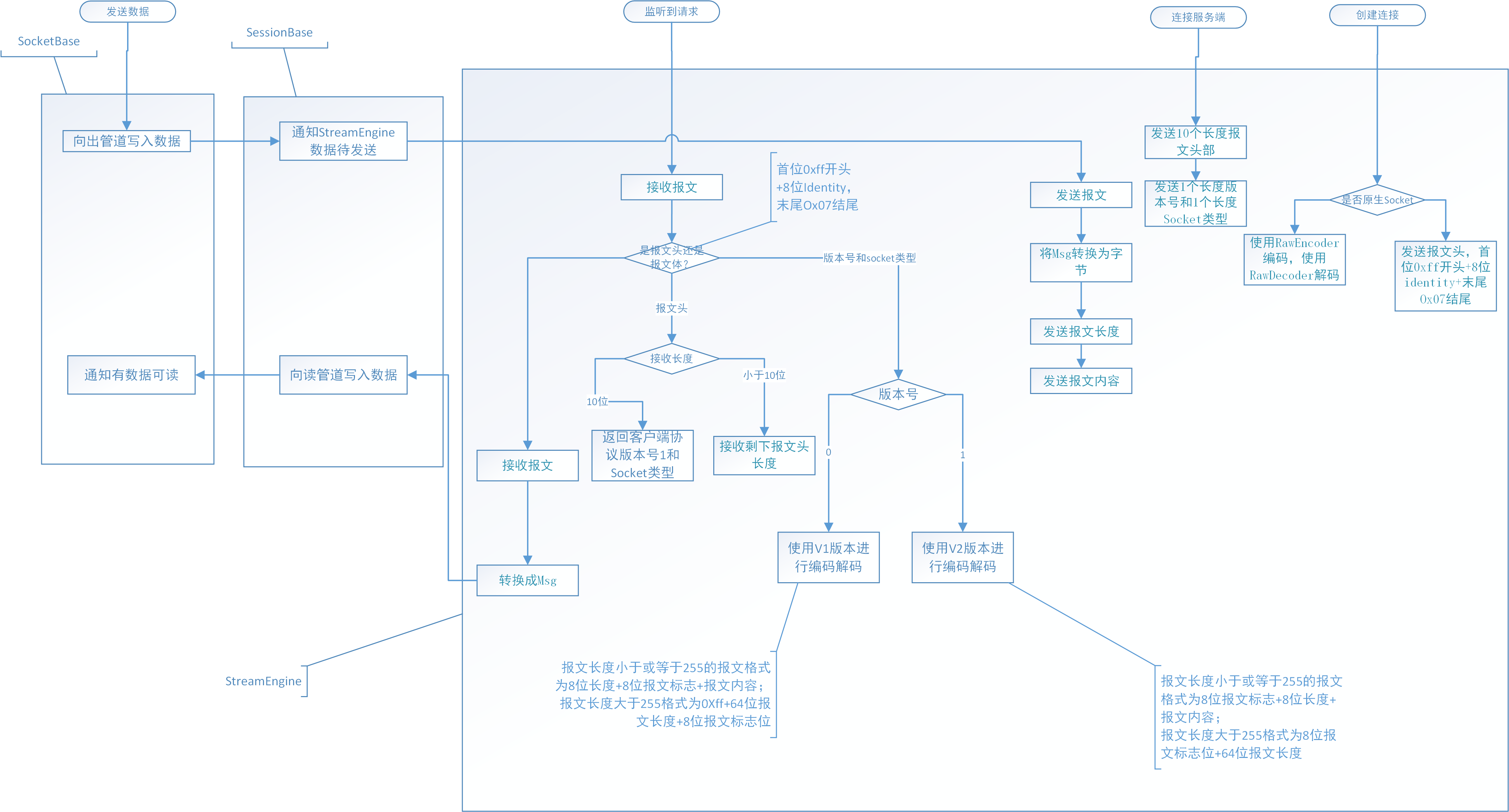
读写数据流程图如下图所示:
我们使用WireShark进行验证。
我们监听15557地址,然后创建一个客户端连接15557地址
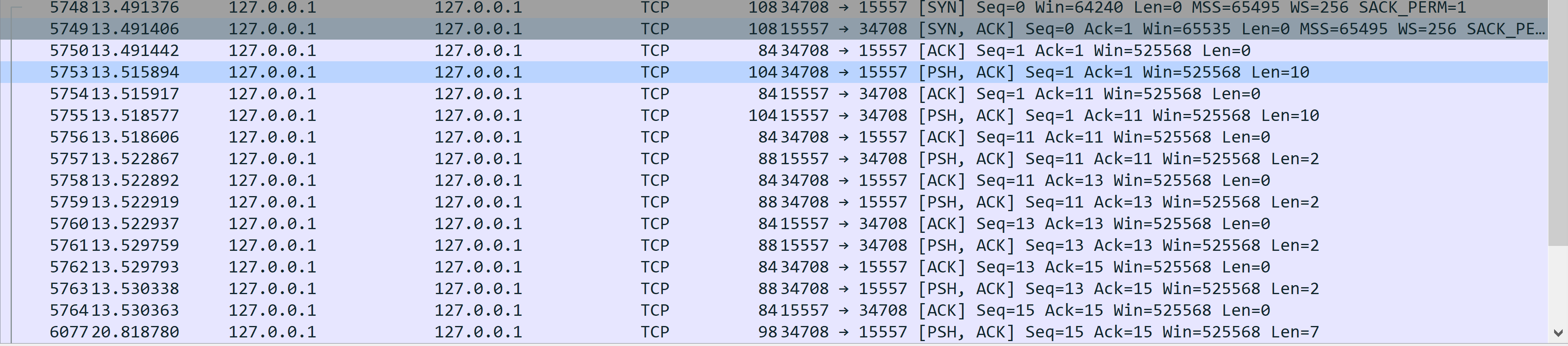
前面3条是三次握手。第四条是客户端向服务器发送了10字节长度的请求头部,以0xff开头,0x7f结尾。中间是8字节是Identitysize长度
...

switch (m_handshakeState)

{

    case HandshakeState.Closed:

        switch (action)

        {

            case Action.Start:

                // Send the 'length' and 'flags' fields of the identity message.

                // The 'length' field is encoded in the long format.

                m_greetingOutputBuffer[m_outsize++] = 0xff;

                m_greetingOutputBuffer.PutLong(m_options.Endian, (long)m_options.IdentitySize + 1, 1);

                m_outsize += 8;

                m_greetingOutputBuffer[m_outsize++] = 0x7f;

                ...

        }

        ...

}

...

第6条是服务器向客户端发送的10字节长度的请求头部,以0xff开头,0x7f结尾。中间是8字节是identitysize的信息
I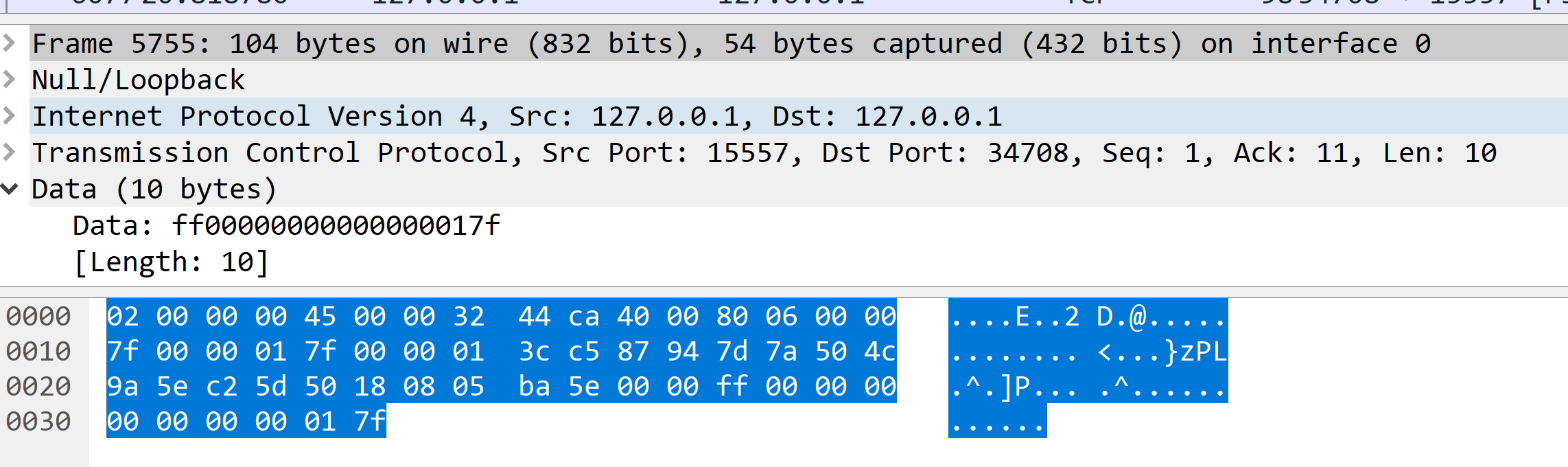
第8条是服务器向客户端发送的版本号和Socket类型,01表示版本号1,06表示当前是RouterSocket
...

case HandshakeState.ReceivingGreeting:

    switch (action)

    {

        case Action.InCompleted:

        ...

                if (m_greeting[0] != 0xff || (m_greetingBytesRead == 10 && (m_greeting[9] & 0x01) == 0)){

                ...

                }

                else if (m_greetingBytesRead < 10)

                {

                    var greetingSegment = new ByteArraySegment(m_greeting, m_greetingBytesRead);

                    BeginRead(greetingSegment, PreambleSize - m_greetingBytesRead);

                }

                else

                {

                    ...

                    m_outpos[m_outsize++] = 1; // Protocol version

                    m_outpos[m_outsize++] = (byte)m_options.SocketType;

                    ...

                }

        ...

    }

...
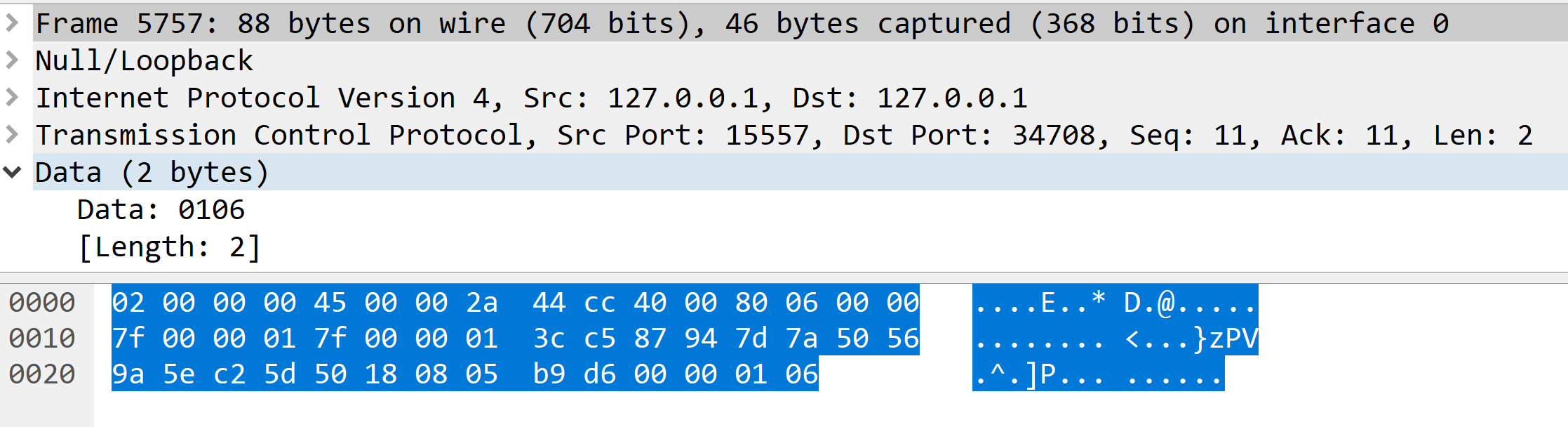
第10条是客户端向服务器发送的版本号和socket类型,05表示当前是DealSocket
...

case HandshakeState.ReceivingRestOfGreeting:

    switch (action)

    {

        case Action.InCompleted:

        ...

        if (m_greeting[VersionPos] == 0)

        {

            // ZMTP/1.0 framing.

            m_encoder = new V1Encoder(Config.OutBatchSize, m_options.Endian);

            m_encoder.SetMsgSource(m_session);

            m_decoder = new V1Decoder(Config.InBatchSize, m_options.MaxMessageSize, m_options.Endian);

            m_decoder.SetMsgSink(m_session);

        }

        else

        {

            // v1 framing protocol.

            m_encoder = new V2Encoder(Config.OutBatchSize, m_session, m_options.Endian);

            m_decoder = new V2Decoder(Config.InBatchSize, m_options.MaxMessageSize, m_session, m_options.Endian);

        }

        Activate();

        ...

    }

...
Encoder
V2Encoder
接下来就是数据传输。
public V2Encoder(int bufferSize, IMsgSource session, Endianness endian)

    : base(bufferSize, endian)

{

    m_inProgress = new Msg();

    m_inProgress.InitEmpty();

    m_msgSource = session;

    // Write 0 bytes to the batch and go to message_ready state.

    NextStep(m_tmpbuf, 0, MessageReadyState, true);

}
由于NetMQ使用的是版本1,用的是V2Encoder和V2Decoder进行编码和解码。
在初始化Encoder的时候会向报文写入2个0字节数据,暂时不明白为何要这样做。
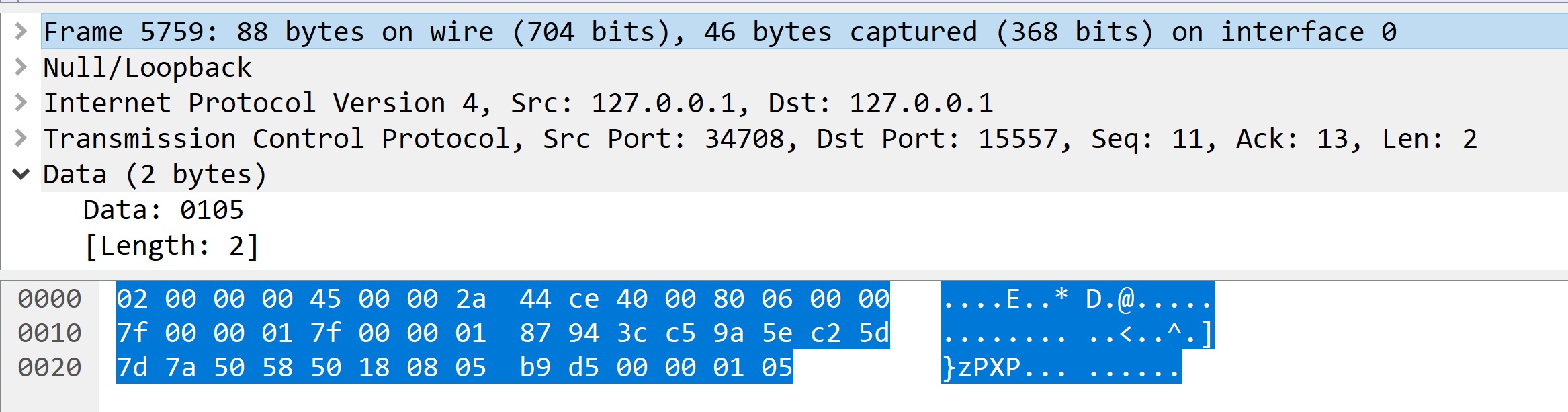
int protocolFlags = 0;

if (m_inProgress.HasMore)

    protocolFlags |= V2Protocol.MoreFlag;

if (m_inProgress.Size > 255)

    protocolFlags |= V2Protocol.LargeFlag;

m_tmpbuf[0] = (byte)protocolFlags;

// Encode the message length. For messages less then 256 bytes,

// the length is encoded as 8-bit unsigned integer. For larger

// messages, 64-bit unsigned integer in network byte order is used.

int size = m_inProgress.Size;

if (size > 255)

{

    m_tmpbuf.PutLong(Endian, size, 1);

    NextStep(m_tmpbuf, 9, SizeReadyState, false);

}

else

{

    m_tmpbuf[1] = (byte)(size);

    NextStep(m_tmpbuf, 2, SizeReadyState, false);

}
第一个字节是Flags用于标记该报文是否为大报文,超过过255个字节就会标记为大包标记,是否还有更多报文。若报文长度小于256,则第二个字节用于存储报文长度。但是若是大报文,则会8个字节保存报文长度。
下面就开始发送数据
我们用客户端发一个字符串test1,然后服务端原样返回该字符串
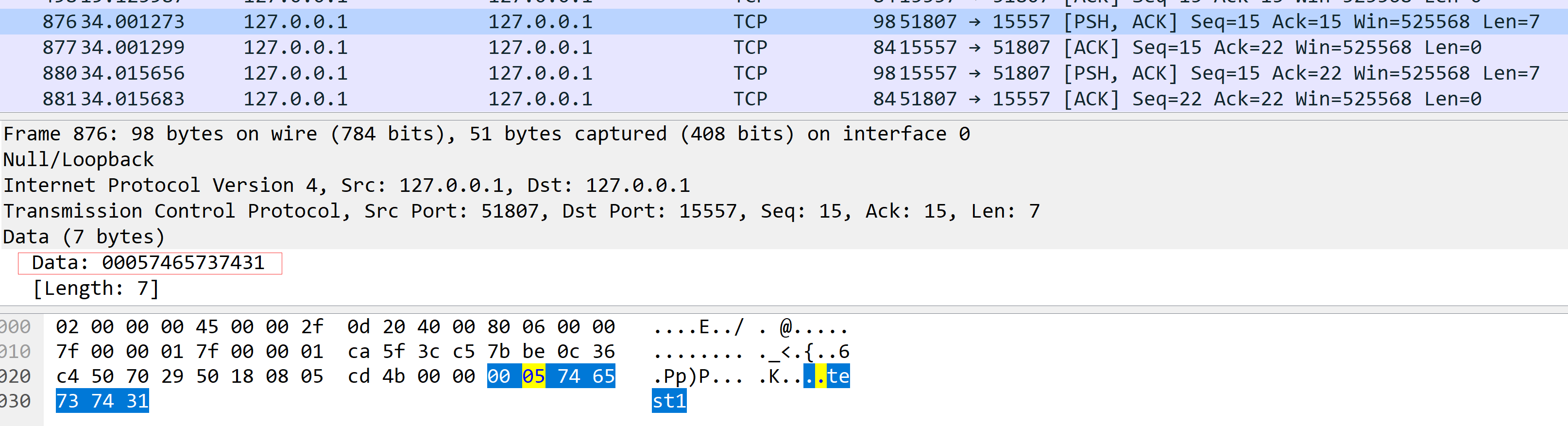
可以看到如我们上面分析的一样,第一个字节为0,第二个字节为大小test1为5个字节长度。由于CMD命令单行输入最长字符限制长度为255,因此我们没办法在CMD命令下输入更长数据进行测试。暂时就不做验证。
V1Encoder
V1Encoder编码如下所示
if (size < 255)

{

    m_tmpbuf[0] = (byte)size;

    m_tmpbuf[1] = (byte)(m_inProgress.Flags & MsgFlags.More);

    NextStep(m_tmpbuf, 2, SizeReadyState, false);

}

else

{

    m_tmpbuf[0] = 0xff;

    m_tmpbuf.PutLong(Endian, size, 1);

    m_tmpbuf[9] = (byte)(m_inProgress.Flags & MsgFlags.More);

    NextStep(m_tmpbuf, 10, SizeReadyState, false);

}
当小于255字符,首字符是长度,第二个字符是Flags,超过255字符,首字符为0xff,然后跟着8个字符长度的长度值,接下来是Flags
RawEncoder
使用RawEncoder会将原始数据原样发送不会增加任何其他字符。
Decoder
V2Decoder
接收到数据会先接收第一个字节Flags判断是否有后续包以及是小包还是打包,若是小包,则解析第一个字节长度位,否则读取8个字节长度位。
V1Decoder
接收到数据收先会判断第一个字节是不是Oxff,若为Oxff则表示为打包,获取8位字节长度,否则获取1位字节长度处理。
RawDecoder
使用RawDecoder会读取数据保存到管道中。
总结
本片介绍了NetMQ的报文格式并阐述了底层Msg如何转换为流进行发送和接收。
微信扫一扫二维码关注订阅号杰哥技术分享
本文地址:https://www.cnblogs.com/Jack-Blog/p/7283897.html
作者博客:杰哥很忙
欢迎转载,请在明显位置给出出处及链接

消息队列NetMQ 原理分析5-StreamEngine、Encord和Decord的更多相关文章
- 消息队列NetMQ 原理分析4-Socket、Session、Option和Pipe
消息队列NetMQ 原理分析4-Socket.Session.Option和Pipe 前言 介绍 目的 Socket 接口实现 内部结构 Session Option Pipe YPipe Msg Y ...
- 消息队列NetMQ 原理分析1-Context和ZObject
前言 介绍 NetMQ是ZeroMQ的C#移植版本,它是对标准socket接口的扩展.它提供了一种异步消息队列,多消息模式,消息过滤(订阅),对多种传输协议的无缝访问. 当前有2个版本正在维护,版本3 ...
- 消息队列NetMQ 原理分析2-IO线程和完成端口
消息队列NetMQ 原理分析2-IO线程和完成端口 前言 介绍 目的 IO线程 初始化IO线程 Proactor 启动Procator线程轮询 处理socket 获取超时时间 从完成端口获取处理完的状 ...
- 消息队列NetMQ 原理分析3-命令产生/处理和回收线程
消息队列NetMQ 原理分析3-命令产生/处理和回收线程 前言 介绍 目的 命令 命令结构 命令产生 命令处理 创建Socket(SocketBase) 创建连接 创建绑定 回收线程 释放Socket ...
- Netty构建分布式消息队列实现原理浅析
在本人的上一篇博客文章:Netty构建分布式消息队列(AvatarMQ)设计指南之架构篇 中,重点向大家介绍了AvatarMQ主要构成模块以及目前存在的优缺点.最后以一个生产者.消费者传递消息的例子, ...
- PHP消息队列用法实例分析
这篇文章主要介绍了PHP消息队列用法,结合实例形式分析了PHP消息队列用于Linux下进程间通信的相关技巧,需要的朋友可以参考下 该消息队列用于linux下,进程通信 队列状态信息:具体参考手册
- Rabbimq必备基础之对高级消息队列协议AMQP分析及Rabbitmq本质介绍
MQ的一个产品... [消息队列] 1. MSMQ windows自带的一个服务... [petshop],message存放在文件系统中. 最原始的消息队列... [集群,消息确认,内存化,高可用, ...
- redis作为消息队列的原理
Redis队列功能介绍 List 转:https://blog.csdn.net/cestlavieqiang/article/details/84197736 常用命令: Blpop删除,并获得该列 ...
- 自制MFC消息响应定位器+原理分析
mfc里面有张消息映射表(MESSAGE_MAP),消息都是通过这张表来分发到相应函数里的. 这个是我自制的定位器,从vc6.0到现在的2013生成的mfc都可以用,全静态扫描并已处理动态基址. 下面 ...
随机推荐
- python 标准库 -- signal
signal 的核心是 : 设置信号处理函数. 预定义信号 signal.SIG_DFL signal.SIGBUS signal.SIGFPE signal.SIGIO signal.SIGPOLL ...
- ionic+AnjularJs实现省市县三级联动效果
建议对ionic和AnjularJs有一定了解的人可以用到,很多时候我们要用到选择省份.城市.区县的功能,现在就跟着我来实现这个功能吧,用很少的代码(我这里是根据客户的要求,只显示想要显示的部分省份和 ...
- 关于 asp.net 点击确定按钮 获取不到新值问题
点击事件内,可以使用request.form[" kk"] 获取到值,但是this.txt.Text 确实旧值, 尼玛,居然没加isPostBack重新加载了数据 ,request ...
- Jquery页面滚动动态加载数据,页面下拉自动加载内容
<!DOCTYPE=html> <html> <head> <script src="js/jquery.js" type="t ...
- php对数组中的键与值进行合并处理
$res=array(); $re=array_count_values($month); foreach( $re as $k=>$v){ $arr['month_name'] = strva ...
- shell中source与sh区别
shell中使用source conf.sh,是直接运行conf.sh的命令,不创建子shell,类似与html中include,而sh是则创建子shell, 子shell里面 的变量父shell无法 ...
- zookeeer client 通信协议
这里主要记录zookeeper client通信协议的.在官方的文档里没找到协议相关部分.这里是记录的协议是通过分析客户端代码得来的. 一.通信流程 客户端发起连接,发送握手包进行timeout协商, ...
- pdf文件之itextpdf操作实例
需求分析 1.需要创建一个pdf文件,包含文件的基本属性 2.文件需要包含附件,通过点击链接直接打开 3.生成的pdf文件不能直接修改(需要输入密码) 4.pdf文件需要有文字或图片水印 准备jar包 ...
- Java集合框架梳理(含经典面试题)
Java Collections Framework是Java提供的对集合进行定义,操作,和管理的包含一组接口,类的体系结构. 1. 整体框架 Java容器类库一共有两种主要类型:Collection ...
- ubuntu主机名修改
1.查看主机名 在Ubuntu系统中,快速查看主机名有多种方法: 其一,打开一个GNOME终端窗口,在命令提示符中可以看到主机名,主机名通常位于"@"符号后: 其二,在终端窗口中输 ...