
SpringBoot上传任意文件功能的实现
<dependencies>

        <dependency>

            <groupId>org.springframework.boot</groupId>

            <artifactId>spring-boot-starter-web</artifactId>

        </dependency>

        <dependency>

            <groupId>org.springframework.boot</groupId>

            <artifactId>spring-boot-starter-test</artifactId>

            <scope>test</scope>

        </dependency>

        <dependency>

            <groupId>org.springframework.boot</groupId>

            <artifactId>spring-boot-starter-thymeleaf</artifactId>

        </dependency>

    </dependencies>
@Controller

public class FileUploadController {

    private final StorageService storageService;

    @Autowired

    public FileUploadController(StorageService storageService) {

        this.storageService = storageService;

    }

    //展示上传过的文件

    @GetMapping("/")

    public String listUploadedFiles(Model model) throws IOException {

        model.addAttribute("files", storageService.loadAll().map(path ->

                        MvcUriComponentsBuilder.fromMethodName(FileUploadController.class, "serveFile", path.getFileName().toString())

                        .build().toString())

                .collect(Collectors.toList()));

        return "uploadForm";

    }

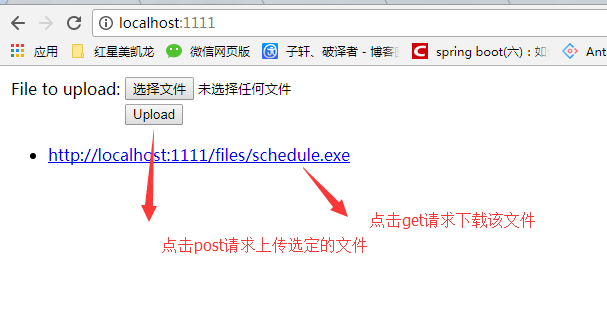
    //下载选定的上传的文件

    @GetMapping("/files/{filename:.+}")

    @ResponseBody

    public ResponseEntity<Resource> serveFile(@PathVariable String filename) {

        Resource file = storageService.loadAsResource(filename);

        return ResponseEntity

                .ok()

                .header(HttpHeaders.CONTENT_DISPOSITION, "attachment; filename=\""+file.getFilename()+"\"")

                .body(file);

    }

    //上传文件

    @PostMapping("/")

    public String handleFileUpload(@RequestParam("file") MultipartFile file,

                                   RedirectAttributes redirectAttributes) {

        storageService.store(file);

        redirectAttributes.addFlashAttribute("message",

                "You successfully uploaded " + file.getOriginalFilename() + "!");

        return "redirect:/";

    }

    @ExceptionHandler(StorageFileNotFoundException.class)

    public ResponseEntity<?> handleStorageFileNotFound(StorageFileNotFoundException exc) {

        return ResponseEntity.notFound().build();

    }

}
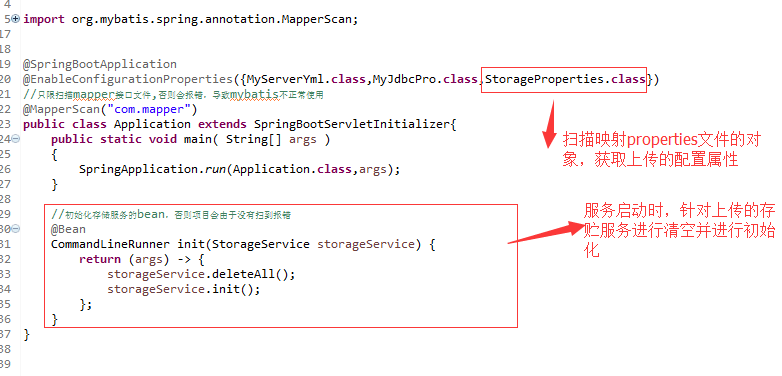
@Service

public class FileSystemStorageService implements StorageService {

    private final Path rootLocation;

    @Autowired

    public FileSystemStorageService(StorageProperties properties) {

        this.rootLocation = Paths.get(properties.getLocation());

    }

    @Override

    public void store(MultipartFile file) {

        try {

            if (file.isEmpty()) {

                throw new StorageException("Failed to store empty file " + file.getOriginalFilename());

            }

            Files.copy(file.getInputStream(), this.rootLocation.resolve(file.getOriginalFilename()));

        } catch (IOException e) {

            throw new StorageException("Failed to store file " + file.getOriginalFilename(), e);

        }

    }

    @Override

    public Stream<Path> loadAll() {

        try {

            return Files.walk(this.rootLocation, )

                    .filter(path -> !path.equals(this.rootLocation))

                    .map(path -> this.rootLocation.relativize(path));

        } catch (IOException e) {

            throw new StorageException("Failed to read stored files", e);

        }

    }

    @Override

    public Path load(String filename) {

        return rootLocation.resolve(filename);

    }

    @Override

    public Resource loadAsResource(String filename) {

        try {

            Path file = load(filename);

            Resource resource = new UrlResource(file.toUri());

            if(resource.exists() || resource.isReadable()) {

                return resource;

            }

            else {

                throw new StorageFileNotFoundException("Could not read file: " + filename);

            }

        } catch (MalformedURLException e) {

            throw new StorageFileNotFoundException("Could not read file: " + filename, e);

        }

    }

    @Override

    public void deleteAll() {

        FileSystemUtils.deleteRecursively(rootLocation.toFile());

    }

    @Override

    public void init() {

        try {

            Files.createDirectory(rootLocation);

        } catch (IOException e) {

            throw new StorageException("Could not initialize storage", e);

        }

    }

}
spring.http.multipart.max-file-size=128KB

spring.http.multipart.max-request-size=128KB
SpringBoot上传任意文件功能的实现的更多相关文章
- Springboot 上传CSV文件并将数据存入数据库
.xml文件依赖配置 <!--csv依赖 --> <dependency> <groupId>org.apache.commons</groupId> ...
- springboot上传下载文件
在yml配置相关内容 spring: # mvc: throw-exception-if-no-handler-found: true #静态资源 static-path-pattern: /** r ...
- 解决springBoot上传大文件异常问题
上传文件过大时的报错: org.springframework.web.multipart.MaxUploadSizeExceededException: Maximum upload size ex ...
- springboot上传linux文件无法浏览,提示404错误
1.配置文件地址置换 @Componentclass WebConfigurer implements WebMvcConfigurer { @Autowired ConfigUtil bootdoC ...
- 【WCF】利用WCF实现上传下载文件服务
引言 前段时间,用WCF做了一个小项目,其中涉及到文件的上传下载.出于复习巩固的目的,今天简单梳理了一下,整理出来,下面展示如何一步步实现一个上传下载的WCF服务. 服务端 1.首先新建一个名 ...
- WebSSH画龙点睛之lrzsz上传下载文件
本篇文章没有太多的源码,主要讲一下实现思路和技术原理 当使用Xshell或者SecureCRT终端工具时,我的所有文件传输工作都是通过lrzsz来完成的,主要是因为其简单方便,不需要额外打开sftp之 ...
- springboot整合ueditor实现图片上传和文件上传功能
springboot整合ueditor实现图片上传和文件上传功能 写在前面: 在阅读本篇之前,请先按照我的这篇随笔完成对ueditor的前期配置工作: springboot+layui 整合百度富文本 ...
- WEB安全第二篇--用文件搞定服务器:任意文件上传、文件包含与任意目录文件遍历
零.前言 最近做专心web安全有一段时间了,但是目测后面的活会有些复杂,涉及到更多的中间件.底层安全.漏洞研究与安全建设等越来越复杂的东东,所以在这里想写一个系列关于web安全基础以及一些讨巧的pay ...
- PHP中使用Session配合Javascript实现文件上传进度条功能
Web应用中常需要提供文件上传的功能.典型的场景包括用户头像上传.相册图片上传等.当需要上传的文件比较大的时候,提供一个显示上传进度的进度条就很有必要了. 在PHP .4以前,实现这样的进度条并不容易 ...
随机推荐
- EntityFramework Core映射关系详解
前言 Hello,开始回归开始每周更新一到两篇博客,本节我们回归下EF Core基础,来讲述EF Core中到底是如何映射的,废话少说,我们开始. One-Many Relationship(一对多关 ...
- 解决Ubuntu开关机动画不正常方法
联想的笔记本,显卡NVIDIA GT218M,默认使用开源的驱动,但挂起后,再唤醒就黑屏回不到桌面. 1.解决办法:安装NVIDIA专有驱动 $sudo apt-get install nvidia- ...
- C# 通过Bartender模板打印条码,二维码, 文字, 及操作RFID标签等。
1.在之前写的一篇文章中, 有讲到如何利用ZPL命令去操作打印里, 后面发现通过模板的方式会更加方便快捷, 既不用去掌握ZPL的实现细节, 就可以轻松的调用实现打印的功能. 解决方案: 1.网络下载 ...
- python大规模爬取京东
python大规模爬取京东 主要工具 scrapy BeautifulSoup requests 分析步骤 打开京东首页,输入裤子将会看到页面跳转到了这里,这就是我们要分析的起点 我们可以看到这个页面 ...
- PHP中递归最详解释.
说到递归函数想必会有很多同学感到晕晕的,很难绕,容易绕错,那下面就让我来为大家详解一下. 首先,什么是递归函数呢? 1.所谓递归:指的是在函数内部,调用函数自身的操作.2.递归分两布:递(从最外层函数 ...
- Linux: Bash基本命令
切换目录 cd 查看当前目录 pwd 生成目录 mkdir 搜索文件 查看当前的文件 ls 删除文件但保留特定类型 rm !(**) 例如: rm !(.tex|*.eps)其中,.tex, .eps ...
- mongodb取出最大值与最小值
$res=self::aggregate([ ['$match'=>[ 'msg_id'=>1007, 'D'=>16, ]], ['$group'=>[ '_id'=> ...
- [leetcode-623-Add One Row to Tree]
Given the root of a binary tree, then value v and depth d, you need to add a row of nodes with value ...
- 【Android Developers Training】 102. 序言:让你的应用获知地点
注:本文翻译自Google官方的Android Developers Training文档,译者技术一般,由于喜爱安卓而产生了翻译的念头,纯属个人兴趣爱好. 原文链接:http://developer ...
- java如何LOG打印出日志信息
log4j 记录日志方式 log4j 是apache 提供的记录日志的jar 档. 下载路径: http://logging.apache.org/log4j/1.2/download.html 这里 ...