
Linux下更换默认yum源为网易yum源的操作记录
废话不多说,下面记录了centos下更换系统默认yum源为网易yum源的操作过程:
1)备份原有的默认yum源
[root@bastion-IDC ~]# cp /etc/yum.repos.d/CentOS-Base.repo /etc/yum.repos.d/CentOS-Base.repo.bak
2)修改CentOS-Base.repo文件。将文件中的baseurl地址修改为网易163的yum源地址即可!
[root@bastion-IDC ~]# vim /etc/yum.repos.d/CentOS-Base.repo
# CentOS-Base.repo

#

# The mirror system uses the connecting IP address of the client and the

# update status of each mirror to pick mirrors that are updated to and

# geographically close to the client. You should use this for CentOS updates

# unless you are manually picking other mirrors.

#

# If the mirrorlist= does not work for you, as a fall back you can try the

# remarked out baseurl= line instead.

#

#

[base]

name=CentOS-$releasever - Base

#mirrorlist=http://mirrorlist.centos.org/?release=$releasever&arch=$basearch&repo=os

baseurl=http://mirrors.163.com/centos/$releasever/os/$basearch/

gpgcheck=1

gpgkey=http://mirrors.163.com/centos/RPM-GPG-KEY-CentOS-6

#released updates

[updates]

name=CentOS-$releasever - Updates

#mirrorlist=http://mirrorlist.centos.org/?release=$releasever&arch=$basearch&repo=updates

baseurl=http://mirrors.163.com/centos/$releasever/updates/$basearch/

gpgcheck=1

gpgkey=http://mirrors.163.com/centos/RPM-GPG-KEY-CentOS-6

#additional packages that may be useful

[extras]

name=CentOS-$releasever - Extras

#mirrorlist=http://mirrorlist.centos.org/?release=$releasever&arch=$basearch&repo=extras

baseurl=http://mirrors.163.com/centos/$releasever/extras/$basearch/

gpgcheck=1

gpgkey=http://mirrors.163.com/centos/RPM-GPG-KEY-CentOS-6

#additional packages that extend functionality of existing packages

[centosplus]

name=CentOS-$releasever - Plus

#mirrorlist=http://mirrorlist.centos.org/?release=$releasever&arch=$basearch&repo=centosplus

baseurl=http://mirrors.163.com/centos/$releasever/centosplus/$basearch/

gpgcheck=1

enabled=0

gpgkey=http://mirrors.163.com/centos/RPM-GPG-KEY-CentOS-6

#contrib - packages by Centos Users

[contrib]

name=CentOS-$releasever - Contrib

#mirrorlist=http://mirrorlist.centos.org/?release=$releasever&arch=$basearch&repo=contrib

baseurl=http://mirrors.163.com/centos/$releasever/contrib/$basearch/

gpgcheck=1

enabled=0

gpgkey=http://mirrors.163.com/centos/RPM-GPG-KEY-CentOS-6
[root@bastion-IDC ~]# yum clean all
[root@bastion-IDC ~]# yum makecache //将服务器上的软件包信息缓存到本地,以提高搜索安装软件的速度
[root@bastion-IDC ~]# yum update //更新系统
依照上面操作后,yum源就更换成网易的了,并能正常使用。
要特别注意的是:如果要想CentOS使用yum update更新时不升级内核,方法如下:
[root@bastion-IDC ~]# cp /etc/yum.conf /etc/yum.confbak
方法一)修改yum的配置文件
[root@bastion-IDC ~]# vim /etc/yum.conf
在[main]的最后添加 exclude=kernel*
方法二)直接在yum的命令后面加上如下的参数:
[root@bastion-IDC ~]# yum --exclude=kernel* update
---------------------------------------------------------------------------------------------------------------------
如果要更换成阿里云的yum源,只需要将/etc/yum.repos.d/CentOS-Base.repo内容替换成下面内容即可,然后yum clean all、yum makecache、yum update
# CentOS-Base.repo

#

# The mirror system uses the connecting IP address of the client and the

# update status of each mirror to pick mirrors that are updated to and

# geographically close to the client.  You should use this for CentOS updates

# unless you are manually picking other mirrors.

#

# If the mirrorlist= does not work for you, as a fall back you can try the

# remarked out baseurl= line instead.

#

#

[base]

name=CentOS-$releasever - Base - mirrors.aliyun.com

failovermethod=priority

baseurl=http://mirrors.aliyun.com/centos/$releasever/os/$basearch/

        http://mirrors.aliyuncs.com/centos/$releasever/os/$basearch/

#mirrorlist=http://mirrorlist.centos.org/?release=$releasever&arch=$basearch&repo=os

gpgcheck=1

gpgkey=http://mirrors.aliyun.com/centos/RPM-GPG-KEY-CentOS-6

#released updates

[updates]

name=CentOS-$releasever - Updates - mirrors.aliyun.com

failovermethod=priority

baseurl=http://mirrors.aliyun.com/centos/$releasever/updates/$basearch/

        http://mirrors.aliyuncs.com/centos/$releasever/updates/$basearch/

#mirrorlist=http://mirrorlist.centos.org/?release=$releasever&arch=$basearch&repo=updates

gpgcheck=1

gpgkey=http://mirrors.aliyun.com/centos/RPM-GPG-KEY-CentOS-6

#additional packages that may be useful

[extras]

name=CentOS-$releasever - Extras - mirrors.aliyun.com

failovermethod=priority

baseurl=http://mirrors.aliyun.com/centos/$releasever/extras/$basearch/

        http://mirrors.aliyuncs.com/centos/$releasever/extras/$basearch/

#mirrorlist=http://mirrorlist.centos.org/?release=$releasever&arch=$basearch&repo=extras

gpgcheck=1

gpgkey=http://mirrors.aliyun.com/centos/RPM-GPG-KEY-CentOS-6

#additional packages that extend functionality of existing packages

[centosplus]

name=CentOS-$releasever - Plus - mirrors.aliyun.com

failovermethod=priority

baseurl=http://mirrors.aliyun.com/centos/$releasever/centosplus/$basearch/

        http://mirrors.aliyuncs.com/centos/$releasever/centosplus/$basearch/

#mirrorlist=http://mirrorlist.centos.org/?release=$releasever&arch=$basearch&repo=centosplus

gpgcheck=1

enabled=0

gpgkey=http://mirrors.aliyun.com/centos/RPM-GPG-KEY-CentOS-6

#contrib - packages by Centos Users

[contrib]

name=CentOS-$releasever - Contrib - mirrors.aliyun.com

failovermethod=priority

baseurl=http://mirrors.aliyun.com/centos/$releasever/contrib/$basearch/

        http://mirrors.aliyuncs.com/centos/$releasever/contrib/$basearch/

#mirrorlist=http://mirrorlist.centos.org/?release=$releasever&arch=$basearch&repo=contrib

gpgcheck=1

enabled=0

gpgkey=http://mirrors.aliyun.com/centos/RPM-GPG-KEY-CentOS-6
[root@bastion-IDC ~]# yum clean all
[root@bastion-IDC ~]# yum makecache
如果出现下面报错:
https://mirrors.aliyun.com/centos/$releasever/os/x86_64/repodata/repomd.xml: [Errno 14] PYCURL ERROR 22 - "The requested URL returned error: 404 Not Found"
原因分析:
$releasever这个变量在CentOS-Base.repo文件中没有被识别出来。可以去aliyun的镜像官网上查看下正确地址:
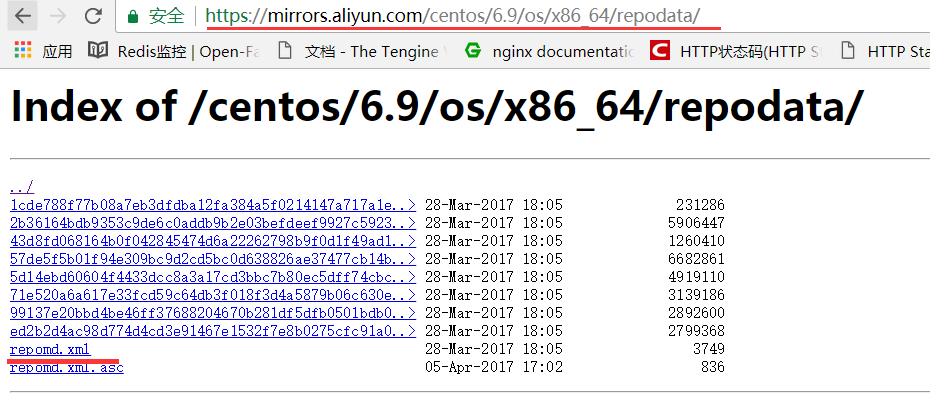
即正确地址是:https://mirrors.aliyun.com/centos/6.9/os/x86_64/repodata/repomd.xml
解决办法:将$releasever换成6.9
[root@bastion-IDC ~]# sed -i 's/$releasever/6.9/g' CentOS-Base.repo
==================================================================
如果更换成163的yum源, 出现这种问题, 即"http://mirrors.163.com/centos/6/os/x86_64/repodata/repomd.xml: [Errno 14] PYCURL ERROR 22 - "The requested URL returned error: 404 Not Found"", 解决方法和上面是一样的, 也是到http://mirrors.163.com/centos下查看哪个6.x/os/x86_64/repodata/repomd.xml下存在这个文件, 然后把CentOS-Base.repo文件中的$releasever全部更换为这个6.x即可!
Linux下更换默认yum源为网易yum源的操作记录的更多相关文章
- Linux下利用CGroup控制CPU、内存以及IO的操作记录
CGroup及其子系统的介绍在这里就不赘述了,可以参考:Linux下CGroup使用说明梳理废话不多说,这里记录下利用CGroup控制CPU.内存以及IO的操作记录: libcgroup工具安装这里以 ...
- Linux下修改默认字符集--->解决Linux下Java程序种中文文件夹file.isDirectory()判断失败的问题
一.问题描述: 一个项目中为了生成树状目录,调用了file.listFiles()方法,然后利用file.isDirectory()方法判断是否为目录,该程序在windows下运行无问题,在Linux ...
- Linux下更换为阿里yum源
更新日期: 2018-08-06 1.yum源的工作原理 yum是为了解决安装包的依赖关系而生的,如果要源码安装一个软件,需要频繁下载各个包,并解决包的依赖关系.这就好比学门课程,要学会这门课程,就要 ...
- 笔记:Linux下软件的安装、CentOS更新yum源、LAMP环境搭建、kali软件管理
一.Linux下软件的安装 方式:yum源 / rpm /源码安装 1.yum:(帮助管理员解决依赖关系) yum是通过分析rpm的包头数据后,根据各种软件的相关性质做出属性相对应的解决方案,然后可以 ...
- yum改成网易的源
用网易的源会快很多,步骤如下:http://mirrors.163.com/.help/centos.html 1.首先备份/etc/yum.repos.d/CentOS-Base.repo mv / ...
- [转]Linux下RPM软件包的安装及卸载 yum操作
在 Linux 操作系统下,几乎所有的软件均通过RPM 进行安装.卸载及管理等操作.RPM 的全称为Redhat Package Manager ,是由Redhat 公司提出的,用于管理Linux 下 ...
- Linux下查看mysql、apache是否安装,安装,卸载等操作
Linux下查看mysql.apache是否安装,并卸载. 指令 ps -ef|grep mysql 得出结果 root ? :: /bin/sh /usr/ ...
- Linux 下搭建ftp服务器 指定用户指定目录及其他操作
搭建 Linux下 rpm -qa |grep vsftpd查看是否安装 没安装yum安装 /etc/vsftpd/目录下有vsftpd.conf配置文件 根据需求 进行配置 是否使用匿名用户以及文 ...
- linux下更换pip源
pip不更换源的话,速度可能非常慢.这里将pip源更换为阿里云源. 1.修改文件~/.pip/pip.conf(没有该文件则创建一个) $ sudo vim ~/.pip/pip.conf 2.写入以 ...
随机推荐
- 设置MYSQL允许用IP访问
mysql>use mysql; mysql>update user set host = '%' where user ='root'; mysql>flush privileg ...
- Discuz X3.2 网站快照被劫持的解决方法
附上另一个人的解决方法:http://www.discuz.net/thread-3549930-3-1.html 问题如下: 快照被劫持,无论怎么申诉,怎么更新快照,都无法消除此问题,第一次打开网站 ...
- C# 文件下载 : WinINet
在 C# 中,除了 WebClient 我们还可以使用一组 WindowsAPI 来完成下载任务.这就是 Windows Internet,简称 WinINet.本文通过一个 demo 来介绍 Win ...
- <精通JavaScript>---阅读笔记01
下面是阅读精通JavaScript书做的相关笔记. JS中的函数重载 函数重载必须依赖两件事情:判断传入参数数量的能力和判断传入参数类型的能力,在js中每个函数都带有一个仅在这个函数范围内作用的变量, ...
- Netty简介
Netty简介 Netty是由JBOSS提供的一个Java开源框架.Netty提供异步的.事件驱动的网络应用程序框架和工具,用以快速开发高性能.高可靠性的网络服务器和客户端程序.和传统BIO不同,NI ...
- ASP.NET MVC传递参数(model)
一看到此标题,相信你也会.因为路由是可以从URL地址栏传过去的. 但是Insus.NET不想在地址栏传递,还是一个条件是jQuery的Ajax进行POST的.Insus.NET不清楚别人是怎样处理的, ...
- NopCommerce 在Category 显示Vendor List列表
实现效果如下: 1.在前台Web的Category Menu显示 Vendor; 2.点击Vendor 显示Vendor List列表: 主要配置步骤: 1.运行网站 Admin 后台 Categ ...
- C#开发微信门户及应用(22)-微信小店的开发和使用
在做企业电子商务方面,微信小店虽然较淘宝天猫等起步较晚,但是作为一个电商平台,这个影响力不容忽视,结合微信的特点和便利,微信小店具有很好的粘合性和广泛的用户基础,因此花费一定的时间,在这方面做深入的研 ...
- C#开发微信门户及应用(8)-微信门户应用管理系统功能介绍
最近对微信接口进行深入的研究,通过把底层接口一步步进行封装后,逐步升级到自动化配置.自动化应答,以及后台处理界面的优化和完善上,力求搭建一个较为完善.适用的微信门户应用管理系统. 微信门户应用管理系统 ...
- hibernate.cfg.xml
<!DOCTYPE hibernate-configuration PUBLIC "-//Hibernate/Hibernate Configuration DTD 3.0//EN&q ...