
JSON Web Tokens(JWT)
现在API越来越流行,如何安全保护这些API? JSON Web Tokens(JWT)能提供基于JSON格式的安全认证。它有以下特点:
- JWT是跨不同语言的,JWT可以在 .NET, Python, Node.js, Java, PHP, Ruby, Go, JavaScript和Haskell中使用
- JWT是自我包涵的,它们包含了必要的所有信息,这就意味着JWT能够传递关于它自己的基本信息,比如用户信息和签名等。
- JWT传递是容易的,因为JWT是自我包涵,它们能被完美用在HTTP头部中,当需要授权API时,你只要通过URL一起传送它既可。
JWT易于辨识,是三段由小数点组成的字符串:
aaaaaaaaaa.bbbbbbbbbbb.cccccccccccc
这三部分含义分别是header,payload, signature
Header
头部包含了两个方面:类型和使用的哈希算法(如HMAC SHA256):
{

"typ": "JWT",

"alg": "HS256"

}
对这个JSON字符进行base64encode编码,我们就有了首个JWT:
eyJhbGciOiJIUzI1NiIsInR5cCI6IkpXVCJ9
Payload
JWT的第二部分是payload,也称为 JWT Claims,这里放置的是我们需要传输的信息,有多个项目如注册的claim名称,公共claim名称和私有claim名称。
注册claim名称有下面几个部分:
- iss: token的发行者
- sub: token的题目
- aud: token的客户
- exp: 经常使用的,以数字时间定义失效期,也就是当前时间以后的某个时间本token失效。
- nbf: 定义在此时间之前,JWT不会接受处理。开始生效时间
- iat: JWT发布时间,能用于决定JWT年龄
- jti: JWT唯一标识. 能用于防止 JWT重复使用,一次只用一个token;如果签发的时候这个claim的值是“1”,验证的时候如果这个claim的值不是“1”就属于验证失败
公共claim名称用于定义我们自己创造的信息,比如用户信息和其他重要信息。
私有claim名称用于发布者和消费者都同意以私有的方式使用claim名称。
下面是JWT的一个案例:
{

"iss": "scotch.io",

"exp": 1300819380,

"name": "Chris Sevilleja",

"admin": true

}
签名
JWT第三部分最后是签名,签名由以下组件组成:
- header
- payload
- 密钥
下面是我们如何得到JWT的第三部分:
var encodedString = base64UrlEncode(header) + "." + base64UrlEncode(payload); HMACSHA256(encodedString, 'secret');
这里的secret是被服务器签名,我们服务器能够验证存在的token并签名新的token。
TWT支持的算法有:

============================================================================================================
以上是官网的理论部分,下面会有提供一些实例:
首先 导入 依赖:
<dependency>

    <groupId>com.auth0</groupId>

    <artifactId>java-jwt</artifactId>

    <version>3.2.0</version>

</dependency>
1, 指定加密算法:
//HMAC

Algorithm algorithmHS = Algorithm.HMAC256("secret");


-------------------------------------------------------------------------
//RSA

Map<String,Object> keys=RSAUtils.getKeys();
RSAPublicKey publicKey = (RSAPublicKey)keys.get("public"); //Get the key instance
RSAPrivateKey privateKey = (RSAPrivateKey)keys.get("private");//Get the key instance
Algorithm algorithmRS = Algorithm.RSA256(publicKey, privateKey);
2 , 生成token
用HS256生成token
try {

    Algorithm algorithm = Algorithm.HMAC256("secret");

    String token = JWT.create()

        .withIssuer("auth0")

        .sign(algorithm);

} catch (UnsupportedEncodingException exception){

    //UTF-8 encoding not supported

} catch (JWTCreationException exception){

    //Invalid Signing configuration / Couldn't convert Claims.

}
用RS256生成token
 Map<String,Object> keys=RSAUtils.getKeys();

        RSAPublicKey publicKey = (RSAPublicKey)keys.get("public"); //Get the key instance

        RSAPrivateKey privateKey = (RSAPrivateKey)keys.get("private");//Get the key instance

try {

    Algorithm algorithm = Algorithm.RSA256(publicKey, privateKey);

    String token = JWT.create()

        .withIssuer("auth0")

        .sign(algorithm);

} catch (JWTCreationException exception){

    //Invalid Signing configuration / Couldn't convert Claims.

}
3, 验证token
1)普通验证
用HS256验证token
String token = "eyJhbGciOiJIUzI1NiIsInR5cCI6IkpXUyJ9.eyJpc3MiOiJhdXRoMCJ9.AbIJTDMFc7yUa5MhvcP03nJPyCPzZtQcGEp-zWfOkEE";

try {

    Algorithm algorithm = Algorithm.HMAC256("secret");

    JWTVerifier verifier = JWT.require(algorithm)

        .withIssuer("auth0")

        .build(); //Reusable verifier instance

    DecodedJWT jwt = verifier.verify(token);

} catch (UnsupportedEncodingException exception){

    //UTF-8 encoding not supported

} catch (JWTVerificationException exception){

    //Invalid signature/claims

}
用RS256验证token
String token = "eyJhbGciOiJIUzI1NiIsInR5cCI6IkpXUyJ9.eyJpc3MiOiJhdXRoMCJ9.AbIJTDMFc7yUa5MhvcP03nJPyCPzZtQcGEp-zWfOkEE";

RSAPublicKey publicKey = //Get the key instance

RSAPrivateKey privateKey = //Get the key instance

try {

    Algorithm algorithm = Algorithm.RSA256(publicKey, privateKey);

    JWTVerifier verifier = JWT.require(algorithm)

        .withIssuer("auth0")

        .build(); //Reusable verifier instance

    DecodedJWT jwt = verifier.verify(token);

} catch (JWTVerificationException exception){

    //Invalid signature/claims

}
2)在payLoad 是可以自定义数据,用于验证,包括时间等。
在生成token的时候指定数据:
@Test

   public void gen1() throws IOException {

        String token ="";

        SimpleDateFormat sdf = new SimpleDateFormat("yyyy-MM-dd HH:mm:ss");

        //日期转字符串

            Calendar calendar = Calendar.getInstance();

            calendar.add(Calendar.SECOND,30 ); //特定时间的年后

            Date date = calendar.getTime();

        try {

           Algorithm algorithm = Algorithm.HMAC256("mysecrite");

            token = JWT.create()

                   .withIssuer("auth0")

                    .withSubject("xiaoming")

                    .withClaim("name", 123)

                    .withArrayClaim("array", new Integer[]{1, 2, 3})

                    .withExpiresAt(date)

                   .sign(algorithm);

           System.out.println("loglogagel:"+token);

       } catch (UnsupportedEncodingException exception){

           //UTF-8 encoding not supported

       } catch (JWTCreationException exception){

           //Invalid Signing configuration / Couldn't convert Claims.

       }

   }
验证token是否过期,是否有制定的
@Test

  public void gen3(){

      String token = "eyJ0eXAiOiJKV1QiLCJhbGciOiJIUzI1NiJ9.eyJpc3MiOiJhdXRoMCIsImV4cCI6MTQ5NzY4NTQwOX0.DHY-90JAA63_TvI-gRZ2oHCIItMajb45zB1tdCHQ_NQ";

      try {

          Algorithm algorithm = Algorithm.HMAC256("mysecrite");

          JWTVerifier.BaseVerification verification = (JWTVerifier.BaseVerification) JWT.require(algorithm)

                  .withIssuer("auth0")

                  .withSubject("xiaomong");

          Clock clock = new Clock() {

              @Override

              public Date getToday() {

                  return new Date();

              }

          };//Must implement Clock interface

          JWTVerifier verifier = verification.build(clock);

          DecodedJWT jwt = verifier.verify(token);

          System.out.println(jwt.getAlgorithm());

          System.out.println(jwt.getType());

          System.out.println(jwt.getIssuer());

          System.out.println(jwt.getExpiresAt());

      } catch (UnsupportedEncodingException exception){

          //UTF-8 encoding not supported

          exception.printStackTrace();

      } catch (JWTVerificationException exception){

          //Invalid signature/claims

          exception.printStackTrace();

      }

}
如果 subject验证的不一致,就会报如下错误:
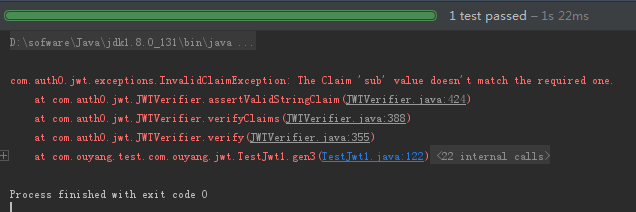
如果时间超过 30 秒,会报如下错误:

对验证的方法稍加修改:
 @Test

  public void gen3(){

      String token = "eyJ0eXAiOiJKV1QiLCJhbGciOiJIUzI1NiJ9.eyJzdWIiOiJ4aWFvbWluZyIsImFycmF5IjpbMSwyLDNdLCJpc3MiOiJhdXRoMCIsIm5hbWUiOiJJYW0gcmlnaHQgZnJvbSBjbGFpbSIsImV4cCI6MTQ5NzY4OTQ4NX0.6lsXISVAgi8B2wAvaZq4tj-h9Pgd6GGaOYZLz_gPFMU";

      try {

          Algorithm algorithm = Algorithm.HMAC256("mysecrite");

          JWTVerifier.BaseVerification verification = (JWTVerifier.BaseVerification) JWT.require(algorithm)

                  .withIssuer("auth0")

                  .withSubject("xiaoming");

          Clock clock = new Clock() {

              @Override

              public Date getToday() {

                  return new Date();

              }

          };//Must implement Clock interface

          JWTVerifier verifier = verification.build(clock);

          DecodedJWT jwt = verifier.verify(token);

          Map<String, Claim> claims = jwt.getClaims();    //Key is the Claim name

          Claim claim = claims.get("name");

          System.out.println(claim.asString());    //打印出claim的值

          System.out.println(jwt.getAlgorithm());

          System.out.println(jwt.getType());

          System.out.println(jwt.getIssuer());

          System.out.println(jwt.getExpiresAt());

      } catch (UnsupportedEncodingException exception){

          //UTF-8 encoding not supported

          exception.printStackTrace();

      } catch (JWTVerificationException exception){

          //Invalid signature/claims

          exception.printStackTrace();

      }
验证后的最后结果:

4,claim的添加,获取
1) 内置的payload主要有以下几个,如果没有就返回null
Issuer ("iss") :发布者
String issuer = jwt.getIssuer();
Subject ("sub")
String subject = jwt.getSubject();
Audience ("aud")
List<String> audience = jwt.getAudience();
Expiration Time ("exp")
Date expiresAt = jwt.getExpiresAt();
Not Before ("nbf")
Date notBefore = jwt.getNotBefore();
Issued At ("iat")
Date issuedAt = jwt.getIssuedAt();
JWT ID ("jti")
String id = jwt.getId();
2)定义私有的claim
添加:
String token = JWT.create()

        .withClaim("name", 123)

        .withArrayClaim("array", new Integer[]{1, 2, 3})

        .sign(algorithm);
获取:
JWTVerifier verifier = JWT.require(algorithm)

    .withClaim("name", 123)

    .withArrayClaim("array", 1, 2, 3)

    .build();

DecodedJWT jwt = verifier.verify("my.jwt.token");
目前,官方支持claim的类型的有:Boolean, Integer, Double, String, Date , String[] 和 Integer.
5, Header Claims
1)header claims 是定义header部分的内容,基本都是默认定义,不需要自己去设置的,内置的有:
Algorithm ("alg")
String algorithm = jwt.getAlgorithm();
Type ("typ")
String type = jwt.getType();
Content Type ("cty")
String contentType = jwt.getContentType();
Key Id ("kid")
String keyId = jwt.getKeyId();
2)添加:
Map<String, Object> headerClaims = new HashMap();

headerClaims.put("owner", "auth0");

String token = JWT.create()

        .withHeader(headerClaims)

        .sign(algorithm);
3)获取:
Claim claim = jwt.getHeaderClaim("owner");
总结: 看了其他人的一些博客,发现他们的api都是相对老一点的版本,生成token是一步一步来,新的确实简单方便很多。分享就这里,欢迎交流。
补充参考链接:
web 中使用jwt: https://github.com/jwtk/jjwt
参考地址:https://github.com/auth0/java-jwt
JSON Web Tokens(JWT)的更多相关文章
- Spring Boot集成JSON Web Token(JWT)
一:认证 在了解JWT之前先来回顾一下传统session认证和基于token认证. 1.1 传统session认证 http协议是一种无状态协议,即浏览器发送请求到服务器,服务器是不知道这个请求是哪个 ...
- 10分钟了解JSON Web令牌(JWT)
JSON Web Token(JWT)是目前最流行的跨域身份验证解决方案.虫虫今天给大家介绍JWT的原理和用法. 1.跨域身份验证 Internet服务无法与用户身份验证分开.一般过程如下. 1.用户 ...
- JSON WEB TOKEN(JWT)的分析
JSON WEB TOKEN(JWT)的分析 一般情况下,客户的会话数据会存在文件中,或者引入redis来存储,实现session的管理,但是这样操作会存在一些问题,使用文件来存储的时候,在多台机器上 ...
- JSON Web Token(JWT)使用步骤说明
在JSON Web Token(JWT)原理和用法介绍中,我们了解了JSON Web Token的原理和用法的基本介绍.本文我们着重讲一下其使用的步骤: 一.JWT基本使用 Gradle下依赖 : c ...
- JSON Web Token(JWT)原理和用法介绍
JSON Web Token(JWT)是目前最流行的跨域身份验证解决方案.今天给大家介绍一下JWT的原理和用法. 官网地址:https://jwt.io/ 一.跨域身份验证 Internet服务无法与 ...
- JSON Web Token(JWT)机制
JSON Web Token(JWT)机制 JWT是一种紧凑且自包含的,用于在多方传递JSON对象的技术.传递的数据可以使用数字签名增加其安全行.可以使用HMAC加密算法或RSA公钥/私钥加密方式. ...
- 了解JSON Web令牌(JWT)
JSON Web Token(JWT)是目前最流行的跨域身份验证解决方案.今天给大家介绍JWT的原理和用法. 1.跨域身份验证 Internet服务无法与用户身份验证分开.一般过程如下. 1.用户向服 ...
- JSON Web令牌(JWT)介绍与使用
手机端接口开发会遇到一个问题是,接口登录后需要返回一个Token.token首先有一点必须唯一,每次请求都需要把token给带上.基于必须唯一的特性,很多朋友在开发是都选择了uuid.是不是token ...
- JSON Web Token(JWT)的详解
1.传统身份验证和JWT的身份验证 传统身份验证: HTTP 是一种没有状态的协议,也就是它并不知道是谁是访问应用.这里我们把用户看成是客户端,客户端使用用户名还有密码通过了身份验证,不过下回这个客户 ...
随机推荐
- WPF 在事件中绑定命令(不可以在模版中绑定命令)
其实这也不属于MVVMLight系列中的东东了,没兴趣的朋友可以跳过这篇文章,本文主要介绍如何在WPF中实现将命令绑定到事件中. 上一篇中我们介绍了MVVMLight中的命令的用法,那么仅仅知道命令是 ...
- J2EE走向成功路-02-Struts2 配置(Maven)
在上一篇中,介绍了使用jar包搭建Struts2框架,这一篇中来介绍一下在Maven环境下搭建Struts2框架,主要为配置Maven. 1.下载Maven,官网:http://maven.apach ...
- 移动端自动化自动化(Android&iOS)——Appium
Appium-Python 移动端自动化环境搭建 Appium介绍 Appium是一个开源.跨平台的测试框架,可以用来测试原生及混合的移动端应用.Appium支持iOS.Android及Firefox ...
- MS-DOS命令dir命令详细解析
DOS命令窗口打开方式为Win+R键,打开运行命令,输入 cmd 即可:特殊情况我们要用管理员身份运行DOS,此时就可以在开始菜单-附件-DOS命令,鼠标右键单击命令提示符以管理员身份运行.如果是wi ...
- bind、apply与call
bind.apply与call 先说观点:不论是bind.apply还是call,最大的好处就是代码复用. bind 在开发中,我们只有复用代码时,才会出现this指向需要改动的情况. 纵观bind的 ...
- win10 uwp 屏幕常亮
我们在播放视频需要屏幕常亮,我们可以使用DisplayRequest,因为代码简单我直接写,代码来自https://msdn.microsoft.com/en-us/library/windows/a ...
- escape、encodeURI和encodeURIComponent的区别及使用
编码 javascript中的编码函数有三种 escape(string) encodeURI(string) encodeURIComponent(string) 解码 相应的解码函数也有以下三种 ...
- (转)Java Socket编程
原文出自:http://www.cnblogs.com/rocomp/p/4790340.html Socket是网络驱动层提供给应用程序编程接口和一种机制.可以把Socket比喻成一个港口码头,应用 ...
- Robot Framework自动化测试框架初探
Robot Framework是一款python语言编写,通用的功能自动化测试框架.它使用了比较易用的表格数据语法,基于关键字驱动测试,主要用来验收测试和验收测试驱动开发(ATDD). 本文主要介绍R ...
- PhiloGL学习(6)——深情奉献:快乐的一家
前言 话说上一篇文章结尾讲到这一篇要做一个地球自转以及月球公转的三维动画,提笔,不对,是提键盘开始写的时候脑海中突然出现了几年前春晚风靡的那首歌:蒙古族小丫头唱的快乐的一家.闲言莫提,进入正题. ...