
WSGI、mini-web框架
阅读目录:
一.服务器动态资源请求
1. 浏览器请求动态页面过程
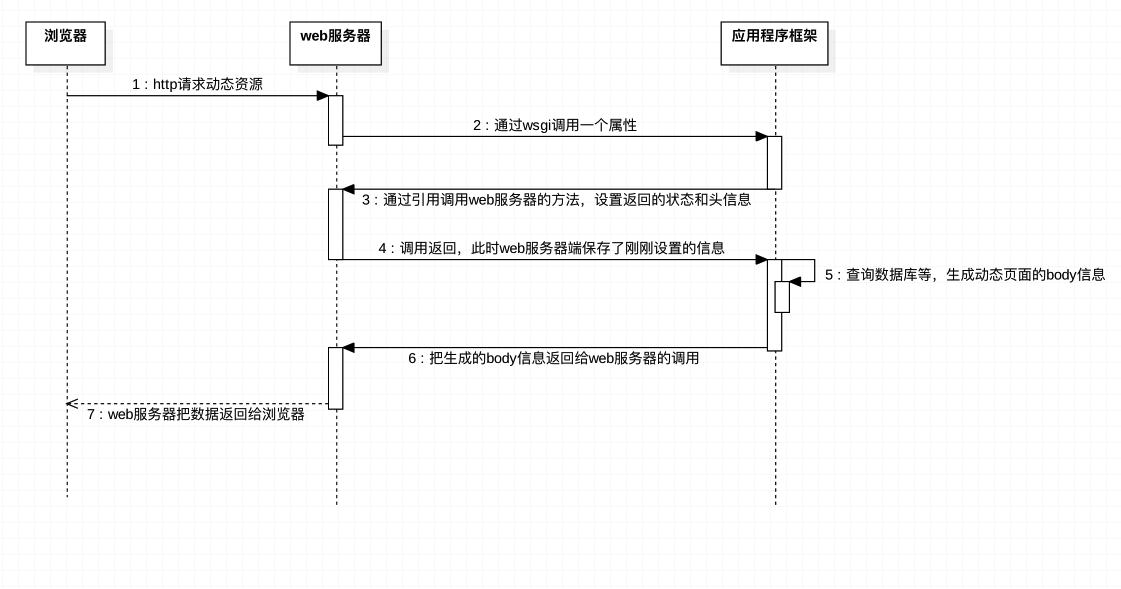
2. WSGI
怎么在你刚建立的Web服务器上运行一个Django应用和Flask应用,如何不做任何改变而适应不同的web架构呢?
在以前,选择 Python web 架构会受制于可用的web服务器,反之亦然。如果架构和服务器可以协同工作,那就好了:
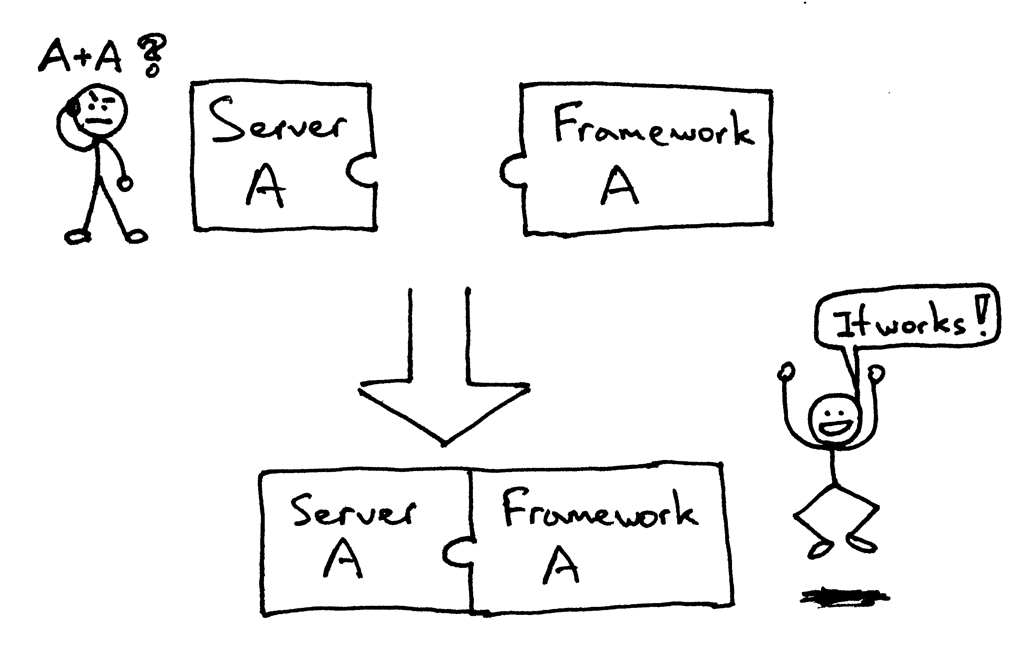
但有可能面对(或者曾有过)下面的问题,当要把一个服务器和一个架构结合起来时,却发现他们不是被设计成协同工作的:
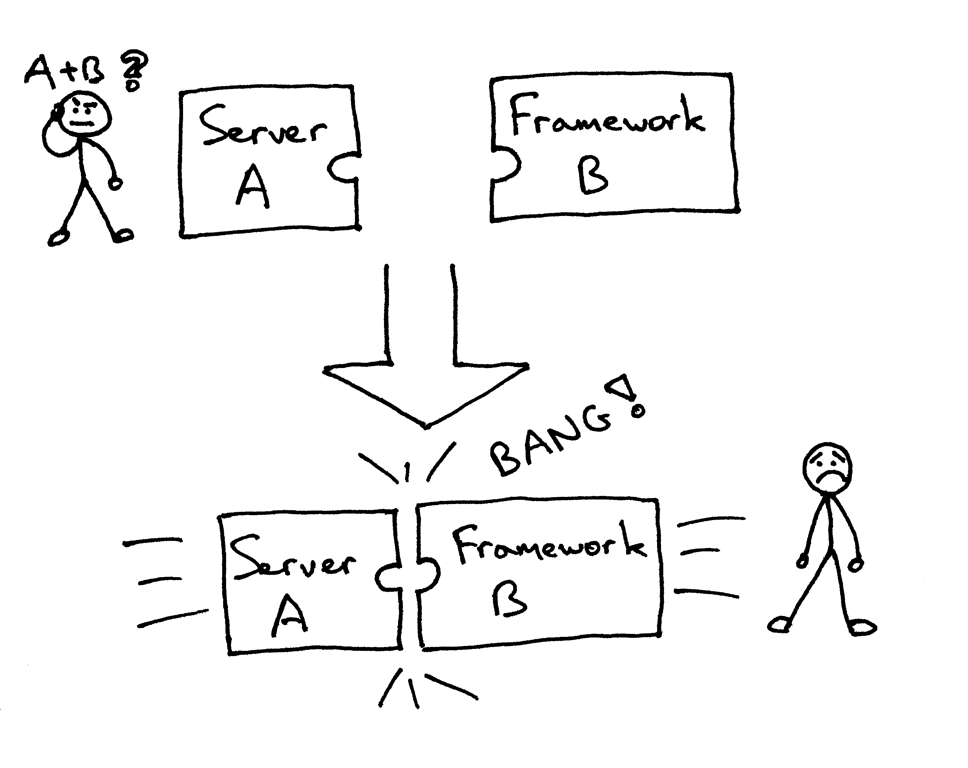
那么,怎么可以不修改服务器和架构代码而确保可以在多个架构下运行web服务器呢?答案就是 Python Web Server Gateway Interface (或简称 WSGI,读作“wizgy”)。

WSGI允许开发者将选择web框架和web服务器分开。可以混合匹配web服务器和web框架,选择一个适合的配对。比如,可以在Gunicorn 或者 Nginx/uWSGI 或者 Waitress上运行 Django, Flask, 或 Pyramid。真正的混合匹配,得益于WSGI同时支持服务器和架构:

web服务器必须具备WSGI接口,所有的现代Python Web框架都已具备WSGI接口,它让你不对代码作修改就能使服务器和特点的web框架协同工作。
WSGI由web服务器支持,而web框架允许你选择适合自己的配对,但它同样对于服务器和框架开发者提供便利使他们可以专注于自己偏爱的领域和专长而不至于相互牵制。其他语言也有类似接口:java有Servlet API,Ruby 有 Rack。
3.定义WSGI接口
WSGI接口定义非常简单,它只要求Web开发者实现一个函数,就可以响应HTTP请求。我们来看一个最简单的Web版本的“Hello World!”:
def application(environ, start_response):

    start_response('200 OK', [('Content-Type', 'text/html')])

    return 'Hello World!'
上面的application()函数就是符合WSGI标准的一个HTTP处理函数,它接收两个参数:
- environ:一个包含所有HTTP请求信息的dict对象;
- start_response:一个发送HTTP响应的函数。
整个application()函数本身没有涉及到任何解析HTTP的部分,也就是说,把底层web服务器解析部分和应用程序逻辑部分进行了分离,这样开发者就可以专心做一个领域了
不过,等等,这个application()函数怎么调用?如果我们自己调用,两个参数environ和start_response我们没法提供,返回的str也没法发给浏览器。
所以application()函数必须由WSGI服务器来调用。有很多符合WSGI规范的服务器。而我们此时的web服务器项目的目的就是做一个既能解析静态网页还可以解析动态网页的服务器
4. web服务器-----WSGI协议---->web框架 传递的字典
{

    'HTTP_ACCEPT_LANGUAGE': 'zh-cn',

    'wsgi.file_wrapper': <built-infunctionuwsgi_sendfile>,

    'HTTP_UPGRADE_INSECURE_REQUESTS': '1',

    'uwsgi.version': b'2.0.15',

    'REMOTE_ADDR': '172.16.7.1',

    'wsgi.errors': <_io.TextIOWrappername=2mode='w'encoding='UTF-8'>,

    'wsgi.version': (1,0),

    'REMOTE_PORT': '40432',

    'REQUEST_URI': '/',

    'SERVER_PORT': '8000',

    'wsgi.multithread': False,

    'HTTP_ACCEPT': 'text/html,application/xhtml+xml,application/xml;q=0.9,*/*;q=0.8',

    'HTTP_HOST': '172.16.7.152: 8000',

    'wsgi.run_once': False,

    'wsgi.input': <uwsgi._Inputobjectat0x7f7faecdc9c0>,

    'SERVER_PROTOCOL': 'HTTP/1.1',

    'REQUEST_METHOD': 'GET',

    'HTTP_ACCEPT_ENCODING': 'gzip,deflate',

    'HTTP_CONNECTION': 'keep-alive',

    'uwsgi.node': b'ubuntu',

    'HTTP_DNT': '1',

    'UWSGI_ROUTER': 'http',

    'SCRIPT_NAME': '',

    'wsgi.multiprocess': False,

    'QUERY_STRING': '',

    'PATH_INFO': '/index.html',

    'wsgi.url_scheme': 'http',

    'HTTP_USER_AGENT': 'Mozilla/5.0(Macintosh;IntelMacOSX10_12_5)AppleWebKit/603.2.4(KHTML,likeGecko)Version/10.1.1Safari/603.2.4',

    'SERVER_NAME': 'ubuntu'

}
二.应用程序示例
import time

def application(environ, start_response):

    status = '200 OK'

    response_headers = [('Content-Type', 'text/html')]

    start_response(status, response_headers)

    return str(environ) + '==Hello world from a simple WSGI application!--->%s\n' % time.ctime()
三.Web动态服务器-基本实现
文件结构
├── web_server.py

├── web

│   └── my_web.py

└── html

    └── index.html

    .....
web/my_web.py
import time

def application(environ, start_response):

    status = '200 OK'

    response_headers = [('Content-Type', 'text/html')]

    start_response(status, response_headers)

    return str(environ) + '==Hello world from a simple WSGI application!--->%s\n' % time.ctime()
web_server.py
import select

import time

import socket

import sys

import re

import multiprocessing

class WSGIServer(object):

    """定义一个WSGI服务器的类"""

    def __init__(self, port, documents_root, app):

        # 1. 创建套接字

        self.server_socket = socket.socket(socket.AF_INET, socket.SOCK_STREAM)

        # 2. 绑定本地信息

        self.server_socket.setsockopt(socket.SOL_SOCKET, socket.SO_REUSEADDR, 1)

        self.server_socket.bind(("", port))

        # 3. 变为监听套接字

        self.server_socket.listen(128)

        # 设定资源文件的路径

        self.documents_root = documents_root

        # 设定web框架可以调用的函数(对象)

        self.app = app

    def run_forever(self):

        """运行服务器"""

        # 等待对方链接

        while True:

            new_socket, new_addr = self.server_socket.accept()

            # 创建一个新的进程来完成这个客户端的请求任务

            new_socket.settimeout(3)  # 3s

            new_process = multiprocessing.Process(target=self.deal_with_request, args=(new_socket,))

            new_process.start()

            new_socket.close()

    def deal_with_request(self, client_socket):

        """以长链接的方式,为这个浏览器服务器"""

        while True:

            try:

                request = client_socket.recv(1024).decode("utf-8")

            except Exception as ret:

                print("========>", ret)

                client_socket.close()

                return

            # 判断浏览器是否关闭

            if not request:

                client_socket.close()

                return

            request_lines = request.splitlines()

            for i, line in enumerate(request_lines):

                print(i, line)

            # 提取请求的文件(index.html)

            # GET /a/b/c/d/e/index.html HTTP/1.1

            ret = re.match(r"([^/]*)([^ ]+)", request_lines[0])

            if ret:

                print("正则提取数据:", ret.group(1))

                print("正则提取数据:", ret.group(2))

                file_name = ret.group(2)

                if file_name == "/":

                    file_name = "/index.html"

            # 如果不是以py结尾的文件,认为是普通的文件

            if not file_name.endswith(".py"):

                # 读取文件数据

                try:

                    f = open(self.documents_root+file_name, "rb")

                except:

                    response_body = "file not found, 请输入正确的url"

                    response_header = "HTTP/1.1 404 not found\r\n"

                    response_header += "Content-Type: text/html; charset=utf-8\r\n"

                    response_header += "Content-Length: %d\r\n" % (len(response_body))

                    response_header += "\r\n"

                    response = response_header + response_body

                    # 将header返回给浏览器

                    client_socket.send(response.encode('utf-8'))

                else:

                    content = f.read()

                    f.close()

                    response_body = content

                    response_header = "HTTP/1.1 200 OK\r\n"

                    response_header += "Content-Length: %d\r\n" % (len(response_body))

                    response_header += "\r\n"

                    # 将header返回给浏览器

                    client_socket.send(response_header.encode('utf-8') + response_body)

            # 以.py结尾的文件,就认为是浏览需要动态的页面

            else:

                # 准备一个字典,里面存放需要传递给web框架的数据

                env = {}

                # 存web返回的数据

                response_body = self.app(env, self.set_response_headers)

                # 合并header和body

                response_header = "HTTP/1.1 {status}\r\n".format(status=self.headers[0])

                response_header += "Content-Type: text/html; charset=utf-8\r\n"

                response_header += "Content-Length: %d\r\n" % len(response_body)

                for temp_head in self.headers[1]:

                    response_header += "{0}:{1}\r\n".format(*temp_head)

                response = response_header + "\r\n"

                response += response_body

                client_socket.send(response.encode('utf-8'))

    def set_response_headers(self, status, headers):

        """这个方法,会在 web框架中被默认调用"""

        response_header_default = [

            ("Data", time.ctime()),

            ("Server", "ItCast-python mini web server")

        ]

        # 将状态码/相应头信息存储起来

        # [字符串, [xxxxx, xxx2]]

        self.headers = [status, response_header_default + headers]

# 设置静态资源访问的路径

g_static_document_root = "./html"

# 设置动态资源访问的路径

g_dynamic_document_root = "./web"

def main():

    """控制web服务器整体"""

    # python3 xxxx.py 7890

    if len(sys.argv) == 3:

        # 获取web服务器的port

        port = sys.argv[1]

        if port.isdigit():

            port = int(port)

        # 获取web服务器需要动态资源时,访问的web框架名字

        web_frame_module_app_name = sys.argv[2]

    else:

        print("运行方式如: python3 xxx.py 7890 my_web_frame_name:application")

        return

    print("http服务器使用的port:%s" % port)

    # 将动态路径即存放py文件的路径,添加到path中,这样python就能够找到这个路径了

    sys.path.append(g_dynamic_document_root)

    ret = re.match(r"([^:]*):(.*)", web_frame_module_app_name)

    if ret:

        # 获取模块名

        web_frame_module_name = ret.group(1)

        # 获取可以调用web框架的应用名称

        app_name = ret.group(2)

    # 导入web框架的主模块

    web_frame_module = __import__(web_frame_module_name)

    # 获取那个可以直接调用的函数(对象)

    app = getattr(web_frame_module, app_name)

    # print(app)  # for test

    # 启动http服务器

    http_server = WSGIServer(port, g_static_document_root, app)

    # 运行http服务器

    http_server.run_forever()

if __name__ == "__main__":

    main()
运行
1. 打开终端,输入以下命令开始服务器
python3 web_server.py my_web:application
2. 打开浏览器

四.mini web框架-1-文件结构
文件结构
├── dynamic ---存放py模块

│   └── my_web.py

├── templates ---存放模板文件

│   ├── center.html

│   ├── index.html

│   ├── location.html

│   └── update.html

├── static ---存放静态的资源文件

│   ├── css

│   │   ├── bootstrap.min.css

│   │   ├── main.css

│   │   └── swiper.min.css

│   └── js

│       ├── a.js

│       ├── bootstrap.min.js

│       ├── jquery-1.12.4.js

│       ├── jquery-1.12.4.min.js

│       ├── jquery.animate-colors.js

│       ├── jquery.animate-colors-min.js

│       ├── jquery.cookie.js

│       ├── jquery-ui.min.js

│       ├── server.js

│       ├── swiper.jquery.min.js

│       ├── swiper.min.js

│       └── zepto.min.js

└── web_server.py ---mini web服务器
my_web.py
import time

def application(environ, start_response):

    status = '200 OK'

    response_headers = [('Content-Type', 'text/html')]

    start_response(status, response_headers)

    return str(environ) + '==Hello world from a simple WSGI application!--->%s\n' % time.ctime()
web_server.py
import select

import time

import socket

import sys

import re

import multiprocessing

class WSGIServer(object):

    """定义一个WSGI服务器的类"""

    def __init__(self, port, documents_root, app):

        # 1. 创建套接字

        self.server_socket = socket.socket(socket.AF_INET, socket.SOCK_STREAM)

        # 2. 绑定本地信息

        self.server_socket.setsockopt(socket.SOL_SOCKET, socket.SO_REUSEADDR, 1)

        self.server_socket.bind(("", port))

        # 3. 变为监听套接字

        self.server_socket.listen(128)

        # 设定资源文件的路径

        self.documents_root = documents_root

        # 设定web框架可以调用的函数(对象)

        self.app = app

    def run_forever(self):

        """运行服务器"""

        # 等待对方链接

        while True:

            new_socket, new_addr = self.server_socket.accept()

            # 创建一个新的进程来完成这个客户端的请求任务

            new_socket.settimeout(3)  # 3s

            new_process = multiprocessing.Process(target=self.deal_with_request, args=(new_socket,))

            new_process.start()

            new_socket.close()

    def deal_with_request(self, client_socket):

        """以长链接的方式,为这个浏览器服务器"""

        while True:

            try:

                request = client_socket.recv(1024).decode("utf-8")

            except Exception as ret:

                print("========>", ret)

                client_socket.close()

                return

            # 判断浏览器是否关闭

            if not request:

                client_socket.close()

                return

            request_lines = request.splitlines()

            for i, line in enumerate(request_lines):

                print(i, line)

            # 提取请求的文件(index.html)

            # GET /a/b/c/d/e/index.html HTTP/1.1

            ret = re.match(r"([^/]*)([^ ]+)", request_lines[0])

            if ret:

                print("正则提取数据:", ret.group(1))

                print("正则提取数据:", ret.group(2))

                file_name = ret.group(2)

                if file_name == "/":

                    file_name = "/index.html"

            # 如果不是以py结尾的文件,认为是普通的文件

            if not file_name.endswith(".py"):

                # 读取文件数据

                try:

                    f = open(self.documents_root+file_name, "rb")

                except:

                    response_body = "file not found, 请输入正确的url"

                    response_header = "HTTP/1.1 404 not found\r\n"

                    response_header += "Content-Type: text/html; charset=utf-8\r\n"

                    response_header += "Content-Length: %d\r\n" % (len(response_body))

                    response_header += "\r\n"

                    response = response_header + response_body

                    # 将header返回给浏览器

                    client_socket.send(response.encode('utf-8'))

                else:

                    content = f.read()

                    f.close()

                    response_body = content

                    response_header = "HTTP/1.1 200 OK\r\n"

                    response_header += "Content-Length: %d\r\n" % (len(response_body))

                    response_header += "\r\n"

                    # 将header返回给浏览器

                    client_socket.send(response_header.encode('utf-8') + response_body)

            # 以.py结尾的文件,就认为是浏览需要动态的页面

            else:

                # 准备一个字典,里面存放需要传递给web框架的数据

                env = dict()

                # 存web返回的数据

                response_body = self.app(env, self.set_response_headers)

                # 合并header和body

                response_header = "HTTP/1.1 {status}\r\n".format(status=self.headers[0])

                response_header += "Content-Type: text/html; charset=utf-8\r\n"

                response_header += "Content-Length: %d\r\n" % len(response_body)

                for temp_head in self.headers[1]:

                    response_header += "{0}:{1}\r\n".format(*temp_head)

                response = response_header + "\r\n"

                response += response_body

                client_socket.send(response.encode('utf-8'))

    def set_response_headers(self, status, headers):

        """这个方法,会在 web框架中被默认调用"""

        response_header_default = [

            ("Data", time.time()),

            ("Server", "ItCast-python mini web server")

        ]

        # 将状态码/相应头信息存储起来

        # [字符串, [xxxxx, xxx2]]

        self.headers = [status, response_header_default + headers]

# 设置静态资源访问的路径

g_static_document_root = "./static"

# 设置动态资源访问的路径

g_dynamic_document_root = "./dynamic"

def main():

    """控制web服务器整体"""

    # python3 xxxx.py 7890

    if len(sys.argv) == 3:

        # 获取web服务器的port

        port = sys.argv[1]

        if port.isdigit():

            port = int(port)

        # 获取web服务器需要动态资源时,访问的web框架名字

        web_frame_module_app_name = sys.argv[2]

    else:

        print("运行方式如: python3 xxx.py 7890 my_web_frame_name:application")

        return

    print("http服务器使用的port:%s" % port)

    # 将动态路径即存放py文件的路径,添加到path中,这样python就能够找到这个路径了

    sys.path.append(g_dynamic_document_root)

    ret = re.match(r"([^:]*):(.*)", web_frame_module_app_name)

    if ret:

        # 获取模块名

        web_frame_module_name = ret.group(1)

        # 获取可以调用web框架的应用名称

        app_name = ret.group(2)

    # 导入web框架的主模块

    web_frame_module = __import__(web_frame_module_name)

    # 获取那个可以直接调用的函数(对象)

    app = getattr(web_frame_module, app_name)

    # print(app)  # for test

    # 启动http服务器

    http_server = WSGIServer(port, g_static_document_root, app)

    # 运行http服务器

    http_server.run_forever()

if __name__ == "__main__":

    main()
五.mini web框架-2-显示页面
dynamic/my_web.py (更新)
import time

import os

template_root = "./templates"

def index(file_name):

    """返回index.py需要的页面内容"""

    # return "hahha" + os.getcwd()  # for test 路径问题

    try:

        file_name = file_name.replace(".py", ".html")

        f = open(template_root + file_name)

    except Exception as ret:

        return "%s" % ret

    else:

        content = f.read()

        f.close()

        return content

def center(file_name):

    """返回center.py需要的页面内容"""

    # return "hahha" + os.getcwd()  # for test 路径问题

    try:

        file_name = file_name.replace(".py", ".html")

        f = open(template_root + file_name)

    except Exception as ret:

        return "%s" % ret

    else:

        content = f.read()

        f.close()

        return content

def application(environ, start_response):

    status = '200 OK'

    response_headers = [('Content-Type', 'text/html')]

    start_response(status, response_headers)

    file_name = environ['PATH_INFO']

    if file_name == "/index.py":

        return index(file_name)

    elif file_name == "/center.py":

        return center(file_name)

    else:

        return str(environ) + '==Hello world from a simple WSGI application!--->%s\n' % time.ctime()
web_server.py (更新)
import select

import time

import socket

import sys

import re

import multiprocessing

class WSGIServer(object):

    """定义一个WSGI服务器的类"""

    def __init__(self, port, documents_root, app):

        # 1. 创建套接字

        self.server_socket = socket.socket(socket.AF_INET, socket.SOCK_STREAM)

        # 2. 绑定本地信息

        self.server_socket.setsockopt(socket.SOL_SOCKET, socket.SO_REUSEADDR, 1)

        self.server_socket.bind(("", port))

        # 3. 变为监听套接字

        self.server_socket.listen(128)

        # 设定资源文件的路径

        self.documents_root = documents_root

        # 设定web框架可以调用的函数(对象)

        self.app = app

    def run_forever(self):

        """运行服务器"""

        # 等待对方链接

        while True:

            new_socket, new_addr = self.server_socket.accept()

            # 创建一个新的进程来完成这个客户端的请求任务

            new_socket.settimeout(3)  # 3s

            new_process = multiprocessing.Process(target=self.deal_with_request, args=(new_socket,))

            new_process.start()

            new_socket.close()

    def deal_with_request(self, client_socket):

        """以长链接的方式,为这个浏览器服务器"""

        while True:

            try:

                request = client_socket.recv(1024).decode("utf-8")

            except Exception as ret:

                print("========>", ret)

                client_socket.close()

                return

            # 判断浏览器是否关闭

            if not request:

                client_socket.close()

                return

            request_lines = request.splitlines()

            for i, line in enumerate(request_lines):

                print(i, line)

            # 提取请求的文件(index.html)

            # GET /a/b/c/d/e/index.html HTTP/1.1

            ret = re.match(r"([^/]*)([^ ]+)", request_lines[0])

            if ret:

                print("正则提取数据:", ret.group(1))

                print("正则提取数据:", ret.group(2))

                file_name = ret.group(2)

                if file_name == "/":

                    file_name = "/index.html"

            # 如果不是以py结尾的文件,认为是普通的文件

            if not file_name.endswith(".py"):

                # 读取文件数据

                try:

                    print(self.documents_root+file_name)

                    f = open(self.documents_root+file_name, "rb")

                except:

                    response_body = "file not found, 请输入正确的url"

                    response_header = "HTTP/1.1 404 not found\r\n"

                    response_header += "Content-Type: text/html; charset=utf-8\r\n"

                    response_header += "Content-Length: %d\r\n" % (len(response_body))

                    response_header += "\r\n"

                    response = response_header + response_body

                    # 将header返回给浏览器

                    client_socket.send(response.encode('utf-8'))

                else:

                    content = f.read()

                    f.close()

                    response_body = content

                    response_header = "HTTP/1.1 200 OK\r\n"

                    response_header += "Content-Length: %d\r\n" % (len(response_body))

                    response_header += "\r\n"

                    # 将header返回给浏览器

                    client_socket.send(response_header.encode('utf-8') + response_body)

            # 以.py结尾的文件,就认为是浏览需要动态的页面

            else:

                # 准备一个字典,里面存放需要传递给web框架的数据

                env = dict()

                # ----------更新---------

                env['PATH_INFO'] = file_name  # 例如 index.py

                # 存web返回的数据

                response_body = self.app(env, self.set_response_headers)

                # 合并header和body

                response_header = "HTTP/1.1 {status}\r\n".format(status=self.headers[0])

                response_header += "Content-Type: text/html; charset=utf-8\r\n"

                response_header += "Content-Length: %d\r\n" % len(response_body.encode("utf-8"))

                for temp_head in self.headers[1]:

                    response_header += "{0}:{1}\r\n".format(*temp_head)

                response = response_header + "\r\n"

                response += response_body

                client_socket.send(response.encode('utf-8'))

    def set_response_headers(self, status, headers):

        """这个方法,会在 web框架中被默认调用"""

        response_header_default = [

            ("Data", time.time()),

            ("Server", "ItCast-python mini web server")

        ]

        # 将状态码/相应头信息存储起来

        # [字符串, [xxxxx, xxx2]]

        self.headers = [status, response_header_default + headers]

# 设置静态资源访问的路径

g_static_document_root = "./static"

# 设置动态资源访问的路径

g_dynamic_document_root = "./dynamic"

def main():

    """控制web服务器整体"""

    # python3 xxxx.py 7890

    if len(sys.argv) == 3:

        # 获取web服务器的port

        port = sys.argv[1]

        if port.isdigit():

            port = int(port)

        # 获取web服务器需要动态资源时,访问的web框架名字

        web_frame_module_app_name = sys.argv[2]

    else:

        print("运行方式如: python3 xxx.py 7890 my_web_frame_name:app")

        return

    print("http服务器使用的port:%s" % port)

    # 将动态路径即存放py文件的路径,添加到path中,这样python就能够找到这个路径了

    sys.path.append(g_dynamic_document_root)

    ret = re.match(r"([^:]*):(.*)", web_frame_module_app_name)

    if ret:

        # 获取模块名

        web_frame_module_name = ret.group(1)

        # 获取可以调用web框架的应用名称

        app_name = ret.group(2)

    # 导入web框架的主模块

    web_frame_module = __import__(web_frame_module_name)

    # 获取那个可以直接调用的函数(对象)

    app = getattr(web_frame_module, app_name)

    # print(app)  # for test

    # 启动http服务器

    http_server = WSGIServer(port, g_static_document_root, app)

    # 运行http服务器

    http_server.run_forever()

if __name__ == "__main__":

    main()
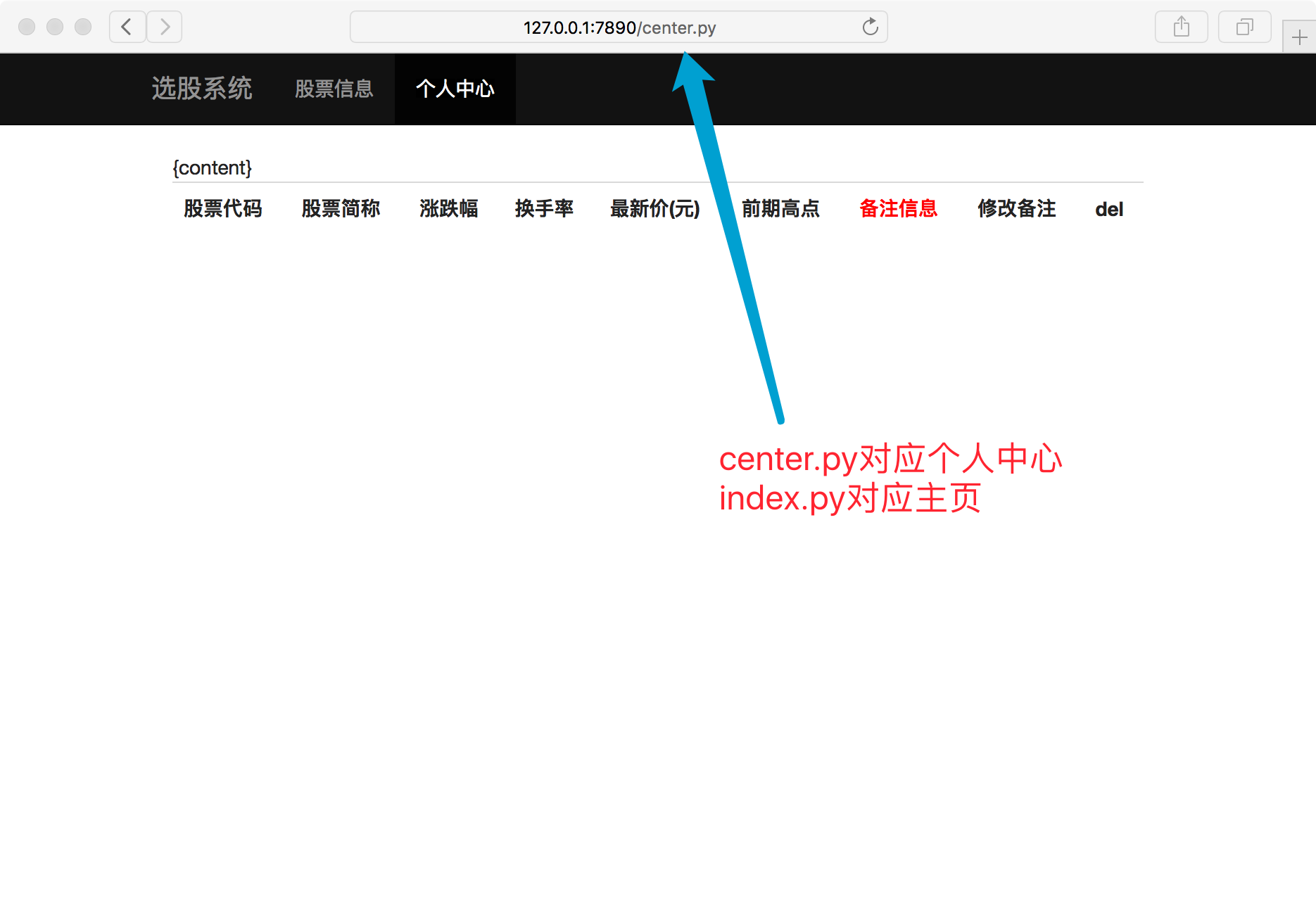
浏览器打开看效果
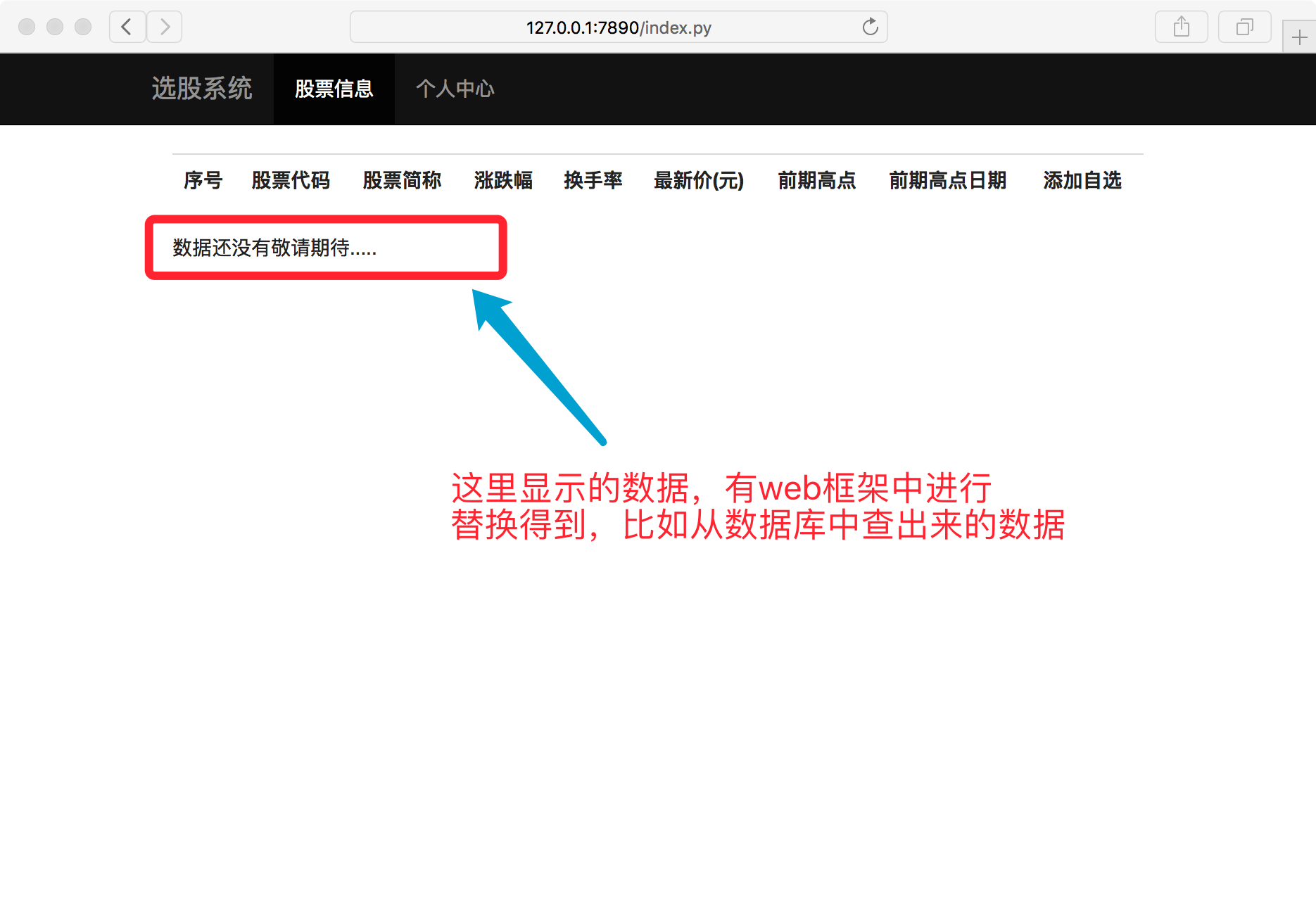
六.mini web框架-3-替换模板
dynamic/my_web.py
import time

import os

import re

template_root = "./templates"

def index(file_name):

    """返回index.py需要的页面内容"""

    # return "hahha" + os.getcwd()  # for test 路径问题

    try:

        file_name = file_name.replace(".py", ".html")

        f = open(template_root + file_name)

    except Exception as ret:

        return "%s" % ret

    else:

        content = f.read()

        f.close()

        # --------更新-------

        data_from_mysql = "数据还没有敬请期待...."

        content = re.sub(r"\{%content%\}", data_from_mysql, content)

        return content

def center(file_name):

    """返回center.py需要的页面内容"""

    # return "hahha" + os.getcwd()  # for test 路径问题

    try:

        file_name = file_name.replace(".py", ".html")

        f = open(template_root + file_name)

    except Exception as ret:

        return "%s" % ret

    else:

        content = f.read()

        f.close()

        # --------更新-------

        data_from_mysql = "暂时没有数据,,,,~~~~(>_<)~~~~ "

        content = re.sub(r"\{%content%\}", data_from_mysql, content)

        return content

def application(environ, start_response):

    status = '200 OK'

    response_headers = [('Content-Type', 'text/html')]

    start_response(status, response_headers)

    file_name = environ['PATH_INFO']

    if file_name == "/index.py":

        return index(file_name)

    elif file_name == "/center.py":

        return center(file_name)

    else:

        return str(environ) + '==Hello world from a simple WSGI application!--->%s\n' % time.ctime()
浏览器打开看效果
WSGI、mini-web框架的更多相关文章
- [Python之路] 实现简易HTTP服务器与MINI WEB框架(利用WSGI实现服务器与框架解耦)
本文描述如果简单实现自定义Web服务器与自定义简易框架,并且不断进行版本迭代,从而清晰的展现服务器与Web框架之间是如何结合.如何配合工作的.以及WSGI是什么. 本文帖的代码有点多,但基本每次迭代修 ...
- Wsgi的web框架实例
建立server服务端: from wsgiref.simple_server import make_server import time def f1(request): return [b'&l ...
- [Python之路] 使用装饰器给Web框架添加路由功能(静态、动态、伪静态URL)
一.观察以下代码 以下来自 Python实现简易HTTP服务器与MINI WEB框架(利用WSGI实现服务器与框架解耦) 中的mini_frame最后版本的代码: import time def in ...
- python学习之路web框架
WEB框架的本质 python的WEB框架分为两大类: 1.自己写socket,自己处理请求 2.基于wsgi(Web Server Gateway Interface WEB服务网关接口),自己处理 ...
- [py]彻底细究web框架的wsgi+逻辑处理模块
wsgi逻辑结构初探 参考: 这里图很精彩,wsgi写的不错 web框架 = wsgi+逻辑处理app 接收请求,返回对应的内容 python wsgiref实现了wsgi规范. from wsgir ...
- python之web框架(3):WSGI之web应用完善
python之web框架(3):WSGI之web应用完善 1.上篇的web框架太low,只能实现回应固定页面.现在将它进行完善.首先将wsgi和web服务器进行分离,并给予它回复静态页面的能力. we ...
- python之web框架(2):了解WSGI接口
python之web框架(2):了解WSGI接口 1.什么是wsgi接口: wsgi:Web Service Gateway Interface.它不是模块,而只是一种规范,方便web服务器和各种框架 ...
- python web框架 django wsgi 理论
django wsgi python有个自带的wsgi模块 可以写自定义web框架 用wsgi在内部创建socket对象就可以了 自己只写处理函数就可以了django只是web框架 他也不负责写soc ...
- 使用Python开发轻量级的Web框架以及基于WSGI的服务器来实现一个网站页面
说明:该篇博客是博主一字一码编写的,实属不易,请尊重原创,谢谢大家! 目录 一丶项目说明 二丶数据准备 三丶使用网络TCP开发一个基于WSGI协议的Web服务器 四丶使用python3开发一个轻量级的 ...
- wsgi Python的WEB框架
Bottle是一个快速.简洁.轻量级的基于WSIG的微型Web框架,此框架只由一个 .py 文件,除了Python的标准库外,其不依赖任何其他模块. pip install bottle easy_i ...
随机推荐
- 结合实例看 maven 传递依赖与优先级,难顶也得上丫
开心一刻 想买摩托车了,但是钱不够,想找老爸借点 我:老爸,我想买一辆摩托车,上下班也方便 老爸:你表哥上个月骑摩托车摔走了,你不知道?还要买摩托车? 我:对不起,我不买了 老板:就是啊,骑你表哥那辆 ...
- impdp/expdp报错: ORA-39064: 无法写入日志文件 ORA-29285: 文件写入错误
问题现象 Windows服务器导入/导出Oracle 11g数据库出现如下报错提示,输出的日志文件从报错位置往后不再输出. ORA-39064: 无法写入日志文件 ORA-29285: 文件写入错误 ...
- Apache DolphinScheduler使用图关系解决核心链路告警问题,减轻任务运维负担!
转载自程序员小陶 Apache DolphinScheduler 在使用过程中,肯定会有任务出现失败的情况,那么问题来了:调度任务的告警是需要人为配置的,在生产环境中,面对海量的任务,如何找到重要的任 ...
- Apache DolphinScheduler 3.1.8 版本发布,修复 SeaTunnel 相关 Bug
近日,Apache DolphinScheduler 发布了 3.1.8 版本.此版本主要基于 3.1.7 版本进行了 bug 修复,共计修复 16 个 bug, 1 个 doc, 2 个 chore ...
- win32 对话框模板添加加速键
今天想在菜单中添加加速键的时候,因是用的对话框模板,不能接受WM_KEYDOWN消息, 在网上收了半天,都不理想,最后在看WM_COMMAND的时候发现有个 wparam的低位有个加速键标识 最后把这 ...
- SAR靶机笔记
SAR 靶机笔记 概述 SAR 是 Vulnhub 上的靶机,大家可以去 vulnhub 网站上去进行下载. 这里有链接: https://download.vulnhub.com/sar/sar.z ...
- 【Python爬虫】之爬取页面内容、图片以及用selenium爬取
下面不做过多文字描述: 首先.安装必要的库 # 安装BeautifulSoup pip install beautifulsoup4 # 安装requests pip install requests ...
- C# 模拟http请求出现 由于系统缓冲区空间不足或队列已满,不能执行套接字上的操作[windows服务器]
系统里面用到C#模拟Http请求,上线到服务器后,发现日志中大量出现"由于系统缓冲区空间不足或队列已满,不能执行套接字上的操作" 或"通常每个套接字地址(协议/网络地址/ ...
- 注册中心Nacos集群搭建
一提到注册中心,大家往往想到Zookeeper.或者Eureka.今天我们看看阿里的一款配置中心+注册中心的中间件--Nacos.有了它以后,我们的项目中的配置就可以统一从Nacos中获取了,而且Sp ...
- Python 版本管理工具选择与 Pyenv 使用说明
Python 版本管理工具的主要作用是帮助开发者在同一台机器上管理多个 Python 版本和环境.这对于开发和部署不同项目非常有用,因为不同项目可能依赖不同的 Python 版本或者不同的包版本. 具 ...