
axis2+spring集成
转载自:http://www.cnblogs.com/linjiqin/archive/2011/07/05/2098316.html
1、新建一个web project项目,最终工程目录如下:

注意:本文只注重webservice服务器端的开发,因此com.ljq.client和com.ljq.test忽略不计
2、添加所需jar

精简包
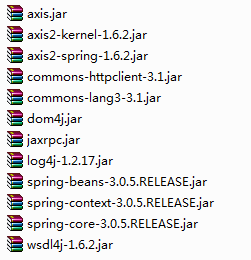
3、接口HelloWorld
package com.ljq.service;

public interface HelloWorld {
    public String greeting(String name);
    public String print();
}
4、接口实现类HelloWorldBean

package com.ljq.service;

public class HelloWorldBean implements HelloWorld {
    public String greeting(String name) {
        return "你好 "+name;
    }

    public String print() {
        return "我叫林计钦";
    }
}
5、webservice类HelloWorldWebService
package com.ljq.service;

import org.apache.axis2.AxisFault;
import org.apache.axis2.ServiceObjectSupplier;
import org.apache.axis2.description.AxisService;
import org.apache.axis2.description.Parameter;
import org.apache.axis2.i18n.Messages;
import org.springframework.beans.BeansException;
import org.springframework.context.ApplicationContext;
import org.springframework.context.ApplicationContextAware;

/**
 * 可能出现Axis2 spring bean not found 或者 Spring applicationContext not found。
 *
 * 解决办法:构建自己的ServiceObjectSupplier,实现接口ServiceObjectSupplier,同时也实现Spring的ApplicationContextAware接口
 *
 *
 * @author Administrator
 *
 */
public class HelloWorldWebService implements ServiceObjectSupplier,
        ApplicationContextAware {
    private static ApplicationContext ctx;

    public Object getServiceObject(AxisService axisService) throws AxisFault {
        Parameter springBeanName = axisService.getParameter("SpringBeanName");
        String beanName = ((String) springBeanName.getValue()).trim();
        if (beanName != null) {
            if (ctx == null)
                throw new AxisFault("applicationContext is NULL! ");
            if (ctx.getBean(beanName) == null)
                throw new AxisFault("Axis2 Can't find Spring Bean: " + beanName);
            return ctx.getBean(beanName);
        } else {
            throw new AxisFault(Messages.getMessage("paramIsNotSpecified",
                    "SERVICE_SPRING_BEANNAME"));
        }

    }

    public void setApplicationContext(ApplicationContext ctx)
            throws BeansException {
        this.ctx = ctx;
    }

}
6、配置web.xml文件
<?xml version="1.0" encoding="UTF-8"?>
<web-app version="2.5" xmlns="http://java.sun.com/xml/ns/javaee"
    xmlns:xsi="http://www.w3.org/2001/XMLSchema-instance"
    xsi:schemaLocation="http://java.sun.com/xml/ns/javaee
    http://java.sun.com/xml/ns/javaee/web-app_2_5.xsd">
    <!-- 添加spring监听器 -->
    <listener>
        <listener-class>
            org.springframework.web.context.ContextLoaderListener
        </listener-class>
    </listener>
    <!-- 加载spring的配置文件 -->
    <context-param>
        <param-name>contextConfigLocation</param-name>
        <param-value>/WEB-INF/applicationContext.xml</param-value>
    </context-param>

    <!-- 注册axis2的servlet -->
    <servlet>
        <servlet-name>AxisServlet</servlet-name>
        <servlet-class>
            org.apache.axis2.transport.http.AxisServlet
        </servlet-class>
        <load-on-startup>1</load-on-startup>
    </servlet>
    <servlet-mapping>
        <servlet-name>AxisServlet</servlet-name>
        <url-pattern>/services/*</url-pattern>
    </servlet-mapping>

    <welcome-file-list>
        <welcome-file>index.jsp</welcome-file>
    </welcome-file-list>
</web-app>
7、在WEB-INF目录下配置applicationContext.xml(不存在则自己创建)
<?xml version="1.0" encoding="UTF-8"?>
<!DOCTYPE beans PUBLIC "-//SPRING//DTD BEAN//EN"
"http://www.springframework.org/dtd/spring-beans.dtd">
<beans>
    <bean id="applicationContext"
        class="org.apache.axis2.extensions.spring.receivers.ApplicationContextHolder" />
    <bean id="helloWorld" class="com.ljq.service.HelloWorldBean"></bean>
</beans>
8、在WEB-INF\services\axis\META-INF\目录下配置services.xml(不存在则自己创建)
<?xml version="1.0" encoding="UTF-8"?>
<service name="hwWebService">
    <description>axis2与spring集成案例</description>
    <!-- 通过ServiceObjectSupplier参数指定SpringServletContextObjectSupplier类来获得Spring的ApplicationContext对象 -->
    <parameter name="ServiceObjectSupplier">
        org.apache.axis2.extensions.spring.receivers.SpringAppContextAwareObjectSupplier
    </parameter>
    <!--
       SpringBeanName固定的不能改
       helloWorld是spring中注册的实现类得id
     -->
    <parameter name="SpringBeanName">helloWorld</parameter>
    <!--
    在这里最值得注意的是<messageReceivers>元素,该元素用于设置处理WebService方法的处理器。
    例如,getGreeting方法有一个返回值,因此,需要使用可处理输入输出的RPCMessageReceiver类,
    而update方法没有返回值,因此,需要使用只能处理输入的RPCInOnlyMessageReceiver类。
     -->
    <messageReceivers>
        <messageReceiver mep="http://www.w3.org/2004/08/wsdl/in-only"
            class="org.apache.axis2.rpc.receivers.RPCInOnlyMessageReceiver" />
        <messageReceiver mep="http://www.w3.org/2004/08/wsdl/in-out"
            class="org.apache.axis2.rpc.receivers.RPCMessageReceiver" />
    </messageReceivers>
</service>
axis2+spring集成到此已经开发完成,接下把工程部署到tomcat,
然后通过http://localhost:8083/axis2spring/services/hwWebService?wsdl访问
axis2+spring集成的更多相关文章
- spring集成环境下的axis webservice的发布,调试
在spring集成的环境下,无论你是ssh集成,还是ssi集成的情况下,发布webservice往往在调用的时候会出错. 特别是,如果你是这个方式: 将webservice打aar包,放到tomcat ...
- 从零开始学 Java - Spring 集成 Memcached 缓存配置(二)
Memcached 客户端选择 上一篇文章 从零开始学 Java - Spring 集成 Memcached 缓存配置(一)中我们讲到这篇要谈客户端的选择,在 Java 中一般常用的有三个: Memc ...
- 从零开始学 Java - Spring 集成 ActiveMQ 配置(一)
你家小区下面有没有快递柜 近两年来,我们收取快递的方式好像变了,变得我们其实并不需要见到快递小哥也能拿到自己的快递了.对,我说的就是类似快递柜.菜鸟驿站这类的代收点的出现,把我们原来快递小哥必须拿着快 ...
- 【转】Dubbo使用例子并且和Spring集成使用
一.编写客户端和服务器端共用接口类1.登录接口类public interface LoginService { public User login(String name, String psw ...
- 从零开始学 Java - Spring 集成 Memcached 缓存配置(一)
硬盘和内存的作用是什么 硬盘的作用毫无疑问我们大家都清楚,不就是用来存储数据文件的么?如照片.视频.各种文档或等等,肯定也有你喜欢的某位岛国老师的动作片,这个时候无论我们电脑是否关机重启它们永远在那里 ...
- rabbitMQ第五篇:Spring集成RabbitMQ
前面几篇讲解了如何使用rabbitMq,这一篇主要讲解spring集成rabbitmq. 首先引入配置文件org.springframework.amqp,如下 <dependency> ...
- 从零开始学 Java - Spring 集成 ActiveMQ 配置(二)
从上一篇开始说起 上一篇从零开始学 Java - Spring 集成 ActiveMQ 配置(一)文章中讲了我关于消息队列的思考过程,现在这一篇会讲到 ActivMQ 与 Spring 框架的整合配置 ...
- spring集成常用技术的配置
使用spring集成其他技术,最基本的配置都是模板化的,比如配置视图模板引擎.数据库连接池.orm框架.缓存服务.邮件服务.rpc调用等,以spring的xml配置为例,我将这些配置过程整理出来,并不 ...
- Activiti工作流学习(三)Activiti工作流与spring集成
一.前言 前面Activiti工作流的学习,说明了Activiti的基本应用,在我们开发中可以根据实际的业务参考Activiti的API去更好的理解以及巩固.我们实际的开发中我们基本上都使用sprin ...
随机推荐
- Three.JS 从世界坐标系转换到屏幕坐标系
var projector = new THREE.Projector(); var world_vector = new THREE.Vector3(0,0,1); var vector = pro ...
- Node.js入门
开始之前,安利一本正在看的书<站在两个世界的边缘>,作者程浩,上帝丢给他太多理想,却忘了给他完成理想的时间.OK,有兴趣的可以看一看. node.js如标题一样,我也是刚开始接触,大家一起 ...
- 《高性能javascript》一书要点和延伸(下)
第六章 快速响应的用户界面 本章开篇介绍了浏览器UI线程的概念,我也突然想到一个小例子,这是写css3动画的朋友都经常会碰到的一个问题: <head> <meta charset=& ...
- WPF - 属性系统 (3 of 4)
依赖项属性元数据 在前面的章节中,我们已经介绍了WPF依赖项属性元数据中的两个组成:CoerceValueCallback回调以及PropertyChangedCallback.而在本节中,我们将对其 ...
- JAVA通信系列二:mina入门总结
一.学习资料 Mina入门实例(一) http://www.cnblogs.com/juepei/p/3939119.html Mina入门教程(二)----Spring4 集成Mina http:/ ...
- 《深入理解Java虚拟机》类文件结构
上节学习回顾 在上一节当中,主要以自己的工作环境简单地介绍了一下自身的一些调优或者说是故障处理经验.所谓百变不离其宗,这个宗就是我们解决问题的思路了. 本节学习重点 在前面几章,我们宏观地了解了虚拟机 ...
- 基于DDDLite的权限管理OpenAuth.net 1.0版正式发布
距离上一篇OpenAuth.net的文章已经有5个多月了,在这段时间里项目得到了很多朋友的认可,开源中国上面的Star数接近300,于是坚定了我做下去的信心.最近稍微清闲点,正式推出1.0版,并在阿里 ...
- 在 Linux 中使用 Git 及其 和 Eclipse 的集成
##参考资料## 我是通过阅读<Pro Git>这本书学习 Git 的,我读的时候还是第一版的英文版,现在已经出第二版了,而且英文版和中文版都有.英文第二版的地址是 [https://gi ...
- spring声明式事务管理总结
事务配置 首先在/WEB-INF/applicationContext.xml添加以下内容: <!-- 配置事务管理器 --> <bean id="transactionM ...
- 百度地图API的使用
------------------自说自话----------------------------- 好奇怪,习惯性使用有道云笔记记录心得与知识后就很少用博客园来记录了. 但是后来想想,有些东西还是 ...